Producte acabatview
The Plantronics Voyager Edge Bluetooth headset is engineered for a dynamic lifestyle, offering a blend of smart features and powerful audio performance. Its sleek, lightweight design ensures a comfortable and secure fit, while advanced Plantronics audio technology actively reduces background noise for clear communication. Responsive features enhance usability, and the included portable charging case ensures your Voyager Edge is always ready for use.

Image: The Plantronics Voyager Edge headset shown alongside its compact charging case, highlighting its sleek design and portability.
Què hi ha a la caixa
- Plantronics Voyager Edge Headset
- Estoig de càrrega portàtil
- Cable de càrrega USB
- Small, Medium, and Large Eartips
- Ear Loop (optional, for secure fit)
Guia de configuració
1. Càrrega dels auriculars
Before first use, fully charge your Plantronics Voyager Edge headset. The headset provides up to 6 hours of talk time on a single charge, and the portable charging case extends this to up to 16 hours. A full charge typically takes approximately 90 minutes.
- Connecteu el cable de càrrega USB a la funda de càrrega i a una font d'alimentació.
- Place the headset into the charging case. The LED indicators on the case will show charging status.
- Alternatively, you can charge the headset directly using a micro-USB cable if the charging case is not available.

Imatge: Side profile of the Plantronics Voyager Edge headset, showing its ergonomic design for in-ear comfort.
2. Emparellament amb el dispositiu
The Voyager Edge uses Bluetooth 4.0 for wireless connectivity. It can be paired with iPhone, Android, and other leading smartphones.
- Enceneu els auriculars.
- Activa el Bluetooth al teu telèfon intel·ligent o dispositiu.
- Put the headset into pairing mode (refer to the headset's specific button combination for pairing, usually holding the power button until the LED flashes).
- Select "Plantronics Voyager Edge" from the list of available Bluetooth devices on your phone.
- Si se us demana, introduïu el codi d'accés "0000" (quatre zeros).
Vinculació NFC: For NFC-enabled smartphones, simply tap the headset to the NFC area on your phone to initiate pairing.
3. Ajust de l'ajust
For optimal comfort and audio quality, choose the eartip size that best fits your ear. Three sizes (small, medium, large) are included. You may also use the optional ear loop for added stability.
Instruccions de funcionament
Gestió de trucades
- Contestar trucades: When a call comes in, the headset will announce the caller's ID. You can simply say "Answer" to accept the call, or place the headset on your ear (Smart Sensor Technology) to automatically answer.
- Ignoring Calls: Say "Ignore" when a call comes in to decline it.
- Finalització de trucades: Press the Call button once to end an active call.
- Remarcació: Double-press the Call button to redial the last number.
Reproducció d'àudio
The headset supports streaming music, podcasts, and GPS directions from your paired device.
- Reproduir/pausa: Press the main button on the boom to play or pause audio.
- Incoming calls will automatically pause audio playback, which will resume after the call ends.
Voice Commands and Smart Features
- Control de veu: Manage calls hands-free by saying "Answer" or "Ignore" when prompted.
- Smartphone Voice Assistant: Hold the main button on the headset for approximately 2 seconds to activate your smartphone's voice assistant (e.g., Siri, Google Assistant).
- Tecnologia de sensor intel·ligent: The headset senses when it's being worn. It can automatically answer calls when placed on your ear or redirect audio to your phone when removed.
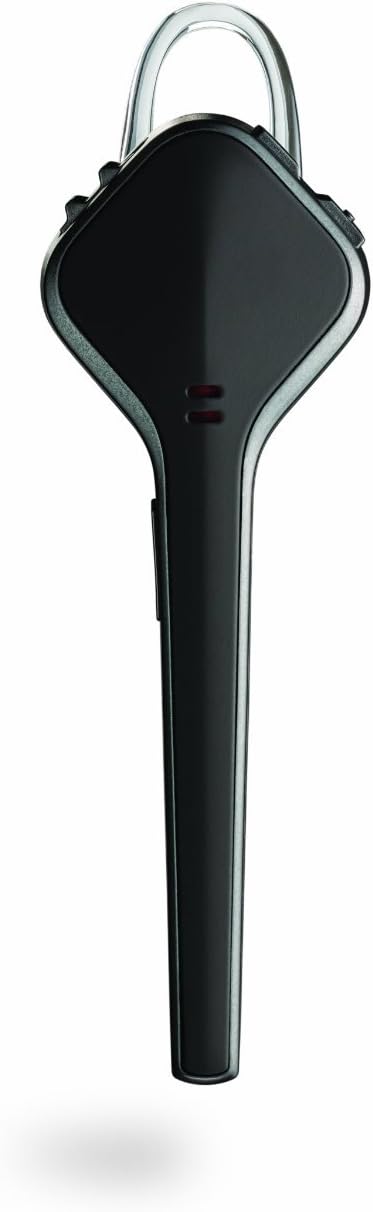
Imatge: De dalt a baix view of the Plantronics Voyager Edge headset, illustrating its compact and streamlined form factor.
Find MyHeadset Feature
If you misplace your headset, use the Plantronics Find MyHeadset app (available for iOS and Android) to locate it. The app can send a tone to your headset, helping you find it if it's within range.
Manteniment
To ensure the longevity and optimal performance of your Plantronics Voyager Edge headset, follow these maintenance guidelines:
- Neteja: Gently wipe the headset with a soft, dry, lint-free cloth. Avoid using harsh chemicals or abrasive materials.
- Emmagatzematge: When not in use, store the headset in its charging case to protect it and keep it charged. Store in a cool, dry place away from extreme temperatures.
- Resistència a la suor: The headset is designed with sweat resistance. However, it is not water-resistant. Avoid submerging it in liquids.
- Cura de la bateria: For best battery life, avoid fully discharging the battery frequently. Charge regularly.
Resolució de problemes
If you encounter issues with your Plantronics Voyager Edge, try the following solutions:
- Sense energia/Sense càrrega:
- Ensure the charging cable is securely connected to both the case/headset and the power source.
- Prova un altre port USB o adaptador de paret.
- Comproveu si la funda de càrrega té corrent.
- Problemes d'aparellament:
- Make sure the headset is in pairing mode (LED flashing).
- Desactiva i després activa el Bluetooth del dispositiu.
- Delete "Plantronics Voyager Edge" from your device's Bluetooth list and try pairing again.
- Ensure the headset is not already connected to another device.
- Poor Audio Quality/Dropped Calls:
- Ensure the headset is within the Bluetooth range (up to 10 meters) of your device.
- Reduce interference by moving away from other wireless devices or large metal objects.
- Check the eartip fit for a secure seal in your ear.
- Ensure the headset's microphone is not obstructed.
- Les ordres de veu no responen:
- Parla clar i directament al micròfon.
- Assegureu-vos que els auriculars estiguin connectats correctament al dispositiu.
- Check your phone's settings for voice assistant activation.
For more detailed troubleshooting or advanced issues, please refer to the official Plantronics Voyager Edge User Manual PDF available online or contact Plantronics customer support.
Especificacions
| Característica | Detall |
|---|---|
| Nom del model | Plantronics Voyager Edge |
| Tecnologia de connectivitat | Sense fil (Bluetooth 4.0) |
| abast sense fils | Fins a 10 metres (33 peus) |
| Temps de conversa | Up to 6 hours (headset only), up to 16 hours (with charging case) |
| Temps de càrrega | Uns 90 minuts |
| Pes | 0.317 unces (aproximadament 9 grams) |
| Tipus de control | Control per veu, botons físics |
| Control de soroll | Cancel·lació activa del soroll |
| Dispositius compatibles | Cellphones (iOS, Android) |
| Components inclosos | Headset, Charging Case, Eartips (S/M/L), USB Charging Cable |
| Número de model | 201010-41 |
| UPC | 017229144088 |
Garantia i Suport
Plantronics products are designed for reliability and performance. For information regarding your product's warranty, please refer to the warranty card included with your purchase or visit the official Plantronics weblloc.
For further assistance, technical support, or to download the complete user manual, please visit the Plantronics Support Weblloc o contactar amb el seu departament d'atenció al client.
A PDF version of the user manual is also available for download: Plantronics Voyager Edge User Manual (PDF).


