1. Introducció
This manual provides essential information for the safe and effective use of your Sony Alpha a7II Mirrorless Digital Camera with the included 28-70mm f/3.5-5.6 lens. Please read this manual thoroughly before operating the camera and retain it for future reference.
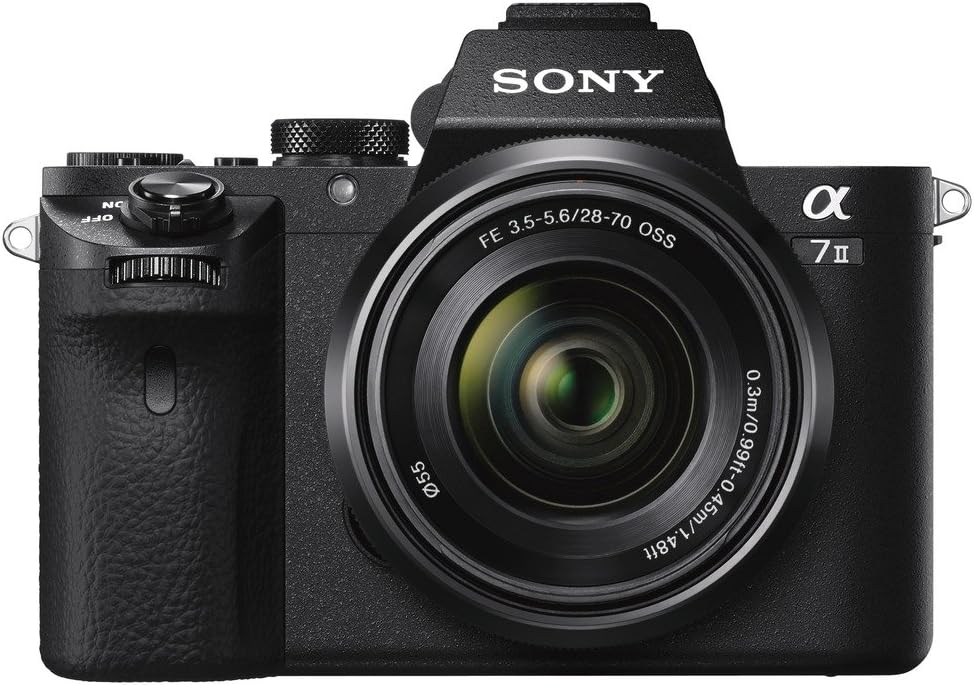
Figura 1: Frontal view of the Sony Alpha a7II camera with the 28-70mm lens attached.
2. Components inclosos
Verifiqueu que tots els elements següents estiguin inclosos al vostre paquet:
- Sony Alpha A7 II Mirrorless Digital Camera Body
- FE 28-70mm F/3.5-5.6 OSS Lens
- NP-FW50 Lithium-Ion Rechargeable Battery (1020mAh)
- AC-UUD11 AC Adaptor
- Corretja d'espatlla
- Gorra del cos
- Multi-Interface Shoe Cover
- Copa ocular
- Cable micro-USB
- Limited 1-Year Warranty Documentation
3. Configuració
- Carregueu la bateria: Insert the NP-FW50 battery into the AC-UUD11 AC Adaptor and connect it to a power outlet. Charge until the indicator light shows a full charge.
- Insereix la bateria: Open the battery compartment cover on the bottom of the camera and insert the charged battery.
- Inseriu la targeta de memòria: Open the memory card slot cover (typically on the side). Insert a compatible SD/SDHC/SDXC or Memory Stick Duo/Pro Duo/Pro-HG Duo card until it clicks into place.
- Connecteu la lent: Remove the body cap from the camera and the rear lens cap from the 28-70mm lens. Align the white index marks on the lens and camera body, then rotate the lens clockwise until it clicks.
- Fixar la corretja de l'espatlla: Securely attach the provided shoulder strap to the camera's strap lugs.

Figura 2: lateral view of the camera showing the open memory card slot.
4. Key Features and Operation
The Sony Alpha a7II is equipped with advanced features designed to enhance your photography and videography experience.
4.1. 5-Axis In-Body Image Stabilization
The camera features the world's first 5-axis in-body image stabilization in a full-frame camera. This system compensates for camera shake across five axes: vertical, horizontal, pitch, yaw, and roll. This significantly reduces blur, especially in low-light conditions or when using longer focal lengths, and is effective with a wide range of lenses, including non-Sony lenses via adapters.
Video 1: Demonstration of the A7II's 5-axis image stabilization system in action, showing how it reduces camera shake for smoother footage.
4.2. 24.3MP Full-Frame Sensor
Capture high-resolution images with rich detail and excellent low-light performance thanks to the 24.3-megapixel 35mm full-frame Exmor CMOS sensor. The BIONZ X image processor enables fast continuous shooting and high-quality video recording.
4.3. Fast Hybrid Autofocus
The camera utilizes a Fast Hybrid AF system combining 117 phase-detection points and 25 contrast-detection points. This system offers approximately 30% faster focusing speed and improved subject tracking compared to previous models, ensuring sharp focus even with moving subjects.
4.4. E-Mount Lens System
The Sony Alpha a7II is compatible with Sony's E-mount lens system, offering a wide selection of lenses, including G Series and ZEISS optics. The E-mount is particularly well-suited for video, supporting features like smooth focusing and silent aperture control.
4.5. XGA OLED Tru-Finder and Tilting LCD
Frame your shots with precision using the high-contrast 2.4-million dot XGA OLED Tru-Finder electronic viewfinder. The 3-inch (1,229k dots) Xtra Fine LCD display tilts up approximately 90° and down approximately 45°, providing flexibility for high and low-angle shooting. WhiteMagic technology enhances visibility in bright daylight.

Figura 3: posterior view of the Sony Alpha a7II, highlighting the tilting LCD screen for flexible viewangles d'ajust.
4.6. Full HD Video Recording
Record Full HD (1920x1080) video in the high-bitrate XAVC S format at up to 50 Mbps, in addition to AVCHD and MP4 codecs. Frame rates include 60p, 60i, 30p, and 24p. The camera also supports 120fps shooting at standard HD (1280x720p) in APS-C crop mode for slow-motion effects.
4.7. Connectivitat
The a7II offers simple connectivity to smartphones via Wi-Fi and NFC (Near Field Communication) for one-touch sharing and remote control. It also supports tethered shooting to a PC via USB for remote camera control and file transfer, including video capture control.
4.8. Professional Workflow Features
For professional video production, the camera includes S-Log2 gamma for expanded dynamic range, Picture Profile settings for color adjustment, Full HD HDMI output, and time code/user bit for easier editing.
4.9. External Microphone Support
The Multi-terminal interface shoe allows connection to Sony's XLR Adaptor Microphone Kits (XLR-K1M and XLR-K2M) for professional audio recording.
5. Manteniment
- Neteja: Use a soft, dry cloth to clean the camera body. For the lens, use a lens brush or blower to remove dust, followed by a lens cleaning solution and microfiber cloth if necessary. Avoid touching the sensor directly.
- Cura de la bateria: Store batteries in a cool, dry place. Do not expose them to extreme temperatures. Fully charge batteries before extended use.
- Emmagatzematge: When not in use, store the camera in a dry, dust-free environment, preferably with a desiccant to prevent moisture buildup. Attach the body cap and lens caps.
6. Solució De Problemes
Si teniu problemes amb la càmera, consulteu els passos habituals següents per a la resolució de problemes:
- La càmera no s'encén: Ensure the battery is fully charged and correctly inserted. Check if the battery is damaged.
- Les imatges són borroses: Verify that the lens is clean. Check autofocus settings and ensure proper focus acquisition. If using manual focus, confirm correct focus. Ensure image stabilization is enabled if shooting handheld in challenging conditions.
- Error de la targeta de memòria: Ensure the memory card is correctly inserted. Try formatting the card (this will erase all data). If the error persists, try a different compatible memory card.
- Problemes de connexió Wi-Fi/NFC: Ensure Wi-Fi and NFC are enabled on both the camera and the connecting device. Check network settings and try restarting both devices.
For more detailed troubleshooting, please consult the full electronic manual available on the Sony support weblloc.
7. Especificacions
| Característica | Especificació |
|---|---|
| Nom del model | Sony Alpha a7II |
| Número de model | ILCE7M2K/B |
| Tipus de sensor | CMOS |
| Resolució de fixes efectius | 24.3 MP |
| Estabilització d'imatge | Sensor-shift (5-axis) |
| Tipus de lent | Interchangeable (E-mount) |
| Lent inclosa | 28-70mm f/3.5-5.6 OSS |
| Punts d'enfocament automàtic | 117 (Phase Detection) |
| Interval ISO | 100-25600 (Expanded ISO Minimum: 50) |
| Resolució de vídeo | FHD 1080p |
| Mida de la pantalla | 3 polzades (LCD inclinable) |
| Connectivitat | HDMI, NFC, USB, Wi-Fi |
| Pes de l'article | 1.32 lliures |
| Fabricant | Sony |
8. Garantia i Suport
Your Sony Alpha a7II camera comes with a limited 1-year warranty covering labor and parts. For warranty claims, technical support, or service, please contact Sony customer support or visit the official Sony weblloc web. Conserveu el comprovant de compra per validar la garantia.


