1. Introducció
The TekPower TP12001X is a professional DC regulated switching power supply designed for various applications requiring a stable and adjustable DC voltage and current. This unit provides a continuously adjustable output from 0-120V DC at 1A. Key features include a low ripple and noise design, a large LCD display with backlight for accurate voltage and current readings, and an automatic cooling fan for extended operation.
This manual provides essential information for the safe and efficient operation, setup, and maintenance of your TP12001X power supply. Please read it thoroughly before use.
2. Instruccions de seguretat
To prevent electric shock, injury, or damage to the unit, observe the following safety precautions:
- Always connect the power supply to a grounded AC outlet.
- No feu funcionar la unitat en llocs humits o secs.amp condicions.
- Assegureu-vos que hi hagi una ventilació adequada; no bloquegeu el ventilador ni les reixetes de ventilació.
- No obriu la c.asing; no hi ha peces a l'interior que l'usuari pugui reparar. Demaneu el servei tècnic a personal qualificat.
- Verifiqueu el vol d'entradatage matches your local power supply (110V for this model).
- Before making any connections or disconnections, ensure the power supply is turned off.
- Eviteu curtcircuitar els terminals de sortida.
- Use appropriate cables and connectors rated for the voltage i corrent.
3. Producte acabatview
3.1 Tauler frontal

Figure 3.1: Front Panel of the TP12001X Power Supply.
The front panel features the digital display for voltage and current, power switch, current and voltage adjustment controls, and output terminals. The display shows the output voltage in Volts (V) and output current in Amperes (A). The "CUR-ADJ" buttons (UP/DOWN) adjust the current limit, and the "VOL-ADJ" knob adjusts the output voltage. The "CC/CV" indicator shows whether the unit is operating in Constant Current or Constant Voltage mode. Output terminals include a negative (black), ground (green), and positive (red) banana jack connections, as well as an external screw terminal block for higher current or more permanent connections.
3.2 Panell posterior
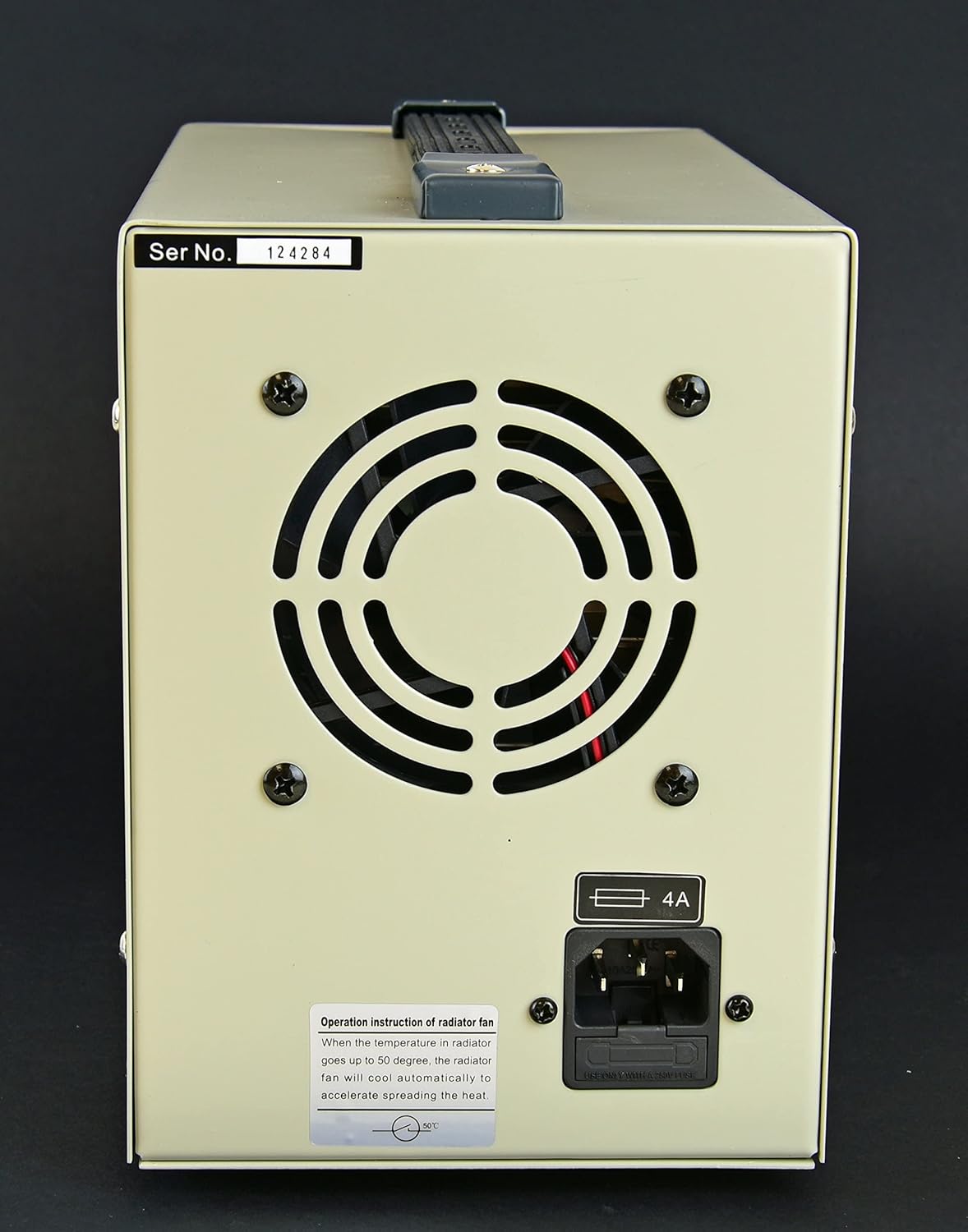
Figure 3.2: Rear Panel of the TP12001X Power Supply.
The rear panel includes the AC power input socket, the main fuse holder, and the cooling fan. The fan automatically activates when the internal temperature reaches approximately 50°C to ensure optimal operating conditions and prevent overheating. Ensure adequate clearance around the fan for proper airflow.
4. Configuració
- Desembalatge: Traieu amb cura la font d'alimentació del seu embalatge. Inspeccioneu la unitat per detectar qualsevol signe de danys durant el transport.
- Col·locació: Place the power supply on a stable, level surface. Ensure there is sufficient space around the unit (at least 10 cm or 4 inches) for proper ventilation, especially around the rear cooling fan and side vents.
- Connexió d'alimentació:
- Ensure the power switch on the front panel is in the "OFF" position.
- Connect the provided AC power cord to the power input socket on the rear panel.
- Plug the other end of the AC power cord into a grounded 110V AC outlet.
- Connexions de sortida:
- Before connecting any load, ensure the power supply is off and the output voltage knob is set to minimum (fully counter-clockwise).
- Connect your load to the output terminals. You can use the banana jacks (red for positive, black for negative, green for ground) or the external screw terminal block. Ensure correct polarity.
- For the external screw terminal block, loosen the screws, insert the wire, and tighten securely.

Figure 4.1: Connecting test leads to the front panel output terminals.
The power supply comes with test leads, typically with banana plugs on one end and alligator clips on the other, for convenient connection to your circuit or device. Ensure these leads are properly inserted into the corresponding positive (+) and negative (-) terminals.
5. Instruccions de funcionament
5.1 Powering On and Initial Adjustment
- Assegureu-vos que totes les connexions siguin segures i correctes.
- Turn on the power supply using the "ON/OFF" switch on the front panel. The digital display will illuminate.
- Configuració Voltage: Rotate the "VOL-ADJ" knob clockwise to increase the output voltage and counter-clockwise to decrease it. Observe the voltaglectura electrònica a la pantalla.
- Setting Current Limit (Constant Current Mode):
- To set the current limit, it is recommended to short-circuit the output terminals temporarily (e.g., by connecting a wire between the positive and negative terminals). The "CC" indicator should light up, indicating Constant Current mode.
- Use the "CUR-ADJ" UP/DOWN buttons to set the desired maximum current. The current display will show the set limit.
- Remove the short circuit. The power supply will now operate in Constant Voltage (CV) mode, and the "CV" indicator will light up. If the load draws more current than the set limit, the unit will automatically switch to Constant Current (CC) mode to protect the load and the power supply.
5.2 Constant Voltage (CV) and Constant Current (CC) Modes
This power supply can operate in two modes:
- Vol. Constanttage (CV) Mode: When the load current is less than the preset current limit, the power supply maintains a constant output voltage as set by the "VOL-ADJ" knob. The "CV" indicator will be lit.
- Constant Current (CC) Mode: When the load current attempts to exceed the preset current limit, the power supply automatically reduces the output voltage to maintain the current at the preset limit. The "CC" indicator will be lit. This protects the connected device from overcurrent.
6. Manteniment
- Neteja: Desconnecteu l'alimentació de la presa de corrent abans de netejar-lo. Feu servir un drap suau i sec per netejar l'exterior. No utilitzeu productes de neteja abrasius ni dissolvents.
- Ventilació: Regularly check that the cooling fan and vents are free from dust and obstructions. A blocked fan can lead to overheating and reduced performance.
- Substitució de fusibles: If the unit does not power on, check the fuse located on the rear panel. Disconnect the power cord, open the fuse holder, and replace the fuse with one of the same type and rating (4A).
- Emmagatzematge: When not in use for extended periods, store the power supply in a cool, dry environment, away from direct sunlight and excessive dust.
7. Solució De Problemes
| Problema | Causa possible | Solució |
|---|---|---|
| Sense engegada/Pantalla apagada | Power cord disconnected, AC outlet faulty, Blown fuse. | Check power cord connection. Test AC outlet. Replace fuse (4A). |
| Sense sortida voltage/actual | Output terminals not connected, Voltage/Current knobs set to zero, Overload protection activated. | Verify connections. Adjust voltage/current knobs. Check load for short circuit or excessive current draw. |
| La unitat es sobreescalfa | Blocked ventilation, Excessive ambient temperature, Prolonged high load. | Ensure clear airflow around fan and vents. Operate in a cooler environment. Reduce load if possible. |
| "CC" indicator always on | Load drawing more current than limit, Current limit set too low, Short circuit in load. | Increase current limit using "CUR-ADJ" buttons. Check load for short circuits or excessive current draw. |
8. Especificacions
- Model: TP12001X
- Vol. De sortidatage: 0-120V CC (ajustable)
- Corrent de sortida: 0-1A CC (ajustable)
- Entrada Voltage: 110 V AC
- Ripple Noise: <100 mV
- Protecció: Overload and Overheat Protection, Fuse Protection
- Refrigeració: Automatic Air Fan
- Entorn de funcionament: 0-40°C, Relative Humidity <90%
- Dimensions (L x A x A): Aproximadament 39.9 x 25.7 x 19.8 cm (16 x 8 x 10 polzades)
- Pes: Aproximadament 6.08 kg (14 lliures)
9. Garantia i Suport
The TekPower TP12001X power supply comes with a Garantia d'1 any als EUA. For warranty claims or technical support, please contact your retailer or the manufacturer directly. Keep your purchase receipt as proof of purchase.
For further assistance, refer to the official TekPower weblloc o poseu-vos en contacte amb el seu departament d'atenció al client.
