Introducció
This user manual provides comprehensive instructions for the safe and efficient use of your Onida 24-inch HD Ready LED TV, model LEO24HRD. Please read this manual thoroughly before operating the television and retain it for future reference.
Informació important de seguretat
Seguiu sempre les precaucions de seguretat bàsiques quan utilitzeu aquest televisor per reduir el risc d'incendi, descàrrega elèctrica i lesions.
- No exposeu el televisor a la pluja o la humitat.
- No obriu el televisor casing; demaneu totes les tasques de manteniment a personal qualificat.
- Assegureu-vos una ventilació adequada al voltant del televisor.
- Mantingueu el televisor allunyat de la llum solar directa, de fonts de calor i de temperatures extremes.
- Feu servir només el cable d'alimentació que s'inclou amb el televisor.
- Desendolleu el televisor durant tempestes o quan no l'utilitzeu durant períodes prolongats.
Contingut del paquet
Verifiqueu que tots els elements siguin presents al paquet:
- Onida LEO24HRD LED TV
- Control remot
- Cable d'alimentació
- Table Stand (if applicable)
- Manual d'usuari (aquest document)

Imatge: Frontal view of the Onida LEO24HRD LED TV with its included table stand.
Configuració
1. Fixació del suport
If you are not wall-mounting the TV, attach the provided stand:
- Carefully place the TV screen-down on a soft, flat surface to prevent scratches.
- Alineeu el suport amb els forats de muntatge de la part inferior del televisor.
- Secure the stand using the screws provided. Do not overtighten.
2. Connexió de dispositius externs
The Onida LEO24HRD TV features various ports for connecting external devices. Refer to the images below for port locations.

Imatge: Part posterior view of the Onida LEO24HRD TV, highlighting the input/output ports.

Imatge: Detallada view of the connectivity ports on the Onida LEO24HRD TV, including HDMI, USB, VGA, and AV inputs.
- HDMI: Connect Blu-ray players, gaming consoles, or set-top boxes. This model has 1 HDMI port.
- USB: Connect USB storage devices for media playback. This model has 1 USB port.
- VGA (PC IN): Connecteu un ordinador.
- AV IN: Connecteu dispositius antics mitjançant cables de vídeo compost i àudio estèreo.
- RF IN: Connecteu una antena o una presa de televisió per cable.
3. Connexió d'alimentació
Plug the power cord into the TV's power input, then into a wall outlet. Ensure the voltage compleix els requisits del televisor.
Funcionament
1. Configuració inicial
Upon first power-on, the TV will guide you through initial setup steps:
- Selecció d'idioma: Trieu el vostre idioma preferit.
- País/Regió: Select your country for correct channel tuning.
- Escaneig de canals: The TV will automatically scan for available channels. This may take several minutes.
2. Ús del comandament a distància
The remote control allows full functionality of your TV. Insert two AAA batteries (not included) into the remote control, observing polarity.

Image: The remote control for the Onida LEO24HRD TV, showing power, volume, channel, input, and navigation buttons.
- Botó d'encesa: Encén o apaga el televisor.
- Font/Entrada: Selecciona la font d'entrada (HDMI, AV, TV).
- Volum +/-: Ajusta el nivell de volum.
- Canal +/-: Canvia els canals de televisió.
- Menú: Accesses the TV's main menu for settings adjustments.
- Botons de navegació (amunt/avall/esquerra/dreta/d'acord): Navega pels menús i confirma les seleccions.
3. Ajustar la configuració
Premeu el botó Menú button on the remote to access settings such as:
- Configuració de la imatge: Brightness, Contrast, Color, Sharpness, Picture Mode.
- Configuració de so: Volume, Bass, Treble, Sound Mode, Balance.
- Configuració del canal: Auto Scan, Manual Scan, Channel List.
- Configuració de l'hora: Clock, Sleep Timer, Auto Standby.
- Configuració del sistema: Language, OSD Duration, Factory Reset.
Manteniment
Neteja del televisor
- Desendolla sempre el televisor abans de netejar-lo.
- Feu servir un drap suau i sec per netejar la pantalla i la carcassa.
- Per a marques difícils, esbandiu lleugeramentampNetegeu el drap amb aigua o un netejador de pantalles suau i no abrasiu.
- No utilitzeu alcohol, benzè, diluents ni altres substàncies volàtils.
Emmagatzematge
If storing the TV for an extended period, ensure it is unplugged, clean, and stored in a dry, dust-free environment. Use original packaging if available.
Resolució de problemes
| Problema | Causa possible | Solució |
|---|---|---|
| Sense poder | Cable d'alimentació no connectat; presa de corrent no funciona. | Comproveu la connexió del cable d'alimentació; proveu la presa de corrent amb un altre dispositiu. |
| No hi ha imatge, però hi ha so | Font d'entrada incorrecta seleccionada; dispositiu extern apagat o desconnectat. | Premeu Font button to select correct input; check external device power and connections. |
| No hi ha so, però hi ha imatge | Volum silenciat o massa baix; configuració de sortida d'àudio incorrecta. | Unmute volume or increase level; check audio settings in the menu. |
| El comandament a distància no funciona | Piles gastades o mal inserides; obstrucció entre el comandament a distància i el televisor. | Canvieu les piles; assegureu-vos que la línia de visió amb el sensor d'infrarojos del televisor estigui clara. |
| Poca qualitat d'imatge | Senyal d'antena feble; configuració d'imatge incorrecta. | Adjust antenna position; perform channel scan; adjust picture settings. |
Especificacions
| Característica | Detall |
|---|---|
| Model | LEO24HRD |
| Mida de la pantalla | 24 polzades (59.94 cm) |
| Tecnologia de visualització | LED |
| Resolució | HD Ready (1366 x 768 píxels) |
| Relació d'aspecte | 1.77:1 |
| Viewangle ing | 176 graus |
| Freqüència d'actualització | 60 Hz |
| Sortida d'àudio | 20 watts (estèreo) |
| Connectivitat | 1x HDMI, 1x USB, VGA, AV In, RF In |
| Tipus de muntatge | Muntatge de paret |
| Font d'alimentació | AC |
| Pes de l'article | 4.6 kg |
| Dimensions del paquet | 64 x 45.2 x 14.2 cm |
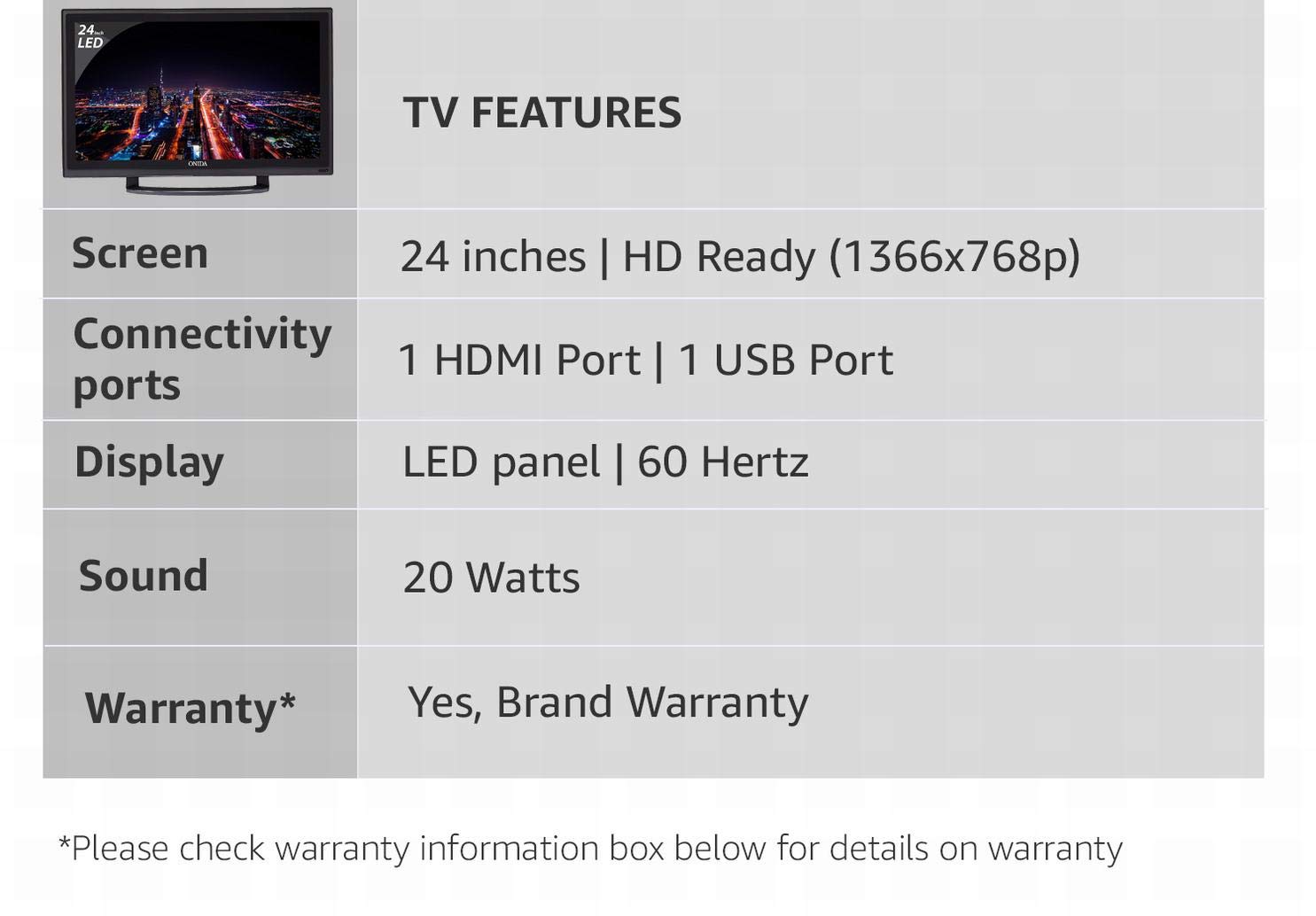
Image: Summary of key TV features including screen size, resolution, connectivity, display type, sound, and warranty.
Garantia i Suport
Informació de la garantia
This Onida LEO24HRD LED TV comes with a 1 anys de garantia from the date of purchase. Please retain your purchase receipt as proof of warranty. The warranty covers manufacturing defects and does not cover damage caused by misuse, accidents, or unauthorized repairs.
Atenció al client
For technical assistance, service requests, or further information, please contact Onida customer support. Refer to the official Onida weblloc web o la documentació de compra per obtenir les dades de contacte més actualitzades.
You can visit the official Onida store page for more information: Onida Store


