1. Instruccions de seguretat importants
Quan utilitzeu el vostre equip telefònic, sempre s'han de seguir les precaucions bàsiques de seguretat per reduir el risc d'incendi, descàrrega elèctrica i lesions a les persones, incloses les següents:
- Llegeix i entén totes les instruccions.
- Seguiu totes les advertències i instruccions marcades al producte.
- Desconnecteu aquest producte de la presa de corrent abans de netejar-lo. No utilitzeu netejadors líquids o aerosols. Utilitza l'anunciamp drap per netejar.
- Do not use this product near water, such as a bathtub, wash bowl, kitchen sink, laundry tub, swimming pool, or in a wet basement.
- No col·loqueu aquest producte sobre un carro, un suport o una taula inestables.
- Aquest producte només s'ha de fer servir amb el tipus de font d'alimentació indicat a l'etiqueta de marcatge. Si no esteu segur del tipus de font d'alimentació de casa vostra, consulteu el vostre distribuïdor o companyia elèctrica local.
- Do not allow anything to rest on the power cord. Do not locate this product where the cord will be walked on.
- Never push objects of any kind into this product through the slots in the base or handset as they may touch dangerous voltage punts o crear un curtcircuit. No aboqui mai cap tipus de líquid sobre el producte.
- To reduce the risk of electric shock, do not disassemble this product. Take it to an authorized service facility when service or repair work is required. Opening or removing covers may expose you to dangerous voltages o altres riscos. Un muntatge incorrecte pot provocar una descàrrega elèctrica quan el producte s'utilitza posteriorment.
- No sobrecarregueu els endolls de paret ni els cables d'extensió, ja que això pot provocar un risc d'incendi o descàrrega elèctrica.
- Desendolleu aquest producte de la presa de corrent i consulteu un centre de servei autoritzat en les condicions següents:
- Quan el cable d'alimentació o l'endoll està danyat o esquinçat.
- Si s'ha vessat líquid sobre el producte.
- Si el producte ha estat exposat a la pluja o l'aigua.
- Si el producte no funciona amb normalitat seguint les instruccions d'ús.
- Si el producte ha caigut o el casing ha estat malmès.
- Si el producte presenta un canvi clar en el rendiment.
- Avoid using a telephone (other than cordless type) during an electrical storm. There may be a remote risk of electric shock from lightning.
- No utilitzeu el telèfon per informar d'una fuita de gas a les proximitats de la fuita.
2. Què hi ha a la caixa
Ensure all items are present in your package. If any items are missing or damaged, contact customer support.
- One (1) CS6629-3 Base Unit with Digital Answering System
- Three (3) Cordless Handsets (one for the base, two additional)
- Three (3) Handset Battery Compartment Covers
- Three (3) Rechargeable Ni-MH Battery Packs
- One (1) Telephone Line Cord
- One (1) Telephone Base Power Adapter
- Two (2) Charger Units for additional handsets
- Two (2) Charger Power Adapters for additional handsets
- One (1) Wall Mount Bracket
- Aquest manual d'usuari
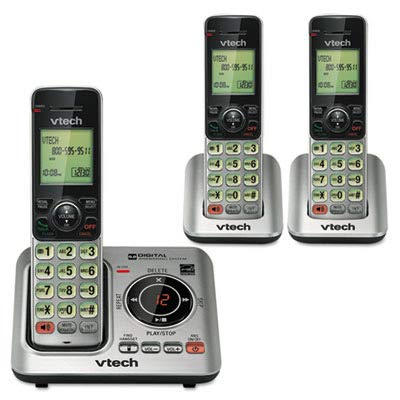
Image: Contents of the VTech CS6629-3 package, showing the base unit, three handsets, and various cords and adapters.
3. Configuració
3.1 Instal·lació de la unitat base
- Connect the Telephone Line Cord: Plug one end of the telephone line cord into the TEL LINE jack on the back of the telephone base. Plug the other end into a telephone wall jack.
- Connecteu l'adaptador de corrent: Plug the large end of the telephone base power adapter into a power outlet not controlled by a wall switch. Plug the small end into the POWER jack on the back of the telephone base.
- Posicionar la base: Place the telephone base on a flat surface, away from other electronic devices that may cause interference.

Imatge: Part posterior view of the VTech CS6629-3 base unit, illustrating the connection points for the telephone line cord and power adapter.
3.2 Instal·lació i càrrega de la bateria del telèfon
- Instal·la la bateria: Open the battery compartment cover on the back of each handset. Connect the battery pack plug into the jack inside the compartment, ensuring correct polarity. Place the battery pack inside the compartment.
- Tancar la coberta: Feu lliscar la tapa del compartiment de la bateria fins que faci clic.
- Càrrega de telèfons: Place each handset face up in its respective charger (base unit or auxiliary charger). The CHARGE light on the handset will illuminate, indicating proper charging.
- Càrrec inicial: Allow the handsets to charge for at least 10 hours before first use. For optimal battery performance, keep the handset in the charger when not in use.

Image: A VTech CS6629-3 handset with its back cover removed, showing the battery compartment and how to connect the battery pack.

Image: A VTech CS6629-3 handset resting in its charging cradle, with the charge indicator light visible.
3.3 Muntatge a la paret (opcional)
The telephone base can be mounted on a wall using the included wall mount bracket.
- Fixeu el suport: Align the wall mount bracket with the mounting holes on the back of the telephone base and slide it into place until it locks.
- Muntatge a la paret: Plug the telephone line cord and power adapter into the base. Route the cords through the bracket's channels. Mount the bracket to a standard wall plate or directly to the wall using two screws (not included) spaced 3-1/4 inches apart.
4. Com utilitzar el telèfon
4.1 Funcions de trucada bàsiques
- Fer una trucada: Premeu XERRADA / FLASH or PONENT, then dial the number. Alternatively, dial the number first and then press XERRADA / FLASH or PONENT.
- Respondre una trucada: Quan soni el telèfon, premeu XERRADA / FLASH or PONENT.
- Finalització d'una trucada: Premeu OFF/CANCEL·LAR o torneu a col·locar el telèfon al carregador.
- Control de volum: Durant una trucada, premeu VOL▲ or VOL▼ per ajustar el volum d'escolta.
- Silenciar: Durant una trucada, premeu MUT to temporarily silence the microphone. Press MUT de nou per activar el so.
4.2 Contestador digital
The base unit includes a digital answering system to record incoming messages when you are away or unable to answer the phone.
- Activació/desactivació: Premeu ANS ON/OFF on the telephone base to activate or deactivate the answering system.
- Reproducció de missatges: Premeu PLAY/STOP on the telephone base to listen to messages. Use SALTAR▲ to skip to the next message and REPETIR▼ to repeat the current message or go back to the previous one.
- Eliminació de missatges: Durant la reproducció del missatge, premeu ELIMINAR on the telephone base to delete the current message.
- Enregistrament d'un anunci: Refer to the full manual for detailed instructions on recording a personalized outgoing announcement.
4.3 Intercomunicador
You can use the handsets to communicate with each other via intercom.
- Inicia l'intercomunicació: With a handset, press INT.
- Select Handset: If you have multiple handsets, dial the number of the handset you wish to call (e.g., 2 for handset 2).
- Answer Intercom: The receiving handset will ring. Press XERRADA / FLASH or PONENT per respondre.
- Finalitzar l'intercomunicador: Premeu OFF/CANCEL·LAR o col·loqueu el telèfon al carregador.
4.4 Agenda telefònica
Store frequently called numbers in the phonebook for quick dialing.
- Afegir una entrada:
- Premeu MENÚ/SELECT.
- Desplaça't fins a GUIA TELEFÒNICA i premeu MENÚ/SELECT.
- Desplaça't fins a ADD NEW ENTRY i premeu MENÚ/SELECT.
- Enter the name using the keypad. Press # to cycle through capitalization.
- Premeu MENÚ/SELECT.
- Introduïu el número de telèfon.
- Premeu MENÚ/SELECT per salvar.
- Marcació des de la llibreta telefònica:
- Premeu DIR.
- Scroll to the desired entry.
- Premeu XERRADA / FLASH or PONENT per marcar.
5. Manteniment
5.1 Neteja del telèfon
Clean the telephone base and handset with a soft, damp cloth. Do not use cleaning sprays or liquid cleaners. Ensure the phone is unplugged from the wall outlet before cleaning.
5.2 Cura de la bateria
- Use only the supplied rechargeable Ni-MH battery pack.
- No llenceu les piles al foc. Poden explotar. Consulteu les normes locals per obtenir instruccions especials d'eliminació.
- No obriu ni malmeti la bateria. L'electròlit alliberat és corrosiu i pot causar cremades o lesions als ulls o a la pell. Pot ser tòxic si s'ingereix.
- Exercise care in handling batteries to not create a short circuit with conductive materials such as rings, bracelets, and keys. The battery or conductor may overheat and cause burns.
- Carregueu la bateria subministrada amb aquest producte només d'acord amb les instruccions i limitacions especificades en aquest manual.
6. Solució De Problemes
If you experience difficulty with your telephone, please try the suggestions below. For customer service, visit vtechphones.com or call 1 (800) 595-9511.
| Problema | Solució |
|---|---|
| Sense to de marcatge. |
|
| El telèfon no es carrega. |
|
| Mala qualitat de so o estàtica. |
|
| El contestador automàtic no enregistra els missatges. |
|
7. Especificacions
| Característica | Detall |
|---|---|
| Model | CS6629-3 |
| Control de freqüència | DECT 6.0 Digital technology |
| Freqüència de transmissió | 1921.536-1928.448 MHz |
| Canals | 5 |
| Nominal Effective Range | Maximum power allowed by FCC and IC. Actual operating range may vary depending on environmental conditions at the time of use. |
| Requisits d'alimentació |
|
| Bateria | Ni-MH battery, 2.4V, 300mAh |
| Memòria |
|
8. Garantia i Suport
8.1 Garantia limitada
VTech Communications, Inc. warrants to the holder of a valid proof of purchase ("Consumer" or "you") that the product and all accessories provided in the sales package ("Product") are free from defects in material and workmanship, pursuant to the following terms and conditions, when installed and used normally and in accordance with the Product operating instructions.
This limited warranty extends only to the Consumer for Products purchased and used in the United States of America and Canada. The warranty period for the VTech CS6629-3 is typically un (1) any from the date of purchase. For full details on warranty coverage, exclusions, and how to obtain service, please refer to the official VTech weblloc web o la targeta de garantia inclosa amb el producte.
8.2 Atenció al client
For technical support, product registration, or to download the full user manual, please visit:
Weblloc: www.vtechphones.com
Suport telefònic: 1 (800) 595-9511 (U.S. and Canada)
Horari de funcionament: Consulteu la informació de VTech website for current support hours.


