1. Introducció
This manual provides detailed instructions for the installation, operation, and maintenance of your SilverStone Strider Plus ST70F-PB 700W Power Supply. The Strider series is a versatile and proven line of power supply products known for their innovative features. The ST70F-PB model offers high efficiency with 80 PLUS Bronze certification, a compact design, a powerful single +12V rail, and a quiet 120mm fan. Its 100% modular cables provide flexibility for various system configurations, supporting current and future graphics card specifications. Please read this manual thoroughly before use to ensure proper and safe operation.
2. Informació de seguretat
Observeu sempre les següents precaucions de seguretat per evitar lesions i danys al vostre equip:
- Risc elèctric: Power supplies contain high voltage components. Do not open the power supply casing. No hi ha peces a l'interior que l'usuari pugui reparar. Demaneu totes les tasques de manteniment a personal de servei qualificat.
- Ventilació: Ensure adequate airflow around the power supply. Do not block ventilation openings. Overheating can lead to malfunction or fire.
- Humitat: Do not expose the power supply to water or excessive humidity. Operate in a dry environment.
- Font d'alimentació: Connect the power supply only to a grounded electrical outlet with the correct voltage i la freqüència tal com s'especifica a l'etiqueta de la unitat.
- Gestió de cables: Route cables carefully to avoid pinching, sharp bends, or interference with other components.
- Electricitat estàtica: Discharge static electricity from your body before handling the power supply or other internal computer components. Use an anti-static wrist strap if available.
- Temperatura: Operate the power supply within the specified temperature range (24/7 continuous power output with 40℃ operating temperature).
3. Contingut del paquet
Verifiqueu que tots els elements siguin presents al paquet abans de continuar amb la instal·lació:
- SilverStone Strider Plus ST70F-PB 700W Power Supply Unit
- Modular Cable Set (including ATX 20+4 pin, EPS/ATX 4+4 pin, PCI-E 6+2 pin, SATA, and Peripheral connectors)
- Cable d'alimentació CA
- Cargols de muntatge
- Manual d'usuari (aquest document)
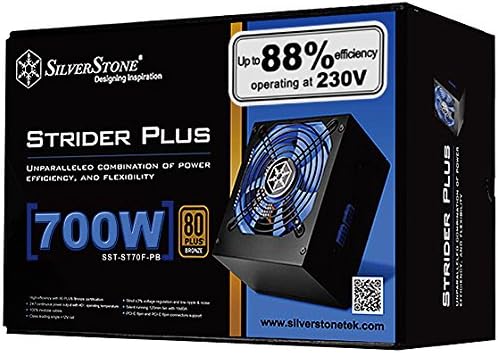
Image: Retail packaging for the SilverStone Strider Plus 700W Power Supply, showing the product name, wattage, and 80 PLUS Bronze certification.
4. Producte acabatview
4.1 Característiques clau
The SilverStone Strider Plus ST70F-PB Power Supply is designed with advanced features for reliable and efficient performance:
- Alta eficiència amb certificació 80 PLUS Bronze
- Sortida de potència contínua les 24 hores del dia amb una temperatura de funcionament de 7 ℃
- 100% modular cables for improved cable management and airflow
- Class-leading single +12V rail for stable power delivery to demanding components
- Strict 3% voltage regulation and low ripple & noise for clean power
4.2 Components and Layout
Familiarize yourself with the main components of the power supply unit:

Imatge: Frontal view of the SilverStone Strider Plus 700W Power Supply, showcasing the large blue cooling fan and the modular cable connection ports on the side.
- Ventilador de refrigeració: A large 120mm fan (visible through the grille) provides efficient cooling for the internal components, ensuring stable operation and longevity.
- Ports de cable modulars: Located on the side of the unit, these ports allow you to connect only the necessary cables, reducing clutter and improving airflow within your PC case.
- Presa d'entrada de CA: Standard IEC C14 socket for connecting the AC power cord from your wall outlet.
- Interruptor d'alimentació: An on/off switch located next to the AC input socket for manually cutting power to the unit.

Imatge: Part posterior view of the SilverStone Strider Plus 700W Power Supply, highlighting the AC power input socket and the main power on/off switch.

Imatge: Primer pla view of the modular cable connection panel on the SilverStone Strider Plus 700W Power Supply, showing various ports for different cable types (e.g., 24-pin ATX, CPU, PCIe, SATA).
5. Configuració i instal·lació
Follow these steps to properly install your power supply unit into your computer system:
- Prepareu el vostre sistema:
- Assegureu-vos que l'ordinador estigui completament apagat i desendollat de la presa de corrent.
- Obriu la carcassa de l'ordinador per accedir a la zona de muntatge de la font d'alimentació.
- If replacing an old power supply, disconnect all cables from the old unit and remove it from the case.
- Muntar la font d'alimentació:
- Carefully slide the SilverStone ST70F-PB power supply into the designated bay in your computer case.
- Align the screw holes on the power supply with those on the case.
- Assegureu la font d'alimentació amb els cargols de muntatge subministrats.
- Connecteu els cables modulars:
- Identify the necessary cables for your motherboard, CPU, graphics card(s), and storage devices.
- Connect the required modular cables to the corresponding ports on the power supply unit. Ensure a firm connection.
- Route the cables neatly through your case's cable management channels to improve airflow and aesthetics.
- Connect the other end of each cable to the appropriate component (e.g., 24-pin ATX to motherboard, 8-pin EPS to CPU, 6+2 pin PCIe to graphics card, SATA to SSD/HDD).
- Tanqueu la caixa i connecteu l'alimentació:
- Once all internal connections are made, close your computer case.
- Connect the AC power cord to the power supply's AC input socket and then to a grounded wall outlet.
6. Instruccions de funcionament
Operating your SilverStone Strider Plus ST70F-PB Power Supply is straightforward:
- Encès: After installation, ensure the power switch on the back of the power supply is in the "ON" (I) position.
- Arrencada del sistema: Press the power button on your computer case. The power supply will provide stable power to all connected components, allowing your system to boot up.
- Funcionament normal: The power supply is designed for 24/7 continuous operation within its specified temperature range. The internal fan will adjust its speed based on the load and temperature to maintain optimal cooling and quiet operation.
- Apagar: To shut down your system, use the operating system's shutdown function. For a complete power cut, switch the power supply's rear switch to the "OFF" (O) position and unplug the AC cord.
7. Manteniment
Un manteniment regular ajuda a garantir la longevitat i el rendiment òptim de la font d'alimentació:
- Eliminació de pols: Periodically clean dust from the power supply's fan grille and internal components (if accessible without opening the casing). Use compressed air to blow dust out of the unit. Always unplug the power supply from the wall outlet before cleaning.
- Inspecció del cable: Occasionally inspect all connected modular cables for any signs of wear, damage, or loose connections.
- Medi ambient: Ensure the computer operates in a clean, dry, and well-ventilated environment to prevent dust buildup and overheating.
8. Solució De Problemes
Si teniu problemes amb la font d'alimentació, consulteu els passos habituals següents per a la resolució de problemes:
| Problema | Causa possible | Solució |
|---|---|---|
| El sistema no s'encén. |
|
|
| El sistema s'encén però s'apaga inesperadament. |
|
|
| Fort soroll del ventilador de la font d'alimentació. |
|
|
If the problem persists after trying these solutions, please contact SilverStone customer support for further assistance.
9. Especificacions
Detailed technical specifications for the SilverStone Strider Plus ST70F-PB 700W Power Supply:
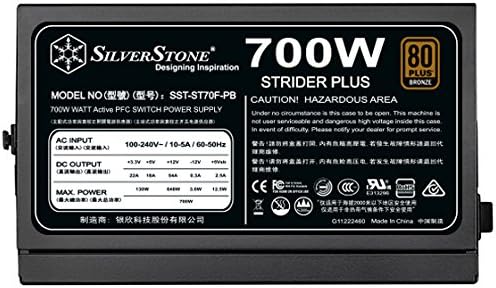
Image: Product label displaying detailed electrical specifications, model number (SST-ST70F-PB), and certifications for the SilverStone Strider Plus 700W Power Supply.
| Característica | Detall |
|---|---|
| Número de model | PS-ST70F-PB |
| Marca | SilverStone |
| Wattage | 700 watts |
| Certificació d'eficiència | 80 PLUS Bronze |
| Factor de forma | ATX12V / EPS12V |
| Cables modulars | 100% Fully Modular |
| PFC | PFC actiu |
| Rail +12V | Single +12V Rail (54A) |
| Mètode de refrigeració | Aire (ventilador de 120 mm) |
| Temperatura de funcionament | Up to 40℃ for 24/7 continuous output |
| Dimensions del producte (L x A x A) | 12 x 8 x 4 inches (approx. 140mm depth) |
| Pes de l'article | 5.6 lliures |
| Tipus de connectors | ATX, EPS, PCI Express, SATA |
| Data de primera disponibilitat | 9 de gener de 2015 |
10. Garantia i Suport
SilverStone Technology Co., Ltd. provides a limited warranty for its products. For specific warranty terms and conditions applicable to your region, please refer to the warranty card included with your product or visit the official SilverStone weblloc.
For technical support, troubleshooting assistance beyond this manual, or warranty claims, please contact SilverStone customer service through their official weblloc web o la informació de contacte proporcionada amb el vostre producte. També podeu visitar el Botiga SilverStone a Amazon per a més informació i recursos del producte.


