1. Introducció
This manual provides essential information for the proper installation, operation, and maintenance of the SIMPLEX 2099-9754 Manual Pull Station. This device is designed for fire alarm systems, allowing manual activation of an alarm in emergency situations.
2. Informació de seguretat
ADVERTIMENT: Installation and maintenance should only be performed by qualified personnel in accordance with all local and national electrical and fire codes. Disconnect power before servicing. Failure to follow these instructions may result in property damage, serious injury, or death.
- Always ensure power is disconnected before wiring or performing maintenance.
- No tamper amb el dispositiu.
- Ensure the device is installed in a location that is easily accessible and visible.
3. Producte acabatview
The SIMPLEX 2099-9754 is a single-action manual pull station. It features a robust design for reliable performance in fire alarm systems.
- Acció única: Requires a single pull to activate the alarm.
- Terminals de cargol: Provides secure wiring connections.
- Tamper Resistant Reset Key Lock: Ensures secure resetting of the device after activation.
- Optional Break-Rod: Can be used for visual indication of activation.
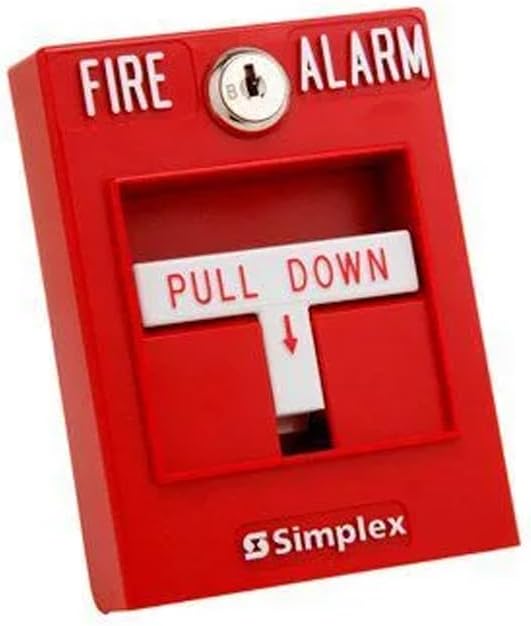
Figura 1: Frontal view of the SIMPLEX 2099-9754 Manual Pull Station, showing the "FIRE ALARM" text, keyhole, and "PULL DOWN" handle.
4. Configuració
The 2099-9754 pull station is designed for surface or flush mounting. Ensure the mounting surface is stable and secure.
- Muntatge: Secure the pull station to the desired location using appropriate fasteners.
- Cablejat: Connect the fire alarm circuit wiring to the screw terminals located on the back of the pull station. Ensure correct polarity and secure connections. Refer to the wiring diagram provided with your fire alarm control panel for specific connections.
- Prova: After installation, test the pull station according to local fire safety regulations and the fire alarm system's testing procedures.
5. Operating the Pull Station
In the event of a fire or emergency requiring alarm activation:
- Locate the SIMPLEX 2099-9754 Manual Pull Station.
- Firmly grasp the "PULL DOWN" handle.
- Pull the handle downwards until it latches into the activated position. This action will initiate the fire alarm sequence.
6. Manteniment
Regular maintenance ensures the reliable operation of your pull station.
6.1 Resetting the Pull Station
After activation, the pull station must be reset to its normal, ready state. A key (not included with the pull station) is required for this procedure.
- Insert the appropriate key into the tamper-resistant reset key lock at the top of the pull station.
- Turn the key to release the latched handle.
- Return the "PULL DOWN" handle to its original, upright position.
- Remove the key. The pull station is now reset.
6.2 Neteja
Clean the exterior of the pull station periodically with a soft, damp tela. No utilitzeu netejadors abrasius ni dissolvents.
7. Solució De Problemes
| Problema | Causa possible | Solució |
|---|---|---|
| L'estació de prémer no activa l'alarma. | Incorrect wiring; Faulty pull station; Issue with fire alarm control panel. | Verify wiring connections. Test the pull station with a known working system. Consult a qualified technician. |
| L'estació de tracció no es pot reiniciar. | Incorrect key; Damaged reset mechanism. | Ensure you are using the correct Simplex key. If the mechanism is damaged, the unit may need replacement. |
| L'alarma s'activa inesperadament. | Accidental activation; System fault. | Reset the pull station. If the issue persists, consult a qualified fire alarm technician immediately. |
8. Especificacions
- Número de peça: L6-QMYZ-MHTW
- Pes de l'article: 1 lliures
- Dimensions del producte: 5 x 4.5 x 4 polzades
- Número de model de l'article: 2099-9754
- Font d'alimentació: Manual
- Quantitat de paquet d'articles: 1
- Piles incloses?: No
- Necessites piles?: No
- Data de primera disponibilitat: 23 de gener de 2015
9. Garantia i Suport
For warranty information or technical support regarding your SIMPLEX 2099-9754 Manual Pull Station, please contact SIMPLEX customer service or refer to the official SIMPLEX weblloc. Conserveu el rebut de compra per a reclamacions de garantia.


