1. Introducció
This manual provides detailed instructions for the installation, operation, maintenance, and troubleshooting of the D-Link DGS-1510-28X SmartPro Switch. The DGS-1510-28X is a high-performance managed switch designed for business environments, offering 24 Gigabit Ethernet ports and 4 10 Gigabit Ethernet SFP+ ports for flexible network expansion and high-bandwidth connectivity.
Please read this manual thoroughly before attempting to install or operate the device to ensure proper setup and optimal performance.
2. Producte acabatview
2.1 Tauler frontal
The front panel of the DGS-1510-28X switch features all network ports, status LEDs, and a console port for local management.

Figura 2.1: Front Panel of DGS-1510-28X Switch. This image displays the front of the D-Link DGS-1510-28X switch, highlighting its 24 standard RJ45 Gigabit Ethernet ports, four 10 Gigabit Ethernet SFP+ uplink ports (labeled 25-28), and various LED indicators for power, link status, and activity. A console port is also visible on the left side.
- Ports RJ45 (1-24): 24 10/100/1000BASE-T Gigabit Ethernet ports for connecting network devices.
- Ports SFP+ (25-28): 4 10 Gigabit Ethernet SFP+ ports for high-speed uplinks or stacking.
- Port de la consola: RJ-45 console port for command-line interface (CLI) management.
- Indicadors LED: Provide visual status for power, link/activity, and 10/100/1000 Mbps speed for each port.
2.2 Panell posterior
The rear panel includes the power input and grounding screw.
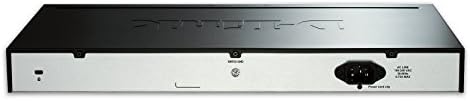
Figura 2.2: Rear Panel of DGS-1510-28X Switch. This image shows the back of the D-Link DGS-1510-28X switch, featuring the standard AC power input connector on the right and a grounding screw terminal on the left.
- Entrada d'alimentació CA: Connects to the provided AC power cord.
- Cargol de presa de terra: For connecting an earth ground cable to protect against electrical surges.
3. Configuració i instal·lació
3.1 Contingut del paquet
Comproveu que el vostre paquet contingui els elements següents:
- DGS-1510-28X SmartPro Switch
- Cable d'alimentació CA
- Kit de muntatge en rack (suports i cargols)
- Peus de goma (per a la instal·lació d'escriptori)
- Cable de consola (RJ-45 a DB-9)
- Guia d'instal·lació ràpida
3.2 Instal·lació física
The DGS-1510-28X can be installed on a desktop or mounted in a standard 19-inch equipment rack.
Instal·lació d'escriptori:
- Attach the four rubber feet to the recessed areas on the bottom of the switch.
- Col·loqueu l'interruptor sobre una superfície plana i estable amb una ventilació adequada.
Instal·lació del bastidor:
- Attach the two mounting brackets to the side grooves of the switch using the provided screws.
- Secure the switch into an open rack space using appropriate rack screws (not typically included with the switch).
3.3 Connexió d'alimentació
- Connecteu el cable d'alimentació de CA a l'entrada d'alimentació del panell posterior de l'interruptor.
- Connecteu l'altre extrem del cable d'alimentació a una presa de corrent adequada.
- Ensure the grounding screw is connected to an earth ground for safety.
3.4 Configuració inicial
El commutador es pot configurar mitjançant un Web-based Graphical User Interface (GUI) or Command Line Interface (CLI) through the console port.
Connexió del port de la consola:
- Connect the RJ-45 end of the console cable to the console port on the switch.
- Connect the DB-9 end to the serial port of a computer.
- Use a terminal emulation program (e.g., PuTTY, Tera Term) with settings: 115200 bps, 8 data bits, no parity, 1 stop bit, no flow control.
WebGestió basada en:
By default, the switch may obtain an IP address via DHCP or have a default static IP. Refer to the Quick Installation Guide for the default IP address and login credentials.
- Connecteu un ordinador a qualsevol dels ports RJ45 del commutador.
- Ensure your computer's IP address is in the same subnet as the switch's default IP.
- Obre a web navegador i introduïu l'adreça IP del commutador.
- Enter the default username and password (refer to documentation).
4. Funcionament de l'interruptor
The DGS-1510-28X is a managed switch offering a wide range of features for network control and optimization. These features are accessible through the Web GUI o CLI.
4.1 Característiques clau
The DGS-1510-28X supports various advanced networking functionalities, including:
- VLAN (xarxes d'àrea local virtuals): For network segmentation and traffic isolation.
- QoS (Qualitat de servei): Prioritize critical network traffic for improved performance.
- Agregació d'enllaços (LAG): Combine multiple ports for increased bandwidth and redundancy.
- Protocol d'arbre d'expansió (STP): Prevent network loops.
- Característiques de seguretat: Access Control Lists (ACLs), Port Security, DHCP Snooping, ARP Inspection.
- Single IP Management (SIM): Manage multiple switches from a single IP address.
- Suport IPv6: Ready for next-generation networks.

Figura 4.1: DGS-1510 Series Feature Overview. This image provides a comprehensive overview of the DGS-1510 series' capabilities, detailing features such as Single IP Management, various Layer 2 functionalities, Quality of Service (QoS) and bandwidth control, network security protocols, IPv6 readiness, versatile management options, and Layer 3 traffic management.

Figura 4.2: DGS-1510 Series Software Features. This image presents a table outlining the software features of the DGS-1510 series, categorized by functionality such as Virtual Stacking Support, L2 Features (e.g., MAC Address Table, Flow Control, IGMP Snooping), VLAN capabilities, Quality of Service (QoS), L3 Features, and Access Control List (ACL) capabilities.

Figura 4.3: DGS-1510 Series Advanced Features. This image details advanced features of the DGS-1510 series, including comprehensive security protocols (e.g., Port Security, DHCP Server Screening), AAA (Authentication, Authorization, and Accounting) functionalities, OAM (Operations, Administration, and Maintenance) tools, and D-Link Green 3.0 Technology for power saving.
For detailed configuration instructions on these features, please refer to the D-Link DGS-1510 Series User Manual available on the D-Link support weblloc.
5. Manteniment
5.1 actualitzacions de microprogramari
Comproveu regularment el suport de D-Link website for the latest firmware versions. Updating the firmware can provide new features, performance enhancements, and security fixes. Follow the instructions provided with the firmware download carefully.
5.2 Neteja
Per mantenir un rendiment òptim i allargar la vida útil del commutador:
- Assegureu-vos que l'interruptor estigui apagat i desconnectat de la font d'alimentació abans de netejar-lo.
- Feu servir un drap suau i sec per netejar les superfícies exteriors.
- Use compressed air to clear dust from ventilation openings and ports.
- No utilitzeu netejadors líquids o aerosols.
5.3 Consideracions ambientals
Operate the switch within the recommended temperature and humidity ranges to prevent damage and ensure stable operation. Ensure proper airflow around the device.
6. Solució De Problemes
This section provides solutions to common issues you might encounter with the DGS-1510-28X switch.
6.1 Sense poder
- Verifiqueu que el cable d'alimentació estigui connectat correctament tant a l'interruptor com a la presa de corrent.
- Assegureu-vos que la presa de corrent funciona provant-la amb un altre dispositiu.
- Check the power LED on the front panel; it should be illuminated.
6.2 No Link on a Port
- Check the Ethernet cable connection at both ends (switch port and connected device).
- Ensure the cable is not damaged and is of the correct type (e.g., Cat5e/6 for Gigabit).
- Verifiqueu que el dispositiu connectat estigui encès i funcioni correctament.
- Try connecting to a different port on the switch or using a different cable.
- Check the port status in the switch's management interface.
6.3 No es pot accedir Web Interfície de gestió
- Assegureu-vos que l'adreça IP de l'ordinador es troba a la mateixa subxarxa que l'adreça IP del commutador.
- Verify the switch's IP address. If unknown, use the console port for CLI access to check or configure the IP.
- Desactiveu temporalment qualsevol tallafocs o programari antivirus de l'ordinador per descartar interferències.
- Prova una altra web navegador.
- If all else fails, consider performing a factory reset (refer to the full user manual for instructions, as this will erase all configurations).
7. Especificacions
Below are the technical specifications for the D-Link DGS-1510-28X SmartPro Switch.

Figura 7.1: DGS-1510-28X Product Dimensions. This image illustrates the physical dimensions of the DGS-1510-28X switch, indicating a length of 17.36 inches, a width of 8.26 inches, and a height of 1.73 inches.
| Característica | Especificació |
|---|---|
| Número de model | DGS-1510-28X |
| Nombre de Ports | 24 x 10/100/1000BASE-T Gigabit Ethernet, 4 x 10GbE SFP+ |
| Tipus d'interfície | RJ45, SFP+ |
| Velocitat de transferència de dades | 128 gigabits per segon (capacitat de commutació) |
| Pes de l'article | 7.15 lliures (3.24 kg) |
| Dimensions del producte (L x A x A) | 17.36" x 8.26" x 1.73" (440.94 mm x 209.8 mm x 43.94 mm) |
| Material de la caixa | Metall |
| Voltage | 100 to 240 VAC, 50/60 Hz Internal Universal Power Supply |
| Temperatura de funcionament | De 32 °F a 122 °F (de 0 °C a 50 °C) |
| Temperatura d'emmagatzematge | -4 °F a 158 °F (-20 °C a 70 °C) |
| Humitat de funcionament | 0% a 95% sense condensació |
| Dispositius compatibles | Desktop (and rack-mountable) |
| UPC | 790069406058, 012304118534 |
8. Garantia i suport tècnic
8.1 Informació de la garantia
The D-Link DGS-1510-28X SmartPro Switch typically comes with a Garantia limitada de per vida. This warranty covers defects in workmanship and materials under normal use and service. Specific terms and conditions may vary by region. Please refer to the official D-Link website or your local D-Link reseller for complete warranty details.
8.2 Suport tècnic
For technical assistance, product documentation, firmware updates, or to register your product, please visit the official D-Link support weblloc:
When contacting support, please have your product model number (DGS-1510-28X) and serial number ready.


