1. Introducció
1.1 Producte acabatview
The Goobay 67999 USB-C to USB A 3.0 Cable is designed for high-speed data transfer and efficient charging. This 0.5-meter black cable features a USB-C male connector on one end and a USB A 3.0 male connector on the other, enabling versatile connectivity between modern USB-C devices and traditional USB-A ports.
Les característiques clau inclouen:
- For superfast synching and charging at up to 4.5 W.
- USB-C connector can be used on both ends (reversible).
- SuperSpeed data transmissions up to 5 Gbit/s – 10x faster than USB 2.0.
- Backwards compatibility to USB 2.0 and 1.1.

Image: The Goobay 67999 USB-C to USB A 3.0 Cable, showing the USB-A 3.0 connector on the left and the reversible USB-C connector on the right.

Image: Diagram highlighting key features: USB-C compatibility, Quick Charge support, 5 Gbit/s data transfer, and 0.5 meter length.
1.2 Què hi ha a la caixa
El paquet conté els elements següents:
- 1 x Goobay USB-C / A charging cable (0.5 meter)
2. Configuració
Setting up your Goobay USB-C to USB A 3.0 cable is straightforward. Follow these steps to connect your devices:
- Identify the USB-C port on your device (e.g., smartphone, tablet, laptop). The USB-C connector is reversible, meaning it can be inserted in either orientation.
- Identify a compatible USB-A 3.0 port on your host device (e.g., computer, wall charger, power bank). USB-A 3.0 ports are typically blue inside, but the cable is also backwards compatible with USB-A 2.0 and 1.1 ports.
- Gently insert the USB-C end of the cable into the USB-C port of your device until it clicks into place.
- Insert the USB-A 3.0 end of the cable into the USB-A port of your host device.
- Assegureu-vos que les dues connexions siguin segures.

Image: A detailed diagram showing the USB-C connector and the USB-A 3.0 connector, illustrating their distinct shapes and pin configurations.
3. Instruccions de funcionament
Once connected, the Goobay USB-C to USB A 3.0 cable facilitates both data transfer and power delivery.
3.1 Transferència de dades
For data transfer, ensure both connected devices support data communication via USB. The cable supports SuperSpeed data transmissions up to 5 Gbit/s, allowing for rapid transfer of large files such as photos, videos, and documents between compatible devices.
- Connect your USB-C device (e.g., smartphone) to a computer's USB-A 3.0 port.
- Your computer should recognize the connected device. Follow on-screen prompts on your computer and device to allow data access.
- You can then drag and drop files between your devices or use file programari de gestió.
3.2 Càrrega
The cable supports charging at up to 15W, making it suitable for charging smartphones, tablets, and other USB-C powered devices when connected to a compatible USB-A power source (e.g., wall adapter, power bank, computer USB port).
- Connect your USB-C device to a USB-A power adapter or a powered USB-A port.
- El dispositiu hauria de començar a carregar-se automàticament.
- Charging speed may vary depending on the power source and the device's charging capabilities.

Image: A smartphone connected to a power source via a USB-C cable, illustrating the charging process with a battery percentagvisualització.

Image: Various electronic devices such as smartphones and tablets, indicating the cable's multi-compatibility for charging and data transfer.
4. Manteniment
To ensure the longevity and optimal performance of your Goobay USB-C to USB A 3.0 cable, follow these maintenance guidelines:
- Emmagatzematge: Store the cable in a cool, dry place away from direct sunlight and extreme temperatures. Avoid tightly coiling or bending the cable, especially near the connectors, to prevent internal wire damage.
- Neteja: If the cable or connectors become dirty, gently wipe them with a soft, dry, lint-free cloth. Do not use harsh chemicals, abrasive cleaners, or excessive moisture.
- Manipulació: Agafeu sempre la carcassa del connector quan connecteu o desconnecteu el cable. Eviteu estirar directament del cable, ja que això pot forçar les connexions i causar danys.
- Inspecció: Periodically inspect the cable for any signs of wear, such as frayed insulation, exposed wires, or bent/damaged connectors. If any damage is observed, discontinue use and replace the cable.
5. Solució De Problemes
If you encounter issues with your Goobay USB-C to USB A 3.0 cable, consider the following troubleshooting steps:
- Cable Not Recognized / No Data Transfer:
- Ensure both ends of the cable are fully and securely inserted into their respective ports.
- Try connecting the cable to different USB-C and USB-A ports on your devices.
- Test the cable with different compatible devices to determine if the issue is with the cable or the devices.
- Restart the connected devices (computer, smartphone).
- Check device drivers on your computer if applicable.
- Slow Charging / Not Charging:
- Verify that the power adapter or USB port you are using provides sufficient power for your device. Some devices require higher wattagcarregadors e.
- Ensure the cable is connected directly to the power source and not through an unpowered USB hub.
- Clean the ports on your devices and the cable connectors from any dust or debris.
- Proveu un altre adaptador d'alimentació o port USB.
- Danys físics:
- Inspect the cable and connectors for any visible damage (bends, breaks, corrosion). A damaged cable should not be used.
6. Especificacions
Technical specifications for the Goobay 67999 USB-C to USB A 3.0 Cable:
| Característica | Detall |
|---|---|
| Nom del model | USB 3.1 SuperSpeed+ Kabel USB C (67999) |
| Marca | Goobay |
| Tipus de connector | USB Type C (Male) to USB Type A 3.0 (Male) |
| Tipus de cable | USB |
| Longitud | 0.5 metre |
| Color | Negre |
| Velocitat de transferència de dades | Up to 5 Gbit/s (SuperSpeed) |
| Potència de càrrega | Fins a 15 W (màx.) |
| Compatibilitat enrere | USB 2.0 i 1.1 |
| Pes de l'article | 9.07 g (0.32 unces) |
| Fabricant | Goobay |
| Data de primera disponibilitat | 18 de febrer de 2015 |

Imatge: Un cop mésview of the cable's technical specifications, including connector types, data transfer rate, power output, and compatible devices.
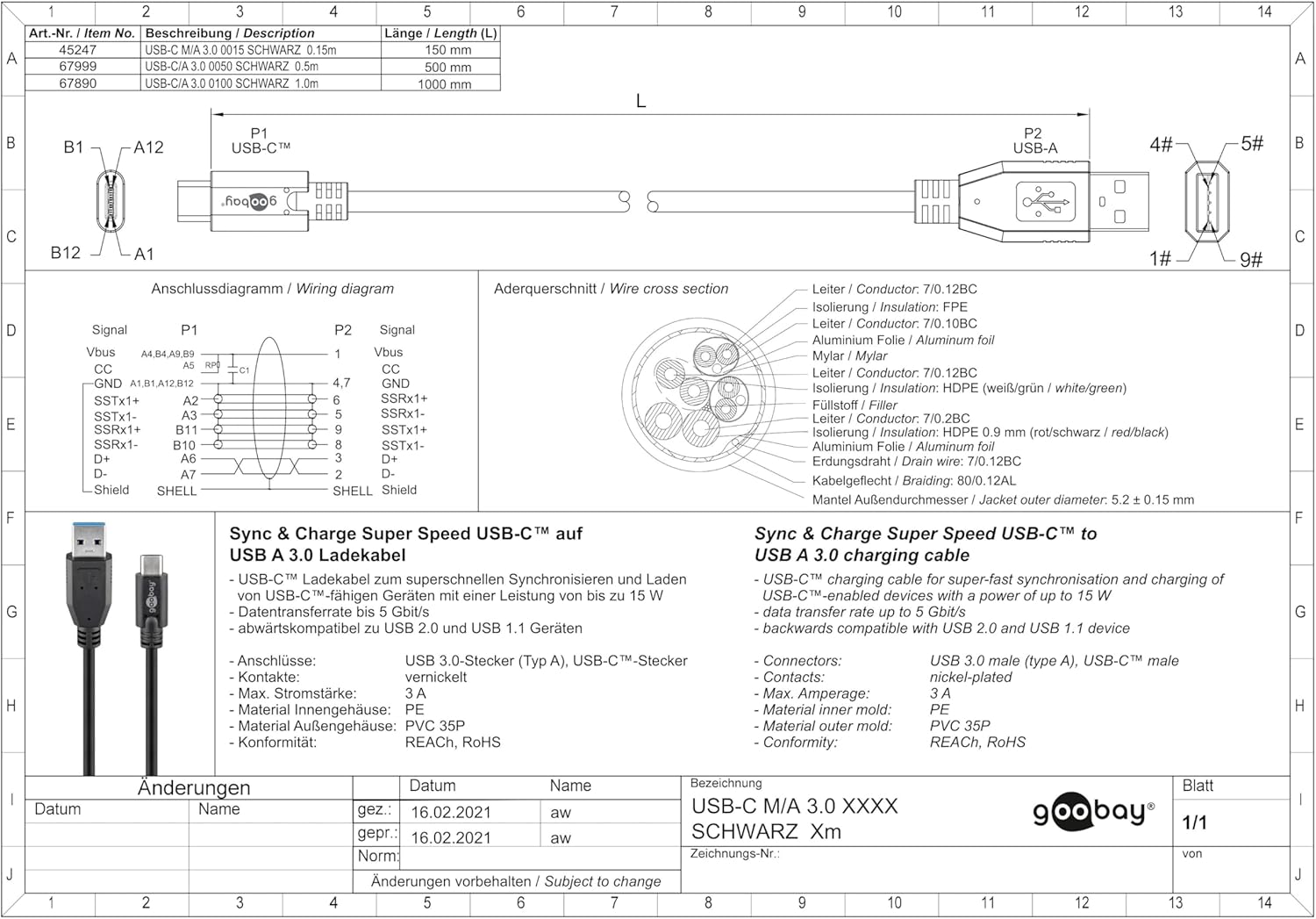
Image: A technical drawing of the Goobay USB-C to USB A 3.0 cable, showing detailed dimensions and internal wiring diagrams.
7. Informació de la garantia
Goobay products are manufactured with quality and reliability in mind. For specific warranty terms and conditions, please refer to the documentation provided with your purchase or visit the official Goobay weblloc. Normalment, la garantia cobreix els defectes de materials i de fabricació en condicions d'ús normal.
8. Suport
For further assistance, technical support, or inquiries regarding your Goobay 67999 USB-C to USB A 3.0 Cable, please contact Goobay customer service. Contact information can usually be found on the product packaging or the official Goobay weblloc.
Official Goobay Weblloc: www.goobay.de


