1. Configuració
1.1 Desembalatge i components inclosos
Carefully remove the television and all components from the packaging. Ensure all items listed below are present:
- Sharp LC-55LE653U 55-Inch Smart LED TV
- Control remot
- Suport de TV
- Bateries AA (2)
- Cable d'alimentació
- Documentació (Guia d'inici ràpid, Informació de seguretat)
1.2 Instal·lació del suport per a TV
To install the TV stand, place the television screen-down on a soft, clean surface to prevent scratches. Align the stand with the mounting holes on the bottom of the TV and secure it using the provided screws. Refer to the diagram below for proper alignment.

Figura 1.2.1: lateral view of the TV showing the stand attachment point.
1.3 Connexió de dispositius externs
The Sharp LC-55LE653U offers various ports for connecting external devices. Ensure the TV is powered off before making any connections.

Figura 1.3.1: Detallada view of the TV's input and output ports.
- Ports HDMI (3): Connect Blu-ray players, gaming consoles, cable/satellite boxes, or other HDMI-compatible devices. One HDMI port supports MHL (Mobile High-Definition Link).
- Ports USB (1): Connecteu dispositius d'emmagatzematge USB per a la reproducció de contingut multimèdia.
- Component/Video Input: For older devices using component (YPbPr) or composite video connections.
- Sortida d'àudio òptic: Per connectar-lo a una barra de so o a un sistema de cinema a casa.
- Port Ethernet: Per a una connexió a Internet per cable.
- Entrada d'antena/cable: Per connectar una antena o un senyal de televisió per cable.
1.4 Powering On the TV
After connecting all desired devices, plug the power cord into the TV and then into a wall outlet. Press the Power button on the remote control or on the TV itself to turn on the television.
2. Instruccions de funcionament
2.1 Control remotview
The included remote control provides full functionality for your Sharp TV. Insert the two AA batteries into the remote control, observing polarity.

Figure 2.1.1: Layout of the Sharp TV remote control.
- Botó d'encesa: Encén o apaga el televisor.
- Botó d'entrada: Selects the input source (HDMI, USB, Component, etc.).
- Pujar/baixar el volum: Ajusta el volum d'àudio.
- Canal amunt/avall: Canvia els canals de televisió.
- Botó intel·ligent: Accesses the Smart Central Apps interface.
- Botó de menú: Opens the TV's main settings menu.
- Teclat de navegació (amunt/avall/esquerra/dreta/retorn): Navega pels menús i selecciona opcions.
- Botó de Netflix: Accés directe a l'aplicació Netflix.
2.2 Smart Central Apps
The Smart Central Apps feature provides access to various streaming services and online content. Press the 'Smart' button on your remote to access this interface.

Figure 2.2.1: The Smart Central Apps home screen.
Available applications include Netflix, YouTube, Pandora, Vudu, and Hulu Plus. An internet connection (Wi-Fi or Ethernet) is required to use Smart Central Apps.
2.3 Configuració d'imatge i so
Access the TV's menu to adjust picture and sound settings. Key features include:
- AquoMotion 120: Enhances motion clarity for fast-moving scenes. This setting can be adjusted to suit viewpreferències.
- Resolució: The TV supports 1080p Full HD resolution.
- Relació d'aspecte: Adjust to 16:9 or other available options to fit the content.
- Sortida de so: The TV features built-in 20-watt speakers. External audio systems can be connected via the optical audio output or HDMI ARC (if available on your sound system).
2.4 Wallpaper Mode
When the TV is turned off, Wallpaper Mode allows it to display virtually any image, transforming the screen into a large photo frame. This feature can be configured in the TV's settings menu.
3. Manteniment
3.1 Neteja del televisor
Per netejar la pantalla, netegeu-la suaument amb un drap suau, sec i sense borrissol. Per a marques difícils, netegeu-la lleugerament.ampen the cloth with water or a specialized screen cleaner. Do not use harsh chemicals or abrasive materials. For the TV casing, feu servir un drap suau i sec.
3.2 Actualitzacions de programari
Periodically check for software updates through the TV's settings menu. Updates can improve performance, add new features, or resolve issues. An active internet connection is required for software updates.
4. Solució De Problemes
Si teniu problemes amb el televisor, consulteu les solucions habituals següents abans de contactar amb el servei d'assistència.
| Problema | Possible solució |
|---|---|
| La televisió no s'encén. |
|
| No picture or poor picture quality. |
|
| No hi ha so o hi ha mala qualitat de so. |
|
| Smart features (Netflix, YouTube) not working. |
|
5. Especificacions
Below are the key technical specifications for the Sharp LC-55LE653U TV.
| Característica | Detall |
|---|---|
| Nom del model | LC-55LE653U |
| Mida de la pantalla | 55 polzades (54.6 polzades en diagonal) |
| Tecnologia de visualització | LCD LCD |
| Resolució | 1080p Full HD |
| Freqüència d'actualització | 60 Hz (AquoMotion 120) |
| Relació d'aspecte | 16:9 |
| Relació de contrast | 4,000,000:1 |
| Temps de resposta | 2 mil·lisegons |
| Connectivitat | Wi-Fi, Ethernet |
| Ports HDMI | 3 (one with MHL support) |
| Ports USB | 1 |
| Sortida d'àudio | Optical, Built-in speakers (20 Watts) |
| Dimensions del producte (amb suport) | 48.82" d'amplada x 30.08" d'alçada x 13.19" de profunditat |
| Pes de l'article (amb suport) | 38.6 lliures |
| Voltage | 120 Volts |
| Components inclosos | TV, Remote Control, Stand, Batteries |
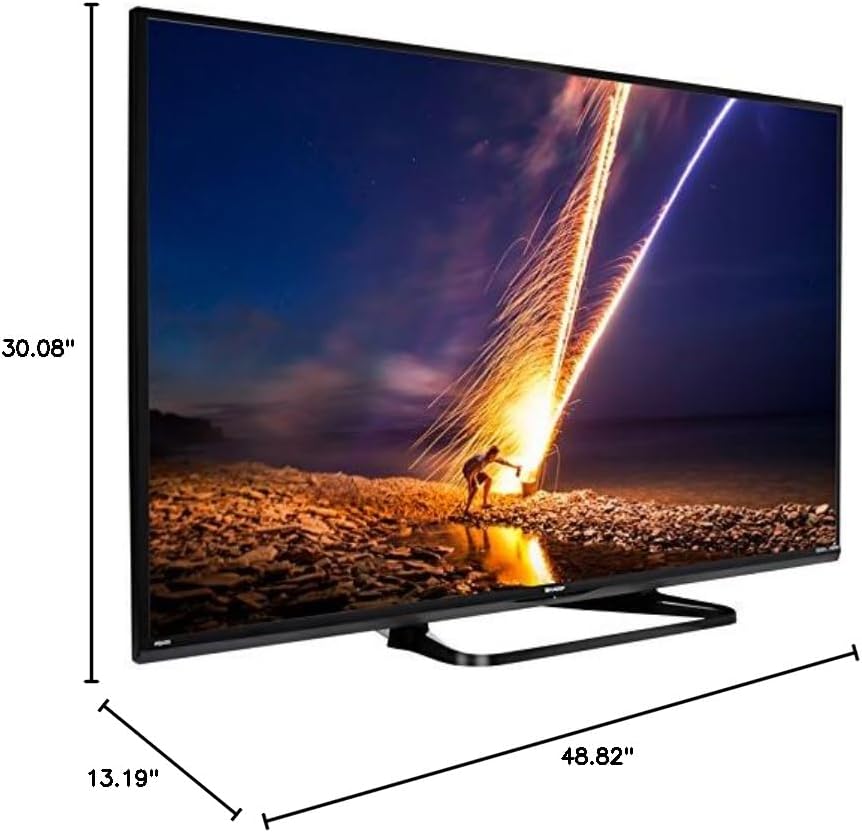
Figure 5.1.1: Product dimensions of the Sharp LC-55LE653U TV.
6. Informació de la garantia
The Sharp LC-55LE653U television comes with a Garantia limitada d'1 any from the date of purchase. This warranty covers manufacturing defects and workmanship under normal use. For specific terms, conditions, and limitations, please refer to the warranty documentation included with your product or contact Sharp customer support.
7. Atenció al client
For technical assistance, service, or warranty claims, please contact Sharp customer support. Have your TV model number (LC-55LE653U) and purchase information ready when you call.
- Fabricant: Sharp Electronics FOB
- Refer to the official Sharp website or your product documentation for the most current contact information.