Introducció
The Polycom EagleEye Video Extender is designed to increase the flexibility of your video conferencing setup by allowing EagleEye IV and EagleEye Acoustic cameras to be positioned up to 330 feet (100 meters) away from your Group Series system. This digital extender provides a dedicated power supply for the connection, enabling extended cable lengths between the camera and the video conferencing system.
Contingut del paquet
- Polycom EagleEye Video Extender Unit
- Power Supply (if included with your model)
- Documentació
Please verify all components are present upon unboxing.
Configuració
Follow these steps to properly set up your Polycom EagleEye Video Extender:
- Identificar els components: Locate the extender unit, power supply, and necessary cables (not always included with extender).
- Connect Camera: Connect your Polycom EagleEye IV or EagleEye Acoustic camera to the transmitter unit of the extender using the appropriate DVI-D cable. Ensure the connection is secure.
- Connect to Video Conferencing System: Connect the receiver unit of the extender to your Polycom Group Series video conferencing system using the appropriate DVI-D cable.
- Interconnect Extender Units: Use a compatible Ethernet cable (e.g., Cat5e/6) to connect the transmitter and receiver units of the extender. This cable carries the video, audio, and control signals.
- Aplicar potència: Connect the power supply to the extender unit (typically the receiver, but refer to specific product labeling) and then plug it into a power outlet. The extender requires power to operate and to power the connected camera.
- Verifica la connexió: Once all connections are made and power is applied, verify that the camera is recognized by the video conferencing system.
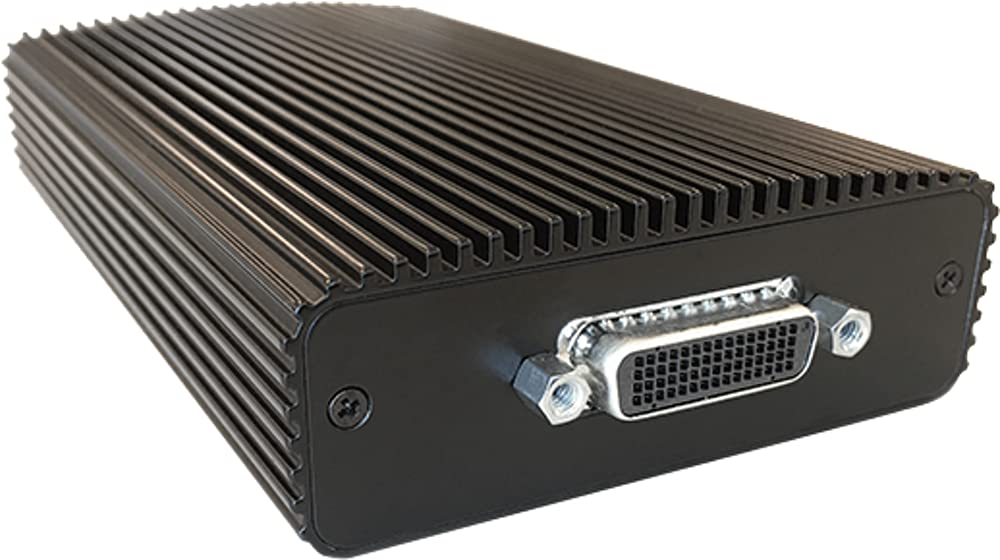
Image: The Polycom EagleEye Video Extender unit, showcasing its black ribbed casing and a DVI-D connector port on the front panel. This unit facilitates extending camera signals over long distances.
En funcionament
The Polycom EagleEye Video Extender operates passively once correctly installed. Its primary function is to transmit video, audio, and control signals between the camera and the video conferencing system over extended distances. No direct user interaction is typically required for its operation beyond the initial setup.
- Assegureu-vos que tots els cables estiguin ben connectats.
- Confirm the extender unit is receiving power.
- The camera connected via the extender should function as if directly connected to the video conferencing system.
Manteniment
To ensure optimal performance and longevity of your Polycom EagleEye Video Extender, consider the following maintenance guidelines:
- Neteja: Feu servir un drap suau i sec per netejar l'exterior de la unitat. Eviteu netejadors líquids o materials abrasius.
- Ventilació: Ensure the unit is placed in a location with adequate airflow to prevent overheating. Do not block the ribbed casing, which acts as a heatsink.
- Medi ambient: Operate the extender in a dry environment, away from direct sunlight, extreme temperatures, and excessive dust.
- Gestió de cables: Periodically check all connected cables for wear, damage, or loose connections.
Resolució de problemes
If you encounter issues with your Polycom EagleEye Video Extender, try the following troubleshooting steps:
- Sense senyal de vídeo:
- Verify all DVI-D and Ethernet cables are securely connected at both the camera, extender units, and video conferencing system.
- Ensure the extender unit is powered on and receiving power.
- Check the camera's power and operational status.
- Test with shorter cables if possible to rule out cable length issues.
- No Camera Control:
- Confirm the Ethernet cable connecting the extender units is functional and properly seated.
- Ensure the camera is compatible with the video conferencing system and extender.
- Senyal intermitent:
- Check for any sources of electromagnetic interference near the extender or cables.
- Inspeccioneu els cables per si hi ha danys o doblecs.
If problems persist after attempting these steps, contact Polycom technical support.
Especificacions
| Característica | Especificació |
|---|---|
| Marca | Polycom |
| Sèrie | EagleEye |
| Número de model | 2215-64200-001 |
| Dispositius compatibles | Polycom EagleEye IV and EagleEye Acoustic Cameras |
| Distància màxima d'extensió | Fins a 330 peus (100 metres) |
| Tipus de connector | DVI-D (for camera/system connection), Ethernet (for extender interconnection) |
| Color | Negre |
| Pes de l'article | 3 lliures (aprox.) |
| Dimensions del producte (LxWxH) | 14 x 8 x 4.5 polzades (aprox.) |
| Potència de sortida | 10 watts |
Informació de la garantia
Specific warranty details for the Polycom EagleEye Video Extender (Model 2215-64200-001) are typically provided with the product at the time of purchase or can be obtained directly from Polycom. Please refer to the documentation included in your product packaging or visit the official Polycom weblloc web per consultar els termes i condicions de garantia més actualitzats.
Suport
For technical assistance, product inquiries, or further support regarding your Polycom EagleEye Video Extender, please contact Polycom customer support through their official website or the contact information provided in your product documentation. Ensure you have your product model number (2215-64200-001) and any relevant purchase information available when seeking support.


