1. Introducció
The Monacor WAP-200 is a versatile internet radio receiver designed to provide access to a vast array of global radio stations, as well as traditional FM RDS and DAB+ digital radio broadcasts. It also functions as a network MP3 player, allowing playback of media files from your local network or via a USB host connection. This manual provides detailed instructions for the setup, operation, and maintenance of your WAP-200 unit.
2. Instruccions de seguretat
- Llegiu atentament totes les instruccions abans d'utilitzar el dispositiu.
- Conserveu aquest manual com a referència futura.
- No exposeu la unitat a la pluja ni a la humitat per evitar incendis o descàrregues elèctriques.
- Assegureu-vos que la ventilació sigui adequada; no obstruïu les obertures de ventilació.
- Utilitzeu només accessoris/accessoris especificats pel fabricant.
- Disconnect the unit from the mains during lightning storms or when unused for long periods.
- Demaneu tot el servei a personal de servei qualificat.
3. Contingut del paquet
Si us plau, comproveu que tots els elements siguin presents i en bon estat:
- Monacor WAP-200 Internet Radio Unit
- Control Remot per Infrarojos
- Antena WLAN
- Antena FM
- Cable d'alimentació
- Manual d'instruccions (aquest document)
4. Producte acabatview
4.1 Tauler frontal
The front panel features the main display, control buttons, and a jog dial for easy navigation. It also includes a USB host input and an auxiliary input jack.
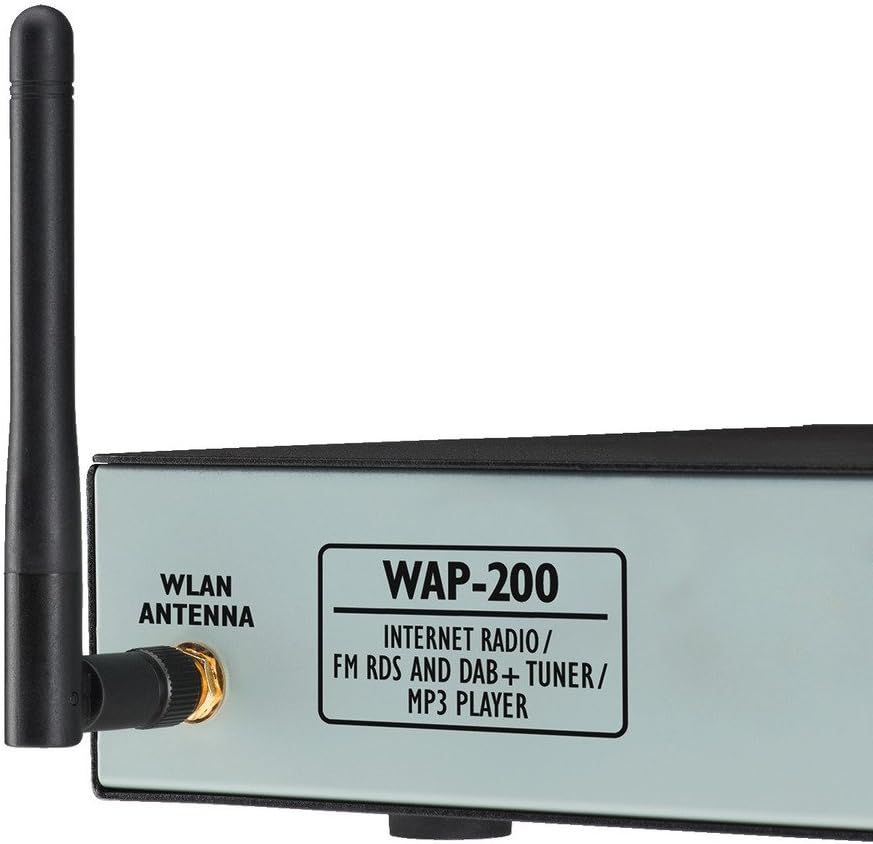
Figura 1: Davant i lateral view of the Monacor WAP-200, showing the WLAN antenna connection and the model designation.
- Visualització: Large illuminated matrix display for information.
- Jog Dial: Per a la navegació i selecció de menús.
- USB Host Input: For direct playback of MP3, AAC, AAC+, WMA, Wave, and FLAC files d'una unitat USB.
- Auxiliary Input (Jack): Per connectar fonts d'àudio externes.
- Headphone Output (3.5mm Stereo Jack): Per a una escolta privada.
4.2 Panell posterior
The rear panel provides all necessary connections for power, network, and audio output.

Figura 2: Rear panel of the Monacor WAP-200, illustrating the various input and output ports.
- WLAN Antenna Connector: RP-SMA connector for the included WLAN antenna.
- LAN (RJ45) Port: Per a la connexió de xarxa amb cable.
- Line Output (RCA L/R): Stereo audio output for connecting to an amplifier o altaveus actius.
- Entrada d'antena FM: Coaxial 75 Ohm connector for the included FM antenna.
- Entrada d'alimentació: For connecting the main power cable (230 V~/50 Hz).
4.3 Control remot
The included infrared remote control allows convenient operation of all functions from a distance.

Figura 3: The infrared remote control for the Monacor WAP-200, showing various control buttons.
Key functions include power, numeric input, menu navigation, volume control, playback controls (play/pause, skip, repeat, shuffle), preset access, sleep timer, alarm, and mode selection.
5. Configuració
5.1 Connexions físiques
- Connecteu les antenes:
- Screw the supplied WLAN antenna onto the RP-SMA connector on the rear panel.
- Connect the supplied FM antenna to the 75 Ohm coaxial FM antenna input.
- Sortida d'àudio: Connect the Line Output (RCA L/R) to your amplifier or active speakers using appropriate audio cables.
- Connexió de xarxa (opcional):
- For a wired connection, connect an Ethernet cable from your router to the LAN (RJ45) port on the rear panel.
- For a wireless connection, ensure the WLAN antenna is connected. You will configure Wi-Fi settings during initial setup.
- Connexió d'alimentació: Connect the power cable to the unit's power input and then to a suitable mains outlet (230 V~/50 Hz).
5.2 Engegada inicial i configuració de xarxa
Upon first power-on, the unit will guide you through an initial setup wizard. Follow the on-screen prompts to configure language, time, and network settings.
- Use the jog dial to navigate menus and select options.
- For Wi-Fi setup, select your network from the list and enter the password using the on-screen keyboard.
- The unit supports both LAN and Wi-Fi for internet access.
6. Instruccions de funcionament
6.1 Ràdio per Internet
Access over 20,000 radio stations worldwide.
- Select "Internet Radio" from the main menu.
- Browse stations by genre, location, or search by name.
- Use the jog dial to select a station.
- Press "Enter" to start playback.
- Save favorite stations to presets for quick access.
6.2 Ràdio FM
Tune into local FM broadcasts with RDS functionality.
- Select "FM Radio" from the main menu.
- Use the tuning controls to find stations.
- RDS (Radio Data System) information will be displayed if available.
Ràdio DAB+ 6.3
Enjoy digital audio broadcasting with enhanced sound quality.
- Select "DAB+ Radio" from the main menu.
- Perform a scan to find available DAB+ stations in your area.
- Select your desired station from the list.
Reproducció USB 6.4
Reprodueix àudio files directament des d'un dispositiu d'emmagatzematge USB.
- Insert a USB drive into the front panel USB host input.
- Select "USB Playback" from the main menu.
- Browse folders and select your desired audio files (MP3, AAC, AAC+, WMA, Wave, FLAC).
- Use playback controls (Play/Pause, Skip, Repeat, Shuffle).
6.5 Network Media Playback (UPnP)
Transmetre contingut multimèdia files shared on your network from a UPnP server.
- Ensure your network has a UPnP media server running.
- Select "Network Media" or "UPnP" from the main menu.
- Browse available media servers and their content.
- Seleccioneu files per a la reproducció.
6.6 característiques addicionals
- Equalitzador: Ajusta el so professionalfiles with preset options or custom settings.
- Shuffle Play and Repeat: Available for USB and network playback.
- Timer and Alarm Function: Set sleep timers or wake-up alarms with snooze functionality.
- Visualització de l'hora: Automatic summer/winter time adjustment.
7. Manteniment
- Neteja: Feu servir un drap suau i sec per netejar la unitat. No utilitzeu netejadors líquids ni aerosols.
- Ventilació: Assegureu-vos que les obertures de ventilació estiguin netes de pols i deixalles.
- Emmagatzematge: Si guardeu la unitat durant un període prolongat, desconnecteu-la de l'alimentació i guardeu-la en un lloc fresc i sec.
8. Solució De Problemes
| Problema | Causa possible | Solució |
|---|---|---|
| Sense poder | Cable d'alimentació no connectat; presa de corrent defectuosa. | Comproveu la connexió del cable d'alimentació; proveu una presa de corrent diferent. |
| Sense connexió a Internet | Incorrect Wi-Fi password; router issue; LAN cable disconnected. | Verify Wi-Fi password; restart router; check LAN cable. |
| Sense so | Volume too low; audio cables disconnected; ampmés viu. | Increase volume; check audio cable connections; ensure ampel lifier està encès. |
| Poor FM/DAB+ reception | Antena no connectada o posicionada correctament. | Ensure antenna is securely connected and reposition it for better signal. |
9. Especificacions
| Font d'alimentació | 230 V~/50 Hz/20 VA, 15 VDC/300 mA |
| Temperatura de funcionament | 0 – 40 °C |
| Dimensions (A x A x P) | 482 x 44 x 245 mm (19", 1U) |
| Pes | 2.7 kg (Unit), 3.02 kg (Product) |
| Ports | 1 x 3.5 mm Aux Input, 1 x RCA L/R Output, 1 x RJ45 (LAN), 1 x USB Host, 1 x 3.5 mm Headphone Output, FM Antenna (75 Ohm), WLAN Antenna (RP-SMA) |
| Supported Audio Formats (USB/Network) | MP3, AAC, AAC+, WMA, Wave, FLAC |
| Número de model | 387030 |
10. Garantia i Suport
For warranty information and technical support, please refer to the documentation provided with your purchase or contact your local Monacor dealer. Keep your proof of purchase for any warranty claims.


