1. Introducció
This manual provides comprehensive instructions for the operation and maintenance of your RadioShack Pro-433 1,000 Channel Trunking Desktop/Mobile Scanner. Please read this manual thoroughly before using the scanner to ensure proper setup and functionality. This device is designed for receiving and monitoring various radio frequencies, including trunked systems.
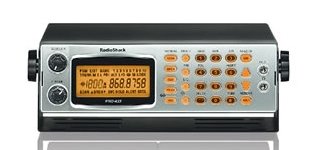
Figura 1: Davant view of the RadioShack Pro-433 1,000 Ch Trunking Desktop/Mobile Scanner, showing the display, keypad, and control knobs.
2. Configuració
- Desembalatge: Carefully remove all components from the packaging. Verify that all items are present: the scanner unit, AC power adapter, and antenna.
- Connexió d'antena: Screw the supplied antenna clockwise into the antenna jack located on the rear or top of the scanner until it is finger-tight. Do not overtighten.
- Connexió d'alimentació:
- Insert the small barrel connector of the AC power adapter into the DC IN jack on the scanner.
- Plug the AC power adapter into a standard 120V AC wall outlet.
- Ensure the power source is stable and matches the adapter's specifications.
- Engegada inicial: Premeu el botó PODER button to turn on the scanner. The display should illuminate.
3. Instruccions de funcionament
3.1 Controls bàsics
- Botó d'encendre: Activa o desactiva l'escàner.
- Botó de VOLUM: Ajusta el nivell de sortida d'àudio. Gireu en sentit horari per augmentar el volum i en sentit antihorari per disminuir-lo.
- SQUELCH Knob: Adjusts the squelch level to eliminate static noise between transmissions. Turn clockwise until static disappears, then slightly further.
- Teclat: Used for entering frequencies, channel numbers, and programming options.
3.2 Canals de programació
The Pro-433 scanner supports up to 1,000 channels. Programming involves entering specific frequencies into memory locations.
- Premeu el botó PROGRAMA botó.
- Enter the desired channel number using the keypad (e.g., 001).
- Premeu el botó FREQ botó.
- Enter the frequency (e.g., 155.47500) using the keypad.
- Premeu ENTRAR to save the frequency to the selected channel.
- Repeat for additional channels.
For programming trunked systems, refer to the advanced programming section in the full manual (if available) or consult online resources specific to the Pro-433 model, as this process is more complex and requires system-specific data.
3.3 Scanning and Monitoring
- Iniciant l'escaneig: Premeu el botó ESCANEAR button to begin scanning programmed channels.
- Stopping Scan: Premeu MANUAL to stop scanning and hold on the current channel.
- Salt de canal: During a scan, press SALTAR to temporarily bypass a busy or unwanted channel.
4. Manteniment
- Neteja:
Netegeu l'exterior de l'escàner amb un drap suau iamp cloth. Do not use harsh chemicals, abrasive cleaners, or solvents, as these can damage the casing and display. Ensure the scanner is powered off and unplugged before cleaning.
- Emmagatzematge:
When not in use for extended periods, store the scanner in a cool, dry place away from direct sunlight and extreme temperatures. Disconnect the power adapter and antenna.
- Cura de l'antena:
Periodically check the antenna connection for tightness. Avoid bending or stressing the antenna excessively.
5. Solució De Problemes
| Problema | Causa possible | Solució |
|---|---|---|
| L'escàner no s'encén. | L'adaptador de corrent no està connectat o està defectuós; la presa de corrent no està activa. | Check power adapter connection and wall outlet. Try a different outlet. |
| No audio or very low audio. | Volume too low; squelch set too high; no active transmissions. | Increase volume. Adjust squelch counter-clockwise. Ensure frequencies are active. |
| Receiving only static. | Squelch set too low; antenna not connected properly; no strong signals. | Adjust squelch clockwise. Check antenna connection. Consider an external antenna for better reception. |
| Cannot program channels. | Incorrect programming sequence; scanner in scan mode. | Ensure scanner is in program mode. Follow programming steps carefully. |
6. Especificacions
- Model: Pro-433
- Marca: RadioShack
- Capacitat del canal: 1,000 (Note: Interpreted from "Standard Sheet Capacity: 1000" in source data, which is likely a miscategorization for a scanner)
- Font d'alimentació: Elèctric amb cable
- UPC: 025836914574
- ASIN: B00VEZB9TQ
- Data de primera disponibilitat: 30 de març de 2015
- Requisits mínims del sistema: Windows 7 (Potentially for programming software, if applicable)
7. Garantia i Suport
This product is covered by a limited warranty provided by RadioShack. For specific warranty terms and conditions, please refer to the warranty card included with your purchase or visit the official RadioShack weblloc web. Conserveu el rebut de compra com a comprovant de compra.
For technical support, troubleshooting assistance beyond this manual, or service inquiries, please contact RadioShack customer service through their official website or designated support channels. Provide your model number (Pro-433) and ASIN (B00VEZB9TQ) when seeking support.
Recursos en línia: For additional information, firmware updates, or advanced programming guides, visit the RadioShack Official Store on Amazon or the main RadioShack weblloc.


