Introducció
This manual provides comprehensive instructions for the setup, operation, and maintenance of your Orbit Digital Hose Sprinkler Irrigation Timer. Designed for efficient lawn, plant, and garden watering, this 2-outlet digital timer allows for flexible scheduling to ensure your landscape remains hydrated. It features a large LCD screen for easy programming, a rain delay function, and a manual override for added convenience.

Figura 1: Frontal view of the Orbit Digital Hose Sprinkler Irrigation Timer, showing the LCD display and control dial.
Característiques clau
- Dual Outlet Design: Independently control two watering zones from a single faucet.
- Horari flexible: Program up to three watering start times per day.
- Extended Watering Duration: Each outlet can water for up to 360 minutes.
- Freqüència personalitzable: Water on specific days of the week or at set intervals.
- Pantalla LCD gran: Provides clear visibility for easy programming and status checks.
- Funció de retard per pluja: Suspend watering for up to 72 hours to conserve water during rainfall.
- Anulació manual: Allows for immediate, temporary watering without disrupting programmed schedules.
- Construcció duradora: Features an over-molded brass hose faucet swivel for secure and easy installation.
Configuració i instal·lació
- Instal·leu les bateries:
Locate the battery compartment on the back of the timer. Insert two (2) AA alkaline batteries, ensuring correct polarity. Close the battery compartment securely.
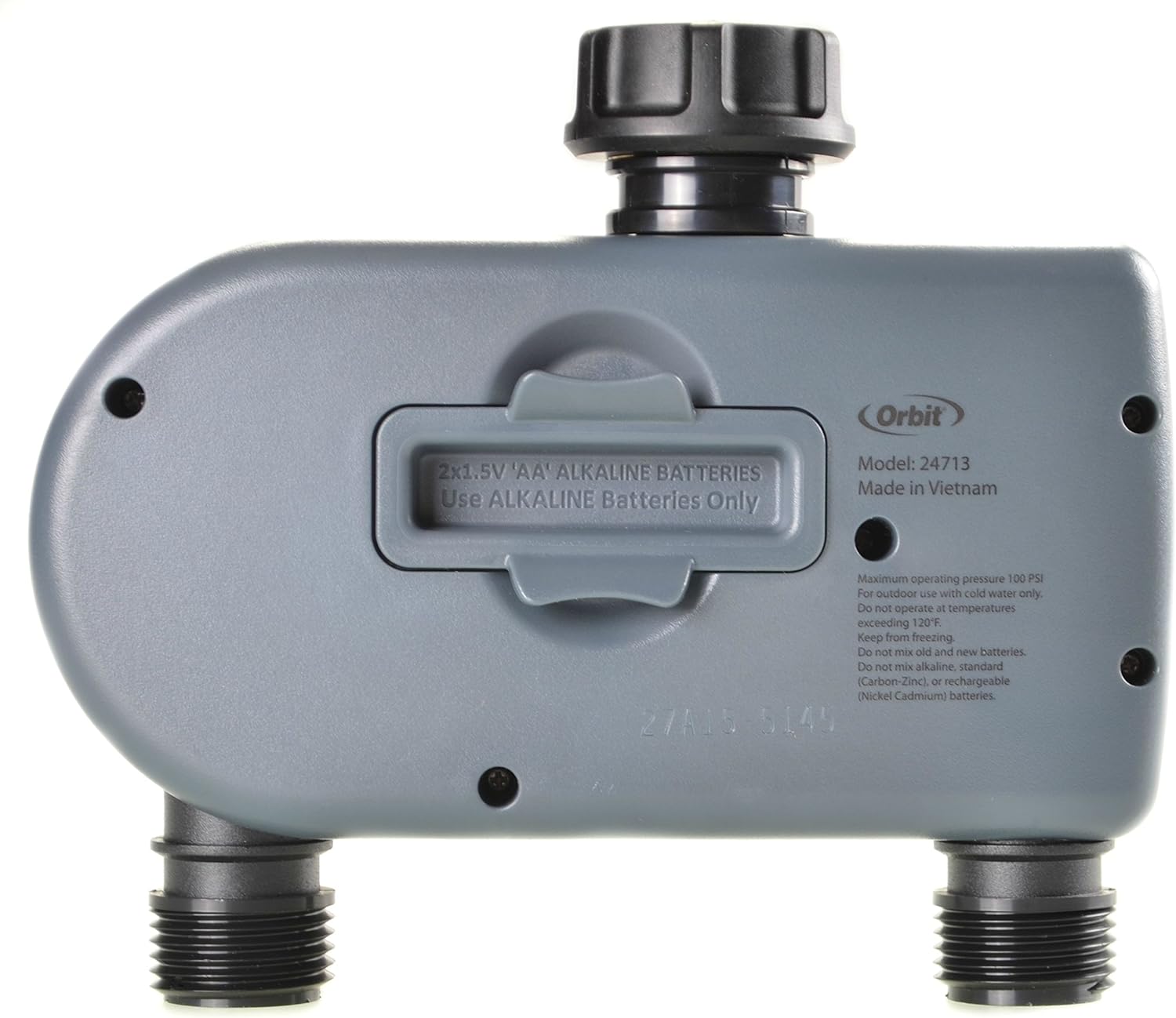
Figura 2: posterior view of the timer, highlighting the battery compartment for two AA batteries.
- Connectar a l'aixeta:
Thread the timer onto your outdoor hose faucet. Hand-tighten only to ensure a secure, leak-free connection. Do not overtighten.
- Connecteu les mànegues:
Attach your garden hoses to the two outlets at the bottom of the timer. Ensure these connections are also hand-tightened to prevent leaks.

Figure 3: The Orbit timer installed on an outdoor faucet, with two hoses connected to its outlets.
Instruccions de funcionament
The Orbit Digital Hose Sprinkler Irrigation Timer features a large dial and intuitive buttons for easy programming. Follow these steps to set up your watering schedule:
1. Estableix el rellotge
- Turn the dial to "SET CLOCK".
- Utilitza el + i - botons per ajustar l'hora actual.
- Premeu el botó > botó per canviar entre hores i minuts.
2. Estableix l'hora d'inici
- Turn the dial to "START TIME".
- You can set up to three independent start times (A, B, C). Use the + i - buttons to set the desired start time for each program.
- Premeu el botó > button to cycle through programs A, B, and C.
3. Set How Long (Watering Duration)
- Turn the dial to "HOW LONG".
- Utilitza el + i - buttons to set the watering duration from 1 minute up to 360 minutes.
4. Set How Often (Watering Frequency)
- Turn the dial to "HOW OFTEN".
- Utilitza el + i - buttons to select the watering frequency:
- Every 6 hours, 12 hours, or daily.
- Every 2, 3, 4, 5, 6, or 7 days.
- Specific days of the week (e.g., M, W, F).
5. Activate Program
- Turn the dial to "AUTO" to activate your programmed watering schedule. The timer will now operate automatically based on your settings.
Rain Delay Feature
- While the dial is set to "AUTO", press the + button to activate the rain delay.
- Each press will increase the delay by 24 hours, up to a maximum of 72 hours.
- The timer will automatically resume its schedule after the delay period ends.
Reg manual
Per regar manualment sense afectar la programació:
- Turn the dial to "OFF".
- Press the "MANUAL/CLEAR" button.
- Utilitza el + i - botons per configurar la durada de reg manual desitjada.
- Press the "PLAY" button to start manual watering.
- To stop manual watering at any time, press the "MANUAL/CLEAR" button again.
Note: The manual override feature allows you to temporarily use the hoses for other purposes without disrupting the set watering schedule. Once manual watering is stopped, the timer reverts to its automatic program.
Manteniment
- Substitució de la bateria: Replace batteries annually or when the low battery indicator appears on the LCD. Always use fresh AA alkaline batteries.
- Neteja: Periodically clean the screen and buttons with a soft, damp tela. No utilitzeu netejadors abrasius.
- Emmagatzematge d'hivern:
To prevent damage from freezing temperatures, remove the timer from the faucet before the first frost. Store the timer indoors in a location where temperatures remain above 32°F (0°C).

Figure 4: Underside of the timer showing the "Keep from Freezing" warning label.
Resolució de problemes
| Problema | Causa possible | Solució |
|---|---|---|
| El temporitzador no rega o no s'encén. | Low or dead batteries; incorrect programming; water pressure issues. | Replace batteries. Verify program settings (start time, duration, frequency). Ensure adequate water pressure from faucet. |
| Fuita d'aigua per les connexions. | Loose connections; missing or damaged washer. | Hand-tighten all connections. Check for and replace any missing or worn rubber washers. |
| LCD display is blank or shows condensation. | Water intrusion; extreme temperatures; dead batteries. | Ensure battery compartment is sealed. If condensation persists, allow to dry in a warm, dry place. Avoid extreme temperatures. Replace batteries. If issue persists, contact customer support. |
| Timer not following schedule. | Incorrect clock setting; program not activated (dial not on AUTO); rain delay active. | Verify current time. Ensure dial is set to "AUTO". Check if rain delay is active and wait for it to expire or manually cancel. |
Especificacions
- Marca: Òrbita
- Número de model: 24713
- Material: Brass (faucet swivel)
- Pes de l'article: 11.2 unces
- Nombre de configuracions: 5 (likely referring to the dial positions)
- UPC: 046878247130
- Dimensions del producte: 11 x 9.5 x 1.7 polzades
- Bateries: Necessites 2 piles AA (no incloses)
- Pressió màxima de funcionament: 100 PSI (from image text)
- Temperatura màxima de l'aigua: 120°F (from image text)
Garantia i Suport
For warranty information, technical support, or assistance with your Orbit Digital Hose Sprinkler Irrigation Timer, please contact Orbit customer service. Refer to the product packaging or Orbit's official weblloc web per obtenir les dades de contacte i els termes de garantia més actualitzats.
This product is tested and certified to look and work like new. The refurbishing process includes functionality testing, basic cleaning, inspection, and repackaging. The product ships with all relevant accessories, and may arrive in a generic box.


