1. Introducció
This manual provides detailed instructions for the safe and effective use of the SKF TKSA 41 Wireless Laser Shaft Alignment System. It covers product overview, configuració, funcionament, manteniment, resolució de problemes i especificacions tècniques. Llegiu atentament aquest manual abans de fer funcionar el dispositiu.
2. Producte acabatview
The SKF TKSA 41 is an advanced laser alignment solution designed for accurate shaft alignments. It features two wireless measurement units, large detectors, and powerful lasers to ensure precise measurements even in challenging environments. The ergonomic display unit offers intuitive touch screen navigation for efficient alignment procedures.
Característiques principals:
- Comunicació sense fils: Enhances instrument handling and enables alignment of difficult-to-reach applications from a safe position.
- Free Measurement: Allows alignment measurements to commence at any angle and conclude with an angular sweep of just 90°.
- Mesura automàtica: Facilitates hands-free measurements by detecting head position and taking a measurement when the heads are correctly positioned.
- Automatic Reports: Generates comprehensive reports after each alignment, customizable with notes and images from the built-in camera. Reports can be exported as PDF files.
- Producte làser: This instrument is a Class 2 Laser Product with a capacity of 1mW.

Figura 2.1: The SKF TKSA 41 system, showing the display unit and two wireless measurement units mounted on a shaft.
3. Components
The SKF TKSA 41 system typically includes the following main components:
- Unitat de visualització: An ergonomic unit with an intuitive touch screen for controlling the alignment process and viewresultats.
- Wireless Measurement Units (2x): These units contain the lasers and detectors for precise measurement. They communicate wirelessly with the display unit.
- Shaft Brackets: Used to mount the measurement units onto the shafts of the machinery.
- Cables and Chargers: For powering and charging the units.
- Estoig de transport: A protective case for transport and storage of all components.
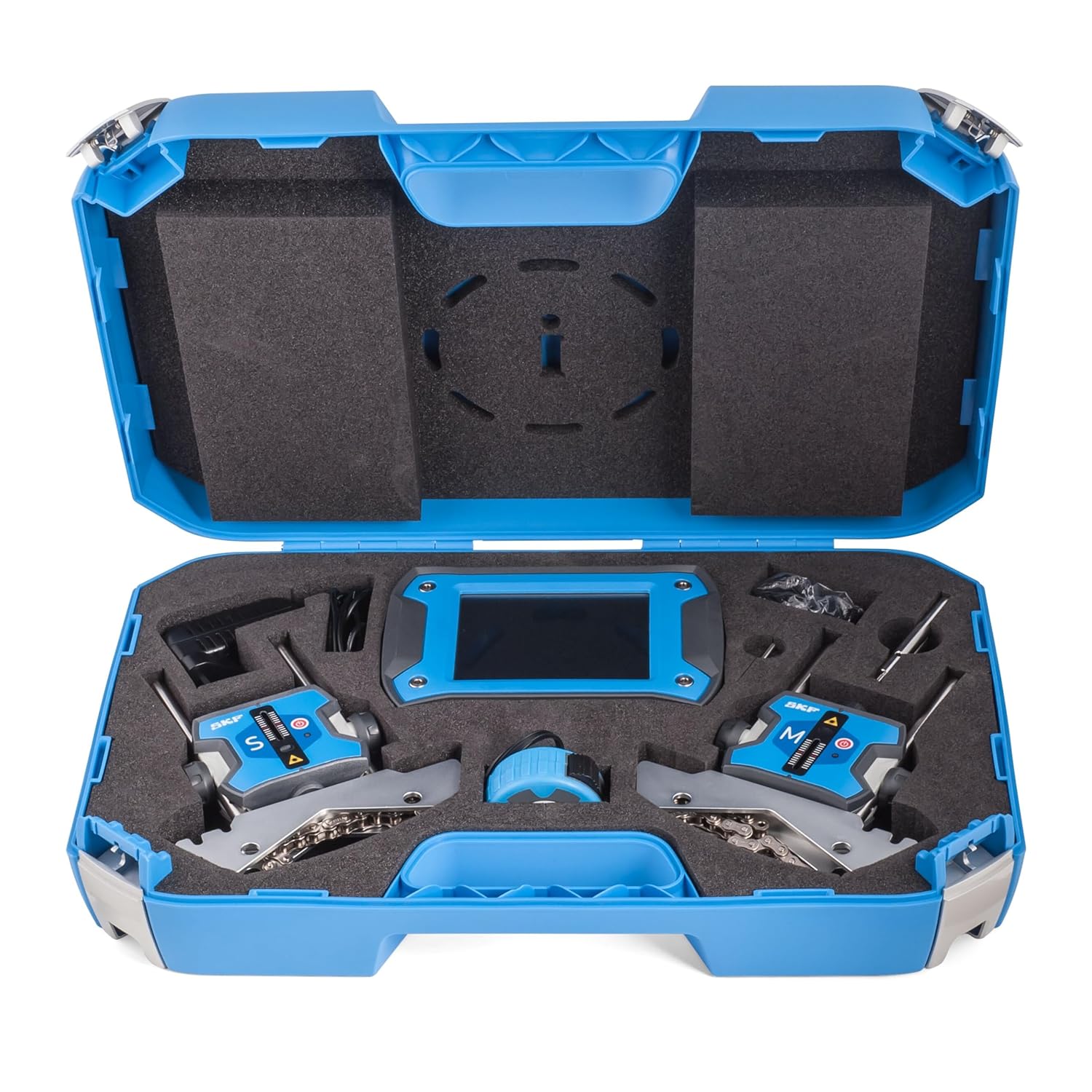
Figura 3.1: All SKF TKSA 41 system components neatly organized within its protective carrying case.
4. Configuració
- Desembalatge i inspecció: Carefully remove all components from the carrying case. Inspect for any visible damage.
- Unitats de càrrega: Ensure both the display unit and wireless measurement units are fully charged before use. Connect them to the provided chargers if necessary.
- Mount Measurement Units: Attach the measurement units to the shafts using the appropriate shaft brackets. Ensure they are securely fastened and positioned correctly according to the alignment task.
- Encès: Power on the display unit and the wireless measurement units. The units should automatically establish a wireless connection.
- Configuració inicial: Follow the on-screen prompts on the display unit to set up basic parameters such as language and measurement units.

Figura 4.1: The SKF TKSA 41 system with measurement units mounted on a shaft, illustrating the setup for an alignment procedure.
5. Funcionament
Operating the SKF TKSA 41 involves navigating the touch screen interface and performing measurement procedures.
- Select Alignment Type: From the main menu, select "New Alignment" to begin. Choose the appropriate alignment method (e.g., horizontal, vertical).
- Input Machine Dimensions: Enter the required machine dimensions as prompted by the display unit.
- Realitzeu la mesura:
- Free Measurement: Rotate the shafts to any starting position. Perform an angular sweep of at least 90° to capture data.
- Mesura automàtica: Rotate the shafts until the measurement units are in the correct positions. The system will automatically detect and record the measurement.
- Review Resultats: The display unit will show the alignment results and recommended adjustments.
- Feu ajustaments: Adjust the machinery as indicated by the system. The display unit provides real-time feedback on adjustments.
- Generate Report: After completing the alignment, select "Report" to generate a detailed alignment report. You can add notes and photos using the built-in camera. Reports can be exported as PDF files.

Figura 5.1: A technician interacting with the SKF TKSA 41 display unit during an active shaft alignment procedure, showing the graphical interface.
6. Manteniment
Proper maintenance ensures the longevity and accuracy of your SKF TKSA 41 system.
- Neteja: Keep the display unit and measurement units clean. Use a soft, dry cloth. For stubborn dirt, a slightly damp Es pot fer servir un drap amb detergent suau, assegurant-se que no entri líquid al dispositiu.
- Cura de les lents làser: The laser lenses on the measurement units must be kept clean and free of dust or smudges to ensure accurate readings. Use a lens cleaning cloth or specialized lens cleaning solution if necessary.
- Cura de la bateria: Fully charge the batteries before long-term storage. Store the device in a cool, dry place. Avoid completely discharging the batteries.
- Emmagatzematge: Store all components in the provided carrying case when not in use to protect them from dust, moisture, and physical damage.
- Calibració: Regular calibration by authorized service centers is recommended to maintain measurement accuracy. Refer to the SKF service guidelines for recommended intervals.
7. Solució De Problemes
This section addresses common issues you might encounter with the SKF TKSA 41 system.
| Problema | Causa possible | Solució |
|---|---|---|
| Units not connecting wirelessly. | Units are out of range, low battery, or interference. | Ensure units are within range. Charge batteries. Check for strong electromagnetic interference. Restart units. |
| Inaccurate measurement readings. | Dirty laser lenses, unstable mounting, or incorrect machine dimensions. | Clean laser lenses. Ensure measurement units are securely mounted. Verify machine dimensions entered are correct. |
| Display unit unresponsive. | Bateria baixa o problema de programari. | Charge the display unit. Perform a soft reset (refer to the device's specific reset procedure if available). |
| Cannot export reports. | Insufficient storage space or connection issue. | Check available storage. Ensure proper connection if exporting via cable or network. |
If the problem persists after attempting these solutions, please contact SKF customer support for further assistance.
8. Especificacions
The following are key technical specifications for the SKF TKSA 41 Wireless Laser Shaft Alignment System:
- Número de model: TKSA 41
- Classe làser: Classe 2
- Potència de sortida làser: 1 mW
- Connectivitat: Sense fil
- Principi de mesura: Laser-based shaft alignment
- Fabricant: SKF
- Data de primera disponibilitat: 20 d'abril de 2015
For a complete list of specifications, please refer to the official SKF product documentation or weblloc.
9. Informació de seguretat
ADVERTÈNCIA: Radiació làser
The SKF TKSA 41 is a Class 2 Laser Product. Avoid direct eye exposure to the laser beam. Do not stare into the beam. The laser output power is 1mW. Use of controls or adjustments or performance of procedures other than those specified herein may result in hazardous radiation exposure.
- Always wear appropriate personal protective equipment (PPE) when operating machinery.
- Ensure the work area is clear and safe before beginning any alignment procedure.
- Follow all local safety regulations and company policies.
10. Garantia i Suport
Warranty information for the SKF TKSA 41 Wireless Laser Shaft Alignment System is typically provided at the time of purchase. Please refer to your purchase documentation or contact your authorized SKF distributor for specific warranty terms and conditions.
For technical support, service, or inquiries regarding spare parts, please contact SKF customer service or visit the official SKF website. Ensure you have your product model number (TKSA 41) and serial number ready when seeking support.


