1. Introducció
Gràcies per la compraasing the Blow KidsTab7 Tablet. This device is designed to provide an engaging and safe digital experience for children, featuring a 7-inch display, Android 9.0 Go operating system, and a durable protective shell. This manual provides essential information on how to set up, operate, and maintain your tablet to ensure optimal performance and longevity.
2. Informació de seguretat
Please read all safety instructions carefully before using the tablet. Failure to follow these instructions may result in electric shock, fire, or damage to the device.
- Perill d'asfixia: Mantingueu les peces petites allunyades dels nens petits.
- Exposició a l'aigua: No exposeu la tauleta a l'aigua ni a la humitat excessiva.
- Temperatura: Avoid extreme temperatures. Do not leave the tablet in direct sunlight or in very cold environments.
- Càrrega: Use only the provided charger or a certified compatible charger. Supervise children during charging.
- Bateria: Do not attempt to replace the battery yourself. Contact support if battery issues arise.
- Neteja: Disconnect the tablet from power before cleaning. Use a soft, dry cloth.
- Protecció auditiva: Prolonged use at high volume may cause hearing damage.
3. Contingut del paquet
Assegureu-vos que tots els elements siguin presents al paquet:
- Blow KidsTab7 Tablet
- Protective Silicone Shell (pre-installed or separate)
- Cable de càrrega USB
- Adaptador d'alimentació
- Manual d'usuari (aquest document)

This image displays the retail packaging box for the Blow KidsTab7 Multimedia Tablet. The box features the 'BLOW' brand logo, 'KIDS TAB 7' model name, and an image of the tablet. Icons for HD, Wi-Fi, and 7-inch screen are visible, along with various app icons and award seals.
4. Dispositiu acabatview
Familiarize yourself with the physical components of your Blow KidsTab7 Tablet.
4.1 Davant i darrere View

This image displays the Blow KidsTab7 Tablet. On the left, the back of the tablet is visible, featuring the 'Multimedia tablet KIDS TAB 7 BLOW' branding, a rear camera, and a speaker grille. On the right, the tablet is shown from the front, encased in its pink protective shell, with the screen displaying colorful graphics.
4.2 Side and Top Views
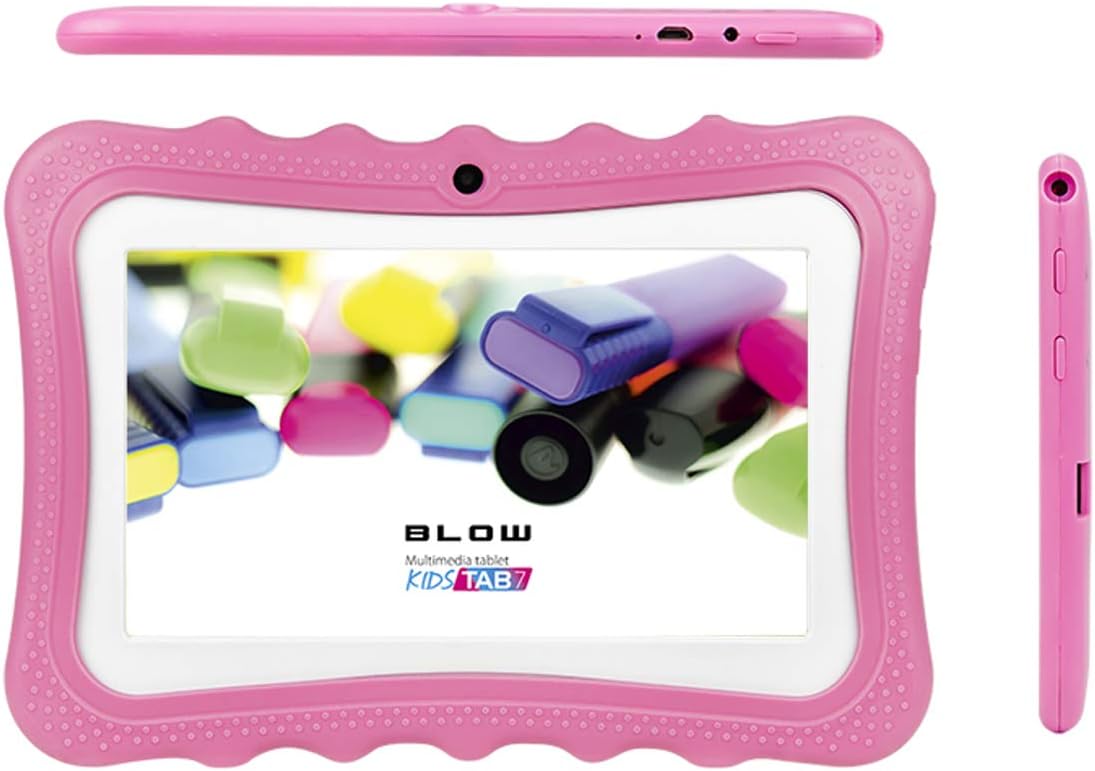
This image provides multiple perspectives of the Blow KidsTab7 Tablet. The top view shows the power button and charging port. The main view presents the tablet from the front, within its pink protective case, displaying the screen. A side view on the right highlights the volume buttons and headphone jack.
4.3 Protective Shell and Kickstand

This image illustrates the Blow KidsTab7 Tablet separated from its pink protective shell. The shell is shown on the left, highlighting its textured design and cutouts. The tablet itself is on the right, displaying its screen with colorful content.

The image shows the back of the Blow KidsTab7 Tablet, still in its pink protective case. A pink, dog-shaped kickstand is attached, allowing the tablet to stand upright. The rear camera and speaker grille are also visible.
5. Configuració
5.1 Càrrega inicial
Before first use, fully charge the tablet for approximately 3-4 hours.
- Connecteu el cable de càrrega USB al port de càrrega de la tauleta.
- Connecteu l'altre extrem del cable USB a l'adaptador d'alimentació.
- Connecteu l'adaptador de corrent a una presa de corrent.
- La icona de la bateria a la pantalla indicarà l'estat de càrrega.
5.2 Engegada/apagada
- Per encendre: Press and hold the Power button (located on the top edge) for a few seconds until the screen lights up.
- Per apagar: Mantingueu premut el botó d'engegada fins que aparegui un menú. Seleccioneu "Apagar" i confirmeu.
- Per reiniciar: Mantingueu premut el botó d'engegada fins que aparegui un menú. Seleccioneu "Reiniciar" i confirmeu.
5.3 Connexió a Wi-Fi
To access the internet and download apps, connect your tablet to a Wi-Fi network.
- Des de la pantalla d'inici, llisqueu el dit cap avall des de la part superior per obrir el tauler Configuració ràpida.
- Toqueu i manteniu premuda la icona de Wi-Fi per obrir la configuració de Wi-Fi.
- Ensure Wi-Fi is toggled 'On'.
- Seleccioneu la xarxa Wi-Fi que vulgueu de la llista.
- Introduïu la contrasenya de xarxa si se us demana i, a continuació, toqueu "Connecta".
5.4 Configuració inicial del dispositiu
Follow the on-screen prompts for initial setup, which typically includes:
- Selecció de la llengua
- Configuració de la data i la zona horària
- Google account sign-in (required for Play Store access)
- Acceptació dels termes i condicions
6. Instruccions de funcionament
6.1 Navegació bàsica
- Toca: Toca una icona per obrir una aplicació o seleccionar un element.
- Llisca: Arrossegueu el dit per la pantalla per desplaçar-vos per pàgines o llistes.
- Pessiga per fer zoom: Feu servir dos dits per ampliar o reduir les imatges i web pàgines.
- Botó d'inici: Tap the circle icon at the bottom of the screen to return to the home screen.
- Botó enrere: Tap the triangle icon to go back to the previous screen.
- Aplicacions recents: Tap the square icon to view i canviar entre les aplicacions utilitzades recentment.
6.2 Gestió d'aplicacions
- Descàrrega d'aplicacions: Open the Google Play Store app, search for desired apps, and tap 'Install'.
- Desinstal·lació d'aplicacions: Vés a Configuració > Aplicacions i notificacions > Veure totes les aplicacions. Select the app and tap 'Uninstall'.
- Organitzar aplicacions: Drag and drop app icons on the home screen to rearrange them or create folders.
6.3 Controls parentals
The Android operating system offers built-in parental control features to manage content and screen time.
- Google Family Link: Download the Google Family Link app on your own device and the child's tablet to set up comprehensive controls, including app approvals, screen time limits, and location tracking.
- Google Play Store Controls: In the Play Store app, go to Configuració > Controls parentals to restrict content based on age ratings for apps, games, movies, and music.
- Benestar digital: Accés Configuració > Benestar digital i controls parentals to monitor usage and set app timers.
7. Manteniment
7.1 Neteja de la tauleta
- Always power off the tablet and disconnect it from the charger before cleaning.
- Feu servir un drap suau i sense borrissol per netejar suaument la pantalla i la carcassa.
- Per a marques difícils, lleugerament dampNetegeu el drap amb aigua o un netejador de pantalles. Eviteu productes químics agressius.
- Clean the protective shell separately with mild soap and water if necessary, ensuring it is completely dry before reattaching.
7.2 Cura de la bateria
- Avoid fully discharging the battery frequently. Charge it before it drops below 20%.
- Do not leave the tablet charging for extended periods after it reaches 100%.
- Guardeu la tauleta en un lloc fresc i sec si no la feu servir durant molt de temps, amb la bateria carregada al 50%.
7.3 Actualitzacions de programari
Comproveu periòdicament si hi ha actualitzacions de programari per assegurar-vos que la tauleta tingui les funcions i els pegats de seguretat més recents. Aneu a Configuració > Sistema > Avançat > Actualització del sistema.
8. Solució De Problemes
Si teniu problemes amb la tauleta, consulteu les solucions habituals següents:
| Problema | Solució |
|---|---|
| Tablet will not power on | Assegureu-vos que la bateria estigui carregada. Connecteu-la al carregador durant almenys 30 minuts i, a continuació, torneu-la a engegar. |
| No es pot connectar a la Wi-Fi | Check if Wi-Fi is enabled in settings. Verify the Wi-Fi password. Restart your router and the tablet. |
| Les aplicacions es bloquegen o es bloquegen | Tanca i torna a obrir l'aplicació. Esborra la memòria cau de l'aplicació (Settings > Apps & notifications > App info > Storage & cache > Clear cache). Reinicieu la tauleta. |
| Rendiment lent | Close unused apps. Clear cache for frequently used apps. Free up storage space by deleting unnecessary files. |
| La pantalla no respon | Perform a forced restart by holding the Power button for about 10-15 seconds until the tablet restarts. |
9. Especificacions
Key technical specifications for the Blow KidsTab7 Tablet (Model 79-006#):
| Característica | Detall |
|---|---|
| Marca | Cop |
| Número de model | 79-006 # |
| Sistema operatiu | Android 9.0 Go |
| Mida de la pantalla | 7 polzades |
| Resolució de visualització | 1024 x 600 |
| Capacitat d'emmagatzematge de memòria | 8 GB |
| Comunicació sense fils | Bluetooth, Wi-Fi (802.11a) |
| posterior WebResolució de la càmera | 2 MP |
| Resolució de captura de vídeo | HD 720p |
| Bateries | 1 bateria de ions de liti (inclosa) |
| Contingut d'energia de la bateria de liti | 29.02 watts-hora |
| Pes de l'article | 800 grams |
| Interfície del maquinari | USB |
| Color | Rosa |
10. Garantia i Suport
The Blow KidsTab7 Tablet comes with a standard manufacturer's warranty. Please refer to the warranty card included in your package for specific terms and conditions, including warranty period and coverage details.
For technical support, troubleshooting assistance beyond this manual, or warranty claims, please contact Blow customer service. Contact information can typically be found on the product packaging or the official Blow weblloc.
- Assistència en línia: Visit the official Blow weblloc web amb preguntes freqüents, articles de suport i formularis de contacte.
- Suport per correu electrònic: Refer to your warranty documentation for a support email address.
- Suport telefònic: Refer to your warranty documentation for a customer service phone number.


