1. Introducció
This manual provides essential information for the safe and effective operation of the OWON SDS5052E 50MHz Digital Storage Oscilloscope. It covers product overview, setup procedures, operational guidelines, maintenance, and troubleshooting tips. Please read this manual thoroughly before using the device to ensure proper functionality and to prevent damage.
2. Informació de seguretat
Observeu sempre les següents precaucions de seguretat per evitar lesions i danys a l'instrument:
- Font d'alimentació: Connect the oscilloscope only to a power source with the specified voltage i freqüència.
- Posada a terra: Ensure the instrument is properly grounded to prevent electric shock.
- Sondes: Use only probes rated for the voltage and current being measured. Do not exceed the maximum input voltage specified for the oscilloscope.
- Medi ambient: Operate the oscilloscope in a dry, well-ventilated area, away from direct sunlight, high temperatures, and excessive dust.
- Manteniment: Refer all servicing to qualified personnel. Do not attempt to open or repair the instrument yourself.
- Neteja: Desconnecteu l'alimentació abans de netejar. Feu servir un drap suau i sec.amp drap; eviteu productes de neteja o dissolvents abrasius.
3. Producte acabatview
The OWON SDS5052E is a 50MHz Digital Storage Oscilloscope featuring a clear 8-inch color LCD display. It offers a real-time sample rate of 500MS/s and a 10K record length, making it suitable for various electrical measurement tasks. Key features include a Pass/Fail function and user-defined measurement menus.
3.1 Tauler frontal
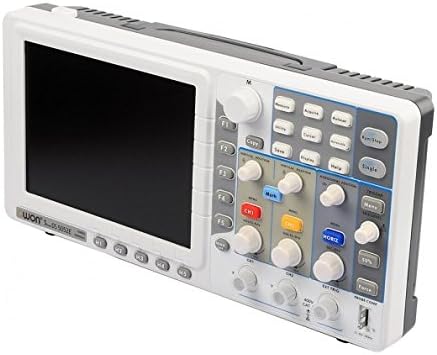
Figura 3.1: Frontal view of the SDS5052E Oscilloscope.
The front panel features the 8-inch TFT color display, function buttons (F1-F5), navigation controls, and dedicated sections for Vertical, Horizontal, and Trigger settings. Input channels CH1, CH2, and EXT TRIG are located at the bottom.

Figura 3.2: Primer pla del panell de control.
The control panel includes buttons for Measure, Acquire, Autoset, Run/Stop, Save, Display, Help, and Utility. Rotary encoders allow fine adjustment of vertical position, volts/division, horizontal position, and seconds/division.
3.2 Panell posterior
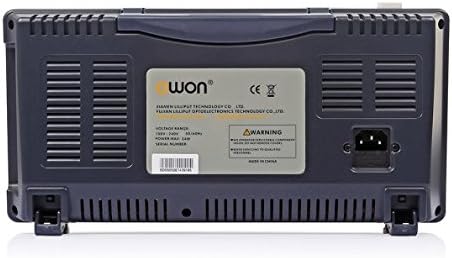
Figura 3.3: posterior view of the SDS5052E Oscilloscope.
The rear panel houses the AC power input connector and ventilation grilles for heat dissipation. A product label with model and serial number information is also present.
3.3 Side Panel (Connectivity)
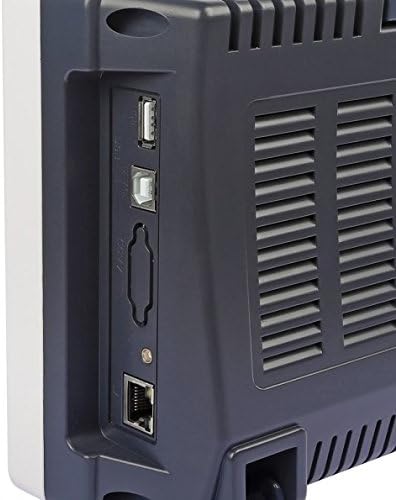
Figura 3.4: Panell lateral amb ports de connectivitat.
The side panel provides various connectivity options, including USB ports for data transfer and device control, and a LAN port for network connectivity.
4. Configuració
4.1 Desembalatge i inspecció
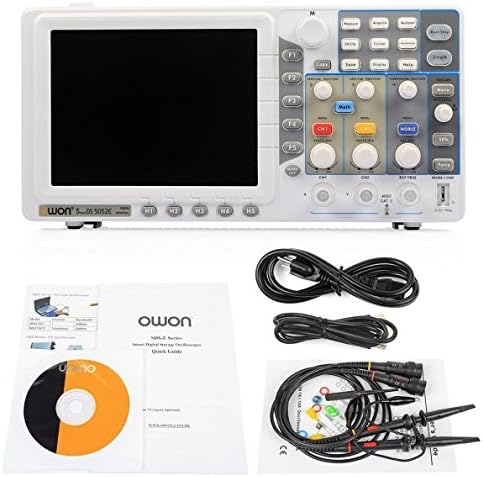
Figura 4.1: Contingut del paquet.
Carefully unpack the oscilloscope and all accessories. Verify that all items listed in the packing list are present and undamaged. The standard package includes the SDS5052E oscilloscope unit, two passive probes, a power cord, a USB cable, and a quick guide/CD.
4.2 Connexió d'alimentació
- Ensure the oscilloscope's power switch is in the OFF position.
- Connect the provided power cord to the AC power input on the rear panel of the oscilloscope.
- Connecteu l'altre extrem del cable d'alimentació a una presa de corrent de CA amb connexió a terra.
4.3 Connexió i compensació de la sonda
- Connect the BNC connector of a passive probe to either the CH1 or CH2 input on the front panel.
- Attach the probe tip to the probe compensation test point (usually a small metal loop or pin labeled "PROBE COMP" or similar) on the front panel.
- Connect the probe's ground clip to the ground terminal next to the probe compensation test point.
- Power on the oscilloscope.
- Premeu el botó Autoconfiguració button. A square wave should appear on the screen.
- Adjust the compensation screw on the probe body using a non-metallic tool until the square wave corners are flat (neither overshot nor undershot).
5. Instruccions de funcionament
5.1 Mesures bàsiques
- Controls verticals: Utilitza el VOLTS/DIV knob for the selected channel (CH1 or CH2) to adjust the vertical scale (voltage per division). Use the POSICIÓ VERTICAL knob to move the waveform up or down.
- Controls horitzontals: Utilitza el SEC/DIV knob to adjust the horizontal scale (time per division). Use the POSICIÓ HORITZONTAL knob to move the waveform left or right.
- Autoset: Premeu el botó Autoconfiguració button to automatically adjust the vertical, horizontal, and trigger settings to display a stable waveform.
5.2 Activació
Triggering stabilizes repetitive waveforms. The SDS5052E supports Edge, Pulse, Video, and Slope trigger types.
- Premeu el botó MENÚ button in the Trigger section to access trigger settings.
- Select the desired trigger type (e.g., Edge).
- Ajusteu el NIVELL DE TRIG botó per ajustar el volumtage level at which the trigger occurs. The trigger level indicator on the screen will move accordingly.
- Utilitza el 50% button for quick adjustment to the 50% level of the waveform.
5.3 Funcions de mesura
The oscilloscope provides automatic measurement functions.
- Premeu el botó Mesura button to display the measurement menu.
- Use the function buttons (F1-F5) to select and add/remove desired measurements (e.g., Vpp, Vmax, Frequency, Period).
- The results will be displayed on the screen.
5.4 Desar dades
Waveforms and settings can be saved to internal memory or a USB flash drive.
- Insert a USB flash drive into the USB host port on the side panel (if saving externally).
- Premeu el botó Desa botó.
- Select the save type (e.g., Waveform, Setup, Image) and destination using the menu options.
- Confirmeu l'operació de desat.
6. Manteniment
6.1 Neteja
To clean the instrument, disconnect it from all power sources and wipe the exterior surfaces with a soft, damp cloth. Do not use abrasive cleaners, solvents, or harsh chemicals, as these may damage the casing or display. Ensure no moisture enters the ventilation openings.
6.2 Emmagatzematge
When not in use for extended periods, store the oscilloscope in a clean, dry environment, protected from extreme temperatures and humidity. It is recommended to keep the original packaging for safe storage and transport.
6.3 Calibració
The oscilloscope is factory calibrated. For continued accuracy, periodic calibration by qualified service personnel is recommended, especially after significant temperature changes or prolonged use.
7. Solució De Problemes
| Problema | Causa possible | Solució |
|---|---|---|
| Sense pantalla després de l’encesa | Power cord not connected; Power switch off; Faulty power supply | Check power cord connection; Ensure power switch is ON; Contact service if power supply is suspected. |
| No es mostra cap forma d'ona | Input signal too small/large; Incorrect vertical/horizontal settings; Trigger not set correctly; Probe not connected | Premeu Autoconfiguració; Adjust VOLTS/DIV and SEC/DIV; Check trigger level and source; Verify probe connection. |
| Unstable waveform | Incorrect trigger settings; No trigger source; Noise in signal | Adjust trigger level; Select appropriate trigger source and type; Use averaging mode to reduce noise. |
| Mides incorrectes | Probe attenuation factor incorrect; Oscilloscope not calibrated | Ensure probe attenuation setting matches the physical probe (e.g., 1X, 10X); Consider professional calibration. |
8. Especificacions
The following are the key technical specifications for the OWON SDS5052E Digital Storage Oscilloscope:
- Ample de banda: 50 MHz
- Sample Rate (real time): 500 MS/s
- Horizontal Scale (s/div): 5ns/div to 100s/div (step by 1-2-5)
- Rise Time (at input, typical): ≤7ns
- Canal: 2 + 1 (external)
- Visualització: 8" color LCD, TFT display, 800 × 600 pixels, 65535 colors
- Impedància d'entrada: 1MΩ ± 2%, in parallel with 15pF±5pF
- Aïllament del canal: 50Hz : 100 : 1, 10MHz : 40 : 1
- Vol. d'entrada màximatage: 400V (PK - PK) (DC+AC, PK - PK)
- Precisió del guany de CC: ±3%
- Durada del registre: 10K (optional 100K, 10M)
- DC Accuracy (average): Average≥16: ±(3% reading + 0.05 div) for ΔV
- Probe Attenuation Factor: 1X, 10X, 100X, 1000X
- LF Respond (AC, -3dB): ≥10Hz (at input, AC coupling, -3dB)
- Sample Rate / Relay Time Accuracy: ± 100 ppm
- Interpolation: sin(x)/x
- Interval (ΔT) Accuracy (full bandwidth): Single: ±(1 interval time + 100ppm × reading + 0.6ns), Average>16: ±(1 interval time + 100ppm × reading + 0.4ns)
- Acoblament d'entrada: DC, AC, and GND
- Vertical Resolution (A/D): 8 bits (2 Channels simultaneously)
- Sensibilitat vertical: 5mV/div to 10V/div (at input)
- Tipus d'activador: Edge, Pulse, Video, Slope, Alternate
- Dimensions del paquet: 42.67 x 23.88 x 12.45 cm
- Pes de l'article: 2.15 kg
9. Garantia i Suport
For warranty information and technical support, please refer to the documentation provided with your product or contact OWON customer service directly. Keep your purchase receipt and product serial number handy when seeking support.


