1. Introducció
The Apricorn Aegis Secure Key 3.0 (ASK3-30GB) is a high-security, hardware-encrypted USB 3.0 flash drive designed to protect sensitive data. It features FIPS 140-2 Level 3 validation, 256-bit AES XTS hardware encryption, and PIN access via an integrated alphanumeric keypad. This manual provides essential information for setting up, operating, and maintaining your device.
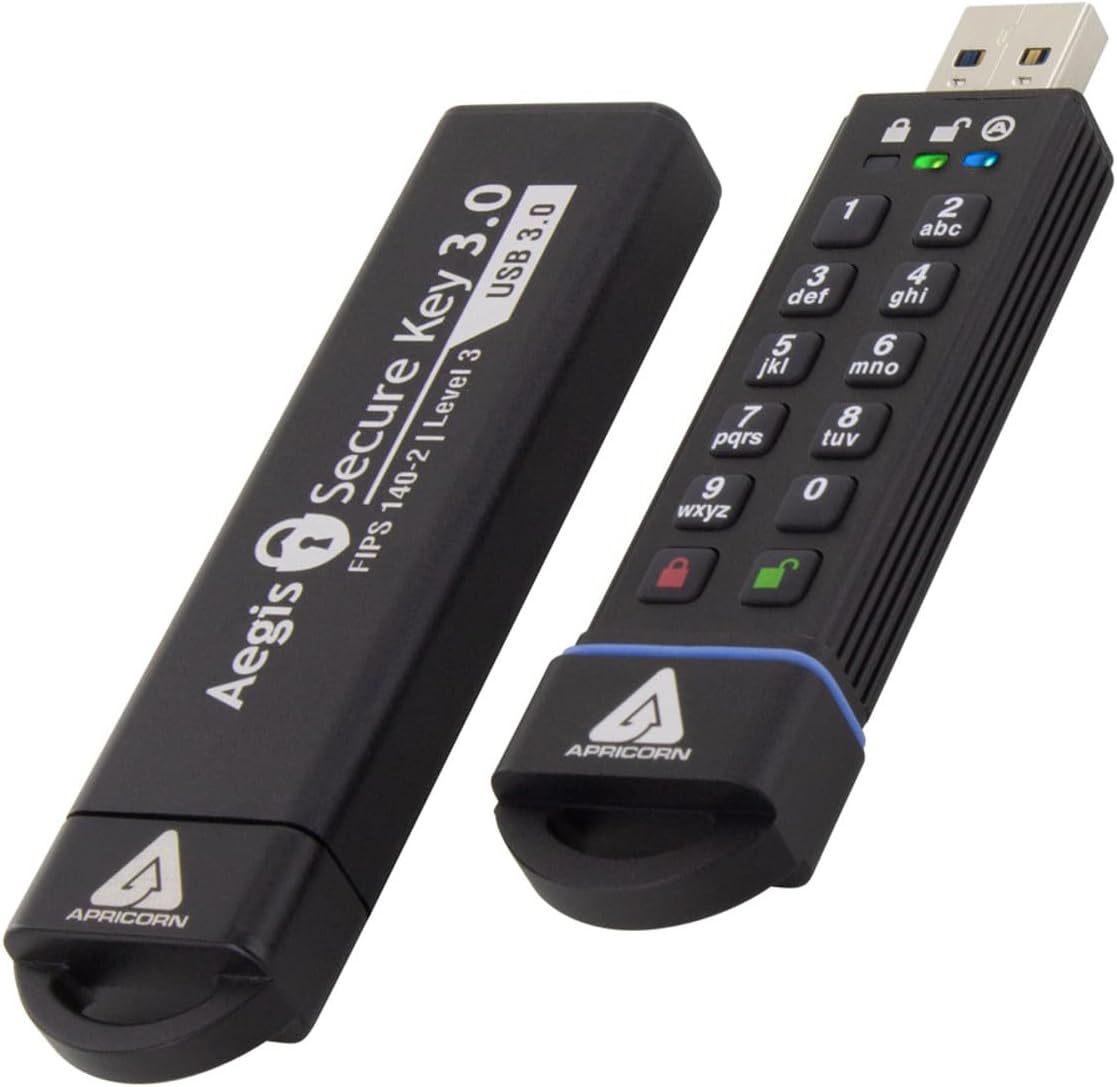
Image: The Apricorn Aegis Secure Key 3.0 flash drive shown with its protective cap both on and off, revealing the integrated keypad.
2. Contingut del paquet
Comproveu que el vostre paquet contingui els elements següents:
- Apricorn Aegis Secure Key 3.0 (ASK3-30GB) USB Flash Drive
3. Característiques del producte
The Aegis Secure Key 3.0 offers advanced features for data security and ease of use:
- FIPS 140-2 nivell 3 validat: Meets stringent government security standards.
- Military Grade Full-disk 256-bit AES XTS Hardware Encryption: All data is encrypted in real-time.
- PIN-Activated: Requires a 7-16 digit alphanumeric PIN for access.
- Software-Free Setup and Operation: No host software required, ensuring cross-platform compatibility.
- OS and Platform Independent: Compatible with Windows, macOS, Linux, and embedded systems.
- Separate Admin and User Modes: Allows for flexible access control.
- Data Recovery PINs: Provides options for data recovery.
- Dust and Water Resistant (IP58 Certified): Offers protection against environmental elements.
- Mode de només lectura: Prevents data modification on the drive.
- Self-Destruct PIN: An optional feature to securely erase data.
- Unattended Auto Lock: Bloqueja automàticament la unitat després d'un període d'inactivitat.
- Drive Reset Feature: Clears all PINs and destroys data.
- Bateria recarregable: Enables PIN entry before connecting to a USB port.

Image: The Apricorn Aegis Secure Key 3.0 alongside a shield logo indicating FIPS 140-2 Level 3 Validation.
4. Configuració
4.1 Càrrec inicial
Before first use, it is recommended to fully charge the internal battery. Connect the Aegis Secure Key 3.0 to any powered USB port. The red LED will illuminate during charging and turn off when fully charged. This process typically takes a few hours.
4.2 Setting the Admin PIN
The Admin PIN is required to access the drive and configure its settings. It must be between 7 and 16 digits long.
- Manteniu premut el botó MAJÚS key (key '2') and then press the BLOC key (red padlock). The red and green LEDs will blink.
- Enter your desired Admin PIN (7-16 digits) and press the BLOC clau.
- Re-enter the same Admin PIN and press the BLOC tecla per confirmar.
- The green LED will illuminate solid, indicating successful PIN setup.
Important: Remember your Admin PIN. If forgotten, data on the drive may become inaccessible.

Imatge: Un primer pla view of the Apricorn Aegis Secure Key 3.0's alphanumeric keypad and LED indicators.
5. Funcionament del dispositiu
5.1 Desbloqueig de la unitat
To unlock the drive and access your data:
- Premeu el botó DESBLOQUEAR key (green padlock). The green LED will blink.
- Enter your Admin or User PIN and press the DESBLOQUEAR clau.
- The green LED will blink rapidly, indicating the drive is unlocked and ready to be connected to a USB port.
- Connect the drive to a USB port on your computer within 30 seconds. The green LED will become solid, and the drive will appear as a removable storage device.
5.2 Locking the Drive
To secure your data, always lock the drive when not in use:
- Bloqueig manual: Premeu el botó BLOC key (red padlock) while the drive is connected and unlocked. The red LED will illuminate solid.
- Desendollament: Simply unplugging the drive from the USB port will automatically lock it.
- Unattended Auto Lock: The drive will automatically lock after a pre-set period of inactivity (configurable via Admin mode).
5.3 Read-Only Mode
To prevent accidental data modification or protect against malware when connecting to an untrusted system, activate Read-Only Mode:
- Unlock the drive as described in Section 5.1.
- While the drive is unlocked (green LED blinking rapidly), press and hold the MAJÚS key (key '2') and then press the DESBLOQUEAR key (green padlock). The blue LED will illuminate, indicating Read-Only Mode is active.
- Connect the drive to your computer. Data can be read but not written or modified.
- To exit Read-Only Mode, unplug the drive and unlock it normally.
6. Manteniment
6.1 Càrrega
The internal battery recharges automatically when connected to a powered USB port. Ensure the drive is periodically connected to maintain battery charge, especially if it is stored for extended periods.
6.2 Neteja
The Aegis Secure Key 3.0 is IP58 certified for dust and water resistance. To clean the device, use a soft, dry cloth. Avoid using harsh chemicals or abrasive materials.
6.3 Consideracions de temperatura
It is normal for the device to become warm during extended use or charging. This is due to the internal components and heat dissipation design. If the device becomes excessively hot, disconnect it from the USB port and allow it to cool down.
7. Solució De Problemes
- Drive not recognized by computer: Ensure the drive is unlocked (green LED solid) abans connecting it to the computer. If the green LED is blinking rapidly, you have 30 seconds to connect it.
- PIN oblidat: If you forget your Admin PIN, the drive cannot be unlocked, and data will be inaccessible. There is no backdoor or recovery method for forgotten PINs to maintain security integrity. A drive reset will erase all data and PINs, allowing you to set a new Admin PIN.
- Brute Force Protection: The drive has a configurable number of failed PIN attempts (default is 10). After exceeding this limit, the drive will initiate a crypto-erase, rendering all data permanently inaccessible.
- Device feels warm: This is normal during operation, especially during data transfer or charging. If it becomes uncomfortably hot, disconnect it and allow it to cool.
- LEDs not responding: Ensure the battery is charged. Connect the drive to a powered USB port for a few hours.
8. Especificacions
| Número de model | ASK3-30GB |
| Capacitat d'emmagatzematge de memòria | 30 GB |
| Interfície del maquinari | USB 3.0 (USB Type A) |
| Tecnologia de connectivitat | USB |
| Característica especial | Encrypted (256-bit AES XTS Hardware Encryption) |
| Validació | Validat per FIPS 140-2 Nivell 3 |
| Velocitat d'escriptura | 60 MB/s |
| Plataforma de maquinari | Mac (and other OS-independent systems) |
| Pes de l'article | 3.2 unces |
| Dimensions del producte (LxWxH) | 3.75 x 0.5 x 0.8 polzades |
| Bateries | 1 bateria de polímer de liti (inclosa) |
9. Garantia i Suport
For warranty information and technical support, please refer to the official Apricorn website or contact Apricorn customer service directly. Details regarding specific warranty periods and support channels are typically provided with your product documentation or on the manufacturer's weblloc.
Apricorn Official Weblloc: www.apricorn.com


