Introducció
Thank you for choosing the BENGOO Wired Gaming Mouse. This manual provides detailed instructions for setting up, operating, and maintaining your new gaming mouse. Designed for gamers, this ergonomic mouse features 4 adjustable DPI settings (1200-1600-2400-3600), 6 programmable buttons, and vibrant RGB backlighting to enhance your gaming environment.
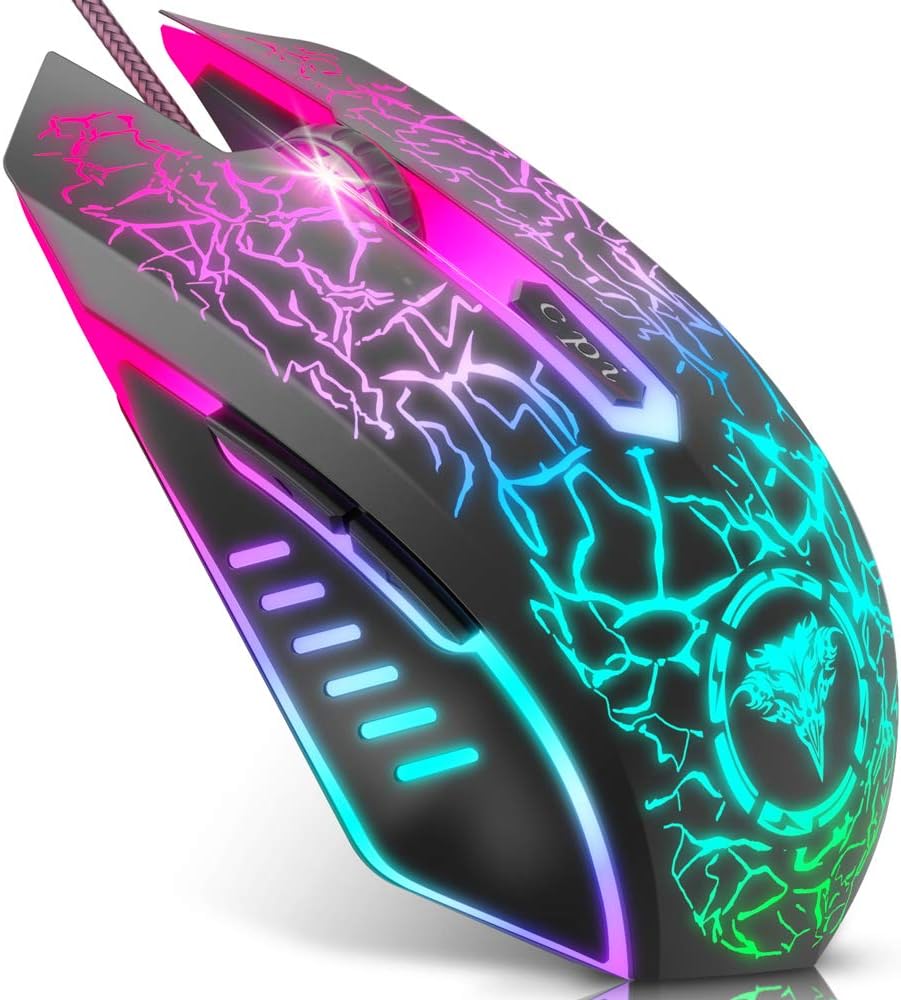
Image: The BENGOO Gaming Mouse showcasinel seu disseny ergonòmic i la seva vibrant il·luminació RGB.
Guia de configuració
The BENGOO Gaming Mouse is designed for simple plug-and-play functionality. No additional drivers are required for basic operation.
- Locate an available USB port on your computer (Desktop PC, Laptop, MacBook, etc.).
- Insert the USB connector of the BENGOO Gaming Mouse into the USB port.
- Wait for your operating system to automatically detect and install the necessary device drivers. This process usually takes a few seconds.
- Once detected, the mouse will be ready for use. The RGB lighting will illuminate automatically.

Image: Illustration of the mouse being plugged into a computer, highlighting its plug-and-play feature.
Instruccions de funcionament
Ajust de DPI
The mouse features a dedicated DPI button to quickly switch between four adjustable DPI settings: 1200, 1600, 2400, and 3600. This allows you to control cursor speed and sensitivity to suit different tasks or gaming scenarios.
- Premeu el botó Botó DPI (located behind the scroll wheel) to cycle through the available DPI settings.
- Each press will change the DPI level, allowing you to find the optimal sensitivity for your needs.

Image: Diagram illustrating the 4 adjustable DPI settings (1200, 1600, 2400, 3600) and their impact on mouse sensitivity.
Funcions del botó
The BENGOO Gaming Mouse is equipped with six functional buttons to enhance your control and efficiency:
- Botó esquerre: Funció estàndard del clic esquerre.
- Botó dret: Funció estàndard del clic dret.
- Roda de desplaçament: Used for scrolling up and down, and also functions as a clickable middle button.
- Botó Endavant: Navega cap endavant web navegadors o file exploradors.
- Botó enrere: Navega cap enrere web navegadors o file exploradors.
- Botó DPI: Adjusts the mouse's sensitivity (DPI) as described above.
These buttons are designed to meet your demands excellently for different games and general computer use, enabling quick switching and actions.

Image: Labeled diagram showing the location and function of each of the six buttons on the gaming mouse.
RGB Lighting Features
The BENGOO Gaming Mouse features dynamic multi-color RGB lighting that greatly matches your style and provides a fancy gaming environment, highlighting your game atmosphere. The lighting effects include 7 RGB breathing lighting effects for an immersive visual experience.

Image: Various color modes of the RGB lighting on the BENGOO Gaming Mouse, showcasing the breathing effects.
Disseny ergonòmic
The mouse is designed to perfectly fit under your palm, providing a comfortable grip for extended gaming or work sessions. The skin-friendly material ensures a pleasant hand feel, reducing fatigue during prolonged use. This ergonomic design assures a comfortable experience for gamers.

Imatge: Primer pla view highlighting the ergonomic contours of the BENGOO Gaming Mouse, designed for comfortable hand placement.

Image: A hand demonstrating the comfortable grip on the BENGOO Gaming Mouse, emphasizing reduced hand fatigue and stable grip.
Compatibilitat del sistema
The BENGOO Gaming Mouse offers wide compatibility with various operating systems, making it adaptable for a range of devices.
- Supports Windows XP, Vista, Windows 7, Windows 8, Windows 10, and Windows 11.
- Compatible with Linux.
- Adaptable for Notebook, PC, laptop, Computer, and Macbook.

Image: Visual representation of the mouse's compatibility with different operating systems, including Windows, Mac OS, and Linux.
Cura i Manteniment
To ensure the longevity and optimal performance of your BENGOO Gaming Mouse, follow these simple care and maintenance guidelines:
- Neteja: Use a soft, dry cloth to wipe down the mouse regularly. For stubborn dirt, slightly dampNetegeu el drap amb aigua o una solució de neteja suau. Eviteu productes químics agressius o materials abrasius.
- Cura del cable: Do not excessively bend or pull the USB cable. Store it neatly to prevent tangles and damage.
- Emmagatzematge: Quan no l'utilitzeu, guardeu el ratolí en un lloc net i sec, allunyat de temperatures extremes i de la llum solar directa.
- Eviteu líquids: Keep the mouse away from liquids to prevent internal damage.
Resolució de problemes
If you encounter any issues with your BENGOO Gaming Mouse, refer to the following common troubleshooting steps:
- El ratolí no respon:
- Assegureu-vos que el cable USB estigui ben connectat a un port USB que funcioni de l'ordinador.
- Prova de connectar el ratolí a un port USB diferent.
- Reinicieu l'ordinador.
- Test the mouse on another computer to determine if the issue is with the mouse or your system.
- Problemes de DPI/sensibilitat:
- Press the DPI button repeatedly to cycle through all available sensitivity settings.
- Check your computer's mouse settings (Control Panel on Windows, System Preferences on Mac) to ensure mouse speed is not set to an extremely low or high value.
- RGB Lights Not Working/Stuck:
- Ensure the mouse is properly connected to your computer.
- The RGB lighting is typically automatic and does not have manual controls. If lights are off, try reconnecting the mouse or restarting your computer.
- Botons que no funcionen:
- Verify that the buttons are not physically stuck.
- Test the mouse on another computer to rule out software conflicts.
Si aquests passos no resolen el problema, consulteu la secció Garantia i assistència per obtenir més ajuda.
Especificacions tècniques
| Característica | Detall |
|---|---|
| Marca | BENGOO |
| Número de model | BX017B |
| Tecnologia de connectivitat | Cable USB |
| Tecnologia de detecció de moviment | Òptic |
| DPI ajustable | 1200/1600/2400/3600 |
| Botons | 6 (Left, Right, Scroll Wheel, Forward, Back, DPI) |
| Característiques especials | Programmable Buttons, RGB Backlit |
| Dimensions del producte | 5.8 x 1.8 x 4.5 polzades |
| Pes de l'article | 4.2 unces |
| Color | Negre |
| Suport del sistema operatiu | Windows XP/Vista/7/8/10/11, Linux |
| Què hi ha a la caixa | 1*BEN-BXO-17B Bengoo Gaming Mouse |
Garantia i Suport
For warranty information, technical support, or any inquiries regarding your BENGOO Gaming Mouse, please contact BENGOO customer service through the retailer's platform or the official BENGOO website. Please have your product model number (BX017B) and purchase details ready when contacting support.

