Introducció
The Logitech Illuminated Living-Room Keyboard K830 is designed to enhance your home entertainment experience. This keyboard combines a full keyboard layout with a built-in touchpad, offering seamless wireless control of your connected TV or computer, even in low-light conditions, thanks to its bright backlit keys.

Figure 1: Logitech K830 Illuminated Living-Room Keyboard, top view.
Contingut del paquet
Assegureu-vos que tots els elements siguin presents al paquet:
- Logitech K830 Illuminated Living-Room Keyboard
- Receptor Logitech Unifying
- Cable de recàrrega USB
- USB range extender
- User information (this manual)
Configuració
1. Càrrega del teclat
Before first use, fully charge the keyboard. Connect the supplied USB recharge cable to the micro-USB port on the keyboard and the other end to a USB power source (e.g., computer USB port, USB wall adapter).
- The battery indicator light will glow green when charging and turn off when fully charged.
- A full charge typically provides several weeks of use.
2. Connexió del teclat
The K830 keyboard offers two connection methods: Logitech Unifying receiver or Bluetooth Smart technology.
2.1. Using the Logitech Unifying Receiver (Recommended for PCs)
- Locate the Logitech Unifying receiver in the package.
- Plug the Unifying receiver into an available USB port on your computer or smart TV. For optimal range, use the included USB range extender if the receiver is obstructed or far from the keyboard.
- Turn on the keyboard by sliding the power switch located on the top edge of the keyboard to the ON position.
- The keyboard should automatically connect to the receiver. If not, use the Logitech Unifying Software (downloadable from Logitech's website) to pair the devices.

Figure 2: User operating the K830 keyboard from a comfortable distance.
2.2. Using Bluetooth Smart Technology (For compatible devices)
- Ensure your device (e.g., Android TV, tablet) has Bluetooth Smart (Bluetooth Low Energy) enabled.
- Enceneu el teclat.
- Press and hold the Bluetooth pairing button (usually indicated by a Bluetooth icon) on the keyboard until the indicator light starts blinking rapidly, indicating it's in pairing mode.
- Al dispositiu, aneu a la configuració de Bluetooth i seleccioneu "Logitech K830" de la llista de dispositius disponibles per emparellar.
- Seguiu les indicacions de la pantalla per completar el procés de vinculació.
Instruccions de funcionament
Disposició i funcions del teclat
The K830 features a compact layout optimized for living room use, including standard alphanumeric keys, function keys, and dedicated media controls.
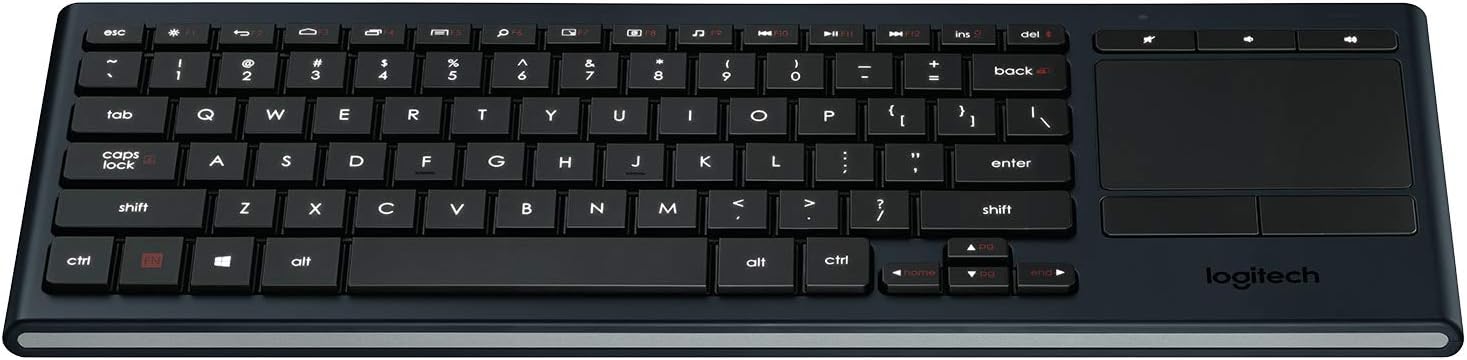
Figura 3: Mésview of the K830 keyboard layout.
Il·luminació de fons
The keyboard features automatic backlighting that adjusts to ambient light conditions. A sensor detects the room's light level and automatically brightens or dims the key backlights for optimal visibility. The backlighting also activates when your hands approach the keyboard and turns off when not in use to conserve battery.
Touchpad integrat
The large, responsive touchpad provides precise cursor control and supports multi-touch gestures. The two physical buttons below the touchpad function as left-click and right-click.
- Toc amb un sol dit: Feu clic amb el botó esquerre.
- Toc amb dos dits: Clic dret.
- Desplaçament amb dos dits: Arrossegueu dos dits amunt o avall per desplaçar-vos verticalment.
- Zoom amb pinça: Pinch in or out with two fingers to zoom.

Figura 4: lateral view highlighting the integrated touchpad and power indicator.
Media Keys and Shortcut Keys
The top row of keys includes dedicated media controls and shortcut keys for quick access to common functions. These keys are optimized for Windows and Android operating systems.
- Controls de volum: Mute, Volume Down, Volume Up.
- Reproducció multimèdia: Play/Pause, Previous Track, Next Track.
- Windows/Android Shortcuts: Home, Back, Search, etc. (specific functions may vary by OS).
To use the F1-F12 functions, press the Fn simultàniament amb la tecla F desitjada.
Manteniment
Neteja del teclat
To clean your K830 keyboard:
- Apagueu el teclat abans de netejar-lo.
- Utilitzeu un drap suau i sense pelusa lleugerament dampamb aigua o una solució de neteja suau.
- Eviteu la humitat excessiva i no ruixeu productes de neteja directament sobre el teclat.
- For the touchpad, use a dry, soft cloth to remove fingerprints and smudges.
Cura de la bateria
The K830 uses a built-in rechargeable Lithium Polymer battery. To maximize battery life:
- Charge the keyboard regularly, but avoid leaving it plugged in constantly after it's fully charged.
- Si guardeu el teclat durant un període prolongat, carregueu-lo al 50% aproximadament abans de guardar-lo.
- Eviteu exposar el teclat a temperatures extremes.
Resolució de problemes
| Problema | Causa possible | Solució |
|---|---|---|
| El teclat no respon | Low battery; Keyboard off; Receiver not plugged in; Out of range; Pairing issue. | Charge the keyboard. Ensure the keyboard is ON. Plug the Unifying receiver into a working USB port. Move closer to the receiver (within 10 meters/33 feet). Re-pair the keyboard using Logitech Unifying Software or Bluetooth pairing process. |
| La retroiluminació no funciona | Low battery; Ambient light too bright; Sensor obstruction. | Charge the keyboard. The backlighting automatically adjusts; it may not activate in bright environments. Ensure the light sensor (located near the top edge) is not covered. |
| Touchpad erratic or unresponsive | Dirty touchpad surface; Software issue; Interference. | Clean the touchpad surface with a dry, soft cloth. Restart your computer/device. Ensure no other wireless devices are causing interference. |
| Les tecles no s'escriuen correctament | Software issue; Physical obstruction under key. | Restart your computer/device. Gently check for any debris under the affected key. |
Especificacions
| Característica | Detall |
|---|---|
| Número de model | 920-007182 |
| Connectivitat | Logitech Unifying (2.4 GHz RF), Bluetooth Smart (Bluetooth Low Energy) |
| abast sense fils | Fins a 10 metres (33 peus) |
| Tipus de bateria | Polímer de liti recarregable |
| Il·luminació de fons | Automatic, single color |
| Touchpad integrat | Yes, with multi-touch gesture support |
| Compatibilitat de sistemes operatius | Windows 7, Windows 8, Windows 10 or later; Android 5.0 or later; Chrome OS |
| Dimensions (LxWxH) | 15.1 x 5.59 x 1.65 polzades (38.35 x 14.2 x 4.19 cm) |
| Pes | 1.09 lliures (0.49 kg) |
Garantia i Suport
Per obtenir informació sobre la garantia, assistència tècnica i recursos addicionals, visiteu el lloc web d'assistència oficial de Logitech. website or refer to the user guide PDF:
- Suport Logitech Weblloc: www.logitech.com/support
- Guia de l'usuari (PDF): Descarregar PDF
Conserveu el vostre comprovant de compra per a reclamacions de garantia.


