1. Acabatview
The Nikon AF-S DX NIKKOR 16-80mm f/2.8-4E ED VR lens is a versatile zoom lens designed for Nikon DX-format DSLR cameras. It offers a wide-angle to portrait-length perspective, making it suitable for various photographic situations. Key features include a fast f/2.8-4 maximum aperture, Vibration Reduction (VR) image stabilization, and advanced optical elements for high image quality.
Característiques principals:
- Rang de zoom 5x: Covers a versatile 16-80mm focal length (24-120mm equivalent on FX format).
- Fast Aperture: f/2.8-4 maximum aperture for excellent low-light performance and shallow depth of field.
- Vibration Reduction (VR): Provides up to 4 stops of image stabilization, beneficial for handheld shooting and low-light conditions. Includes a specialized tripod VR mode.
- ED and Aspherical Elements: Extra-low Dispersion glass and aspherical lens elements reduce chromatic aberration and enhance sharpness and contrast.
- Recobriment de nanocristalls: Minimizes flare and ghosting for clear images.
- Electromagnetic Diaphragm: Ensures stable exposure control during high-speed continuous shooting.
- Fluorine Coat: Repels water, dirt, and smudges on the front and rear lens elements for easier cleaning.
Què hi ha a la caixa:
- AF-S DX NIKKOR 16-80mm f/2.8-4E ED Vibration Reduction Zoom Lens
- Parasol de baioneta HB-75
- Tapa frontal d'objectiu LC-72 de 72 mm amb clip
- Tapa de la lent posterior LF-4

Figure 1: The Nikon AF-S DX NIKKOR 16-80mm f/2.8-4E ED VR Zoom Lens.
2. Configuració
Col·locació de la lent:
- Assegureu-vos que la càmera estigui apagada.
- Remove the rear lens cap (LF-4) from the lens and the body cap from the camera.
- Alineeu la marca de muntatge de l'objectiu amb la marca de muntatge del cos de la càmera.
- Gireu la lent en sentit antihorari fins que encaixi al seu lloc.
Attaching the Lens Hood (HB-75):
The HB-75 bayonet lens hood helps prevent stray light from entering the lens, reducing flare and ghosting. It also offers some protection to the front element.
- Align the lens hood's mounting mark with the lens hood alignment mark on the lens.
- Rotate the hood until it clicks into place.
- To remove, reverse the process while pressing the release button on the hood.
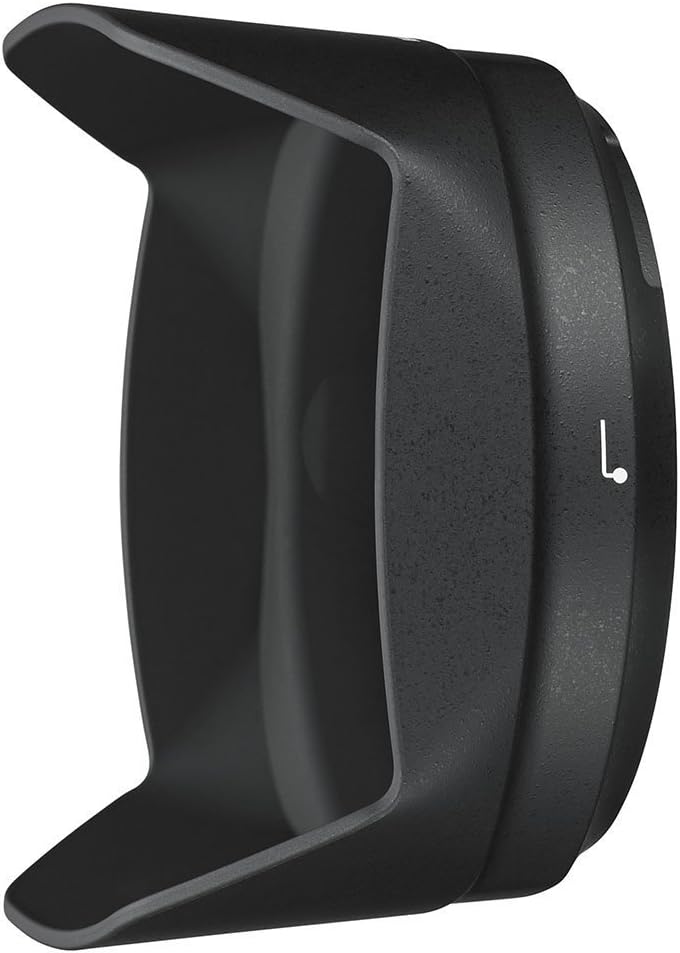
Figure 2: The HB-75 Bayonet Lens Hood.
3. Funcionament de l'objectiu
Interruptor de mode d'enfocament:
L'objectiu té un interruptor de mode d'enfocament amb dos ajustos:
- M/A (enfocament automàtic amb accionament manual): Allows for instant manual focus adjustment even when autofocus is engaged. Simply rotate the focus ring to fine-tune focus after the camera has autofocused.
- M (Enfocament manual): Disables autofocus, allowing for full manual control of the focus ring.
Vibration Reduction (VR) Switch:
The VR system helps reduce blur caused by camera shake. It has two settings:
- ACTIVITAT: Activates Vibration Reduction. Recommended for most handheld shooting situations.
- DESACTIVAT: Disables Vibration Reduction. Recommended when using a tripod or when shutter speeds are fast enough to prevent blur.
Additionally, the VR mode switch offers:
- NORMAL: For general shooting, compensating for broad camera shake.
- ACTIVA: For shooting from moving vehicles or when significant camera movement is expected.
Zoom:
Rotate the zoom ring to change the focal length between 16mm (wide-angle) and 80mm (telephoto). The lens maintains a relatively fast aperture throughout its zoom range (f/2.8 at 16mm to f/4 at 80mm).
Control de l'obertura:
This lens features an electromagnetic diaphragm, which provides precise and consistent exposure control, especially during high-speed continuous shooting. Aperture is controlled via the camera body.
4. Manteniment
Neteja de la lent:
- Elements de la lent: Use a blower brush to remove dust and debris. For smudges or fingerprints, use a soft, clean microfiber cloth specifically designed for optics, along with a small amount of lens cleaning fluid. The fluorine coat on the front and rear elements makes cleaning easier.
- Cos de la lent: Wipe with a soft, dry cloth. Avoid using organic solvents like paint thinner or benzene.
Emmagatzematge:
- Col·loqueu sempre les tapes de l'objectiu davantera i posterior quan no les feu servir.
- Guardeu la lent en un lloc fresc i sec, allunyat de la llum solar directa i de temperatures extremes.
- If storing for an extended period, consider using a dehumidifying agent to prevent mold and mildew.
5. Solució De Problemes
Problemes comuns i solucions:
- L'enfocament automàtic no funciona:
- Ensure the lens focus mode switch is set to M/A.
- Check the camera's focus mode settings.
- Ensure the lens is securely mounted to the camera body.
- Vibration Reduction Not Engaging:
- Ensure the VR switch on the lens is set to ON.
- VR may not be noticeable at very fast shutter speeds or when the camera is perfectly still on a tripod (though a dedicated tripod VR mode is available).
- Dust or Smudges on Lens:
- Refer to the 'Cleaning the Lens' section in Maintenance.
- Image Quality Issues (e.g., soft focus, chromatic aberration):
- Ensure the lens elements are clean.
- Check camera settings (e.g., ISO, shutter speed, aperture).
- Ensure proper focusing technique.
- Chromatic aberration and distortion can often be corrected in post-processing software.
For further troubleshooting or issues not listed here, please consult your camera's instruction manual or contact Nikon customer support.
6. Especificacions
| Número de model | AFSDXVR16-80 |
| Distància focal | 16-80 mm |
| Apertura màxima | f/2.8-4 |
| Obertura mínima | f/22-32 |
| Tipus de lent | Zoom gran angular |
| Muntatges compatibles | Nikon F (DX format) |
| Distància mínima d'enfocament | 1.15 peus (0.35 metre) |
| Mida del filtre | 72 mm |
| Dimensions (Diàmetre x Longitud) | 3.39 x 3.15 x 3.15 polzades (aprox.) |
| Pes de l'article | 1.1 lliures (aprox.) |
| Reducció de vibracions (VR) | Yes (approx. 4 stops) |
| Enfocament automàtic | Yes (Silent Wave Motor) |
7. Garantia i Suport
This Nikon product is covered by a limited warranty provided by Nikon. The specific terms and duration of the warranty may vary by region and purchase location. Please retain your proof of purchase for warranty claims.
For detailed warranty information, product registration, service, and technical support, please visit the official Nikon website or contact your local authorized Nikon service center.
Suport Nikon Weblloc: www.nikonusa.com/en/service-and-support/index.page


