Introducció
This manual provides essential information for the installation, operation, and maintenance of your Intel Core i5-6400 processor. The Intel Core i5-6400 is a 6th generation desktop processor designed for reliable performance in various computing tasks.
Configuració i instal·lació
Llista de comprovació prèvia a la instal·lació
- Placa base compatible: Ensure your motherboard supports the LGA 1151 socket and is compatible with 6th generation Intel Core processors.
- Memòria (RAM): DDR4 RAM is required for this processor generation.
- Font d'alimentació: A stable power supply unit (PSU) with sufficient wattage for your entire system.
- Solució de refrigeració: An appropriate CPU cooler (a fan and heat sink are typically included with boxed processors).
- Pasta tèrmica: If your cooler does not have pre-applied thermal paste, ensure you have a tube available.
Processor Installation Steps
- Prepareu la placa base: Place your motherboard on a non-conductive surface. Locate the CPU socket, typically covered by a protective plastic cap.
- Open the Socket: Gently push down and away on the small lever next to the CPU socket to release it. Lift the load plate.
- Alineeu el processador: Carefully remove the processor from its packaging. Identify the gold triangle or notch on one corner of the processor and align it with the corresponding mark on the CPU socket. Do not force the processor into the socket.
- Inseriu el processador: Gently lower the processor straight down into the socket. It should sit flush without resistance.
- Assegurar el processador: Close the load plate over the processor, then push the lever back down and under the retention tab until it clicks into place.
- Aplicar pasta tèrmica (si cal): If your CPU cooler does not have pre-applied thermal paste, apply a small pea-sized amount to the center of the processor's integrated heat spreader (IHS).
- Instal·leu el refrigerador de la CPU: Place the CPU cooler onto the processor, ensuring proper contact. Follow the cooler's specific instructions for securing it to the motherboard. Connect the CPU fan cable to the designated CPU_FAN header on the motherboard.

Image: Intel Core i5 processor, showing the top view with the Intel logo and Core i5 branding.
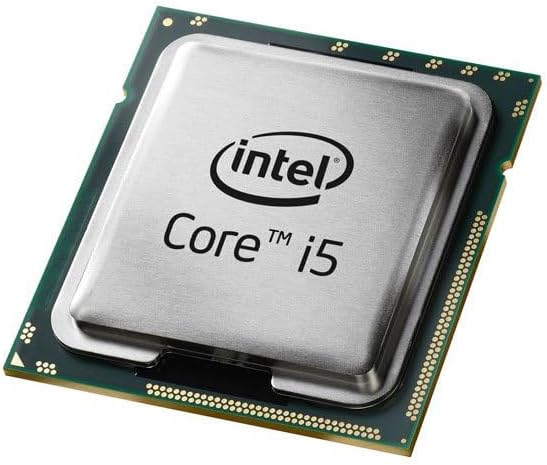
Image: Close-up of an Intel Core i5 processor, highlighting its integrated heat spreader and the underlying substrate.
Instruccions de funcionament
Once correctly installed and your computer system is assembled, the Intel Core i5-6400 processor operates automatically. Its base clock speed is 2.7 GHz, with Intel Turbo Boost Technology dynamically increasing frequency when needed for demanding tasks. The processor manages its power and performance states based on system load and thermal conditions.
- Engegada del sistema: Ensure all components are connected, then power on your computer.
- Sistema operatiu: Install a compatible operating system (e.g., Windows 10, Linux) and necessary drivers for your motherboard and other components.
- Rendiment: The processor will adjust its performance based on the applications running, providing efficient power usage for everyday tasks and increased speed for intensive applications like gaming or content creation.
Manteniment
Proper maintenance ensures the longevity and optimal performance of your Intel Core i5-6400 processor.
- Eliminació de pols: Regularly clean dust from your computer case, especially around the CPU cooler's fan and heatsink fins. Dust accumulation can impede airflow and lead to higher operating temperatures.
- Monitorització de la temperatura: Use system monitoring software to periodically check your CPU temperatures. Ensure they remain within safe operating limits, especially under heavy load.
- Flux d'aire: Maintain good airflow within your PC case by ensuring cables are neatly managed and case fans are functioning correctly.
- Pasta tèrmica: If you notice consistently high temperatures, consider reapplying thermal paste after several years of use, following proper cleaning procedures.
Resolució de problemes
Si teniu problemes, tingueu en compte els passos bàsics següents per resoldre'ls:
- Sense pantalla/El sistema no arrenca:
- Verifiqueu que tots els cables d'alimentació (ATX de 24 pins, CPU de 8 pins) estiguin connectats correctament a la placa base.
- Assegureu-vos que la CPU estigui correctament col·locada al seu sòcol i que la palanca estigui bloquejada.
- Check that RAM modules are properly seated in their slots.
- Confirm your monitor is connected to the correct display output (either motherboard integrated graphics or dedicated graphics card).
- Inestabilitat/Avaries del sistema:
- Monitor CPU temperatures to rule out overheating.
- Ensure your operating system and drivers (especially chipset and graphics drivers) are up to date.
- Executeu eines de diagnòstic de memòria per comprovar si hi ha problemes de RAM.
- Sobreescalfament:
- Confirmeu que el refrigerador de la CPU estigui instal·lat correctament i que faci bon contacte amb el processador.
- Check that the CPU fan is spinning and connected to the correct header.
- Netegeu la pols del dissipador de calor i del ventilador.
- Verificar l'aplicació de pasta tèrmica.
For more advanced troubleshooting, consult your motherboard's manual or the Intel support weblloc.
Especificacions
| Característica | Especificació |
|---|---|
| Model de processador | Intel Core i5-6400 |
| Número de model de l'article | BX80662I56400 |
| Socket de CPU | LGA 1151 |
| Velocitat de la CPU | 2.7 GHz (Base) |
| Nombre de nuclis | 4 |
| Memòria cau del processador | 6 MB de memòria cau intel·ligent |
| Tipus de memòria compatibles | SDRAM DDR4 |
| Gràfics integrats | Intel HD Graphics 530 |
| Pes de l'article | 10.4 unces |
| Dimensions del producte | 4.6 x 4.2 x 3.3 polzades |
| Components inclosos | Fan and Heat Sink (with boxed version) |
Informació de la garantia
Intel processors typically come with a limited manufacturer's warranty. For specific details regarding the warranty period and terms for your Intel Core i5-6400 processor, please refer to the documentation included with your product or visit the official Intel weblloc web. És possible que es requereixi un comprovant de compra per a les reclamacions de garantia.
Suport i Recursos
For further assistance, technical support, driver downloads, and additional product information, please visit the official Intel support weblloc:
Suport Intel Weblloc: www.intel.com/support
You can also find community forums and knowledge bases on the Intel website for peer-to-peer support and solutions to common issues.


