Producte acabatview
The Apple Wireless Keyboard is designed for seamless integration with your Mac devices, offering a comfortable and efficient typing experience. Its ultra-thin profile and anodized aluminum enclosure provide both durability and a sleek aesthetic. Enjoy the freedom of wireless connectivity with a range of up to 33 feet, allowing you to work from anywhere in your space.
Característiques clau
- Disseny compacte: Takes up significantly less space than traditional full-size keyboards, making it ideal for various setups.
- Connectivitat Bluetooth: Effortlessly connects to your Mac via built-in Bluetooth technology for a reliable wireless experience.
- Energia eficient: Operates on just two AA batteries, offering extended usage and convenience.
- Ergonomic Typing: Features comfortable, well-spaced Qwerty keys with optimal pressure for a satisfying typing feel.
Guia de configuració
Contingut del paquet
- Teclat sense fil Apple
Instal·lació de la bateria
The Apple Wireless Keyboard requires two AA batteries. To install them, locate the circular battery compartment on the right side of the keyboard. Twist the cap counter-clockwise to open, insert the batteries with the correct polarity, and then twist the cap clockwise to secure it.

Imatge: Lateral view of the keyboard, highlighting the battery compartment.
Emparellament Bluetooth
- Ensure your keyboard has fresh batteries installed and is powered on. The power button is located on the right side of the keyboard.
- A la vostra Mac, aneu a Configuració del sistema (o Preferències del sistema on older macOS versions).
- Feu clic a Bluetooth.
- Make sure Bluetooth is turned On.
- Your Apple Wireless Keyboard should appear in the list of nearby devices. Click Connecta't or Parella al costat del seu nom.
- Follow any on-screen prompts to complete the pairing process. Once connected, the keyboard will automatically pair with your Mac when in range and powered on.
Instruccions de funcionament
Ús bàsic
The Apple Wireless Keyboard features a standard Qwerty layout, providing a familiar typing experience. The keys are designed for comfortable and responsive feedback. Simply begin typing after successful Bluetooth pairing.
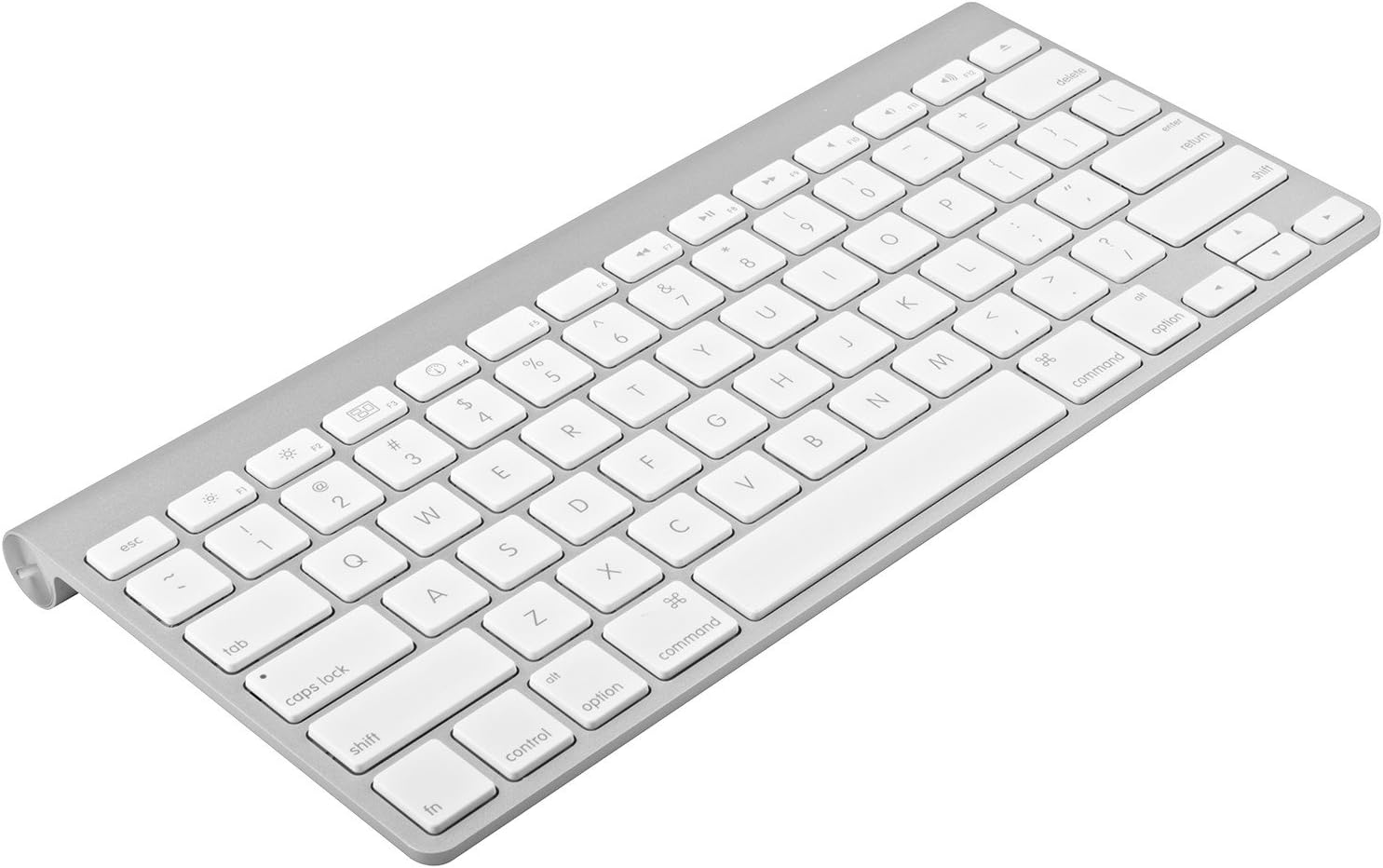
Imatge: De dalt a baix view of the Apple Wireless Keyboard layout.
Tecles de funció especial
The top row of the keyboard includes special function keys (F1-F12) that provide quick access to various system controls. These include brightness control, Mission Control, Launchpad, media playback controls, and volume adjustments. Some functions may require specific macOS settings or applications to be active.

Imatge: Anglesa view of the keyboard, highlighting the function keys.
Cura i Manteniment
- Neteja: Utilitzeu un drap suau i sense pelusa lleugerament dampened with water or an electronics cleaner to wipe down the keyboard surface. Avoid excessive moisture.
- Eliminació de pols: Feu servir aire comprimit per eliminar la pols i les restes que hi ha entre les tecles.
- Emmagatzematge: When not in use for extended periods, turn off the keyboard to conserve battery life. Store in a dry, cool place away from direct sunlight.
- Eviteu líquids: Mantingueu els líquids allunyats del teclat per evitar danys als components interns.
Resolució de problemes
| Problema | Possible solució |
|---|---|
| El teclat no es vincula | Ensure Bluetooth is enabled on your Mac. Check if batteries are properly installed and charged. Try restarting both the keyboard and your Mac. |
| Les claus no responen | Check battery level. Ensure the keyboard is within the 33-foot wireless range. Clean any debris from under the affected keys. |
| Connexió intermitent | Reduce distance between keyboard and Mac. Avoid interference from other wireless devices. Try re-pairing the keyboard. |
| La bateria s'esgota ràpidament | Ensure the keyboard is turned off when not in use. Use high-quality AA batteries. |
Especificacions tècniques
| Característica | Detall |
|---|---|
| Dimensions del producte | 12.8 x 1.4 x 7.3 polzades |
| Pes de l'article | 9.6 unces |
| Número de model | MC184LL/B |
| Tecnologia de connectivitat | Bluetooth |
| Descripció del teclat | Sense fil |
| Color | Plata |
| Material | Alumini |
| Nombre de botons | 78 |
| Piles necessàries | 2 x piles AA |
Garantia i Suport
This Apple Wireless Keyboard (Renewed) comes with a 90-day refund/replacement policy from the date of purchase. Please retain your proof of purchase for any warranty claims.
For technical support or warranty inquiries, please refer to the Amazon Renewed program guidelines or contact the seller directly through your purchase history on Amazon.com. You may also find additional support resources on the official Apple support weblloc web amb informació general sobre el producte.


