Producte acabatview
The Muse M-1280 BT is a versatile Bluetooth tower speaker designed to deliver clear audio with multiple connectivity options. It features A2DP Bluetooth for wireless streaming, a powerful 120W output, a PLL FM radio tuner, and ports for USB and SD card playback. Additionally, it includes a USB charging function and an auxiliary input for wired connections. The speaker is housed in a stylish wooden cabinet and stands approximately 100cm tall, making it a prominent addition to any room.
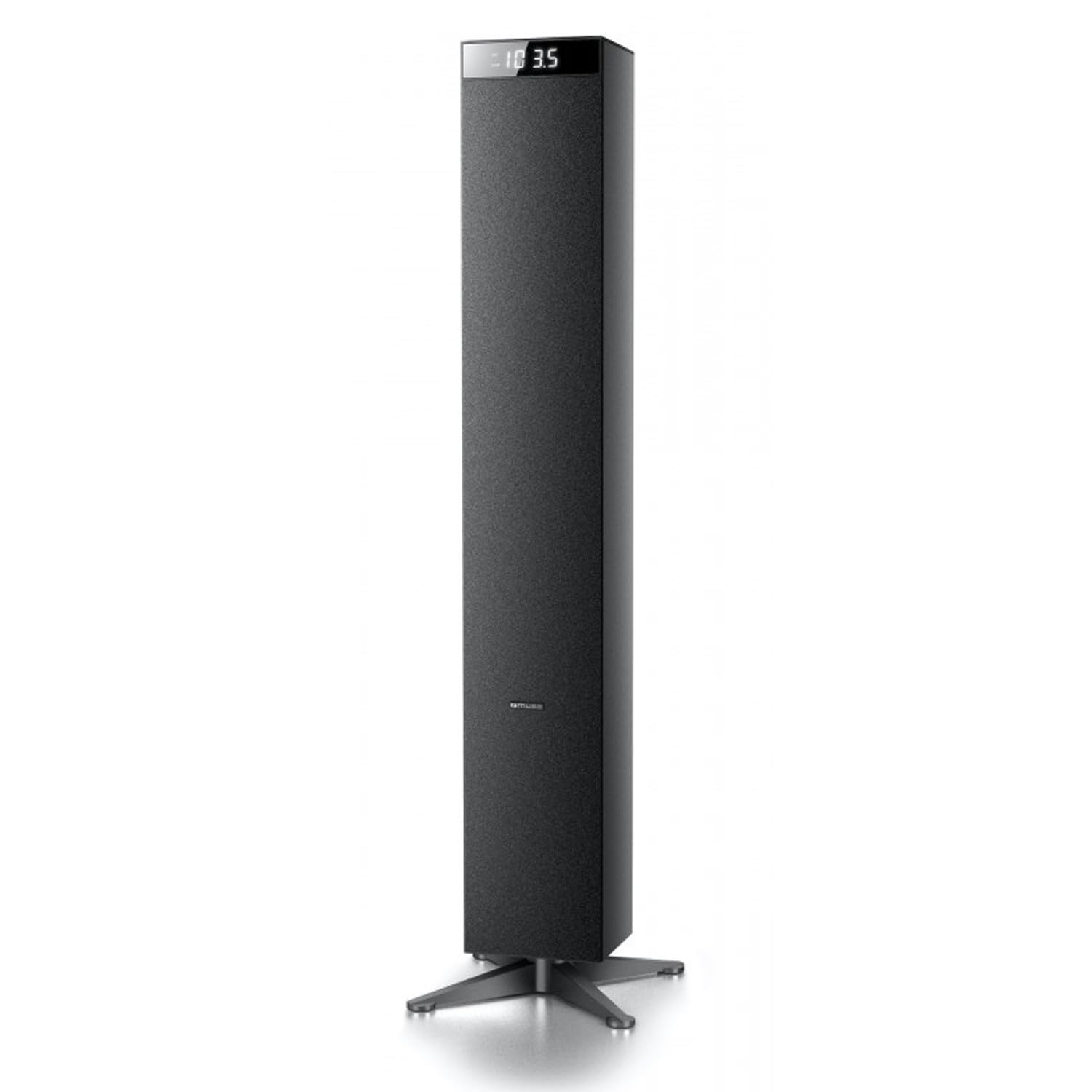
Imatge: Frontal view of the Muse M-1280 BT Bluetooth Tower Speaker, showcasing its sleek black design and integrated display.
Contingut del paquet
Abans de la configuració, assegureu-vos que tots els elements estiguin presents al paquet:
- Muse M-1280 BT Bluetooth Tower Speaker
- Control remot
- Cable d'entrada auxiliar
- Guia d'inici ràpid
- Cable d'alimentació
Instruccions de configuració
- Desembalatge: Traieu amb cura l'altaveu i tots els accessoris de l'embalatge.
- Col·locació: Position the M-1280 BT speaker on a stable, flat surface. Ensure it is placed in a location with good ventilation and away from direct sunlight, heat sources, or moisture. The speaker is designed for floor standing.
- Connectar l'alimentació: Insert the power cable into the AC IN port on the back of the speaker, then plug the other end into a standard wall outlet.
- Encesa inicial: Press the Power button on the top panel or the remote control to turn on the speaker. The display will illuminate.

Image: The Muse M-1280 BT speaker positioned in a room, with a detailed view of its top control panel and phone dock.
Instruccions de funcionament
1. Selecting a Source
Premeu el botó FONT button on the top panel or remote control to cycle through available input modes: Bluetooth, FM Radio, USB, SD, and AUX.
2. Mode Bluetooth
- Seleccioneu Bluetooth mode using the SOURCE button. The display will show "BT" and flash, indicating it's in pairing mode.
- On your smartphone, tablet, laptop, or PC, enable Bluetooth and search for available devices.
- Selecciona "M-1280 BT" from the list of devices. Once paired, the speaker will emit a confirmation sound, and "BT" on the display will stop flashing.
- You can now play audio from your connected device. Use the playback controls on your device or the speaker's top panel/remote (Play/Pause, Next/Previous Track) to manage your music.
3. Mode de ràdio FM
- Seleccioneu Ràdio FM mode using the SOURCE button.
- Per escanejar i desar emissores automàticament, manteniu premut el botó REPRODUCCIÓ/PAUSA button (often labeled as "SCAN" or "AUTO" in radio mode). The speaker will scan for available FM stations and store them.
- Utilitza el PISTA SEGÜENT/ANTERIOR botons per navegar per les emissores desades.
- For manual tuning, briefly press the PISTA SEGÜENT/ANTERIOR botons per ajustar la freqüència pas a pas.
4. Reproducció des de targeta USB/SD
- Inseriu una unitat flaix USB al Port USB o una targeta SD a la Ranura per a targeta SD.
- Seleccioneu USB or SD mode using the SOURCE button. The speaker will automatically begin playing compatible audio files.
- Use the playback controls (Play/Pause, Next/Previous Track) on the speaker or remote to control playback.
- Note: The speaker supports common audio file formats. Unsupported file types will not play.
5. Entrada AUX
- Connect one end of the provided Aux-In cable to the AUX IN port on the speaker and the other end to the audio output (e.g., headphone jack) of your external audio device.
- Seleccioneu AUX mode using the SOURCE button.
- Reprodueix àudio des del teu dispositiu extern. El volum es pot controlar mitjançant l'altaveu o el dispositiu extern.
6. Càrrega USB
The USB port on the speaker can also be used to charge compatible devices. Connect your device's USB charging cable to the speaker's USB port.

Image: Close-up of the Muse M-1280 BT speaker's top panel, highlighting the control buttons, digital display, and integrated dock for mobile devices.
Manteniment
- Neteja: Use a soft, dry cloth to clean the speaker's exterior. Do not use liquid cleaners or abrasive materials, as they may damage the finish.
- Emmagatzematge: If storing the speaker for an extended period, disconnect it from power and store it in a cool, dry place.
- Ventilació: Assegureu-vos que les obertures de ventilació de l'altaveu no estiguin bloquejades per evitar el sobreescalfament.
Resolució de problemes
| Problema | Causa possible | Solució |
|---|---|---|
| Sense poder | Cable d'alimentació no connectat; Presa de corrent no activa | Ensure power cable is securely connected to both the speaker and a working wall outlet. |
| Sense so | Volume too low; Incorrect source selected; Device not paired (Bluetooth) or connected (AUX) | Increase volume. Select the correct input source. For Bluetooth, ensure device is paired. For AUX, ensure cable is fully inserted. |
| L'aparellament de Bluetooth falla | L'altaveu no està en mode d'emparellament; el dispositiu és massa lluny; l'interferència | Ensure speaker is in Bluetooth pairing mode (BT flashing). Move device closer to speaker. Avoid strong electromagnetic interference. |
| Mala recepció de ràdio FM | Senyal feble; Antena no estesa | Adjust the position of the speaker. Ensure the FM antenna (if external) is fully extended. |
Especificacions
- Nom del model: M-1280 BT
- Marca: MUSA
- Tipus d'altaveu: Torre
- Tecnologia de connectivitat: Bluetooth (A2DP), USB, SD, AUX
- Potència de sortida: 120 watts (màx.)
- Sintonitzador de ràdio: PLL FM
- Port USB: Yes (for playback and charging)
- Lector de targetes SD: Sí
- Font d'alimentació: Cable elèctric
- Material: Fusta
- Color: Negre
- Dimensions (L x A x A): 20 x 18 x 101.2 cm (7.87 x 7.09 x 39.84 polzades)
- Pes: 5.3 quilos (11.68 lliures)
- Components inclosos: Aux-In Cable, Quick Start Guide, Remote Control
- Dispositius compatibles: Smartphone, Laptop, PC
Garantia i Suport
This Muse M-1280 BT speaker comes with a 1 any de garantia del fabricant des de la data de compra. Si us plau, conserveu el comprovant de compra per a reclamacions de garantia.
For technical support, service, or warranty inquiries, please refer to the contact information provided in the Quick Start Guide or visit the official Muse website for your region. Do not attempt to repair the device yourself, as this may void the warranty.


