1. Introducció
The midiplus Origin 37 is a versatile USB MIDI Keyboard Controller designed for musicians and producers. It features 37 full-size sensitive keys, 8 real-time controller knobs, 9 real-time controller sliders, and essential performance controls like pitch bend and modulation wheels. This manual provides detailed instructions for setting up, operating, and maintaining your Origin 37 controller to ensure optimal performance and longevity.
2. Informació de seguretat
- No exposeu la unitat a la pluja, la humitat o les temperatures extremes.
- Eviteu col·locar la unitat a prop de fonts de calor com ara radiadors, registres de calor, estufes o altres aparells (inclosos amplificadors) que produeixen calor.
- Utilitzeu només accessoris/accessoris especificats pel fabricant.
- Netegeu només amb un drap sec.
- No bloquegeu cap obertura de ventilació. Instal·leu-ho d'acord amb les instruccions del fabricant.
- Eviteu que el cable d'alimentació sigui trepitjat o pessigat, especialment als endolls, els endolls i el punt on surten de l'aparell.
- Desendolleu aquest aparell durant les tempestes amb llamps o quan no l'utilitzeu durant llargs períodes de temps.
3. Contingut del paquet
Si us plau, comproveu que tots els elements que s'enumeren a continuació estiguin inclosos al vostre paquet:
- midiplus Origin 37 USB MIDI Keyboard Controller
- Cable USB
- Manual del propietari (aquest document)
4. Producte acabatview
Familiarize yourself with the various components and controls of your Origin 37 controller.
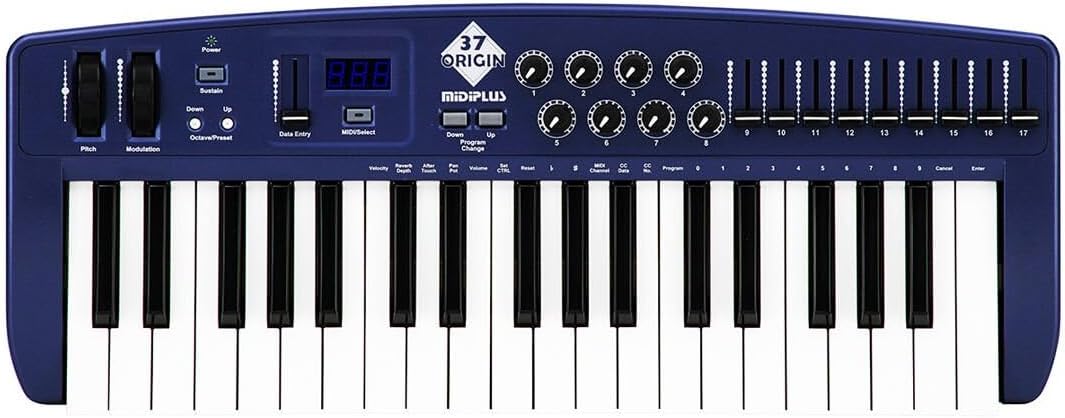
Figura 4.1: De dalt a baix view of the midiplus Origin 37, showing the 37 keys, pitch and modulation wheels, control knobs, sliders, and display.
4.1 Controls del panell frontal
- 37 Full-Size Sensitive Keys: Standard piano-style keys for playing notes.
- Roda Pitch Bend: Permet la modulació del to de les notes en temps real.
- Roda de modulació: Provides real-time control over various assignable parameters, typically vibrato or other effects.
- Botó d'encesa: Encén o apaga la unitat.
- Botó de sosteniment: Toggles sustain on/off, mimicking a sustain pedal.
- Botons d'octava amunt/avall: Desplaça el rang d'octaves del teclat amunt o avall.
- Data Entry Slider: Used for adjusting parameter values shown on the display.
- MIDI/Select Button: Used to enter MIDI configuration mode or select options.
- Program Up/Down Buttons: Navigates through different program or preset numbers.
- 8 Real-Time Controller Knobs (1-8): Assignable rotary encoders for controlling various MIDI parameters.
- 9 Real-Time Controller Sliders (9-17): Assignable faders for controlling various MIDI parameters.
- Pantalla LED: Shows current parameter values, program numbers, and other status information.

Figure 4.2: Detail of the left-side controls, including Pitch Bend, Modulation, Power, Sustain, Octave Up/Down, Data Entry slider, and LED display.
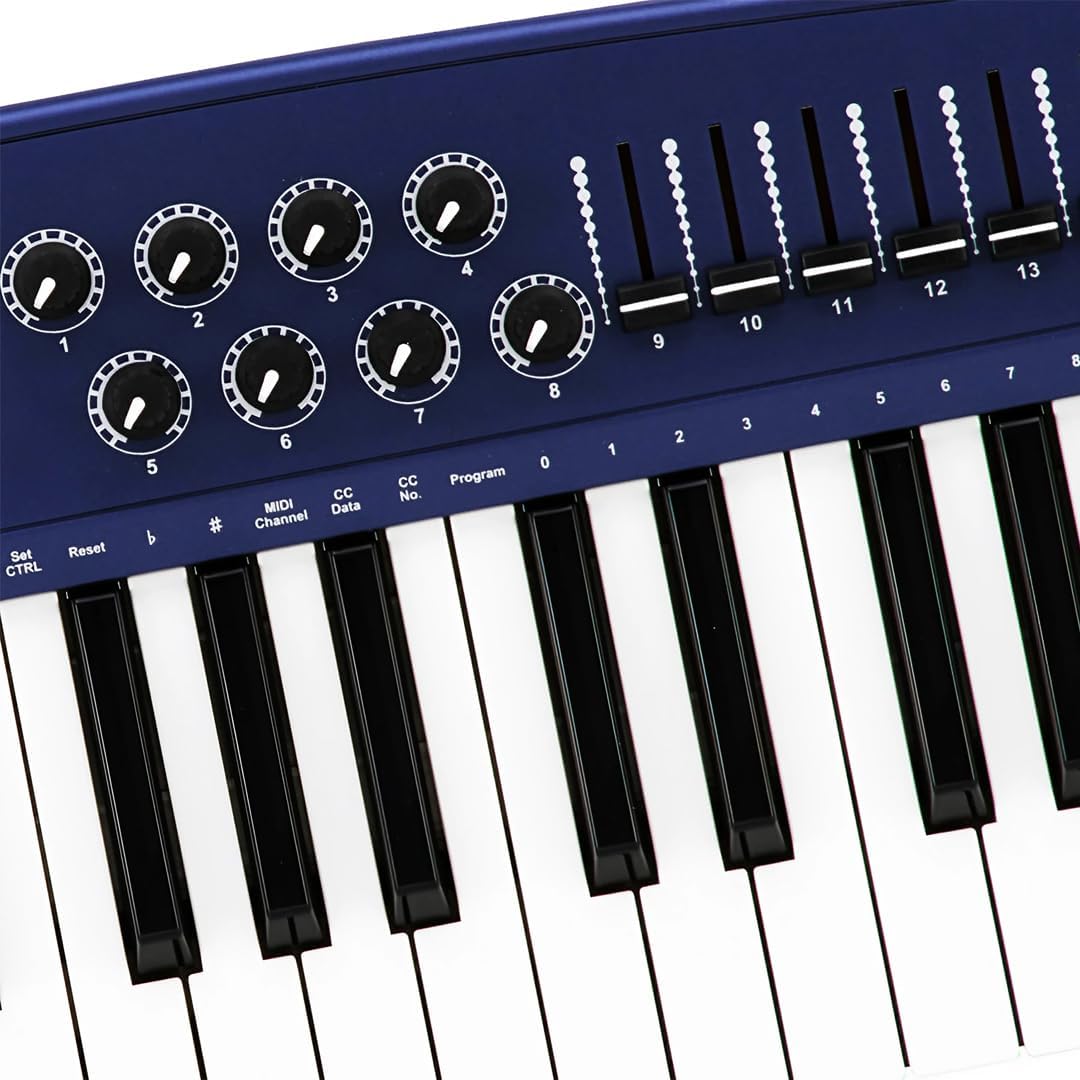
Figure 4.3: Detail of the right-side controls, showing the 8 rotary knobs and 9 faders, along with key labels for MIDI configuration.
4.2 Connexions del panell posterior
- Sustain Switch Input: 1/4-inch jack for connecting an external sustain pedal (not included).
- KEYBOARD MIDI OUT (5-pin DIN): Standard MIDI output for connecting to other MIDI devices.
- Port USB: For connecting to a computer (PC/Mac) for MIDI communication and power.
- Interruptor d'alimentació: Interruptor d'alimentació principal de la unitat.

Figure 4.4: Rear panel showing the Sustain Switch input, KEYBOARD MIDI OUT, USB port, and Power switch.
5. Configuració
5.1 Connexió a un ordinador (USB)
- Assegureu-vos que l’ordinador estigui engegat.
- Connect one end of the supplied USB cable to the USB port on the rear panel of the Origin 37.
- Connecteu l'altre extrem del cable USB a un port USB disponible de l'ordinador.
- The Origin 37 is USB class-compliant and does not require special drivers for most operating systems (PC/Mac). It will be powered via the USB connection.
- Turn on the Origin 37 using the Power button on the front panel.
- Your computer should automatically recognize the device. You can then select it as a MIDI input device in your Digital Audio Workstation (DAW) or music software (e.g., Ableton Live).
5.2 Connecting to External MIDI Devices (MIDI OUT)
- Ensure both the Origin 37 and the external MIDI device are powered off.
- Connect a standard 5-pin MIDI cable from the "KEYBOARD MIDI OUT" port on the Origin 37 to the MIDI IN port of your external MIDI device (e.g., synthesizer, sound module).
- Power on the Origin 37, then power on your external MIDI device.
- Configure your external MIDI device to receive MIDI data on the appropriate MIDI channel.
5.3 Connecting a Sustain Pedal
- Connect a standard 1/4-inch TS (mono) sustain pedal (not included) to the "Sustain Switch" input on the rear panel.
- The pedal will function as a sustain control for your MIDI notes.
6. Instruccions de funcionament
6.1 Funcionament bàsic
- Tocant les tecles: Simply press the keys to send MIDI note-on/note-off messages to your connected software or hardware. The keys are velocity-sensitive, meaning the harder you press, the higher the velocity value sent.
- Roda Pitch Bend: Move the wheel up or down to bend the pitch of currently held notes. It automatically returns to the center position.
- Roda de modulació: Move the wheel to apply modulation effects. This wheel typically stays in the position you leave it. The specific effect controlled depends on your software or hardware instrument's settings.
- Botó de sosteniment: Press to toggle sustain on or off. When active, notes will continue to sound after the key is released, similar to a piano's sustain pedal.
- Octave Up/Down: Use these buttons to transpose the entire keyboard up or down in octave increments. The LED display will indicate the current octave shift.
- Program Up/Down: These buttons are used to send MIDI Program Change messages, allowing you to switch between different sounds or presets on your connected MIDI device or software.
6.2 Assigning Knobs and Sliders
The 8 knobs and 9 sliders are assignable MIDI controllers. They send MIDI Control Change (CC) messages. The specific CC number each knob/slider sends can be configured. Refer to your software's or hardware's manual for how to map these CC messages to parameters.
To assign a knob or slider:
- Premeu el botó MIDI/Select button to enter configuration mode.
- Utilitza el Entrada de dades slider or Octava amunt/avall buttons to navigate through parameters on the LED display.
- Select the desired knob or slider to assign.
- Adjust the value (e.g., MIDI CC number) using the Entrada de dades control lliscant.
- Premeu MIDI/Select again to exit configuration mode and save changes.
Note: Specific assignment procedures may vary. Consult the detailed MIDI implementation chart (if available) or your DAW's manual for advanced mapping.
6.3 Data Entry and Display
The LED display provides visual feedback for various settings and parameters. The Entrada de dades slider is primarily used to adjust numerical values shown on this display, such as MIDI channel, CC numbers, or program numbers during configuration.
7. Manteniment
- Neteja: Use a soft, dry cloth to clean the surface of the unit. Do not use abrasive cleaners, waxes, or solvents.
- Emmagatzematge: When not in use for extended periods, store the controller in a cool, dry place, away from direct sunlight and extreme temperatures.
- Manipulació: Eviteu deixar caure la unitat o sotmetre-la a impactes forts.
- Potència: Always disconnect the USB cable when the unit is not in use or during electrical storms.
8. Solució De Problemes
| Problema | Causa possible | Solució |
|---|---|---|
| No hi ha alimentació/La unitat no s'encén. | USB cable not connected or faulty. | Ensure USB cable is securely connected to both the controller and a powered USB port. Try a different USB port or cable. |
| No sound from software/hardware. | MIDI input not selected in software; incorrect MIDI channel; software instrument not loaded. | Verify the Origin 37 is selected as a MIDI input device in your DAW. Check that the MIDI channel on the controller matches the receiving channel of your software/hardware. Ensure a sound-generating instrument is loaded and active. |
| Knobs/Sliders do not control parameters. | Not mapped in software; incorrect MIDI CC assignment. | Ensure the knobs/sliders are correctly mapped to parameters within your DAW or software instrument. Check the MIDI CC numbers being sent by the controller and ensure they match the expected input. |
| Keys are not responding or sending incorrect notes. | Connection issue; software conflict. | Reconnect the USB cable. Restart your computer and DAW. Check for any conflicting MIDI drivers or software. |
| LED display flickering or unstable. | Fluctuació de potència; falla interna. | Ensure a stable USB power source. Try connecting to a different USB port or a powered USB hub. If the issue persists, contact customer support. |
9. Especificacions
| Característica | Detall |
|---|---|
| Les claus | 37 full-size, velocity-sensitive keys |
| Controladors | Pitch Bend Wheel, Modulation Wheel, 8 Assignable Knobs, 9 Assignable Sliders, Sustain Button, Octave Up/Down, Program Up/Down, Data Entry Slider |
| Mostra | Pantalla LED |
| Connexions | USB (Type B), 5-pin MIDI OUT, 1/4" Sustain Switch Input |
| Font d'alimentació | Alimentació del bus USB |
| Compatibilitat | PC, Mac (USB Class Compliant) |
| Dimensions (L x A x A) | 27.56 x 10.24 x 4.13 polzades (70 x 26 x 10.5 cm) |
| Pes | 6.39 lliures (2.9 kg) |
10. Garantia i Suport
10.1 Informació de la garantia
Midiplus products are designed and manufactured to the highest quality standards. For specific warranty terms and conditions, please refer to the warranty card included with your product or visit the official Midiplus weblloc web. Conserveu el rebut de compra com a comprovant de compra per a reclamacions de garantia.
10.2 Atenció al client
If you encounter any issues or have questions not covered in this manual, please contact Midiplus customer support. You can typically find contact information on the official Midiplus weblloc web o a través del vostre distribuïdor.
Per a més ajuda, podeu visitar el Midiplus Store on Amazon.


