1. Introducció
This user manual provides detailed instructions for the operation and maintenance of your Venstar S404 Wireless Bluetooth Sport Portable Speaker. Designed for outdoor sports and bicycle use, this speaker allows you to enjoy music during activities like riding or climbing. Its robust TPU material ensures shockproof capability, and the included remote controller offers convenient volume control. Please read this manual carefully to ensure proper use and to maximize the lifespan of your device.
2. Informació de seguretat
- Always read this manual thoroughly before initial use.
- The speaker is designed to be waterproof (IPX5 rated) against water splashes. However, it is not intended for submersion in water. If water splashes on the device, wipe it dry immediately.
- Keep the speaker away from strong magnetic fields to prevent damage.
- Do not attempt to disassemble, repair, or modify the speaker yourself. This may void the warranty and cause damage.
- Use only the provided charging cable and a DC5V, 1A power adapter for charging.
- Eviteu exposar l'altaveu a temperatures extremes (calentes o fredes) o a la llum solar directa durant períodes prolongats.
- Mantenir fora de l'abast dels nens.
3. Contingut del paquet
Marqueu la casella per als elements següents:
- 1 x Venstar S404 Bluetooth Speaker
- 1 x cable de càrrega USB
- 1 cable d'àudio de 3.5 mm
- 1 x Metal Hook Loop (Carabiner)
- 1 x Bike Mount
- 1 x Fixed Trestle
- 1 x clau Allen
- 1 x comandament a distància
- 4 x Fastener Strings
- 1 x Manual d'usuari
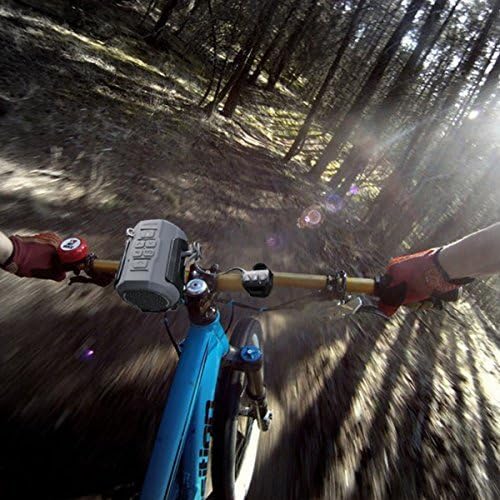
Figure 3.1: All components included in the Venstar S404 package.
4. Producte acabatview
Familiarize yourself with the various parts and controls of your Venstar S404 speaker.
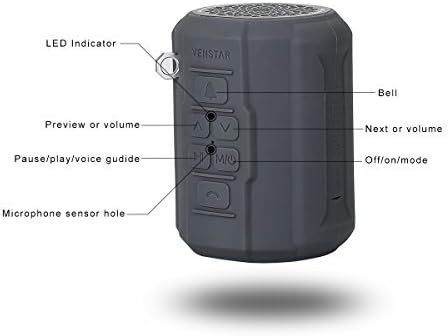
Figura 4.1: lateral view of the speaker with labeled controls.
- Indicador LED: Mostra l'estat de l'alimentació i de la connexió.
- Botó de campana: Activates the bike bell sound.
- Botó Anterior/Baixar volum: Premeu curt per a la pista anterior, premeu llargament per baixar el volum.
- Botó Següent/Pujar volum: Premeu curt per a la següent pista, premeu llargament per pujar el volum.
- Pause/Play/Voice Guide Button (M/Mic): Controls playback, answers/ends calls, and toggles voice guide.
- Off/On/Mode Button: Powers the speaker on/off and switches between modes (Bluetooth, FM, TF Card, AUX).
- Microphone Sensor Hole: Per a trucades amb mans lliures.
5. Configuració
5.1 Càrrega de l'altaveu
Before first use, fully charge the speaker. Connect the micro USB end of the provided USB cable to the speaker's charging port and the standard USB end to a DC5V, 1A USB power adapter or a computer's USB port. The LED indicator will show charging status.
5.2 Mounting on a Bicycle
The Venstar S404 comes with a bicycle mount for easy attachment to your bike's handlebars or frame. This mount also doubles as a bottle holder.
- Attach the fixed trestle to your bicycle's handlebar using the provided screws and Allen wrench. Ensure it is securely fastened.
- Slide the speaker into the bike mount until it clicks into place.
- Use the fastener strings if additional securing is needed.
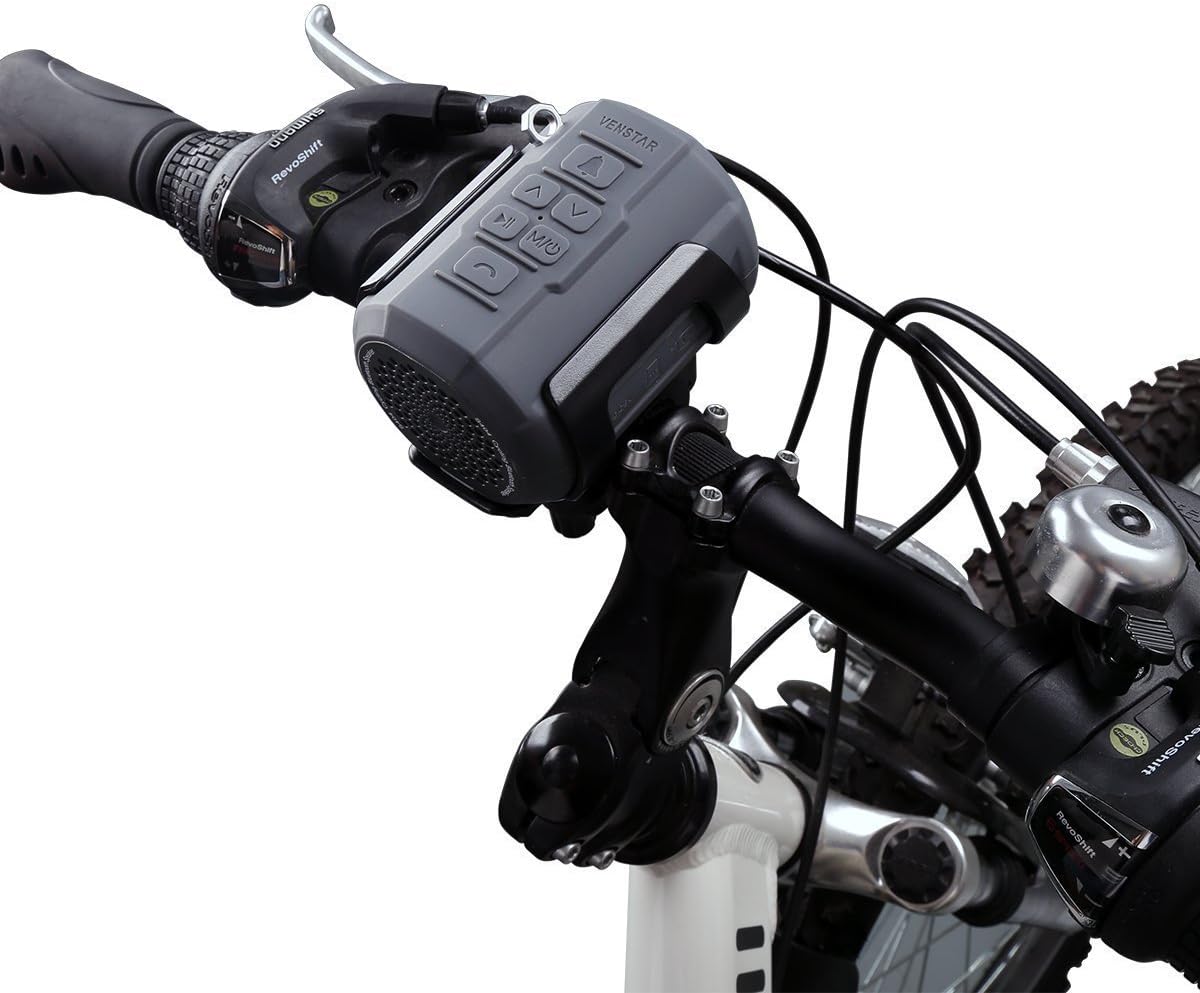
Figure 5.1: Speaker mounted on a bicycle handlebar.
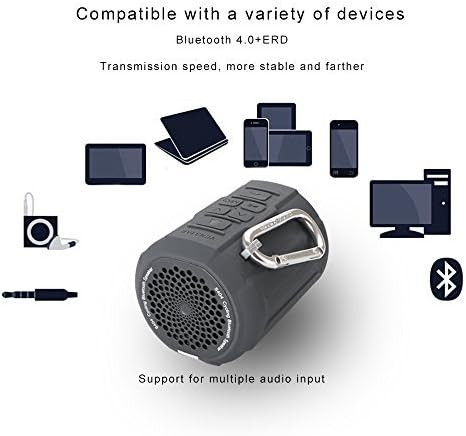
Figure 5.2: Rider's view of the speaker mounted on a bicycle.
6. Instruccions de funcionament
6.1 Encès/Apagat
Manteniu premut el botó Off/On/Mode button to power the speaker on or off.
6.2 Vinculació Bluetooth
The speaker will automatically enter Bluetooth pairing mode upon power-on if no other mode is selected. The LED indicator will flash. On your device (smartphone, tablet, etc.), enable Bluetooth and search for "Venstar S404". Select it to pair. The speaker will confirm successful connection, and the LED will become solid blue. The speaker will automatically connect to the last paired device when powered on.

Figure 6.1: Hands-free calling feature in use with the speaker.

Figure 6.2: Compatibility with various Bluetooth devices.
6.3 Funcionament de la ràdio FM
Premeu el botó Off/On/Mode button to switch to FM radio mode. The speaker will automatically scan and save available FM stations. Use the Anterior/Abaixar el volum i Següent / Augment de volum buttons to navigate between saved stations. The speaker has breakpoint memory for FM stations.
Reproducció de targetes TF 6.4
Insert a TF (Micro SD) card (up to 32GB) loaded with music files (APE, FLAC, MP3, WMA, WAV formats supported) into the TF card slot. The speaker will automatically switch to TF card mode and begin playback. The speaker has breakpoint memory for TF card playback.
6.5 Entrada AUX
Connect an external audio device using the provided 3.5mm audio cable to the AUX input port on the speaker. The speaker will automatically switch to AUX mode.
6.6 Trucades mans lliures
When connected via Bluetooth to a smartphone, you can use the speaker for hands-free calls. Press the Pause/Play/Voice Guide button to answer or end a call. The built-in noise reduction microphone ensures clear communication.
6.7 Ús del control remot
The included remote controller allows for convenient operation while on the go. It can control volume, track skipping, and call functions without needing to reach the speaker directly.
6.8 Using as a Bike Bell
Premeu el botó Campana button on the speaker to activate the bike bell sound, providing an audible warning to pedestrians or other riders.
7. Manteniment
- Neteja: Netegeu l'altaveu amb un suau, damp drap. No utilitzeu productes químics agressius ni netejadors abrasius. Assegureu-vos que la tapa del port de càrrega estigui ben tancada abans de netejar-la.
- Emmagatzematge: Guardeu l'altaveu en un lloc fresc i sec, allunyat de la llum solar directa i de temperatures extremes quan no l'utilitzeu durant períodes prolongats.
- Cura de la bateria: Per allargar la durada de la bateria, eviteu descarregar-la completament amb freqüència. Carregueu l'altaveu regularment, fins i tot si no l'esteu fent servir.
8. Solució De Problemes
| Problema | Causa possible | Solució |
|---|---|---|
| L'altaveu no s'encén. | Bateria baixa. | Carregueu l'altaveu completament. |
| No es pot emparellar per Bluetooth. | L'altaveu no està en mode d'emparellament; el Bluetooth del dispositiu està desactivat; massa lluny de l'altaveu. | Ensure speaker is in Bluetooth mode (flashing LED). Turn on Bluetooth on your device. Move device closer to speaker (within 10 meters). |
| Sense so. | Volume too low; incorrect mode selected; audio cable not fully inserted. | Increase volume on speaker and connected device. Ensure correct mode (Bluetooth, FM, TF, AUX) is selected. Re-insert audio cable firmly. |
| La recepció de ràdio FM és deficient. | Senyal feble; interferències. | Move to an area with better signal. Try re-scanning stations. |
| Speaker is unresponsive. | Error del sistema. | Use the reset function (if available, typically a small pinhole button) or power cycle the device. |
9. Especificacions
| Característica | Detall |
|---|---|
| Número de model | S404 (385968) |
| Unitat d'altaveus | 1.5 polzades |
| Potència de sortida màxima dels altaveus | 6 watts |
| Versió Bluetooth | 4.0 EDR |
| Modes de reproducció | Bluetooth, FM Radio, TF Card, AUX |
| Memory Type (TF Card) | Fins a 32 GB |
| Music Formats Supported | APE, FLAC, MP3, WMA, WAV |
| Bateria | Bateria Li-ion de 2100 mAh integrada |
| Entrada | DC5V, 1A (Micro USB Port) |
| Dimensions del producte | 8.89 x 6.1 x 6.1 cm |
| Pes de l'article | 0.26 quilograms (260 g) |
| Material | Plàstic (TPU) |
| Característiques especials | Portable, Waterproof (IPX5), FM Radio, Shockproof, Dustproof, Hands-free Calling, Bike Bell Function |
10. Garantia i Suport
The Venstar S404 Wireless Bluetooth Sport Portable Speaker comes with a Garantia del fabricant de 1 anys. This warranty covers defects in materials and workmanship under normal use from the date of purchase.
Addicionalment, a Garantia de devolució de 30 dies is offered. Please refer to your purchase receipt or retailer's policy for specific terms and conditions.
For technical assistance, product inquiries, or warranty claims, please contact Venstar customer service. Contact information can typically be found on the product packaging or the official Venstar website. When contacting support, please have your product model number (S404) and proof of purchase ready.


