1. Introducció
The GoWISE Power 2000W Pure Sine Wave Power Inverter converts 12V DC power from a battery source into 120V AC household power. This inverter is designed for use in various applications, including vehicles, boats, camping, and during power outages. It provides a stable and clean power source suitable for sensitive electronic equipment, offering 2000W of continuous power and a 4000W surge capacity.
1.1. Què hi ha a la caixa
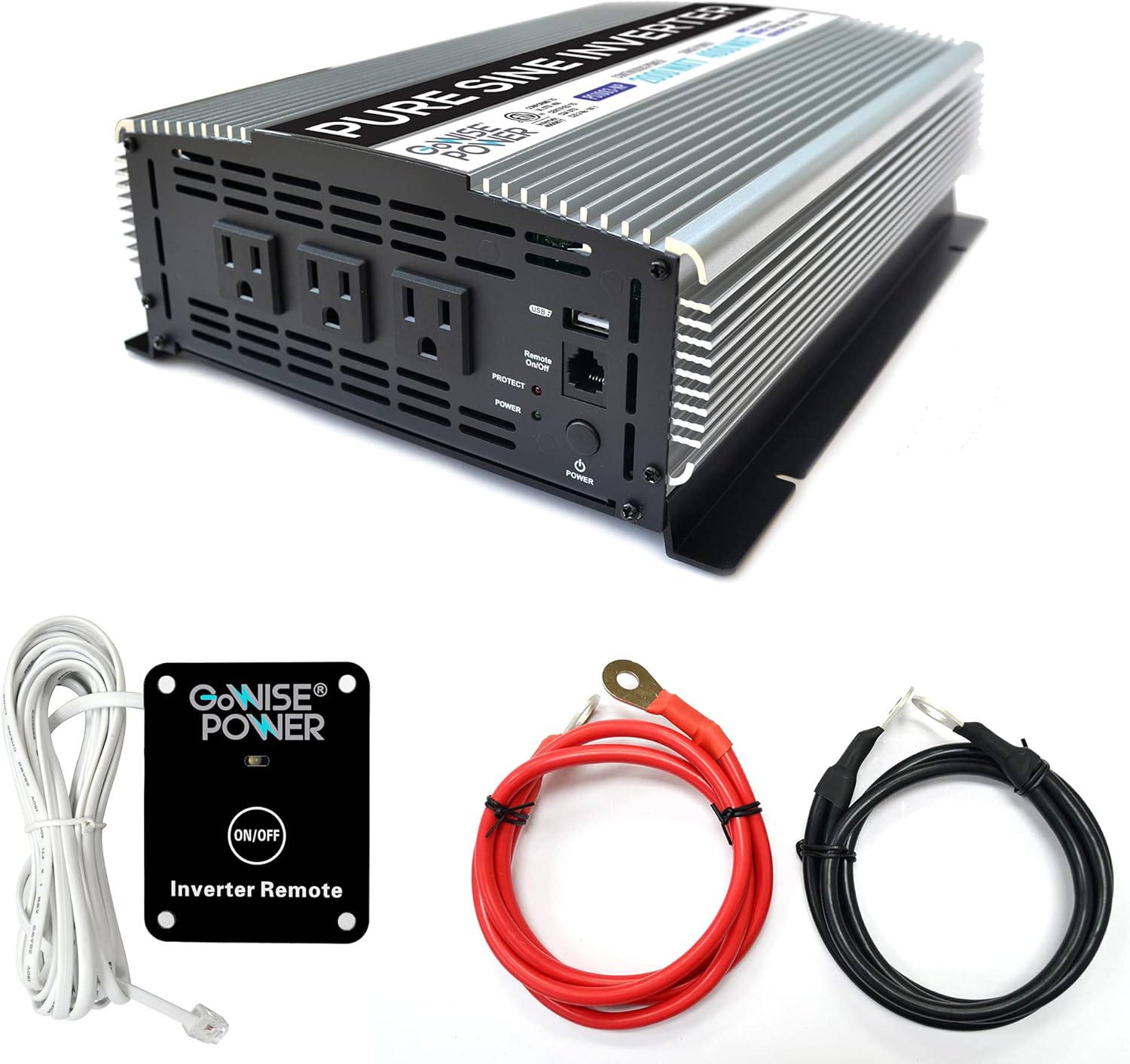
Image 1.1: GoWISE Power 2000W Pure Sine Wave Power Inverter with included accessories.
- GoWISE Power 2000W Pure Sine Wave Power Inverter (Model PS1003)
- Remote Switch with connecting cable
- One pair of Black and Red Battery Cables with ring terminals
- Manual d'instruccions (aquest document)
2. Informació de seguretat
Read all safety warnings and instructions carefully before installing or operating the inverter. Failure to follow these instructions may result in electric shock, fire, serious injury, or property damage.
2.1. Precaucions generals de seguretat
- Keep the inverter away from moisture, water, rain, and snow.
- No feu funcionar l'inversor si s'ha caigut o s'ha fet malbé.
- Do not disassemble the inverter. Incorrect reassembly may result in electric shock or fire.
- To reduce the risk of electric shock, unplug the inverter from the outlet before attempting any maintenance or cleaning.
- Avoid placing the inverter in direct sunlight or near heating vents.
- Assegureu-vos que hi hagi una ventilació adequada al voltant de l'inversor. No bloquegeu les obertures de ventilació.
- Aquest dispositiu no està pensat per ser utilitzat per persones (inclosos nens) amb capacitats físiques, sensorials o mentals reduïdes, o amb manca d'experiència i coneixements, tret que hagin rebut la supervisió o instruccions sobre l'ús de l'aparell per una persona responsable de la seva seguretat. .
2.2. Seguretat elèctrica
- Connecteu l'inversor només a una font d'alimentació de 12 V CC.
- Ensure the battery cables are connected with correct polarity (red to positive, black to negative). Incorrect connection will damage the inverter.
- Do not connect the inverter to AC distribution wiring.
- Always connect the inverter to a properly grounded electrical system.
- Before connecting or disconnecting any cables, ensure the inverter is turned off.
- Comproveu que el wat totaltagLa potència nominal de tots els aparells connectats no supera la potència nominal contínua de l'inversor (2000 W).
3. Configuració i instal·lació
3.1. Triar una ubicació
Select a location for the inverter that is:
- Dry and protected from water.
- Ben ventilat per permetre la dissipació de la calor.
- Allunyat de la llum solar directa i de fonts de calor.
- Fixat de manera segura per evitar moviments.
- As close as possible to the 12V DC power source to minimize cable length and voltage gota.
3.2. Instruccions de cablejat
Follow these steps to connect the inverter to your 12V DC power source:
- Prepareu l'inversor: Assegureu-vos que l'interruptor d'alimentació de l'inversor estigui en la posició OFF.
- Connecteu el cable de terra: Connect one end of a suitable ground wire (not supplied) to the inverter's ground terminal (marked with a ground symbol) and the other end to a proper earth ground point (e.g., vehicle chassis, ground rod).
- Connect DC Cables to Inverter:Connect the ring terminal of the red battery cable to the positive (+) DC input terminal on the inverter. Connect the ring terminal of the black battery cable to the negative (-) DC input terminal on the inverter. Tighten the terminal nuts securely.

Image 3.1: Rear panel of the inverter with DC input terminals.
- Connect DC Cables to Battery: Connect the other end of the red battery cable to the positive (+) terminal of your 12V DC battery. Connect the other end of the black battery cable to the negative (-) terminal of your 12V DC battery. Ensure these connections are tight and secure.
- Remote Switch Connection (Optional): If using the remote switch, plug its cable into the RJ45 port labeled 'Remote On/Off' on the front panel of the inverter.

Image 3.2: Remote switch and battery cables.
Important: Always ensure proper cable gauge for your application. Inadequate cable size can lead to voltage drop and reduced performance or damage.
4. Instruccions de funcionament
4.1. Encès / apagat

Image 4.1: Front panel of the inverter.
- Encendre: Press and hold the main POWER button on the inverter's front panel for a few seconds until the green POWER indicator light illuminates. If using the remote switch, ensure the main power button on the inverter is in the ON position, then press the ON/OFF button on the remote.
- Apagar: Press and hold the main POWER button on the inverter's front panel until the green POWER indicator light turns off. If using the remote switch, press the ON/OFF button on the remote.
4.2. Using AC Outlets and USB Port
- Once the inverter is powered on, you can plug your 120V AC appliances into the three standard AC outlets.
- For charging USB devices, connect them to the 5V USB port.
- Assegureu-vos que el consum total d'energia de tots els dispositius connectats no superi els 2000 W.
4.3. Operació de control remot
The included remote switch allows you to turn the inverter on and off from a distance. Simply plug the remote cable into the designated RJ45 port on the inverter's front panel. The remote has an ON/OFF button and an indicator light.
5. Característiques de protecció
The GoWISE Power Inverter is equipped with multiple protection systems to ensure safe operation and protect both the inverter and your connected devices.

Image 5.1: Inverter protection systems.
- Protecció tèrmica: Automatically shuts down the inverter if its internal temperature exceeds a safe limit. This prevents damage from overheating.
- Protecció de sobrecàrrega: Activates if the total power draw from connected devices exceeds the inverter's rated capacity. The inverter will shut down to prevent damage.
- Més del voltage Protecció: Protects the inverter from damage if the input DC voltage from the battery exceeds a safe operating level.
- Sota el voltage Protecció: Shuts down the inverter if the input DC voltage drops below a critical level, protecting the battery from deep discharge.
- Volum baixtage Protection Alarm: An audible alarm will sound when the battery voltage is getting low, providing a warning before the inverter shuts down due to under voltage.
When a protection system is triggered, the inverter will typically shut down, and the PROTECT indicator light on the front panel may illuminate. Disconnect the load, resolve the issue, and then restart the inverter.
6. Manteniment
Un manteniment regular garanteix un rendiment òptim i una llarga vida útil del vostre inversor.
- Neteja: Periodically clean the exterior of the inverter with a soft, dry cloth. Do not use abrasive cleaners or solvents. Ensure ventilation openings are free from dust and debris.
- Inspecció del cable: Regularly inspect battery cables and connections for any signs of wear, corrosion, or looseness. Tighten connections as needed.
- Ventilació: Ensure the area around the inverter remains clear to allow for proper airflow and cooling.
- Emmagatzematge: Si guardeu l'inversor durant un període prolongat, desconnecteu-lo de la bateria i guardeu-lo en un lloc fresc i sec.
7. Solució De Problemes
Aquesta secció tracta problemes comuns que podeu trobar amb el vostre inversor.
| Problema | Causa possible | Solució |
|---|---|---|
| L'inversor no s'encén. | No DC input power; Loose battery connections; Inverter switch off; Remote switch off (if used). | Comproveu el volum de la bateriatage; Ensure battery cables are securely connected; Turn on inverter's main power switch; Turn on remote switch. |
| No AC output, PROTECT light on. | Overload; Overheating; Low battery voltage; High battery voltage. | Reduce connected load; Allow inverter to cool down; Recharge battery; Check battery charging system. |
| Vol baixtage sona l'alarma. | Bateria voltage és baixa. | Recharge or replace the battery. Reduce load to extend battery life. |
| Connected appliance does not work. | Appliance requires more power than inverter can provide; Appliance is faulty. | Check appliance wattage; Try appliance with a standard AC outlet; Ensure inverter is providing power. |
| Fans are running loudly. | Inverter is under heavy load or operating in a warm environment. | This is normal operation. Ensure adequate ventilation. |
8. Especificacions
Technical details for the GoWISE Power 2000W Pure Sine Wave Power Inverter (Model PS1003).

Image 8.1: Inverter dimensions.
| Característica | Especificació |
|---|---|
| Model | PS1003 |
| Potència contínua | 2000 watts |
| Potència de sobretensió | 4000 watts |
| Entrada Voltage | 12 V CC (200 A) |
| Vol. De sortidatage | 120 V AC |
| Freqüència de sortida | 60 Hz |
| Forma d'ona de sortida | Onda senyal pura |
| Sortida USB | 5V CC, 2.1A |
| Distorsió harmònica total (THD) | <3% |
| Dimensions (L x A x A) | 17.1 x 9.3 x 4 inches (approx. 13" x 9.75" x 3.5" based on image) |
| Pes de l'article | 11.4 lliures |
| Sistemes de protecció | Thermal, Overload, Over Voltage, sota el voltage, Vol baixtage Alarma |
9. Garantia i Suport
9.1. Informació de la garantia
GoWISE Power products are designed for reliability. For specific warranty terms and conditions, please refer to the documentation included with your purchase or contact GoWISE Power customer support.
9.2. Atenció al client
If you require further assistance or have questions not covered in this manual, please contact GoWISE Power customer support. You can also refer to the official PDF user manual for additional details:


