Introducció
The Foscam R2 Home Security Camera is designed to provide comprehensive surveillance for your home, children, pets, or business. This Full HD 1080P WiFi IP camera offers real-time video at 25 frames per second, pan and tilt capabilities with 8X digital zoom, and intelligent motion detection with alerts. It supports various recording methods including local storage via MicroSD card, Network Video Recorder (NVR), and optional cloud service, giving you full control over your security footage.

Figura 1: Frontal view of the Foscam R2 Home Security Camera.
Contingut del paquet
Verifiqueu que tots els elements siguin presents al vostre paquet:
- Foscam R2 Security Camera
- Antena sense fil
- Suport de muntatge
- Power Supply / Security Camera Adapter
- Guia d'instal·lació ràpida
- Manual d'usuari

Figure 2: Contents included in the Foscam R2 product package.
Característiques clau
- Resolució Full HD 1080P: Captures video at 1920x1080 pixels at 25 frames per second, powered by an Ambarella chipset for real-time video streaming.
- Senyal WiFi fort: Equipped with a 2.4G antenna for extended range and optional higher gain antenna (5db) support.
- Emmagatzematge al núvol: Offers 8 hours of free cloud storage with 12 months' validity for Foscam Cloud subscribers, with no data space limitation during the last 8 hours. Utilizes US-based AWS servers for high-level encrypted security.
- Camp Ampli de View & Pan/Tilt: Features a 2.0 MP optical lens (f=2.8mm) with a 110° view angle, 350° horizontal pan, and 100° vertical tilt for 360° coverage.
- Visió nocturna: Provides clear night vision up to 26 feet using 13 IR LEDs.
- Fàcil configuració i compatibilitat: Quick setup via the Foscam App for iOS and Android devices. Compatible with Foscam VMS (Video Management Software), third-party VMS like Blue Iris, ONVIF recording devices, and web browsers (IE, Chrome).
- Xerrada bidireccional: High-quality two-way audio with noise reduction.

Figure 3: Visual representation of Foscam R2's key features.
Configuració
Initial Setup with Foscam App
- Download the Foscam App: Cerca "Foscam" in your device's app store (iOS/Android) and install it.
- Enceneu la càmera: Connect the camera to the power supply using the provided adapter. The camera will initiate its startup sequence.
- Connecteu-vos a la xarxa:
- WPS Setup (Recommended for quick setup): Ensure your router has a WPS button. Press the WPS button on your router, then press the WPS button on the side of the camera's base. The camera will connect to your WiFi network automatically.
- Configuració del codi QR: Open the Foscam App, select "Add New Device," and scan the QR code located on the camera. Follow the on-screen prompts, which may include connecting your phone to the camera's temporary WiFi hotspot and then selecting your home WiFi network.
- Configuració per cable: For initial setup or if wireless connection is difficult, connect the camera directly to your router using an Ethernet cable.
- Crea un compte d'usuari: Follow the Voice Setup Wizard and app prompts to create a secure username and password for your camera. This is crucial for security.

Figure 4: Using the Foscam app for pan and tilt control.
MicroSD Card Installation (for Local Recording)
The Foscam R2 supports local recording to a MicroSD card (not included). This allows the camera to record footage directly without requiring a constant internet connection or cloud subscription. The camera records to the SD card when motion is detected.
- Locate the MicroSD card slot on the camera (refer to the physical camera for exact location, typically on the side or bottom).
- Introduïu suaument la targeta MicroSD a la ranura fins que encaixi al seu lloc.
- Within the Foscam App or web interface, navigate to the storage settings to format the MicroSD card and enable local recording.
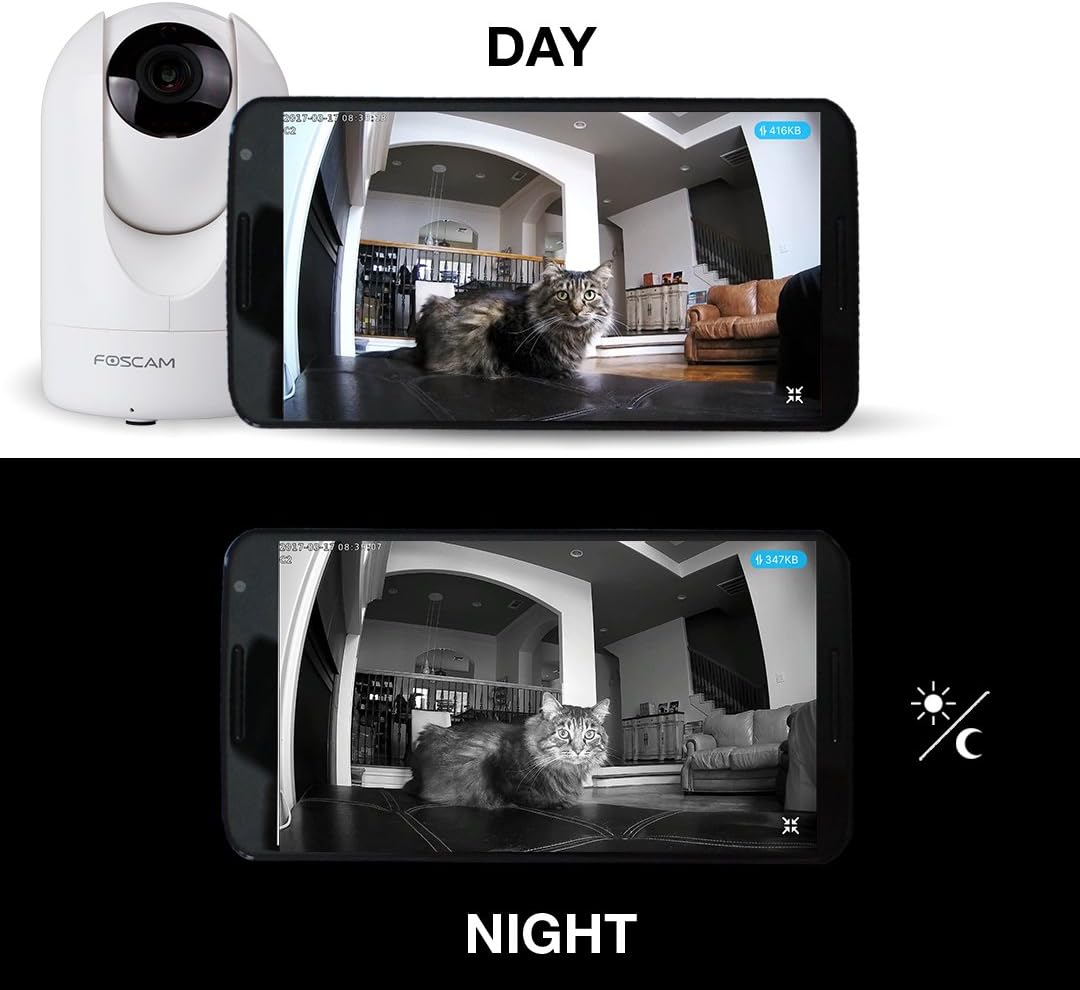
Figure 5: Day and Night vision capabilities of the Foscam R2.
Instruccions de funcionament
Viu View i Control
Access live video streams and control your camera through the Foscam App or the web interface. The app provides intuitive controls for pan, tilt, and digital zoom.

Figura 6: Viewing 1080P HD live feed on mobile and desktop.
Detecció de moviment i alertes
The camera features intelligent motion detection. When motion is detected, the camera can:
- Envia notificacions push al teu dispositiu mòbil.
- Record video clips to the MicroSD card or cloud storage.
- Send email alerts.
You can configure motion detection zones and sensitivity settings within the Foscam App or web interface to minimize false alarms.

Figure 7: Motion detection alert displayed on a smartphone.
Àudio bidireccional
Utilize the built-in microphone and speaker for two-way communication. This feature allows you to listen in on the camera's environment and speak through the camera from your mobile device.
Visió nocturna
The Foscam R2 automatically switches to infrared night vision mode in low-light conditions, providing clear black-and-white video up to 26 feet.
Gravació al núvol
Foscam offers an optional cloud service for storing recorded video. This provides off-site backup and access to your footage from anywhere. Review recorded events via the cloud recording timeline in the Foscam App or web interfície.
Video 1: Official Foscam video demonstrating various features of the Foscam Home Security Camera, including remote viewing, motion detection, and two-way audio. This video highlights the camera's capabilities for home monitoring.
Manteniment
To ensure optimal performance and longevity of your Foscam R2 camera:
- Neteja: Netegeu suaument la lent i el cos de la càmera amb un drap suau i sec. Eviteu utilitzar productes químics agressius o netejadors abrasius.
- Col·locació: Assegureu-vos que la càmera estigui col·locada en un lloc estable, allunyat de la llum solar directa, de fonts de calor i d'humitat excessiva.
- Actualitzacions de firmware: Regularly check for and install firmware updates through the Foscam App or web interface to ensure the camera has the latest features and security enhancements.
Resolució de problemes
If you encounter issues with your Foscam R2 camera, consider the following:
- Connectivity Issues (Offline/Lagging Video):
- Assegureu-vos que la càmera estigui dins de l'abast del vostre encaminador WiFi.
- Comproveu la vostra connexió a Internet.
- Reinicieu la càmera i el router.
- If using the Foscam app and experiencing lag, consider using a third-party app or accessing the camera via a web browser (e.g., Firefox) on a desktop, as some users report smoother performance.
- Motion Detection Not Triggering/Too Sensitive:
- Ajusteu la configuració de sensibilitat de detecció de moviment a l'aplicació.
- Define specific motion detection zones to exclude areas with frequent irrelevant movement (e.g., trees swaying).
- Poca qualitat de vídeo:
- Assegureu-vos que la lent estigui neta.
- Check your network bandwidth, especially if streaming over a limited internet connection, as the MJPEG format can consume significant data.
- Longitud del cable d'alimentació: The provided power cord may be short for ceiling mounting. An extension or alternative power supply (5V, 2000mA rated) may be required.
Especificacions
| Característica | Especificació |
|---|---|
| Nom del model | Foscam Security camera (R2W) |
| Resolució de captura de vídeo | 1080p (1920x1080) at 25FPS |
| Tecnologia de connectivitat | Wireless (Wi-Fi, 2.4G band), Ethernet |
| Interval de panoràmica/inclinació | 350° Horizontal Pan, 100° Vertical Tilt |
| Camp de View | 110 graus |
| Zoom digital | 8x |
| Gamma de visió nocturna | Up to 26 Feet (13 IR LEDs) |
| Àudio | Two-Way Talk (Built-in mic & speaker) |
| Opcions d'emmagatzematge | MicroSD Card (up to 128GB), NVR, Cloud Service |
| Font d'alimentació | AC/DC (5V, 2000mA) |
| Dimensions (L x A x A) | 2.91 x 4.6 x 2.91 polzades |
| Pes de l'article | 8 unces (227 grams) |
| Ús interior/exterior | Interior |
Garantia i Suport
The Foscam R2 Home Security Camera comes with a full 1-year USA Warranty, ensuring peace of mind regarding your purchase.
For detailed instructions, advanced configurations, or further assistance, please refer to the official User Manual (PDF) and User Guide (PDF) available through the following links:


