1. Introducció
Gràcies per la compraasing the UNIC UC40 Mini Portable Multimedia Projector. This compact and versatile projector is designed to transform your viewing experience, allowing you to enjoy movies, presentations, and games on a large screen. Its multiple connectivity options make it compatible with a wide range of devices, offering convenience and portability.
Característiques principals:
- Resolució nativa: 320 x 240 píxels
- Screen Size: 20 to 60 inches (optimal viewing in dark environments)
- Connectivity: HDMI, USB, VGA, AV, SD Card
- Audio Output: 3.5mm jack for external speakers
- Disseny portàtil i lleuger
2. Precaucions de seguretat
Llegiu atentament totes les instruccions de seguretat abans d'utilitzar el projector. Si no seguiu aquestes instruccions, podeu patir incendis, descàrregues elèctriques o altres lesions.
- No bloquegeu les obertures de ventilació. Assegureu-vos que hi hagi un flux d'aire adequat al voltant del projector per evitar el sobreescalfament.
- No mireu directament a la lent del projector quan estigui encès.amp està encès. La llum brillant pot causar lesions oculars.
- Keep the projector away from water or any liquids. Do not operate in wet environments.
- Feu servir només l'adaptador de corrent que s'inclou amb el projector.
- No intenteu desmuntar ni reparar el projector vosaltres mateixos. Encarregueu totes les tasques de manteniment a personal qualificat.
- Col·loqueu el projector sobre una superfície estable i plana per evitar que caigui.
3. Contingut del paquet
Verifiqueu que tots els articles que s'enumeren a continuació s'inclouen al vostre paquet. Si falta algun article o està malmès, poseu-vos en contacte amb el vostre distribuïdor.
- UNIC UC40 Mini Portable Multimedia Projector
- Control remot
- Adaptador d'alimentació
- Cable AV
- Manual d'usuari (aquest document)

Figure 3.1: Package Contents - UNIC UC40 Projector, remote, power adapter, and AV cable.
4. Producte acabatview
Familiarize yourself with the various parts and connections of your UNIC UC40 projector.

Figura 4.1: superior View of UNIC UC40 Projector with control panel.
Tauler de control i ports:
- Lent: Projects the image.
- Anell de focus: Ajusta la nitidesa de la imatge.
- Correcció Keystone: Adjusts image distortion (if available, not explicitly listed but common).
- Botons de control: Power, Menu, Input, Navigation (Up/Down/Left/Right), Enter/OK, Exit/Return.
- Port USB: Connecteu unitats USB per a la reproducció de contingut multimèdia.
- Ranura per a targeta SD: Inseriu targetes SD per a la reproducció multimèdia.
- Port HDMI: Connect HDMI-enabled devices (laptops, gaming consoles, Blu-ray players).
- Port VGA: Connect computers via VGA cable.
- Port AV: Connect devices using the included AV cable (DVD players, set-top boxes).
- Sortida d'àudio de 3.5 mm: Connecteu altaveus externs o auriculars.
- DC IN: Port d'entrada d'alimentació.
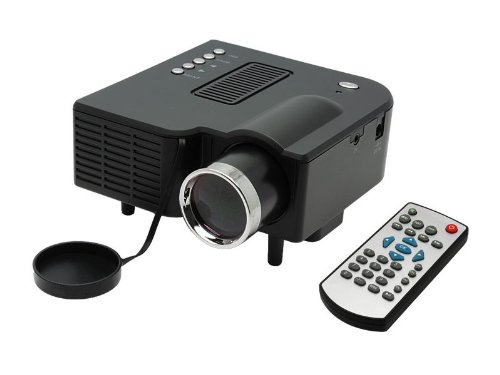
Figure 4.2: UNIC UC40 Projector and Remote Control.
5. Configuració
5.1 Connexió d'alimentació
- Connect the power adapter to the "DC IN" port on the projector.
- Connecteu l'altre extrem de l'adaptador d'alimentació a una presa de corrent.
- L'indicador lluminós d'engegada del projector s'il·luminarà.
5.2 Col·locació
Per a un òptim viewing, place the projector on a stable, flat surface. The ideal projection distance for a clear image is between 1.2 to 3.8 meters (approximately 4 to 12.5 feet), yielding a screen size of 20 to 60 inches. A darker room environment is highly recommended for the best picture quality due to the projector's lumen output.
5.3 Ajust del focus
- Enceneu el projector.
- Rotate the focus ring on the front of the projector until the projected image appears clear and sharp.
5.4 Connexió de dispositius
The UNIC UC40 supports multiple input sources:
- HDMI: Connect laptops, gaming consoles, Blu-ray players, or other HDMI-enabled devices using an HDMI cable.
- VGA: Connect desktop computers or older laptops using a VGA cable.
- DE: Use the included AV cable to connect DVD players, VCD players, or set-top boxes.
- USB: Insert a USB flash drive or external hard drive (up to 2TB, ensure sufficient power) into the USB port for direct media playback.
- Targeta SD: Insert an SD card into the SD card slot for direct media playback.
Note: For connecting a CPU, use the VGA port. For better sound, connect external speakers or a home theater system via the 3.5mm audio out port.
6. Instruccions de funcionament
6.1 Encès/Apagat
- Encès: Premeu el botó Poder botó del projector o del comandament a distància.
- Apagar: Premeu el botó Poder button again. The projector will shut down.
6.2 Navegació de menús
Feu servir els botons de navegació (Amunt, Avall, Esquerra, Dreta) on the projector or remote to move through menu options. Press Introduïu/D'acord to confirm a selection. Press ESC/Return to go back to the previous menu or exit.
6.3 Selecció de la font d'entrada
After connecting your device, press the Entrada button on the projector or remote control. A menu will appear allowing you to select the desired input source (HDMI, VGA, AV, USB, SD).
6.4 Reproducció multimèdia (USB/SD)
When a USB drive or SD card is inserted, the projector will typically prompt you to select the media type (Movie, Music, Photo, Text). Navigate to your desired file i premeu Introduïu/D'acord per jugar.
6.5 Sortida d'àudio
The projector has a built-in speaker. For a more immersive audio experience, connect external speakers or a home theater system to the 3.5mm audio out port on the projector.
7. Manteniment
- Neteja de lents: Feu servir un drap suau i sense borrissol dissenyat específicament per a lents òptiques per netejar suaument la lent del projector. No utilitzeu productes de neteja abrasius ni força excessiva.
- Ventilació: Regularly check that the ventilation openings are clear of dust and debris. Do not place the projector on soft surfaces that might block airflow.
- Emmagatzematge: When not in use for extended periods, store the projector in a cool, dry place, away from direct sunlight and extreme temperatures. Use the original packaging or a protective case.
- Cable d'alimentació: Inspect the power cord regularly for any damage. If damaged, replace it with an approved cord.
8. Solució De Problemes
Si teniu problemes amb el projector, consulteu els problemes i solucions més comuns següents:
| Problema | Possible causa/solució |
|---|---|
| No es projecta cap imatge |
|
| La imatge està borrosa o desenfocada |
|
| Sense so |
|
| Image quality is poor/pixelated |
|
| El projector es sobreescalfa |
|
9. Especificacions
| Característica | Detall |
|---|---|
| Marca | UNIC |
| Model | UC40 |
| Resolució nativa | 320 x 240 píxels |
| Tecnologia de visualització | LCD |
| Screen Size (Recommended) | 20 - 60 polzades |
| Connectivitat | HDMI, USB, VGA, AV, SD Card |
| Sortida d'àudio | 3.5mm Àudio Jack |
| Consum d'energia | 24 watts |
| Pes de l'article | 750 g |
| Dimensions (aprox.) | 25.6 x 16.6 x 14.2 cm (Dimensions del paquet) |
10. Garantia i Suport
The UNIC UC40 Mini Portable Multimedia Projector comes with a standard manufacturer's warranty. Please refer to your purchase documentation for specific warranty terms and conditions. For technical support, service, or warranty claims, please contact your original retailer or the manufacturer's customer service department.
Conserva el comprovant de compra per validar la garantia.


