1. Introducció
This manual provides essential information for the setup, operation, and maintenance of your MikroTik RouterBoard RB951Ui-2nD hAP device. The hAP is designed as a compact home access point suitable for small offices, offering wireless connectivity and multiple wired ports.

Figura 1.1: Key Features of the MikroTik hAP. This image highlights the main technical specifications and capabilities of the device, including its wireless standard, CPU, RAM, PoE output, and USB port.
Key features include a 2.4 GHz dual-chain wireless interface, a 650 MHz CPU, 64 MB of RAM, Passive PoE output on port 5, and a USB port for 3G/4G modems. The device is preconfigured for ease of use.

Figura 1.2: Acabatview of the MikroTik RouterBoard RB951Ui-2nD hAP. This image displays the device from a top-down angle, highlighting the five Ethernet ports, power input, USB port, and LED indicators.
2. Contingut del paquet
Comproveu que el vostre paquet contingui els elements següents:
- MikroTik RouterBoard RB951Ui-2nD hAP device
- Adaptador de corrent (24V 0.8A)
- Wire (Ethernet cable)
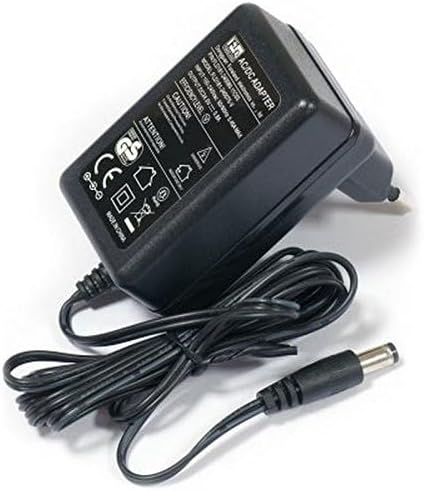
Figura 2.1: Included Power Adapter. This image shows the 24V 0.8A power adapter with its cable and barrel connector.
3. Instruccions de configuració
Follow these steps to set up your MikroTik hAP device:
3.1. Dispositiu acabatview i Ports

Figura 3.1: MikroTik hAP Port Layout. This image illustrates the front panel of the hAP device, clearly labeling the power input, reset button (RES), power indicator (PWR), user LED (USR), Internet port (Ether1), LAN ports (Ether2-4), and the PoE output port (Ether5).
- Entrada d'alimentació: DC 10-28V.
- RES (Botó de reinici): Used for resetting the device to factory defaults.
- PWR (LED d'alimentació): Indica l'estat d'alimentació.
- USR (LED d'usuari): Programmable LED.
- Internet (Ether1): Connect your internet service provider's cable here. This port also supports Passive PoE input.
- LAN (Ether2-4): Connect your wired devices (computers, switches, etc.) to these ports.
- PoE out (Ether5): This port provides Passive PoE output, capable of powering other PoE-capable devices with the same voltage as applied to the unit. Maximum load is 500mA.
- USB: Connect a 3G/4G modem or other USB devices.
3.2. Connexió inicial
- Connecta't a Internet: Plug your internet cable (from your modem or ISP) into the port labeled "Internet" (Ether1) on the hAP device.
- Connectar l'alimentació:
- If using the included power adapter: Connect the power adapter to the "Power" jack on the device, then plug the adapter into a wall outlet.
- If using Passive PoE: Connect a Passive PoE injector to the "Internet" (Ether1) port. The device can be powered via this port.
- Encès: The device will power on automatically. Wait for the PWR LED to stabilize.
- Connecteu-vos a la xarxa:
- Amb cable: Connect a computer to any of the "LAN" ports (Ether2-4) using an Ethernet cable.
- Sense fil: Cerca available Wi-Fi networks on your computer or mobile device. The hAP is preconfigured with a default MikroTik wireless network. Connect to this network.
- Configuració d'accés: Un cop connectat, obriu a web navegador i navegueu fins a l'adreça IP predeterminada (normalment http://192.168.88.1). You will be prompted to log in. The default username is admin with no password. It is highly recommended to set a strong password immediately after initial login.
4. Instruccions de funcionament
The MikroTik hAP runs RouterOS, a powerful operating system that offers extensive configuration options.
4.1. Basic Network Functionality
- Accés a Internet: After connecting the internet cable and powering on, your devices connected to the hAP (wired or wireless) should automatically obtain an IP address and have internet access.
- Wireless Access Point: The hAP functions as a wireless access point, allowing Wi-Fi enabled devices to connect to your network. The default wireless network name (SSID) and password can be found on the device label or in the initial configuration.
- Connectivitat per cable: Use the LAN ports (Ether2-4) to connect devices that require a stable wired connection, such as desktop computers, smart TVs, or network printers.
4.2. Advanced Configuration (RouterOS)
For advanced network configurations, such as setting up firewalls, VPNs, VLANs, or customizing wireless settings, you will need to use the RouterOS interface. This can be accessed via:
- WebFiga: El web-based graphical user interface (GUI) accessible through your browser at the device's IP address.
- Caixa de vins: A dedicated Windows application for managing MikroTik devices.
- CLI (Command Line Interface): Accessible via SSH for experienced users.
Detailed documentation and guides for RouterOS are available on the official MikroTik weblloc.
5. Manteniment
Regular maintenance ensures optimal performance and security of your hAP device.
- Actualitzacions de firmware: Revisa el MikroTik periòdicament website for RouterOS updates. Keeping your firmware updated provides new features, performance improvements, and security patches.
- Neteja física: Mantingueu el dispositiu net de pols i brutícia. Feu servir un drap suau i sec per netejar-lo. No utilitzeu netejadors líquids.
- Condicions ambientals: Assegureu-vos que el dispositiu estigui col·locat en un lloc ben ventilat, allunyat de la llum solar directa, de fonts de calor i de la humitat.
- Configuració de còpia de seguretat: Regularly back up your device's configuration using the RouterOS interface. This allows for quick restoration in case of unexpected issues or device replacement.
6. Solució De Problemes
If you encounter issues with your MikroTik hAP, refer to the following common troubleshooting steps:
- Sense energia:
- Assegureu-vos que l'adaptador de corrent estigui connectat correctament tant al dispositiu com a una presa de corrent que funcioni.
- If using PoE, verify the PoE injector is functioning and connected correctly.
- Check the PWR LED on the device; if it's off, there might be a power issue.
- Sense accés a Internet:
- Verify that the internet cable is securely plugged into the "Internet" (Ether1) port.
- Check your modem or ISP connection to ensure it is active.
- Log into RouterOS and check the status of the Ether1 interface.
- No es pot connectar a Wi-Fi:
- Ensure the wireless interface is enabled in RouterOS.
- Verifiqueu que esteu utilitzant el nom de xarxa Wi-Fi (SSID) i la contrasenya correctes.
- Check if the device is within range of the hAP.
- Forgot Password / Device Unresponsive:
- You can reset the device to factory defaults by holding the RES button during power-up until the USR LED starts flashing, then release it. Avís: This will erase all your configurations.
- Rendiment lent:
- Comproveu si hi ha congestió o interferències a la xarxa.
- Assegureu-vos que el firmware del dispositiu estigui actualitzat.
- Monitor CPU and memory usage in RouterOS.
For more detailed troubleshooting, consult the MikroTik documentation or support resources.
7. Especificacions
Key technical specifications for the MikroTik RouterBoard RB951Ui-2nD hAP:
| Característica | Detall |
|---|---|
| Codi de producte | RB951Ui-2nD |
| Freqüència nominal de la CPU | 650 MHz |
| CPU Core Count | 1 |
| Mida de la memòria RAM | 64 MB |
| Ports Ethernet 10/100 | 5 |
| Sense fil | Built-in 2.4 GHz 802.11b/g/n, dual-chain |
| Guany de l'antena | 1.5 dBi |
| PoE In | Yes (Passive PoE) |
| PoE Out | Yes (Ether5, Passive PoE, max 500mA) |
| Entrada compatible Voltage | 6 V - 30 V (Jack or Passive PoE) |
| Port USB | USB 2.0 Type A full size port, 1A |
| Sistema operatiu | RouterOS |
| Dimensions | 113 x 89 x 28 mm |
| Consum màxim d'energia | 5 W |

Figura 7.1: Detailed Specifications. This image presents a table summarizing the technical specifications of the RB951Ui-2nD hAP.
8. Garantia i Suport
For warranty information, please refer to the documentation provided with your purchase or visit the official MikroTik weblloc.
For technical support, detailed documentation, and community forums, please visit the official MikroTik weblloc: https://mikrotik.com/.