1. Introducció
This manual provides comprehensive instructions for the setup, operation, maintenance, and troubleshooting of your Avaya 9508 Digital Deskphone. Designed for small and medium-sized businesses, this deskphone offers reliable and high-quality communication solutions.
The Avaya 9508 Digital Deskphone features an intuitive design and functionality, making it an ideal choice for various user types in mixed digital/IP telephony environments.
2. Configuració
Follow these steps to set up your Avaya 9508 Digital Deskphone:
- Connecteu el telèfon: Plug one end of the coiled cord into the handset and the other end into the handset jack on the side of the phone base.
- Connect the Network Cable: Connect a digital line cable from your wall jack to the port labeled "Digital Line" on the back of the phone.
- Connecteu l'alimentació (si escau): If your system requires external power, connect the power adapter to the phone and a power outlet.
- Posicioneu el telèfon: Place the phone on a stable surface. The integrated stand allows for an angled viewposició d'ingrés.
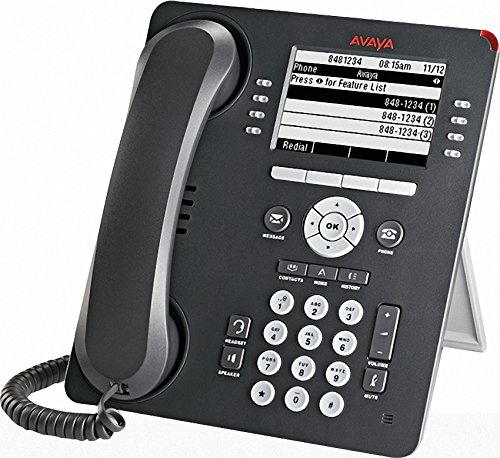
Figure 1: Avaya 9508 Digital Deskphone. This image shows the complete phone unit, including the handset, display screen, and the full keypad with various function buttons.
3. Instruccions de funcionament
3.1 Funcions de trucada bàsiques
- Fer una trucada: Aixequeu el telèfon o premeu Altaveu button. Dial the desired number.
- Respondre una trucada: Aixequeu el telèfon o premeu Altaveu botó quan sona el telèfon.
- Finalització d'una trucada: Pengeu l'auricular o premeu la tecla Phone/Exit botó.
3.2 Keypad and Display
The phone features a clear display and a standard 12-button dial pad. Soft keys below the display provide context-sensitive options.
- Clúster de navegació: Utilitza el OK button and surrounding arrow keys to navigate menus and select options on the display.
- Tecles programades: The buttons adjacent to the display (as seen in Figure 1) change function based on the current menu or call state. The OCR shows "Press for Feature List" as a display option, indicating dynamic soft key functionality.
3.3 Botons de funció
- Missatge: Access your voicemail messages. A red indicator light next to this button signals new messages.
- Contactes: Access your stored contact directory.
- Menú: Access the phone's main menu for settings and features.
- Registre de trucades: View a list of recent incoming, outgoing, and missed calls. A red indicator light next to this button signals new missed calls.
- Reposició: Torna a marcar l'últim número trucat.
- Altaveu: Toggle speakerphone mode on or off.
- Silenciar: Mute your microphone during a call.
- Volum: Adjust the volume for the handset, speaker, or ringer.
- Auriculars: Activate or deactivate the headset port.
- Aguanta: Posa una trucada activa en espera.
- Conferència: Inicieu una trucada de conferència.
- Transferència: Transfer an active call to another extension or external number.
- Gota: Disconnect an active call.
4. Manteniment
To ensure the longevity and proper functioning of your Avaya 9508 Digital Deskphone, follow these simple maintenance guidelines:
- Neteja: Utilitzeu un suau, damp cloth to clean the phone's surface. Avoid abrasive cleaners or solvents. Do not spray liquids directly onto the phone.
- Medi ambient: Keep the phone away from excessive heat, direct sunlight, and moisture. Ensure proper ventilation.
- Gestió de cordons: Avoid tangling or excessive pulling on the handset and network cords to prevent damage.
5. Solució De Problemes
If you encounter issues with your Avaya 9508 Digital Deskphone, refer to the following common problems and solutions:
- Sense to de marcatge:
- Check that the network cable is securely connected to both the phone and the wall jack.
- Ensure the phone has power (if using an external adapter).
- La pantalla està en blanc o no respon:
- Verifiqueu la connexió d'alimentació.
- Try restarting the phone by disconnecting and reconnecting the power/network cable.
- Cannot Hear or Be Heard:
- Ajusteu el volum amb el botó Volum botons.
- Assegureu-vos el Silenciar button is not active.
- Comproveu les connexions del microtelèfon i dels auriculars.
- Botons que no responen:
- Reinicieu el telèfon.
- Assegureu-vos que no hi hagi deixalles que obstrueixin els botons.
For persistent issues, contact your system administrator or Avaya support.
6. Especificacions
| Marca | Avaya |
| Número de model | 9508 |
| Fabricant | Avaya |
| Color | Negre |
| Tipus de contestador | Digital |
| Identificació de trucades | No |
| UPC | 712155447561, 033587515940 |
| ASIN | B014FHW9WA |
| Data de primera disponibilitat | 6 de febrer de 2016 |
7. Garantia i Suport
For detailed warranty information, please refer to the documentation provided with your purchase or contact your Avaya reseller. Warranty terms and conditions may vary.
For technical support, contact your IT department or the official Avaya support channels. You can typically find support contact information on the Avaya website or through your service provider.


