1. Introducció
This manual provides detailed instructions for the setup, operation, and maintenance of your Marathon Digital Desktop Clock, Model CL030050BK. This compact and versatile digital clock is designed for use on a desk or nightstand, offering time, date, day of the week, and temperature displays, along with a dual alarm function and a button-activated backlight.
2. Producte acabatview

Figura 2.1: Frontal view of the Marathon Digital Desktop Clock CL030050BK, showing its large digital display with time, date, day, and temperature.
2.1 Característiques clau
- Large, High-Quality Display: Enhanced contrast for clear legibility.
- Nightowl Super Glow Backlight: Button-activated, gentle blue backlight that illuminates for approximately 10 seconds.
- Funció d'alarma dual: Separate alarm settings for weekdays (Monday-Friday) and weekends (Saturday-Sunday).
- Botó Posposa: Conveniently located for temporary alarm suspension.
- Múltiples modes de visualització: Time in 12 or 24-hour format, temperature in Fahrenheit or Celsius.
- Multilingual Day of Week: Displays the day of the week in seven languages: English, Dutch, French, Spanish, Italian, Danish, and German.
- Disseny compacte i lleuger: Ideal for desktop, nightstand, or travel.
2.2 Contingut del paquet
- 1 x Marathon Digital Desktop Clock CL030050BK
- 3 piles AAA (incloses)
- 1 x Manual d'usuari
3. Configuració
3.1 Instal·lació de la bateria
- Localitza la tapa del compartiment de les piles a la part posterior del rellotge.
- Feu lliscar la tapa cap avall per obrir el compartiment.
- Insert 3 new AAA batteries, ensuring the correct polarity (+ and -) as indicated inside the compartment.
- Torneu a col·locar la tapa del compartiment de la bateria lliscant-la cap amunt fins que encaixi al seu lloc.
3.2 Encès inicial
Upon successful battery installation, the clock display will activate, typically showing a default time and date. It is recommended to perform a reset after battery installation to ensure optimal performance.
3.3 Resetting the Clock
To reset the clock, use a thin, pointed object (like a paperclip) to press the recessed RESET button located on the back of the unit. This will clear all settings and return the clock to its factory defaults.
4. Instruccions de funcionament
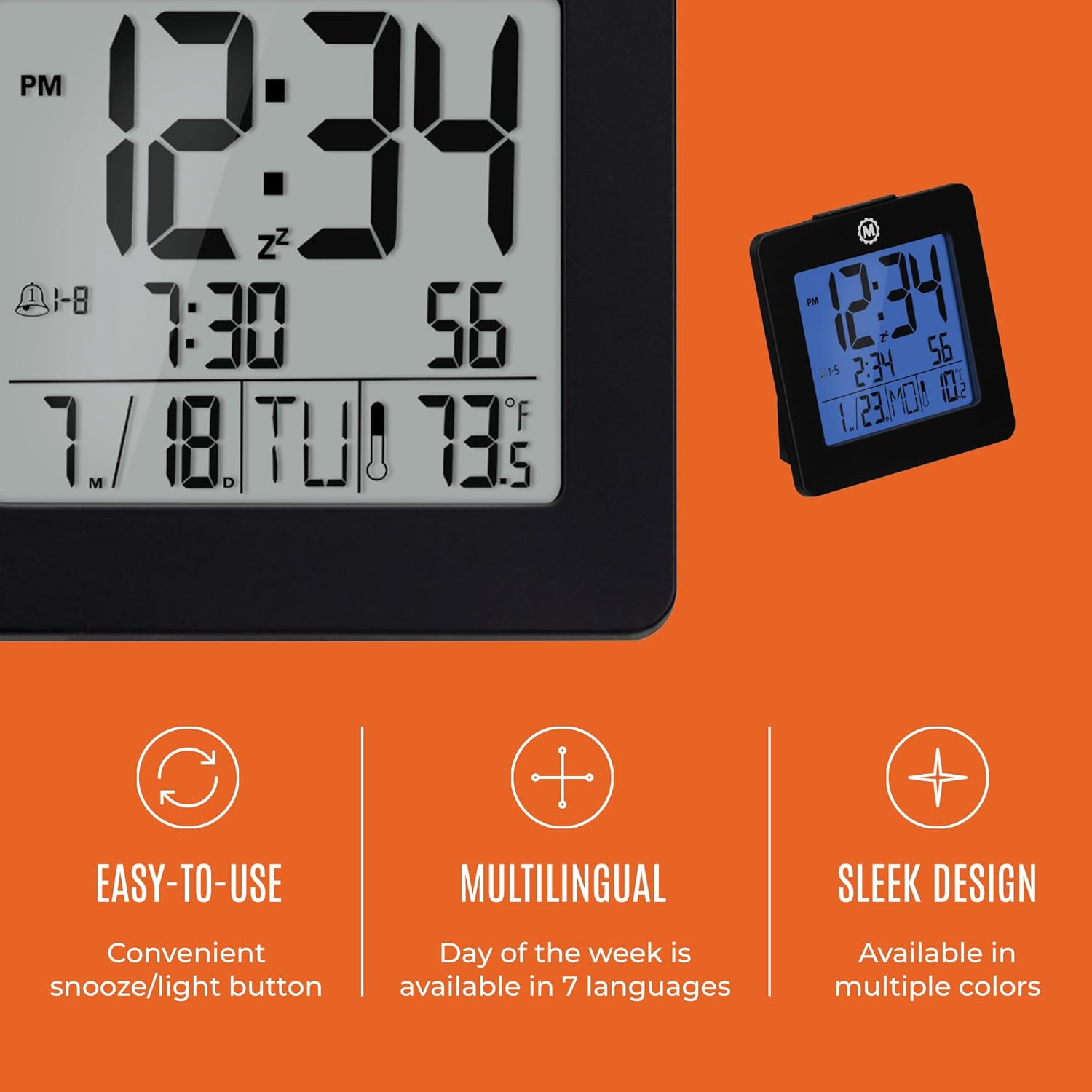
Figura 4.1: Mésview of key features and design elements.
4.1 Funcions dels botons
The clock features several buttons on the back for configuration:
- Mode: Toggles between Time, Alarm, and Timer display modes.
- SET: Enters setting mode for the currently displayed mode (Time, Alarm, Timer).
- UP / 12/24: In setting mode, increases the value. In time display mode, toggles between 12-hour and 24-hour format.
- DOWN / °C/°F: In setting mode, decreases the value. In time display mode, toggles between Celsius and Fahrenheit temperature units.
- LIGHT / SNOOZE: Activates the backlight for 10 seconds. When the alarm sounds, press to activate snooze.
- RESET: Resets the clock to factory defaults (requires a pointed object).
4.2 Configuració de l'hora i la data
- Premeu el botó MODE button until the time is displayed.
- Manteniu premut el botó SET button for approximately 3 seconds until the year flashes.
- Utilitza el UP or ABAIX botons per ajustar l'any.
- Premeu SET to confirm and move to the month setting.
- Repeat steps 3 and 4 to set the month, day, 12/24-hour format, hour, and minute.
- After setting the minutes, press SET to exit time/date setting mode.
4.3 Setting the Day of Week Language
While in time display mode, repeatedly press the UP or ABAIX button to cycle through the 7 available languages for the day of the week display (English, Dutch, French, Spanish, Italian, Danish, German).
4.4 Setting the Temperature Unit
While in time display mode, press the DOWN / °C/°F button to toggle the temperature display between Celsius (°C) and Fahrenheit (°F).
4.5 Setting the Dual Alarm
- Premeu el botó MODE button until the alarm time is displayed (indicated by an alarm icon).
- Manteniu premut el botó SET button for approximately 3 seconds until the alarm hour flashes.
- Utilitza el UP or ABAIX botons per ajustar l'hora de l'alarma.
- Premeu SET to confirm and move to the alarm minute setting.
- Repeat steps 3 and 4 to set the alarm minute.
- After setting the minutes, press SET to select the alarm type: Weekday (1-5) or Weekend (6-7). Use UP or ABAIX per triar.
- Premeu SET per confirmar i sortir del mode de configuració de l'alarma.
- Per activar/desactivar l'alarma, premeu el botó UP button while in alarm display mode. An alarm icon will appear/disappear on the screen.
4.6 Using the Snooze and Backlight
Premeu el gran LLUM / SNOOZE button on the top of the clock to activate the blue backlight. The backlight will remain illuminated for approximately 10 seconds. If the alarm is sounding, pressing this button will activate the snooze function, temporarily silencing the alarm for a short period before it sounds again.
5. Manteniment
- Neteja: Wipe the clock with a soft, dry cloth. Avoid using abrasive cleaners or solvents.
- Substitució de la bateria: Replace all 3 AAA batteries when the display becomes dim or the clock functions erratically. Always replace with new batteries of the same type.
- Emmagatzematge: Si guardeu el rellotge durant un període prolongat, traieu-ne les piles per evitar fuites.
6. Solució De Problemes
| Problema | Causa possible | Solució |
|---|---|---|
| La pantalla està en blanc o tènue. | Bateries baixes o esgotades. | Substituïu les 3 piles AAA. |
| Hora/data incorrecta mostrada. | Settings were not saved or incorrect. | Perform a reset and re-enter time/date settings as per Section 4.2. |
| L'alarma no sona. | L'alarma no està activada o està configurada incorrectament. | Ensure the alarm is activated (alarm icon visible) and the alarm time is correctly set (Section 4.5). |
| La retroiluminació no funciona. | Piles baixes o mal funcionament del botó. | Canvieu les piles. Si el problema persisteix, poseu-vos en contacte amb el servei d'atenció al client. |
7. Especificacions
- Número de model: CL030050BK
- Marca: Marató
- Tipus de visualització: Digital
- Color: Negre
- Dimensions del producte: 3.7 cm d'amplada x 3.7 cm d'alçada
- Pes de l'article: 5.6 unces
- Font d'alimentació: Battery Powered (3 x AAA batteries included)
- Material: Plàstic
- Tipus de muntatge: Taula
- Característica especial: Button-activated backlight, dual alarm, temperature display, multilingual day of week.
8. Garantia i Suport
8.1 Informació de la garantia
This Marathon Digital Desktop Clock CL030050BK comes with a 1 any de garantia des de la data de compra. Aquesta garantia cobreix els defectes de fabricació i la mà d'obra en condicions d'ús normal. No cobreix els danys causats per un mal ús, accidents, modificacions no autoritzades o desgast normal.
8.2 Atenció al client
For technical assistance, troubleshooting, or warranty claims, please visit the official Marathon website or contact their customer service department. Please have your model number and proof of purchase ready when contacting support.


