
Introducció
La caixa forta amb combinació digital gran Master Lock núm. X055ML està dissenyada per protegir objectes valuosos com ara ordinadors portàtils, joies, documents, diners i altres dispositius electrònics dins d'un entorn domèstic. Les seves dimensions internes són adequades per a documents de mida A4. Aquesta caixa forta compta amb un pany electrònic programable, que permet als usuaris establir la seva pròpia combinació, i inclou una clau d'anul·lació per accedir en cas d'oblid d'un codi. L'interior està enmoquetat per evitar ratllades dels objectes emmagatzemats. Per a una major seguretat, la caixa forta es pot tancar amb cargols mitjançant els accessoris inclosos, evitant així la retirada no autoritzada. La robusta construcció d'acer i la porta resistent a les palanques amb dos cargols de bloqueig proporciona un alt nivell de seguretat per a les vostres pertinences.
Informació de seguretat
- Guardeu sempre les claus d'aturada en un lloc segur, lluny de la caixa forta. No les guardeu dins de la caixa forta.
- Assegureu-vos que la caixa forta estigui ben fixada a terra o a la paret per evitar que se la pugui treure no autoritzada, si escau.
- No guardeu materials inflamables ni recipients de líquids oberts dins de la caixa forta.
- Mantingueu el teclat net i sec per garantir un funcionament correcte.
- Canvieu les piles immediatament quan aparegui l'indicador de bateria baixa per evitar que us bloquegeu.
Contingut del paquet
- 1 x Caixa forta de seguretat Master Lock (Model X055ML)
- 2 claus de sobreescriptura
- 1 x Kit de fixació amb cargols (per assegurar la caixa forta)
- Manual d'usuari (aquest document)
Configuració
1. Instal·lació de la bateria
La caixa forta necessita 4 piles AA (no incloses) perquè el pany electrònic funcioni. El compartiment de les piles es troba a l'interior de la porta de la caixa forta. Obriu la caixa forta amb la clau de bloqueig si està tancada.
- Localitzeu la tapa del compartiment de les piles a l'interior de la porta de la caixa forta.
- Traieu la coberta fent-la lliscar o desenroscant-la, segons el disseny.
- Introduïu 4 piles AA noves, assegurant-vos de la polaritat correcta (+/-).
- Col·loqueu la coberta del compartiment de la bateria amb seguretat.
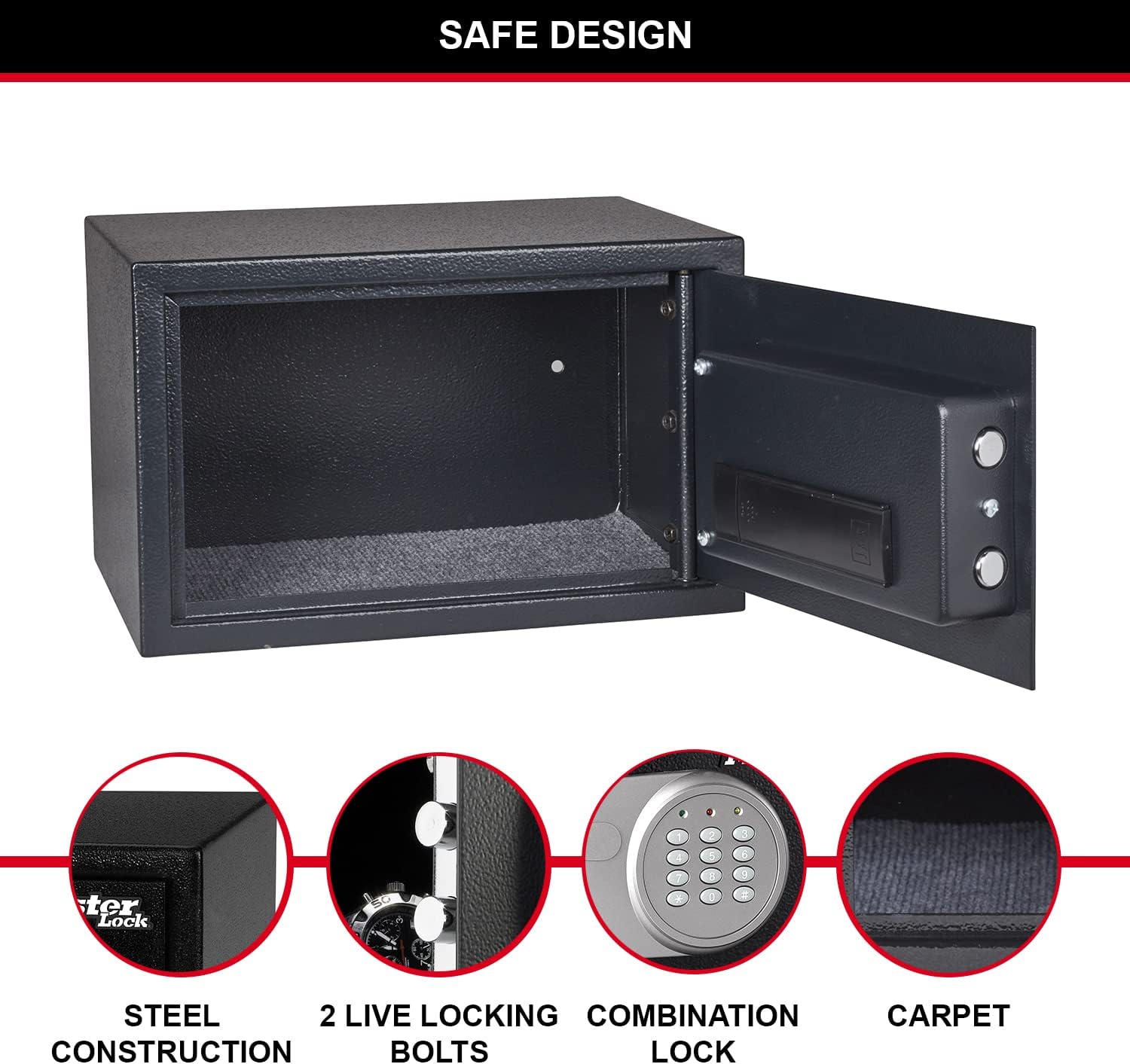
Figura 1: Interior de la porta de la caixa forta, on es destaca el compartiment de la bateria i els perns de bloqueig.
2. Configuració de la combinació personal
En el primer ús, o després de substituir la bateria, haureu de configurar la vostra combinació personal. El codi per defecte de fàbrica sol ser 1-2-3-4, però es recomana canviar-lo immediatament.
- Amb la porta de la caixa forta oberta, localitzeu el botó vermell de reinici a l'interior de la porta, a prop del compartiment de la bateria.
- Premeu el botó vermell de reinici. S'il·luminarà la llum groga del teclat numèric.
- Introduïu la nova combinació de 3 a 8 dígits al teclat numèric.
- Premeu el botó "A" o "B" (o "#" o "*" segons el model) per confirmar. La llum groga s'apagarà, indicant que el nou codi està configurat.
- Prova la nova combinació amb la porta oberta per assegurar-te que funciona correctament abans de tancar la caixa forta.
3. Assegurar la caixa forta (opcional)
Per a una màxima seguretat, la caixa forta es pot fixar amb cargols a terra o a la paret amb el kit de fixació inclòs. Això impedeix que la caixa forta es pugui retirar sense autorització.
- Trieu un lloc adequat per a la caixa forta, com ara dins d'un armari o moble.
- Marqueu els punts de perforació a través dels forats pretallats a la part inferior o posterior de la caixa forta.
- Perforeu forats pilot a la superfície de muntatge amb una broca adequada.
- Alineeu la caixa forta amb els forats perforats i fixeu-la amb els cargols i les volanderes proporcionats.

Figura 2: Exampde col·locació segura dins d'un armari per a un emmagatzematge segur.
Instruccions de funcionament
1. Obrir la caixa forta amb la combinació digital
- Introduïu la vostra combinació personal de 3 a 8 dígits al teclat numèric.
- Premeu el botó "A" o "B" (o "#" o "*" segons el model) per confirmar.
- Si el codi és correcte, s'il·luminarà la llum verda. En 5 segons, gireu el pom en sentit horari per obrir la porta de la caixa forta.
- Si s'introdueix un codi incorrecte, la llum groga parpellejarà. Després de tres intents incorrectes, la caixa forta entrarà en un període de bloqueig.

Figura 3: Frontal view de la caixa forta amb el pany de combinació digital.
2. Obrir la caixa forta amb la clau de control
La clau d'anul·lació proporciona accés d'emergència a la caixa forta, útil si les piles s'han esgotat o s'ha oblidat la combinació.
- Localitza el forat del pany, normalment amagat darrere d'una petita tapa al panell del teclat.
- Introduïu una de les claus de posició manual proporcionades al forat del pany.
- Gireu la clau en sentit horari mentre gireu simultàniament el pom en aquest sentit per obrir la porta de la caixa forta.
- Traieu la clau un cop oberta la caixa forta.
3. Tancament i bloqueig de la caixa forta
Per tancar la caixa forta, només cal que tanqueu la porta i gireu el pom en sentit antihorari fins que els perns encaixin. El pany electrònic bloquejarà la caixa forta automàticament.
Manteniment
1. Substitució de la bateria
Quan les piles estiguin baixes, és possible que el llum vermell del teclat numèric parpellegi o que la caixa forta no respongui a les entrades de combinació. Substituïu les 4 piles AA tal com es descriu a la secció "Instal·lació de piles" a Configuració.
2. Neteja
Netegeu l'exterior de la caixa forta amb un drap suau iamp drap. No utilitzeu productes de neteja abrasius ni dissolvents. Manteniu el teclat numèric i els components interns secs.
Resolució de problemes
| Problema | Causa possible | Solució |
|---|---|---|
| La caixa forta no s'obre amb la combinació. | Combinació incorrecta introduïda; piles baixes. | Torneu a introduir la combinació amb cura. Canvieu les piles. Feu servir la clau d'aturada. |
| Els llums del teclat no s'encenen. | Piles gastades o instal·lades incorrectament. | Substituïu les 4 piles AA, assegurant-vos de la polaritat correcta. |
| La porta de la caixa forta no tanca correctament. | Obstrucció al marc de la porta; els forrellats no estan completament retraïts. | Comproveu si hi ha obstruccions. Assegureu-vos que el pom estigui completament girat per retraure els perns abans de tancar. |
| Combinació oblidada. | Combinació perduda o oblidada. | Feu servir la clau d'anul·lació per obrir la caixa forta i després restableix la combinació. |
Especificacions
| Característica | Detall |
|---|---|
| Número de model | X055ML |
| Dimensions exteriors (alçada x amplada x profunditat) | 13.78" d'alçada x 8.66" d'amplada x 10.63" de profunditat (22 x 35 x 27 cm) |
| Dimensions interiors (alçada x amplada x profunditat) | 21.6 cm d'alt x 34.6 cm d'ample x 22 cm de fons |
| Capacitat | 16 litres |
| Pes | 14.11 lliures (6400 grams) |
| Tipus de bloqueig | Combinació digital amb anul·lació de tecles |
| Material | Acer d'aliatge |
| Font d'alimentació | Funciona amb piles (es necessiten 4 piles AA, no incloses) |
| Característiques especials | Porta resistent a la palanca, dos forrellats amb bloqueig actiu, terra enmoquetat, cargols inclosos. |

Figura 4: Dimensions detallades de la caixa forta.
Garantia i suport
Aquest producte Master Lock està cobert per un període de disponibilitat de peces de recanvi d'1 any a la UE. Per obtenir detalls específics de la garantia, assistència tècnica o per consultar sobre peces de recanvi, consulteu la pàgina oficial de Master Lock. weblloc web o contacteu directament amb el servei d'atenció al client. Conserveu el rebut de compra per a reclamacions de garantia.
Per obtenir més ajuda, visiteu el Botiga Master Lock a Amazon.


