Monster iSport Superslim Bluetooth Wireless In-Ear Headphones User Manual
Model: MH ISRT WLS IE BK BT WW
Producte acabatview
The Monster iSport Superslim Bluetooth Wireless In-Ear Headphones are designed for active lifestyles, offering a super slim, low-profile design with exceptional wireless sound quality. They feature a patented Sport clip for a secure fit during physical activity and provide total noise isolation for an immersive audio experience.

Image: The Monster iSport Superslim headphones, featuring two black earbuds connected by a flat cable. An inline remote control is visible on the cable, positioned closer to the right earbud.
Configuració
Carregant els auriculars
Before first use, fully charge your Monster iSport Superslim headphones. A micro-USB charging cable is included in the package.
- Locate the micro-USB charging port, typically on the inline remote control.
- Connect the micro-USB cable to the headphones and the other end to a USB power source (e.g., computer USB port, wall adapter).
- The indicator light will show charging status (refer to the specific light behavior in your quick start guide for details).
- Una càrrega completa proporciona aproximadament 5 hores de durada de la bateria.
Vinculació amb un dispositiu Bluetooth
The headphones use Bluetooth connectivity for wireless audio. Ensure your device is within the 10-meter Bluetooth range.
- Assegureu-vos que els auriculars estiguin apagats.
- Press and hold the multi-function button on the inline remote until the indicator light flashes rapidly (usually blue and red), indicating pairing mode.
- Al dispositiu amb Bluetooth (telèfon intel·ligent, tauleta, etc.), aneu a la configuració de Bluetooth i activeu-lo.
- Cerca available devices. "Monster iSport Superslim" or a similar name should appear in the list.
- Select the headphones from the list to connect. Once connected, the indicator light will typically turn solid blue or flash slowly.
Col·locació dels auriculars
Proper fit is crucial for sound quality and comfort, especially during sports. The headphones come with patented Sport clips and multiple eartip sizes.
- Experiment with different eartip sizes to find the best seal for your ear canal. A good seal provides optimal bass response and noise isolation.
- Position the Sport clip within your ear's concha (outer ear bowl) to secure the earbud in place. Adjust until comfortable and stable.
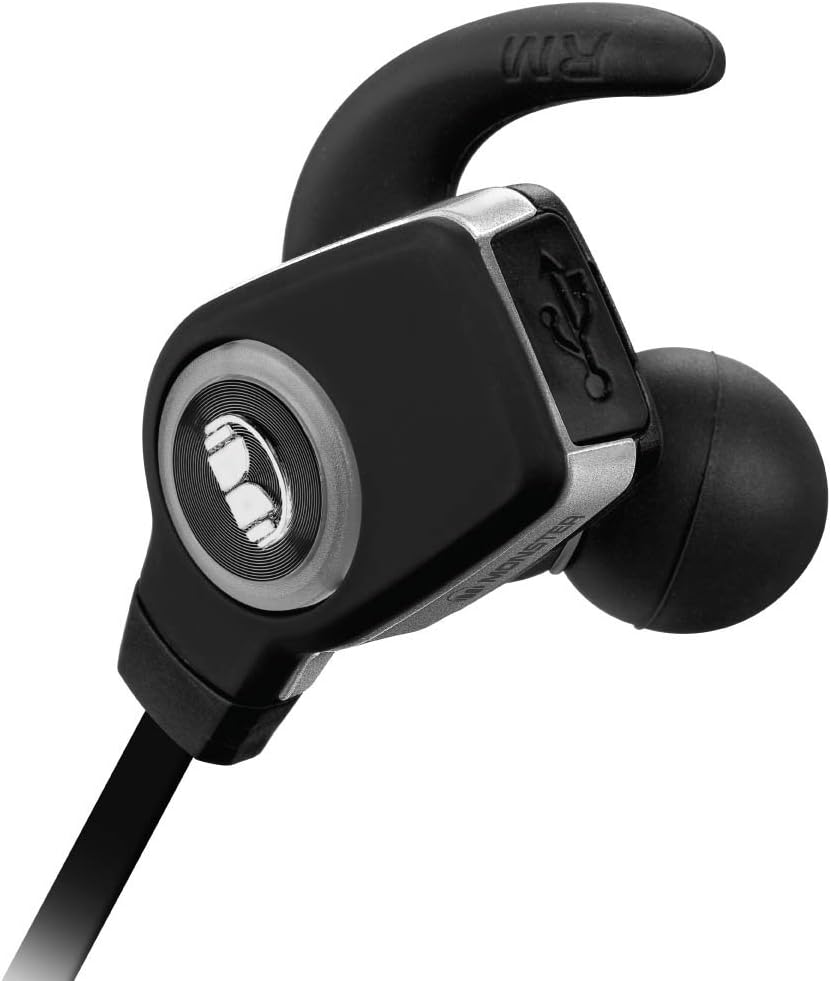
Imatge: Una imatge detallada view of a single Monster iSport Superslim earbud, highlighting its ergonomic shape and the integrated Sport clip designed for a secure fit.
Instruccions de funcionament
The inline remote control allows for easy management of audio playback and calls.

Image: The front side of the inline remote control for the Monster iSport Superslim headphones, featuring clearly visible volume up (+) and volume down (-) buttons, and a central multi-function button.

Image: The reverse side of the inline remote control, displaying the Monster logo and branding.
Encès/Apagat
- Encès: Press and hold the multi-function button until the indicator light illuminates.
- Apagar: Premeu i manteniu premut el botó multifunció fins que l'indicador lluminós s'apagui.
Control de reproducció de música
- Reproduir/pausa: Premeu el botó multifunció una vegada.
- Pista següent: Premeu dues vegades el botó multifunció.
- Pista anterior: Premeu tres vegades el botó multifunció.
- Pujar el volum: Premeu el botó '+'.
- Baixar el volum: Premeu el botó '-'.
Gestió de trucades
- Respondre/Finalitzar la trucada: Premeu el botó multifunció una vegada.
- Rebutja la trucada: Manteniu premut el botó multifunció durant 2 segons.
- Torna a marcar l'últim número: Premeu dues vegades el botó multifunció quan no esteu fent una trucada.
Manteniment
Una cura adequada garanteix la longevitat i el rendiment dels vostres auriculars.
- Neteja: Gently wipe the earbuds and cable with a soft, dry cloth. For eartips, remove them and clean with mild soap and water, then dry thoroughly before reattaching.
- Emmagatzematge: When not in use, store the headphones in the included travel pouch to protect them from dust and damage. Avoid extreme temperatures.
- Resistència a l'aigua: The headphones are water resistant, making them suitable for sports and exercise. However, they are not designed for submersion. Avoid exposing them to excessive moisture or direct water jets.
- Cura de la bateria: To preserve battery life, avoid fully discharging the headphones frequently. Charge them regularly, even if not in constant use.
Resolució de problemes
Si trobeu problemes, proveu les solucions següents:
| Problema | Solució |
|---|---|
| Els auriculars no s'encenen. | Ensure the headphones are charged. Connect to a power source and allow time to charge. |
| No es pot emparellar amb el dispositiu. |
|
| Sense so o amb un volum baix. |
|
| Sound crackling or cutting out. |
|
Especificacions
- Model: MH ISRT WLS IE BK BT WW
- Connectivitat: Bluetooth (apt-X + AAC)
- Col·locació de les orelles: In-orella
- Tipus de control: Control multimèdia, comandament a distància
- Control de soroll: Aïllament acústic
- Durada de la bateria: Fins a 5 hores
- Rang Bluetooth: Fins a 10 metres (33 peus)
- Resistència a l'aigua: Water Resistant (suitable for sports)
- Material: Plàstic
- Dimensions: 6 x 1.63 x 8.75 polzades (Producte)
- Pes de l'article: 7.52 unces
- Inclòs: Micro-USB charging cable, travel pouch, various eartips and Sport clips.
Garantia i Suport
For detailed warranty information, product registration, or technical support, please refer to the documentation included with your product or visit the official Monster weblloc web. Conserveu el comprovant de compra per a reclamacions de garantia.
Fabricant: Monster Power, LLC


