1. Introducció
The Denon Professional DN-200BR is a compact stereo Bluetooth audio receiver designed to integrate wireless audio streaming into professional audio systems. It provides a solution for connecting Bluetooth-enabled devices to mixers and amplification systems, offering reliable wireless connectivity up to 33 meters. The unit features balanced XLR and 1/4-inch outputs, a rugged metal enclosure for durability, and supports mainstream Bluetooth profiles for broad compatibility. Its design allows for simple, discreet installation in various environments, making it suitable for sound reinforcement, event applications, and updating existing AV systems.
2. Què hi ha a la caixa
- DN-200BR Bluetooth Audio Receiver
- Adaptador de corrent
- 6’ magnetic antenna
- Guia d'usuari
- Safety and warranty manual
3. Configuració
3.1. Connexions físiques
The DN-200BR provides balanced XLR and 1/4-inch outputs for integration with professional audio equipment such as mixers and amplifiers. Connect the audio outputs of the DN-200BR to the corresponding inputs on your audio system.

Image: Rear panel of the DN-200BR, illustrating the balanced XLR and unbalanced 1/4-inch audio output connections.
3.2. Instal·lació d'antenes
Attach the supplied 6-foot magnetic antenna to the BNC connector on the front panel of the DN-200BR. Position the antenna in an area free from obstructions to maximize Bluetooth signal reception. The magnetic base allows for flexible placement on metal surfaces.
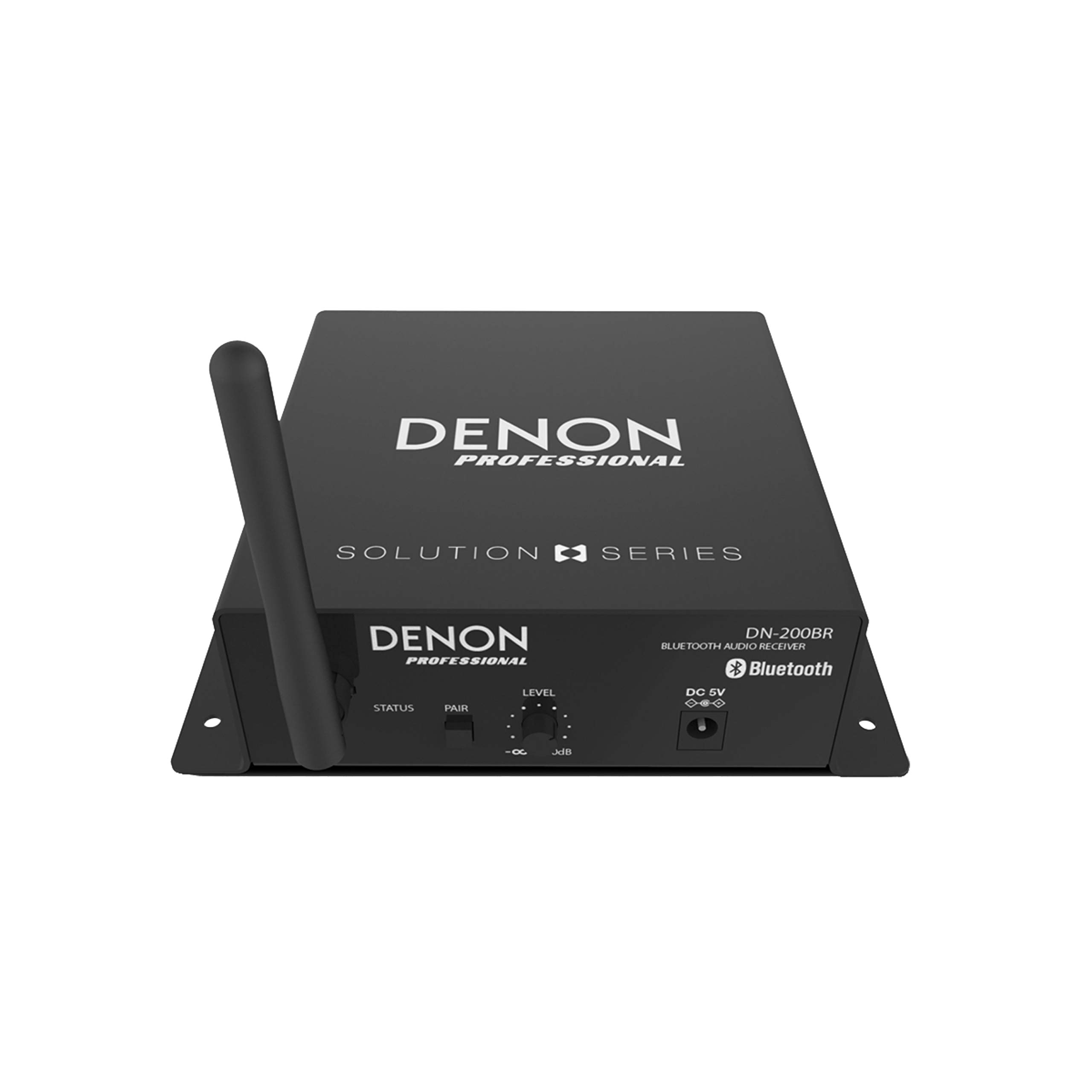
Image: Front panel of the DN-200BR, showing the BNC connector for the magnetic antenna and other controls.
3.3. Connexió d'alimentació
Connect the included power adapter to the DC 5V 2A input on the front panel of the DN-200BR, then plug the adapter into a suitable power outlet. The unit will power on automatically.
4. Instruccions de funcionament
4.1. Emparellament Bluetooth
- Ensure the DN-200BR is powered on. The Status LED will illuminate.
- Manteniu premut el botó Parella button on the front panel of the DN-200BR until the Status LED begins to flash, indicating it is in pairing mode.
- On your Bluetooth-enabled device (e.g., smartphone, tablet), navigate to the Bluetooth settings and select "DN-200BR" from the list of available devices.
- Once successfully paired, the Status LED on the DN-200BR will stop flashing and remain solid.
- You can now stream audio wirelessly from your device to the DN-200BR.
4.2. Audio Level Adjustment
Utilitza el Nivell knob on the front panel to adjust the output audio level of the DN-200BR. This allows for proper gain staging with your connected audio system.
4.3. Remote Pairing Feature
For installations where the DN-200BR is not easily accessible, a remote pairing button can be connected to the dedicated connector on the front panel. This allows for remote initiation of the Bluetooth pairing process using a conventional normally open push-button switch.
5. Producte acabatview Vídeo
Vídeo: Un producte oficial acabatview of the Denon Professional DN-200BR, demonstrating its features and connectivity options.
6. Especificacions
| Número de model | DN200BR |
| Pes de l'article | 0.16 unces |
| Dimensions del producte | 1.75 x 4.61 x 5.88 polzades |
| Marca | Denon Professional |
| Tecnologia de connectivitat | XLR, RCA, Bluetooth |
| Dispositius compatibles | Amplifier, Mixer, Speaker, Smartphone, Tablet |
| Tipus de connector | RCA, presa de 3.5 mm |
| Potència de sortidatage | 200 watts |
| Voltage | 5 volts (CC) |
| Codificació d'àudio | estèreo |
| Mode de sortida d'àudio | Estèreo, Envoltant |
| Configuració del canal de so envoltant | 2.0 |
| Característica especial | Bluetooth integrat |
7. Solució De Problemes
If you encounter issues with your DN-200BR, consider the following common troubleshooting steps:
- Sense energia: Assegureu-vos que l'adaptador de corrent estigui connectat correctament tant a la unitat com a una presa de corrent que funcioni.
- Sense sortida d'àudio: Verify all audio cables (XLR, 1/4-inch) are correctly connected to your audio system. Check the Level knob on the DN-200BR and the input levels on your mixer/ampmés viu.
- Problemes de vinculació de Bluetooth: Make sure the DN-200BR is in pairing mode (flashing Status LED). Ensure your Bluetooth device is within range and its Bluetooth function is enabled. Try unpairing and re-pairing the device.
- Poor Bluetooth Range/Interference: Reposition the magnetic antenna for optimal line-of-sight with your Bluetooth device. Avoid placing the unit near other wireless devices or large metal objects that may cause interference.
8. Manteniment
To ensure the longevity and optimal performance of your Denon Professional DN-200BR, follow these maintenance guidelines:
- Neteja: Use a soft, dry cloth to clean the exterior of the unit. Avoid using abrasive cleaners, solvents, or harsh chemicals.
- Emmagatzematge: Quan no l'utilitzeu durant períodes prolongats, guardeu la unitat en un lloc fresc i sec, allunyat de la llum solar directa i de temperatures extremes.
- Ventilació: Assegureu-vos que hi hagi una ventilació adequada al voltant de la unitat per evitar el sobreescalfament. No bloquegeu cap obertura de ventilació.
9. Garantia i Suport
For detailed warranty information and technical support, please refer to the safety and warranty manual included in your product packaging or visit the official Denon Professional weblloc web. Conserveu el comprovant de compra per a reclamacions de garantia.


