Introducció
This manual provides instructions for the safe operation, setup, and maintenance of your Stack-On PDS-1500 Drawer Safe with Electronic Lock. This safe is designed to secure pistols, ammunition, and other valuables. It features solid steel construction, pry-resistant plate steel doors, steel live-action locking bolts, and concealed hinges for enhanced security. The electronic lock includes a keypad for combination entry and a backup key for alternative access.
Informació important de seguretat
- Always store the backup key in a secure location away from the safe and out of reach of unauthorized individuals.
- Do not store the backup key inside the safe.
- Ensure the safe is mounted to a solid surface (floor, shelf, or wall) to prevent unauthorized removal. Fastening hardware is included for this purpose.
- This safe is a California-approved Firearm Safety Device, meeting the requirements of Penal Code section 23655.
- Keep the safe closed and locked when not in use.
Contingut del paquet
Verifiqueu que hi hagi tots els elements:
- Stack-On PDS-1500 Drawer Safe
- Tecles de còpia de seguretat (2)
- Bateries AA (4)
- Maquinari de muntatge
- Manual d'usuari
Configuració
1. Instal·lació de la bateria
- Localitzeu el compartiment de les piles a l'interior de la porta de la caixa forta.
- Obriu la tapa del compartiment de la bateria.
- Inseriu 4 piles AA, assegurant la polaritat correcta.
- Tanqueu la tapa del compartiment de la bateria.
2. Configuració de la combinació personal
The safe comes with a default combination. It is highly recommended to change this to a personal combination immediately after battery installation.
- With the safe door open, locate the reset button on the back of the door.
- Press the reset button. The keypad will beep, indicating it is ready to accept a new combination.
- Enter your desired 3 to 6 digit combination on the keypad.
- Press the "check mark" button to confirm. The keypad will beep again, confirming the new combination is set.
- Test the new combination with the door open to ensure it works correctly before closing the safe.
3. Muntatge de la caixa forta
For optimal security, the safe should be mounted to a solid surface.
- Choose a suitable location for mounting (e.g., inside a drawer, to a floor, or wall).
- Use the pre-drilled holes on the safe as a template to mark drilling locations on the mounting surface.
- Practicar forats pilot a la superfície de muntatge.
- Position the safe and secure it using the provided fastening hardware. Ensure all bolts are tightened securely.

Figura 1: Frontal view of the Stack-On PDS-1500 Drawer Safe, showing the electronic keypad and manual lock.
Instruccions de funcionament
1. Obrir la caixa forta amb pany electrònic
- Enter your personal combination on the keypad.
- Press the "check mark" button.
- En 5 segons, gireu la maneta en sentit horari per obrir la porta de la caixa forta.
2. Opening the Safe with Backup Key
Use the backup key if batteries are depleted or the combination is forgotten.
- Locate the keyhole cover on the electronic lock panel.
- Remove the keyhole cover.
- Insert the backup key into the keyhole and turn it clockwise.
- Gireu la maneta en sentit horari per obrir la porta de la caixa forta.
3. Muting/Unmuting Keypad Beeps
The keypad beeps can be toggled on or off.
- Press the "megaphone" button on the keypad to mute or unmute the beeps.

Figure 2: Interior capacity of the Stack-On PDS-1500 Drawer Safe, illustrating typical items that can be stored.
Manteniment
- Substitució de la bateria: Replace batteries annually or when the low battery indicator appears. Always use 4 new AA alkaline batteries.
- Neteja: Netegeu l'exterior de la caixa forta amb un drap suau iamp drap. Eviteu productes de neteja o dissolvents abrasius.
- Mecanisme de bloqueig: Do not lubricate the electronic lock or key mechanism.
Resolució de problemes
| Problema | Causa possible | Solució |
|---|---|---|
| La caixa forta no s'obre amb la combinació. | Incorrect combination entered; depleted batteries. | Re-enter combination carefully. Replace batteries. Use backup key if necessary. |
| El teclat no respon. | Depleted batteries; electronic malfunction. | Replace batteries. If issue persists, use backup key and contact customer support. |
| Safe opens without entering a code. | Problema de mecanisme intern. | This indicates a potential security vulnerability. Immediately secure contents and contact customer support. |
| Rattling sound inside the safe. | Loose internal components. | This may indicate a manufacturing defect or damage. Contact customer support for assistance. |
| Combinació oblidada. | Combination not remembered. | Use the backup key to open the safe, then reset the combination as per "Setting Your Personal Combination" instructions. |
Especificacions
- Marca: Stack-On
- Model: PDS-1500
- Tipus de bloqueig: Combinació, Electrònica, Clau
- Color: Negre
- Material: Acer d'aliatge
- Característica especial: Funcions de seguretat millorades
- Tipus de muntatge: Muntatge a terra, muntatge a la paret
- Components inclosos: Safe, Keys, Batteries
- Pes de l'article: 13.2 lliures
- Dimensions del producte: 12 x 8.75 x 4.5 polzades
- Bateries: 4 piles AA (incloses)
- Nivell de resistència a l'aigua: No resistent a l'aigua
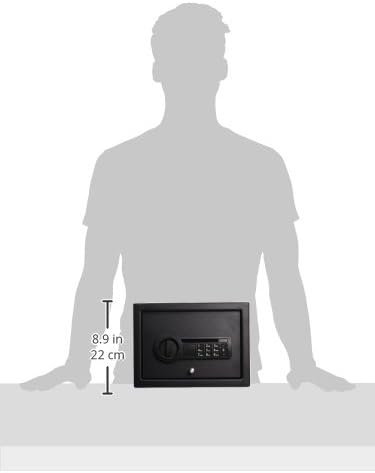
Figure 3: Dimensional representation of the safe.
Garantia i assistència al client
For warranty claims or technical support, please contact Stack-On customer service. It is important to retain your proof of purchase (receipt) as it may be required to validate warranty coverage or receive assistance for product issues. Without a valid receipt, Stack-On may not be able to offer fixes, replacements, or other warranty services.
Contact information for Stack-On customer service can typically be found on their official weblloc web o a l'embalatge del producte.


