1. Introducció
Thank you for choosing the PoP voice Professional Lavalier Lapel Microphone. This omnidirectional condenser microphone is designed to provide high-quality audio recording for a variety of applications, including interviews, video production, live broadcasts, and vlogging. Its compact design and broad compatibility make it an ideal tool for enhancing your audio experience across multiple devices.
2. Producte acabatview
The PoP voice lavalier microphone is engineered for clear sound capture, offering superior performance compared to many built-in device microphones. It features an extra-long cable for flexible usage and comes with essential accessories for convenience.
Característiques principals:
- Omnidirectional Condenser Mic: Captures sound equally from all directions, ideal for interviews and general recording.
- Àmplia compatibilitat: Designed for iPhone, Android smartphones, iPad, Sony, LG, Blackberry & Windows Smartphones, Retina Macbook Pro Air, PCs, and laptops. Includes a 4 Pin to 3 Pin adapter for PC/laptop use.
- Plug & Play: No batteries required, simplifying setup and operation.
- Extra-long Cable: Total length of 79 inches (2 meters) provides ample reach for various recording scenarios.
- Disseny durador: Made from professional-grade premium materials for reliable performance.
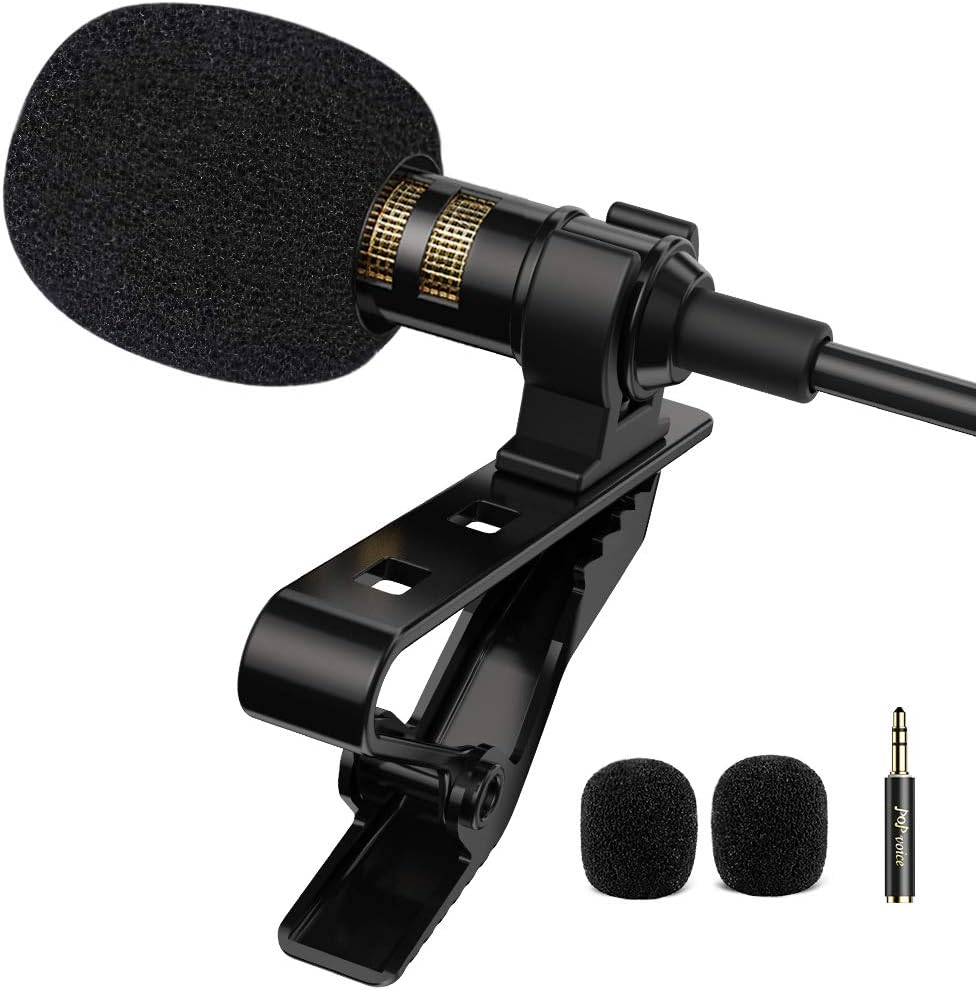
Figure 2.1: PoP voice Professional Lavalier Lapel Microphone with included accessories.

Figure 2.2: Internal structure of the microphone, highlighting the professional sound chipset and anti-interference shield cable.
3. Configuració
Setting up your PoP voice microphone is straightforward. Follow these steps to connect it to your device.
Connecting to Smartphones (iPhone/Android):
- Locate the 3.5mm audio jack on your smartphone.
- For iPhone 7 and above: An original phone adapter (Lightning to 3.5mm or USB-C to 3.5mm) is required and is not included with the microphone. Connect the microphone's 3.5mm jack to this adapter, then plug the adapter into your iPhone.
- Per a telèfons intel·ligents Android: Directly plug the microphone's 3.5mm jack into your phone's audio port.
- Ensure the microphone is fully inserted into the jack for proper functionality.

Figure 3.1: Connecting the microphone to an iPhone using an original adapter (not included).

Figure 3.2: The microphone's broad compatibility with various devices, including smartphones, laptops, and cameras.
Connecting to PC/Laptop/Camera:
- Use the included 4 Pin to 3 Pin adapter. Plug the microphone's 3.5mm jack into the adapter.
- Insert the adapter into the microphone input port (often marked with a microphone icon) on your PC, laptop, or camera.
- Note: This is a professional recording microphone. You will not hear sound from your device through the microphone after plugging it in.
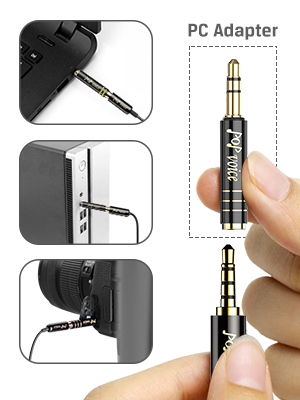
Figure 3.3: Connecting the microphone to a laptop, desktop PC, or camera using the PC adapter.
4. Instruccions de funcionament
Once connected, the PoP voice microphone is ready for use. It operates on a plug-and-play basis, requiring no additional power source.
Ús bàsic:
- Clip the microphone to your clothing, ideally near your mouth, for optimal sound capture.
- Open your preferred audio or video recording application on your device (e.g., Voice Memos, Camera app, YouTube Studio, GarageBand).
- Ensure the app recognizes the external microphone as the input source. This usually happens automatically upon connection.
- Begin recording or live broadcasting.
- After recording, unplug the microphone to listen to your audio through your device's speakers or headphones.

Figure 4.1: The microphone in use for vlogging, connected to a smartphone.

Figure 4.2: The microphone provides a clear audio solution for various content creation activities.

Figure 4.3: Versatile applications of the microphone, including live broadcasting, recording, interviews, i vlogging.
5. Manteniment
Proper care and maintenance will ensure the longevity and optimal performance of your PoP voice microphone.
Atenció general:
- Store the microphone in the provided small pouch when not in use to protect it from dust and damage.
- Use the magic tape to tidy the cord, preventing tangles and extending cable life.
- Avoid exposing the microphone to extreme temperatures, humidity, or direct sunlight.
- Handle the microphone and its cable gently to prevent internal damage.
Neteja:
- Gently wipe the microphone body with a soft, dry cloth.
- The foam windscreen can be carefully removed and cleaned if necessary. Ensure it is completely dry before reattaching.
- Do not use harsh chemicals or abrasive cleaners on any part of the microphone.
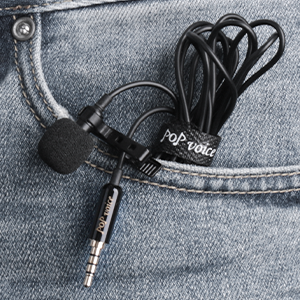
Figure 5.1: The compact design allows for easy storage and portability in the included pouch.
6. Solució De Problemes
If you encounter issues with your microphone, please refer to the following common problems and solutions:
Q: Can't hear anything after recording.
A:
- Ensure the microphone is fully plugged into your device. A loose connection can prevent audio capture.
- Unplug the microphone to listen to the recording through your device's built-in speakers or connected headphones. Many devices automatically route audio output through the 3.5mm jack when an input device is connected.
Q: Microphone not working on devices.
A:
- Verify the microphone is fully inserted into the device's audio jack.
- For iPhones (7 and above), confirm you are using an original Apple adapter (Lightning to 3.5mm or USB-C to 3.5mm).
- For Android devices, try downloading a third-party camera or audio recording app (e.g., "Open Camera") as some native apps may have limited external mic support.
- If using with a PC/laptop, ensure the 4 Pin to 3 Pin adapter is correctly used and plugged into the microphone input port. Check your computer's sound settings to ensure the external microphone is selected as the input device.
- Test the microphone on another compatible device to rule out a device-specific issue.
Q: Damaged microphone or dissatisfaction with sound.
A: Please contact the PoP voice service team for assistance. Refer to the Warranty & Support section for contact information.
7. Especificacions
| Característica | Especificació |
|---|---|
| Marca | veu PoP |
| Nom del model | FBA_LLMB |
| Factor de forma del micròfon | Lavalier |
| Patró polar | Omnidireccional |
| Tecnologia de connectivitat | Auxiliar |
| Tipus de connector | 3.5 mm Jack |
| Longitud del cable | 2 metres (79 polzades) |
| Sensibilitat d'àudio | 30 dB |
| Ràtio senyal / soroll | 60 dB |
| Interval de freqüència | 20 Hz - 20 kHz |
| Pes de l'article | 28 grams (0.988 unces) |
| Material | Acer d'aliatge |
| Font d'alimentació | AC (Bus-powered, no external battery needed) |
| Dispositius compatibles | Televisió, ordinador personal, telèfon intel·ligent |
| Components inclosos | Micròfon |
8. Garantia i assistència
PoP voice is committed to providing high-quality products and excellent customer service. If you have any questions, concerns, or require assistance with your microphone, please do not hesitate to contact our service team.
For detailed support and warranty information, please refer to the contact details provided on the product packaging or the official PoP voice website. Our team is ready to provide professional support and satisfactory service.


