1. Introducció
Thank you for choosing the Minidiva E02 Smart Bracelet. This manual provides essential information for setting up, operating, and maintaining your device. Please read it thoroughly before use to ensure proper functionality and to maximize your experience.
2. Informació de seguretat
- No exposeu el dispositiu a temperatures extremes ni a la llum solar directa durant períodes prolongats.
- The device is life waterproof only. Do not use it for diving, swimming, or in hot water.
- Mantingueu el dispositiu allunyat de camps magnètics forts.
- No intenteu desmuntar ni reparar el dispositiu vosaltres mateixos. Poseu-vos en contacte amb el servei d'atenció al client si sorgeixen problemes.
- Use only the specified charging method (Standard PC USB interface 5V).
3. Contingut del paquet
Upon opening your Minidiva E02 Smart Bracelet package, you should find the following items:
- 1 x Minidiva E02 Smart Bracelet
- 1 x Manual d'usuari (aquest document)
4. Guia de configuració
4.1. Charging the Bracelet
Before first use, fully charge your Minidiva E02 Smart Bracelet. The bracelet features a standard PC USB interface for charging.

Image: The Minidiva E02 Smart Bracelet showing its integrated USB charging port, which can be directly plugged into a standard USB port for charging.
- Locate the USB charging interface on the bracelet.
- Plug the bracelet directly into a standard 5V USB port (e.g., computer USB port, USB wall adapter).
- The display will indicate charging status. A full charge typically provides up to 180 days of standby time.
4.2. Instal·lació i emparellament de l'aplicació
To unlock the full features of your smart bracelet, you need to install the companion application on your smartphone and pair the devices via Bluetooth.
- Descarrega l'aplicació: Scan the QR code provided in the physical instruction manual included with your bracelet, or search for the official Minidiva E02 app in your smartphone's app store. The application supports English and Chinese languages.
- Compatibilitat: Ensure your smartphone meets the minimum requirements: Android 4.3 or above, or iOS 7.0 or above, with Bluetooth 4.0 enabled.
- Activa el Bluetooth: On your smartphone, go to your settings and ensure Bluetooth is turned on.
- Obriu l'aplicació: Launch the Minidiva E02 application on your smartphone.
- Maridatge: Follow the in-app instructions to search for and connect to your Minidiva E02 Smart Bracelet. The app will guide you through the pairing process.
5. Instruccions de funcionament
The Minidiva E02 Smart Bracelet offers various functions to help you monitor your health and stay connected.
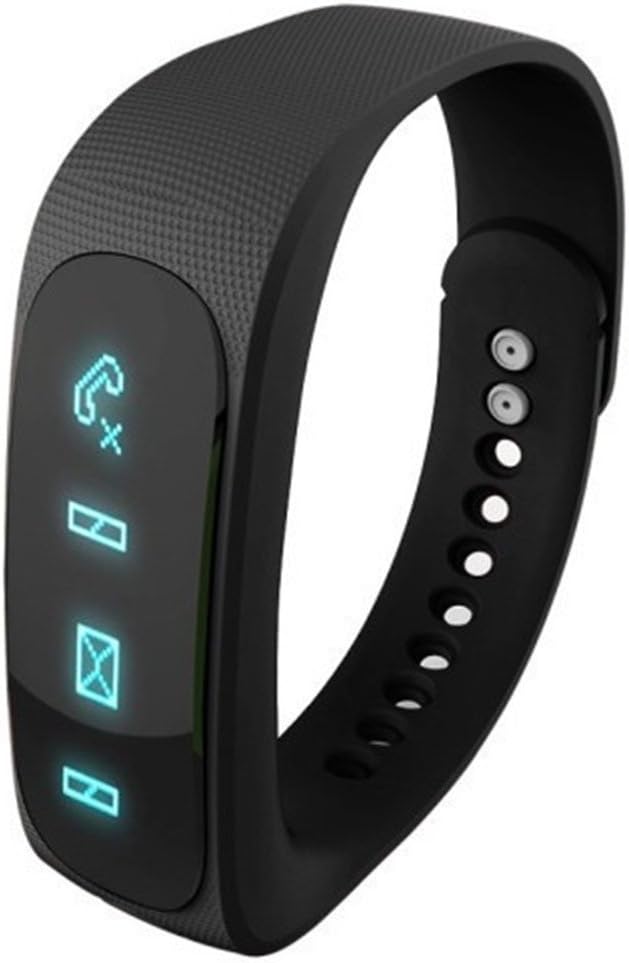
Image: The Minidiva E02 Smart Bracelet showing its OLED display with various notification icons, including incoming calls and messages.
5.1. Funcions bàsiques de la pantalla
- Time/Date/Week/Battery State: The bracelet's 0.84-inch OLED display shows the current time, date, day of the week, and battery level.

Image: The Minidiva E02 Smart Bracelet displaying the time '15:58' on its OLED screen, indicating its primary function as a timepiece.
5.2. Notification Features
- Identificador de trucada: When connected to an Android phone, the bracelet will display the caller's ID. For iOS phones, it will display "INCOMING CALL". Note: The bracelet cannot dial or answer calls.
- SMS Notice: Receive notifications for incoming SMS messages directly on your bracelet.
- Recordatori de vibració: The built-in motor provides vibration alerts for incoming calls, SMS messages, long periods of sitting (sedentary reminder), and alarm clock notifications.
5.3. Health and Activity Tracking
- Podòmetre: The bracelet records your steps, calculates calories burned, and tracks mileage throughout the day. This data provides a comprehensive overview of your daily physical activity.
- Monitor per dormir: Set the bracelet to sleeping monitoring mode before going to bed. It accurately detects your actual sleep time, deep sleep and shallow sleep periods, short awakenings, and the number of activities during sleep. You can sync this data to your phone to review your sleep quality and adjust your schedule accordingly.

Image: A visual representation of the Minidiva E02 Smart Bracelet's sleep monitoring capabilities, showing a person sleeping with the bracelet and icons indicating various sleep metrics.
5.4. Funcions intel·ligents
- Despertador: Set alarms within the companion application. The bracelet will vibrate to remind you at the set time.
- Càmera remota: Use the bracelet as a remote shutter for your phone's camera. Double-click or hold the key on the bracelet to take pictures when the camera interface is open on your phone.

Image: A family posing for a photo, illustrating the remote camera function of the Minidiva E02 Smart Bracelet, which allows users to trigger their smartphone's camera remotely.
6. Manteniment
To ensure the longevity and optimal performance of your Minidiva E02 Smart Bracelet, follow these maintenance guidelines:
- Neteja: Wipe the bracelet regularly with a soft, dry cloth. If necessary, use a slightly damp cloth, but ensure it is completely dry before wearing or charging.
- Resistència a l'aigua: The bracelet is designed with normal life waterproof capabilities. This means it can withstand splashes, rain, and hand washing. However, it is NOT suitable for showering, swimming, diving, or any prolonged submersion in water. Avoid exposing it to hot water or steam.
- Emmagatzematge: Store the bracelet in a cool, dry place when not in use. Avoid direct sunlight and extreme temperatures.
7. Solució De Problemes
If you encounter issues with your Minidiva E02 Smart Bracelet, please refer to the following common problems and solutions:
| Problema | Possible causa/solució |
|---|---|
| Bracelet does not turn on or respond. | Battery may be depleted. Charge the bracelet for at least 30 minutes. Ensure the USB connection is secure. |
| No es pot emparellar amb el telèfon intel·ligent. | 1. Assegureu-vos que el Bluetooth estigui activat al telèfon. 2. Make sure the bracelet is charged and within range. 3. Restart both the bracelet and your phone. 4. Check app permissions and ensure it has access to Bluetooth. 5. Verify phone compatibility (Android 4.3+ / iOS 7.0+ with Bluetooth 4.0). |
| No es reben notificacions. | 1. Ensure the bracelet is successfully paired with the app. 2. Check notification settings within the app and on your phone (e.g., app notifications enabled, DND mode off). 3. Ensure the app is running in the background. |
| Activity data is inaccurate. | Ensure the bracelet is worn correctly and securely on your wrist. Calibrate the pedometer if the app provides such an option. |
| L'aplicació es bloqueja o es bloqueja. | Try clearing the app's cache and data, or reinstalling the app. Ensure your phone's operating system is up to date. |
If the problem persists after trying these solutions, please contact Minidiva customer support for further assistance.
8. Especificacions
| Característica | Especificació |
|---|---|
| Número de model | SB0001-Black-UK |
| Mostra | 0.84 inches OLED (96x16 resolution) |
| Mida de la pantalla | 1.57 polzades (diagonal) |
| Connectivitat | Bluetooth 4.0 BLE, USB |
| Capacitat de la bateria | 60 mA |
| Temps d'espera | Fins a 180 dies |
| Interfície de càrrega | Standard PC USB interface 5V |
| Compatibilitat de sistemes operatius | Android 4.3 o superior, iOS 7.0 o superior |
| Sensor | Sensor de gravetat |
| Motor | Built-in, for vibration reminders |
| Resistència a l'aigua | Normal life waterproof (not for diving or swimming) |
| Pes de l'article | 90 g |
| Color | Negre |
9. Garantia i Suport
Your Minidiva E02 Smart Bracelet comes with a standard manufacturer's warranty. Please refer to the warranty card included in your package for specific terms and conditions. For technical support, troubleshooting assistance, or warranty claims, please contact your retailer or the Minidiva customer service department.
Conserveu el tiquet de compra com a comprovant de compra a efectes de garantia.


