Introducció
This manual provides essential instructions for the proper setup, operation, and maintenance of the MSA ALTAIR 4/4X Multi-Gas Detector Calibration Station, also known as the Galaxy GX2 Automated System Test Stand (Model 10128630). Adherence to these instructions ensures optimal performance and longevity of the device. This system is designed to provide automated testing and calibration for MSA ALTAIR multi-gas detectors, ensuring they are always ready for use.
Configuració
Desembalatge i inspecció inicial
Carefully unpack all components from the packaging. Verify that all items listed in the packing slip are present and undamaged. The comprehensive equipment includes pre-configured plugs, barbs, a fresh air filter, a power supply with its corresponding plug, a spare parts kit, and an Ethernet cable for connecting multiple test stands.

This image displays the front of the MSA Galaxy GX2 Automated Test System, highlighting its user interface screen which shows system status and options for configuration and testing.
Instal·lació física
The automated test station can be placed on a benchtop or wall-mounted. Ensure the chosen location is stable and provides adequate ventilation. Connect the power supply to the unit and a suitable power outlet. For multi-unit setups, connect test stands using the provided Ethernet cable.
Aquest costat view illustrates the connection ports on the MSA Galaxy GX2 Automated Test System, including power and data interfaces, essential for system setup.
Connexió del cilindre de gas
Connect calibration gas cylinders to the designated ports on the side of the test stand. The system supports up to four cylinder holders for simultaneous detector tests. Ensure connections are secure to prevent leaks.

The image highlights the side of the MSA Galaxy GX2 Automated Test System, detailing the labeled ports for connecting up to four calibration gas cylinders, crucial for multi-gas detector testing.
Instruccions de funcionament
Performing a Test or Calibration
- Ensure the Galaxy GX2 system is powered on and calibration gas cylinders are properly connected.
- Insert the ALTAIR multi-gas detector into the test stand. The detector should fit securely into the designated slot.
- The system will automatically detect the device and initiate the programmed test or calibration sequence.
- Monitor the test stand's display and light indicators. A pass/fail LED will illuminate upon completion.
- Charging progress LEDs on the multi-unit charger indicate the battery status of the inserted detector.
- A lighted cylinder band on the electronic cylinder holder provides warnings for low gas levels or expiration dates.

The image shows an MSA ALTAIR 4/4X multi-gas detector securely placed within the MSA Galaxy GX2 Automated Test System, ready for calibration or functional testing.
Gestió de dades
The system is compatible with MSA Link Software for comprehensive data management, allowing for record-keeping of calibration and test results. It can also function as a stand-alone testing and calibration unit without direct software integration.

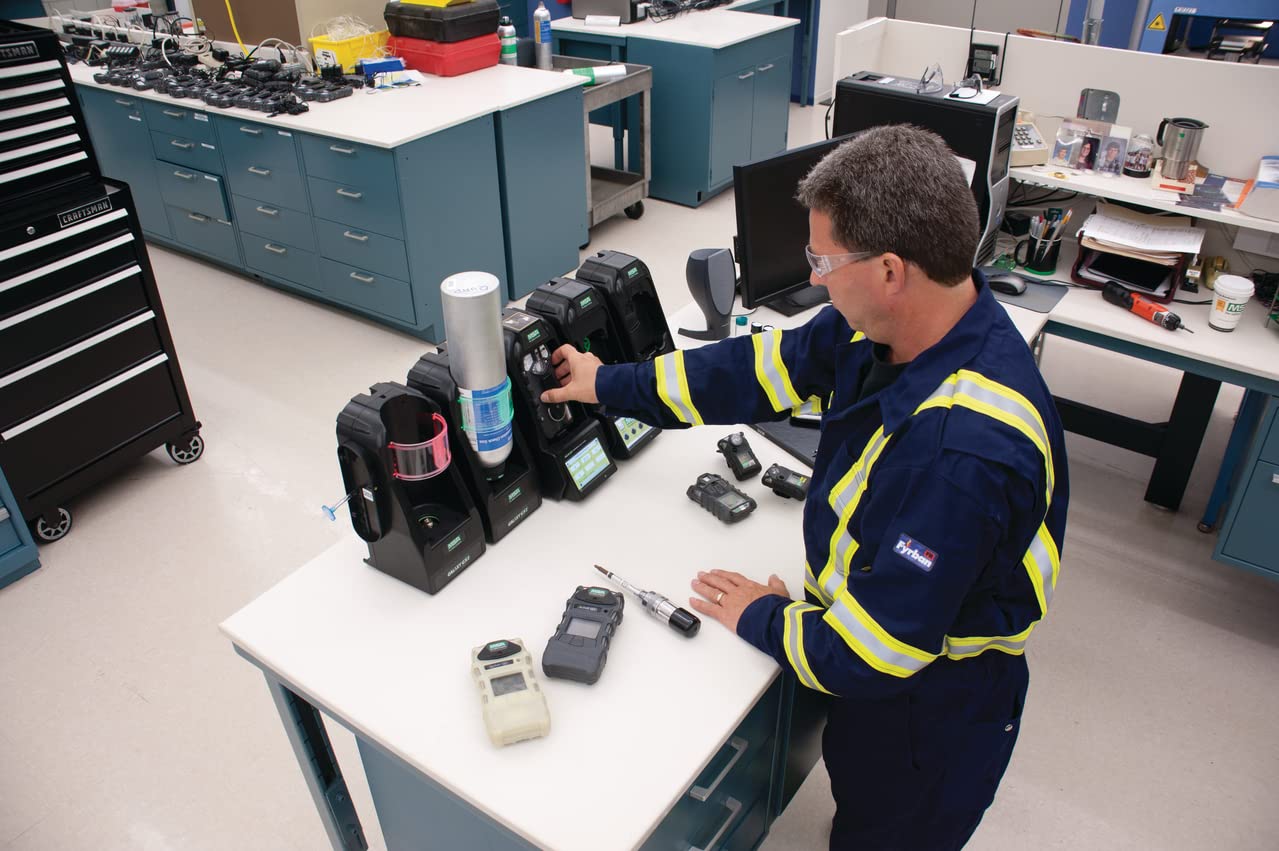
A technician is shown in a professional environment, operating several MSA Galaxy GX2 Automated Test Systems simultaneously, demonstrating the system's capability for batch processing of gas detectors.
Manteniment
Regular maintenance is crucial for the reliable operation of your Galaxy GX2 Automated System Test Stand. Keep the unit clean and free from dust and debris. Periodically inspect all connections, including gas lines and power cables, for any signs of wear or damage. Replace the fresh air filter as needed. Refer to the official MSA documentation for detailed maintenance schedules and procedures specific to your model.
Resolució de problemes
If the system encounters an issue, first check all power and gas connections. Ensure the gas cylinders are not empty or expired, as indicated by the lighted cylinder band. If a detector fails calibration, ensure it is properly seated in the test stand and that its sensors are clean. For persistent issues or error codes displayed on the screen, consult the comprehensive troubleshooting guide in the official MSA user manual or contact MSA technical support.
Especificacions
| Característica | Detall |
|---|---|
| Número de model | 10128630 |
| Dimensions del producte | 1 x 1 x 1 polzades |
| Pes de l'article | 5.95 lliures |
| Fabricant | MSA |
| Mida de la connexió d'entrada | 1 polzades |
| Tipus de connexió d'entrada | Brida |
| Tipus de connexió de presa | Brida |
| Nombre de Ports | 1 |
| Mida de connexió de presa | 1 polzades |
| Especificació Met | Automated Test System for Gas Detector Calibration |
| UPC | 641817037843 |
Compatibilitat
The MSA Galaxy GX2 Automated System Test Stand offers excellent compatibility, allowing users to connect up to 10 test stands and up to 4 cylinder holders. This enables simultaneous testing of multiple detectors, enhancing efficiency in environments requiring frequent calibration. The system also connects seamlessly to Galaxy GX2 charging stations for integrated power management.
Garantia i Suport
For information regarding product warranty, technical support, or service, please refer to the official documentation provided with your MSA Galaxy GX2 Automated System Test Stand or visit the official MSA Safety website. MSA is committed to providing high-quality products and support to ensure the safety and satisfaction of its customers.


