Introducció
The Logitech M337 Bluetooth Mouse is a versatile wireless mouse designed for seamless connectivity and comfortable use. It features a 10-meter wireless range, a laser-grade optical sensor for precise tracking, and an LED indicator light. Powered by a single AA battery, it offers extended battery life for up to 10 months.
This manual provides detailed instructions for setting up, operating, and maintaining your M337 Bluetooth Mouse, along with troubleshooting tips and product specifications.
Contingut del paquet
- Ratolí Bluetooth Logitech M337
- 1 pila AA (preinstal·lada o inclosa)
- Documentació d'usuari
Configuració
1. Instal·lació de la bateria
The Logitech M337 mouse uses one AA battery. If the battery is not pre-installed, follow these steps:
- Localitzeu la tapa del compartiment de la bateria a la part inferior del ratolí.
- Feu lliscar la coberta oberta.
- Inseriu una pila AA, assegurant-vos que els terminals positiu (+) i negatiu (-) s'alineïn correctament amb els indicadors de l'interior del compartiment.
- Tanqueu bé la tapa del compartiment de la bateria.

Imatge: Part inferior view of the Logitech M337 mouse, illustrating the location of the battery compartment and power switch.
2. Encendre el ratolí
Locate the On/Off switch on the underside of the mouse. Slide the switch to the "On" position. An LED indicator light on the top of the mouse will illuminate briefly.
3. Emparellament Bluetooth
The M337 mouse connects via Bluetooth. Follow these steps to pair it with your device:
- Ensure your device (computer, tablet, smartphone) has Bluetooth enabled.
- On the underside of the mouse, press and hold the Botó de connexió (often located near the optical sensor or power switch) for a few seconds until the LED indicator on the top of the mouse starts blinking rapidly. This indicates the mouse is in pairing mode.
- Al dispositiu, vés a la configuració de Bluetooth i cerca dispositius nous.
- Select "Logitech M337" from the list of available devices.
- Follow any on-screen prompts to complete the pairing process. Once successfully paired, the LED indicator on the mouse will stop blinking and remain solid for a moment, then turn off.
El ratolí ja està llest per al seu ús.
Funcionament del ratolí
Funcions bàsiques
- Clic esquerre: Botó principal per seleccionar elements, obrir enllaços, etc.
- Clic dret: Botó secundari per a menús contextuals i opcions addicionals.
- Roda de desplaçament: Desplaça't amunt o avall pels documents i web pàgines. La roda de desplaçament també funciona com a botó central.
- Botó multifunció: Located below the scroll wheel. This button's function can vary depending on your operating system and installed Logitech software. It often defaults to a gesture button for Windows (e.g., Task View) or Mac (e.g., Mission Control).
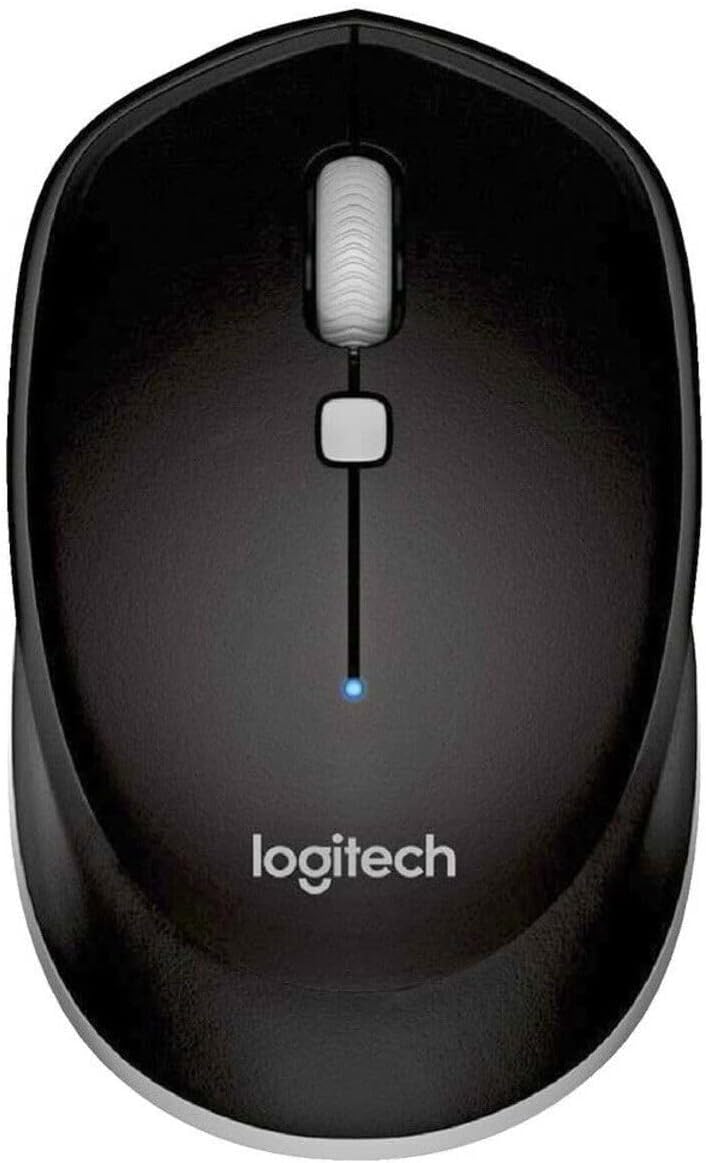
Imatge: De dalt a baix view of the Logitech M337 mouse, highlighting the left and right click buttons, scroll wheel, and multi-function button.
Disseny ambidiestro
The M337 mouse features a symmetrical design, making it comfortable for both left-handed and right-handed users. Its contoured shape fits naturally in the palm of your hand.

Image: A person using the Logitech M337 mouse alongside a laptop on a wooden desk, demonstrating its compact size and comfortable grip.

Image: A woman using the Logitech M337 mouse with her laptop at a cafe table, showcasing its portability and suitability for various environments.
Manteniment
Neteja
To clean your mouse, gently wipe it with a soft, damp cloth. Avoid using harsh chemicals or abrasive cleaners, as these can damage the surface.
Durada de la bateria
The M337 mouse is designed for long battery life, up to 10 months with typical use. Battery life may vary based on usage and computing conditions. When the battery is low, the LED indicator on the mouse may flash to alert you. Replace the AA battery when necessary.
Emmagatzematge
When not in use for extended periods, it is recommended to turn off the mouse using the On/Off switch on the underside to conserve battery life.
Resolució de problemes
- El ratolí no respon:
- Assegureu-vos que el ratolí estigui encès.
- Comproveu la bateria. Substituïu-la si cal.
- Assegureu-vos que el Bluetooth estigui habilitat al vostre dispositiu.
- Prova de tornar a emparellar el ratolí amb el dispositiu.
- Move the mouse closer to your device to ensure it's within the 10-meter range.
- Lagging or erratic cursor movement:
- Assegureu-vos que el ratolí estigui sobre una superfície neta i no reflectant.
- Comproveu si hi ha interferències d'altres dispositius sense fil.
- Re-pair the mouse.
- Actualitza els controladors Bluetooth del teu dispositiu.
- Cannot pair the mouse:
- Assegureu-vos que el ratolí estigui en mode d'emparellament (el LED parpelleja ràpidament).
- Remove any previous pairings of the M337 from your device's Bluetooth settings and try again.
- Restart your device and the mouse.
Especificacions
| Característica | Detall |
|---|---|
| Número de model | M337 |
| Connectivitat | Bluetooth sense fil |
| abast sense fils | Fins a 10 metres (33 peus) |
| La tecnologia de sensors | Seguiment òptic de grau làser |
| Tipus de bateria | 1 x bateria AA |
| Durada de la bateria | Fins a 10 mesos |
| Dimensions (L x A x A) | 7.32 x 4.96 x 3.27 polzades |
| Pes | 2.89 unces |
| Color | Negre |
| Fabricant | GAXIWILO (Brand: Logitech) |
| Primera data disponible | 21 de gener de 2016 |
Garantia i Suport
Per obtenir informació sobre la garantia i assistència tècnica, consulteu la pàgina oficial de Logitech. weblloc web o poseu-vos en contacte amb el servei d'atenció al client de Logitech. Conserveu el comprovant de compra per a reclamacions de garantia.
You can find additional support resources, FAQs, and driver downloads by visiting the Pàgina d'assistència de Logitech.


