1. Introducció
This manual provides comprehensive instructions for the Altec Lansing IMW140-AB Dual Motion Portable Bluetooth Speaker. It covers essential information regarding setup, operation, maintenance, and troubleshooting to ensure optimal performance and longevity of your device. Please read this manual thoroughly before using the speaker.
2. Contingut del paquet
Si us plau, verifiqueu que tots els elements que s'enumeren a continuació siguin presents al vostre paquet:
- Altec Lansing IMW140-BLK Dual Motion Portable Bluetooth Speaker
- Cable de càrrega USB
- Cable auxiliar de 3.5 mm
- Guia d'inici ràpid (no inclosa en aquest manual digital)

Figura 2.1: Speaker and included accessories. The image displays the black Altec Lansing IMW140-AB speaker alongside a coiled USB charging cable and a coiled 3.5mm auxiliary audio cable.
3. Producte acabatview
Familiarize yourself with the physical components and controls of your Altec Lansing IMW140-AB speaker.

Figura 3.1: Davant i superior View. This image shows the black Altec Lansing IMW140-AB speaker from a slightly elevated front angle, highlighting the speaker grille and the control buttons on the top panel.
3.1 Controls i ports
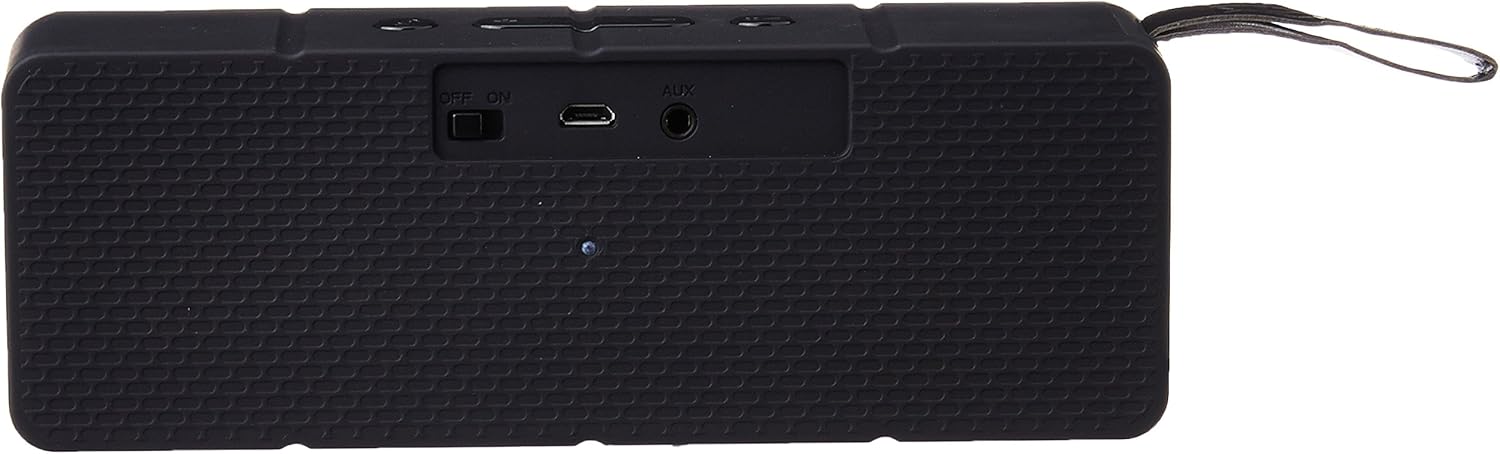
Figura 3.2: Rear Panel. The rear panel of the black Altec Lansing IMW140-AB speaker is visible, featuring an "OFF/ON" slide switch, a Micro USB charging port, and an "AUX" 3.5mm audio input jack.
- Power Switch (OFF/ON): Located on the rear panel, slides to turn the speaker on or off.
- Port de càrrega micro USB: Located on the rear panel, used for charging the speaker's internal battery.
- Entrada AUX (3.5 mm): Located on the rear panel, allows connection of non-Bluetooth audio devices.
- Botons de control (panell superior): Includes buttons for power, Bluetooth pairing, volume adjustment, and track navigation. Specific functions are detailed in the Operating section.
- Integrated Carry Strap: A durable strap for convenient portability.
- Micròfon integrat: Per a trucades amb mans lliures.
4. Configuració
4.1 Càrrega de l'altaveu
- Connect the small end of the supplied USB charging cable to the Micro USB port on the rear of the speaker.
- Connecteu l'extrem gran del cable de càrrega USB a un adaptador de corrent USB (no inclòs) o al port USB d'un ordinador.
- L'indicador lluminós de càrrega s'il·luminarà. Espereu aproximadament de 2 a 3 hores per a una càrrega completa.
- Un cop completament carregat, l'indicador lluminós pot canviar de color o apagar-se. Desconnecteu el cable de càrrega.
Nota: Per a una durada òptima de la bateria, carregueu completament l'altaveu abans del primer ús.
4.2 Engegada/apagada
- To power on, slide the "OFF/ON" switch on the rear panel to the "ON" position. You will hear a voice confirmation.
- To power off, slide the "OFF/ON" switch to the "OFF" position.
4.3 Vinculació Bluetooth
- Assegureu-vos que l'altaveu estigui encès. L'indicador lluminós de Bluetooth parpellejarà, indicant que està en mode d'emparellament.
- On your Bluetooth-enabled device (smartphone, tablet, computer), navigate to the Bluetooth settings menu.
- Cerca available devices. Select "IMW140" from the list.
- Once paired, you will hear a voice confirmation, and the Bluetooth indicator light will become solid.
- L'altaveu intentarà tornar a connectar-se automàticament amb l'últim dispositiu emparellat quan s'engegui.
Consell: If pairing fails, turn off the speaker and your device's Bluetooth, then repeat the steps.
4.4 Auxiliary (AUX) Connection
- Connect one end of the supplied 3.5mm auxiliary cable to the AUX input port on the rear of the speaker.
- Connect the other end of the 3.5mm auxiliary cable to the headphone jack or audio output of your non-Bluetooth device.
- L'altaveu canviarà automàticament al mode AUX.
- Controla la reproducció i el volum directament des del dispositiu connectat.
5. Funcionament de l'altaveu
Reproducció de música 5.1 (mode Bluetooth)
- Reproduir/pausa: Press the Play/Pause button on the top panel.
- Pista següent: Press and hold the Volume Up (+) button for approximately 2 seconds.
- Pista anterior: Press and hold the Volume Down (-) button for approximately 2 seconds.
- Pujar el volum: Premeu breument el botó d'apujar el volum (+).
- Baixar el volum: Premeu breument el botó per baixar el volum (-).
Nota: Some devices may require volume control directly from the source device.
5.2 Trucades de mans lliures
Quan es connecta mitjançant Bluetooth, el micròfon integrat de l'altaveu permet fer trucades telefòniques amb mans lliures.
- Respon a la trucada: Premeu el botó Reproduir/Pausa una vegada quan rebeu una trucada.
- Finalitzar la trucada: Premeu el botó Reprodueix/Pausa una vegada durant una trucada.
- Rebutja la trucada: Press and hold the Play/Pause button for approximately 2 seconds when a call comes in.
6. Manteniment
- Neteja: Use a soft, dry cloth to clean the speaker's exterior. Do not use liquid cleaners or aerosols.
- Emmagatzematge: Guardeu l'altaveu en un lloc fresc i sec, allunyat de la llum solar directa i de temperatures extremes.
- Cura de la bateria: To preserve battery life, charge the speaker regularly, even if not in frequent use. Avoid fully discharging the battery for extended periods.
- Exposició a l'aigua: Aquest altaveu és NO waterproof. Avoid exposure to water, rain, or excessive moisture.
7. Solució De Problemes
| Problema | Causa possible | Solució |
|---|---|---|
| L'altaveu no s'encén. | La bateria està esgotada. | Carregueu l'altaveu amb el cable USB subministrat. |
| No es pot emparellar per Bluetooth. | Speaker is not in pairing mode; device's Bluetooth is off; speaker is already connected to another device; too far from speaker. | Ensure speaker is on and indicator is flashing. Turn device's Bluetooth off and on. Disconnect from other devices. Move device closer to speaker (within 33 feet). |
| No hi ha so de l'altaveu. | Volume is too low; incorrect input mode; device is not playing audio. | Increase speaker and device volume. Ensure correct mode (Bluetooth/AUX). Verify audio is playing on the source device. |
| Mala qualitat d'àudio. | Device is too far from speaker; interference; low battery. | Move device closer. Avoid obstacles. Charge the speaker. |
8. Especificacions
- Nom del model: IMW140-BLK
- Tipus d'altaveu: Altaveu Bluetooth portàtil
- Connectivitat: Bluetooth, 3.5mm Auxiliary
- Interval sense fil: Fins a 33 peus (10 metres)
- Potència de sortida: 10 watts
- Durada de la bateria: Fins a 6 hores (varia segons el volum i el contingut)
- Font d'alimentació: Bateria de liti recarregable incorporada
- Característiques especials: Built-in Microphone for hands-free calling, Voice Confirmation, On-board song navigation controls, Integrated carry strap.
- Dimensions (L x A x A): Aproximadament 16.8 cm x 4.5 cm x 6 cm (6.61 polzades x 1.77 polzades x 2.36 polzades)
- Pes: Aproximadament 454 g (1 lliures)
- Resistència a l'aigua: No impermeable
- Dispositius compatibles: Smartphones, Tablets, Laptops, MP3 Players, and other Bluetooth-enabled or 3.5mm audio output devices.
9. Garantia i Suport
For warranty information and technical support, please refer to the documentation included with your purchase or visit the official Altec Lansing weblloc web. Conserveu el comprovant de compra per a reclamacions de garantia.


