Introducció
Thank you for choosing the Excelvan Color Weather Station. This device provides accurate indoor and outdoor temperature and humidity readings, along with weather forecasts, time, and date. It features a vibrant LCD display and a wireless outdoor sensor for comprehensive environmental monitoring. Please read this manual carefully before operation to ensure proper use and longevity of your device.
Contingut del paquet
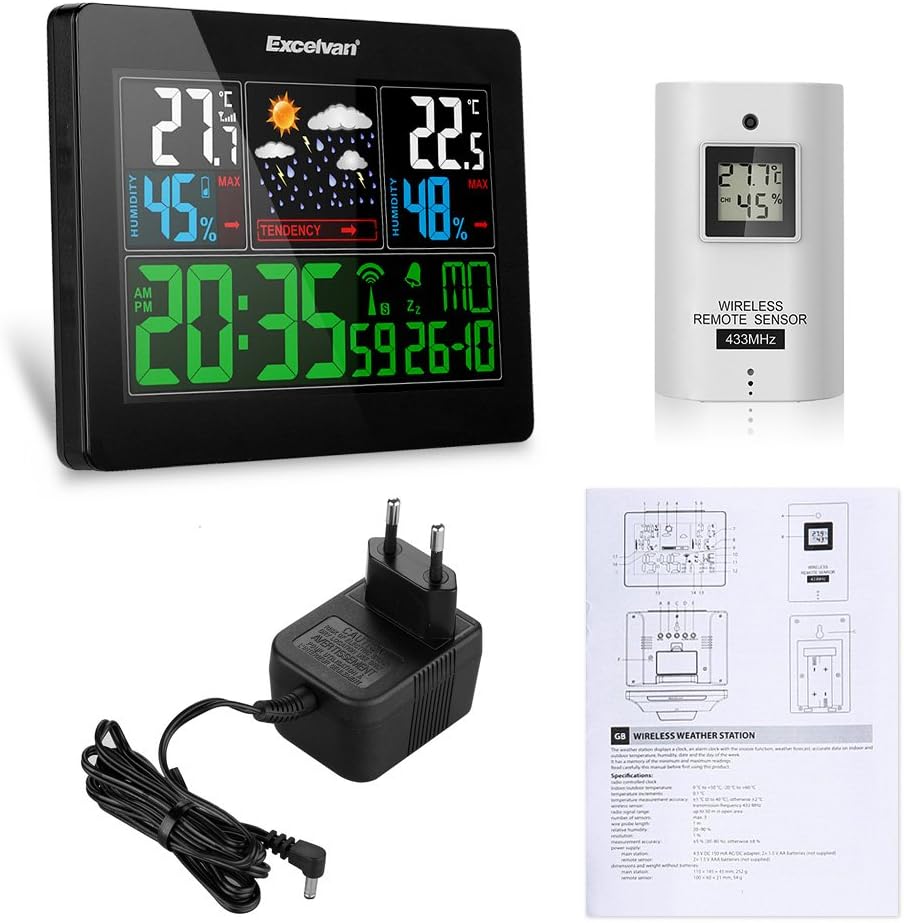
Image: All components included in the package, showing the main weather station unit, the wireless outdoor sensor, the power adapter, and the user manual.
- 1 x Excelvan Color Weather Station (Main Unit)
- 1 x Sensor exterior sense fil
- 1 adaptador de corrent (4.5 V CC)
- 1 x Manual d'usuari
Característiques del producte
- Temperatura i humitat interiors/exteriors: Measures and displays temperature (0°C to +50°C indoors; -20°C to +60°C outdoors) and humidity (20-90% RH) with trend indicators.
- Pressió baromètrica: Built-in barometer with barometric pressure and history display.
- Sensor sense fils: 433MHz transmission frequency with a range of up to 50 meters in open space. Supports up to 3 external sensors (one included).
- Pronòstic del temps: Five weather icons (sunny, partially sunny, cloudy, rainy, stormy) indicate future weather conditions.
- Pantalla LCD gran: Simultaneous display of time, indoor/outdoor temperature, humidity, barometric pressure, and calendar (available in 7 languages).
- Il·luminació de fons: Long-lasting LED backlight when connected to power adapter for colorful background illumination.
- Radio-Controlled Clock: Sincronització horària automàtica.
Especificacions
| Característica | Especificació |
|---|---|
| Rang de temperatura interior | 0 °C a +50 °C |
| Interval de temperatura exterior | -20 °C a +60 °C |
| Increment de temperatura | 0.1 °C |
| Precisió de la temperatura | ±1°C (0 to 40°C), otherwise ±2°C |
| Gamma d’humitat | 20-90% HR |
| Resolució d’humitat | 1% |
| Precisió de la humitat | ±5% (30-80%), otherwise ±8% |
| Wireless Sensor Frequency | 433 MHz |
| abast sense fils | Fins a 50 m (espai obert) |
| Sensors màxims compatibles | 3 |
| Probe Cable Length (Sensor) | 1m |
| Potència de la unitat principal | 4.5V DC 150mA AC/DC adapter, 2 x 1.5V AA batteries (not included) |
| Sensor remot d'alimentació | 2 piles AAA de 1.5 V (no incloses) |
| Dimensions de la unitat principal | 110 x 145 x 45 mm |
| Pes de la unitat principal | 252g (sense bateries) |
| Dimensions del sensor remot | 100 x 60 x 21 mm |
| Pes del sensor remot | 54g (sense bateries) |
Configuració
1. Alimentació de la unitat principal
- Obriu la tapa del compartiment de la bateria a la part posterior de la unitat principal.

Imatge: Part posterior view of the weather station showing the open battery compartment, ready for battery insertion.
- Insert 2 x 1.5V AA batteries (not included) into the compartment, observing the correct polarity (+/-).
- Tanqueu la tapa del compartiment de la bateria.
- For continuous backlight and optimal performance, connect the provided AC/DC power adapter to the DC 4.5V port on the back of the main unit and plug it into a power outlet.

Imatge: Part posterior view of the weather station with the power adapter cable plugged into the DC 4.5V port.
2. Powering the Wireless Outdoor Sensor
- Open the battery compartment cover on the back of the wireless sensor.
- Insert 2 x 1.5V AAA batteries (not included) into the compartment, observing the correct polarity (+/-).
- Tanqueu la tapa del compartiment de la bateria.
3. Sensor Placement and Connection
- Place the main unit indoors, preferably on a desktop or table. This unit is designed for indoor use only.
- Position the wireless outdoor sensor outdoors, away from direct sunlight and rain, in a shaded and well-ventilated area. It can be wall-mounted or placed on a desktop.

Image: The main weather station unit displayed on an indoor desk, with an inset showing the wireless outdoor sensor mounted on an exterior wall.
- Ensure the sensor is within the 50-meter effective range of the main unit. Obstacles like thick walls or electronic devices may reduce the range.

Image: The main weather station unit and the wireless remote sensor are shown side-by-side, with text indicating an effective using distance of 50 meters for the sensor.
- The main unit will automatically search for and connect to the wireless sensor. This may take a few minutes. Once connected, outdoor temperature and humidity will be displayed.
Instruccions de funcionament
Visualització finalitzadaview

Imatge: Una imatge detallada view of the weather station's color LCD display, showing indoor and outdoor temperature and humidity, weather forecast icons, time, and date.
The large LCD display is divided into several sections:
- A dalt a l'esquerra: Indoor Temperature and Humidity with MAX/MIN records.
- Top Center: Weather Forecast icons (Sunny, Partially Sunny, Cloudy, Rainy, Stormy) and barometric pressure tendency.
- A dalt a la dreta: Outdoor Temperature and Humidity with MAX/MIN records.
- A baix: Time (AM/PM), Alarm status, Radio Control signal, and Calendar (Day, Month, Date).
Funcions del botó
- Mode: Press to cycle through display modes (e.g., time, alarm settings). Press and hold to enter setting mode.
- +: Increase value during setting, or switch between Celsius/Fahrenheit.
- -: Decrease value during setting, or view MIN/MAX temperature/humidity.
- ALARMA: Premeu per view alarm time. Press and hold to set alarm.
- CERCAR: Manually search for the outdoor sensor signal.
- SNOOZE/LLUM: (Usually on top) Press to activate snooze during alarm, or adjust backlight brightness (when powered by adapter).
Configuració de l'hora i la data
- Manteniu premut el botó MODE botó fins que la pantalla de l'hora parpellegi.
- Utilitza el + or - botons per ajustar l'hora.
- Premeu MODE again to confirm and move to the next setting (minutes, year, month, day, language for day of week).
- Repeat steps 2 and 3 until all settings are configured.
- Premeu MODE per sortir del mode de configuració.
- The clock is radio-controlled and will attempt to synchronize automatically. Manual setting is for initial setup or if radio signal is unavailable.
Configuració d'alarma
- Manteniu premut el botó ALARMA botó fins que l'hora de l'alarma parpellegi.
- Utilitza el + or - botons per ajustar l'hora de l'alarma.
- Premeu ALARMA again to confirm and move to alarm minutes.
- Repetiu els passos 2 i 3.
- Premeu ALARMA per sortir del mode de configuració.
- Premeu ALARMA briefly to turn the alarm ON/OFF. An alarm icon will appear/disappear on the display.
Selecció de la unitat de temperatura (°C/°F)
- Premeu breument + button to switch between Celsius (°C) and Fahrenheit (°F) display for temperature.
Viewing MAX/MIN Records
- Premeu breument - button to cycle through current, maximum (MAX), and minimum (MIN) temperature and humidity readings.
- To clear MAX/MIN records, press and hold the - button while MAX/MIN values are displayed.
Previsió meteorològica
The weather station predicts weather conditions for the next 12-24 hours based on barometric pressure changes. The icons displayed are:
- ☀ Assolellat
- ☁ Partially Sunny
- ☁️ Cloudy
- ☔ Plujós
- ☕ Stormy
Note: Weather forecasts are estimates and may not always be 100% accurate.
Manteniment
- Neteja: Wipe the unit and sensor with a soft, damp tela. No utilitzeu netejadors abrasius ni dissolvents.
- Substitució de la bateria: Replace batteries in both the main unit and sensor when the low battery indicator appears on the display. Ensure correct polarity.
- Emmagatzematge: Si guardeu el dispositiu durant un període prolongat, traieu totes les piles per evitar fuites.
- Medi ambient: Avoid exposing the main unit to extreme temperatures, direct sunlight, or high humidity. The outdoor sensor is designed for outdoor use but should be protected from direct heavy rain and snow for longevity.
Resolució de problemes
| Problema | Causa possible | Solució |
|---|---|---|
| No hi ha cap pantalla a la unitat principal | Batteries are dead or incorrectly inserted; Power adapter not connected or faulty. | Check battery polarity and replace if necessary. Ensure power adapter is securely connected and functional. |
| Outdoor temperature/humidity not displayed or flashing | Sensor out of range; Sensor batteries dead; Interference; Sensor not paired. | Move sensor closer to the main unit. Replace sensor batteries. Relocate units away from interfering electronics. Press the CERCAR button on the main unit to re-establish connection. |
| Lectures inexactes | Sensor exposed to direct sunlight/rain; Unit placed near heat/cold sources. | Relocate the outdoor sensor to a shaded, protected area. Ensure main unit is not near vents, windows, or appliances that affect temperature. |
| Time not synchronizing (Radio-Controlled Clock) | Weak radio signal; Interference; Unit too far from signal source. | Place the main unit near a window or in an open area, away from electronic devices that may cause interference. Allow up to 24 hours for initial synchronization. |
| Backlight not working (when on batteries) | Backlight is designed to be continuous only when powered by the AC adapter. | Connect the power adapter for continuous backlight. On battery power, the backlight is typically momentary to conserve energy. |
Garantia i Suport
Excelvan products are manufactured to high-quality standards. For any issues or questions regarding your weather station, please refer to the contact information provided with your purchase or visit the official Excelvan weblloc de suport.
Conserveu el vostre comprovant de compra per a reclamacions de garantia.


