Introducció
This manual provides detailed instructions for setting up, operating, and maintaining your Logitech M275 Wireless USB Mouse. Please read this guide thoroughly to ensure optimal performance and longevity of your device. The Logitech M275 mouse is designed for comfortable use with its contoured shape and offers reliable wireless connectivity.

Imatge: De dalt a baix view of the Logitech M275 Wireless Mouse, showcasing its black finish and central scroll wheel.
Configuració
Follow these steps to set up your Logitech M275 Wireless USB Mouse:
- Instal·leu la bateria:
- Localitzeu el compartiment de la bateria a la part inferior del ratolí.
- Obriu la tapa del compartiment de la bateria.
- Insert one AA battery, ensuring correct polarity (+/-). The mouse includes one AA battery.
- Tanqueu bé la tapa del compartiment de la bateria.
Imatge: Part inferior view of the Logitech M275 Wireless Mouse, showing the ON/OFF switch, battery compartment, and optical sensor.
- Connecteu el receptor USB:
- Locate the tiny USB Nano Receiver, typically stored inside the battery compartment or packaged separately.
- Connecteu el nanoreceptor USB a un port USB disponible de l'ordinador.
- L'ordinador hauria de detectar i instal·lar automàticament els controladors necessaris.

Image: Close-up of the Logitech Nano Receiver plugged into a laptop's USB port, indicating successful connection.
- Engegar el ratolí:
- Slide the ON/OFF switch on the underside of the mouse to the 'ON' position.
- El ratolí ja està llest per al seu ús.

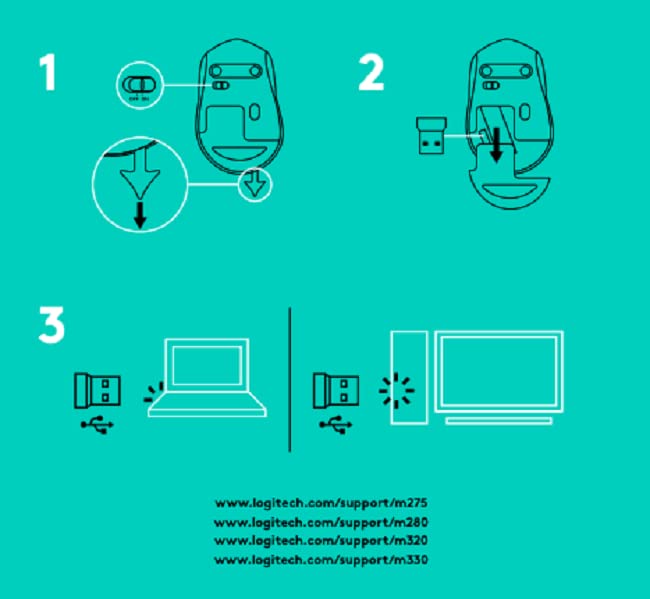
Image: A diagram showing the three steps for setting up the mouse: 1) Insert battery, 2) Insert receiver into mouse for storage, 3) Plug receiver into computer's USB port.
Instruccions de funcionament
The Logitech M275 Wireless USB Mouse offers intuitive control for your computer:
- Funcions bàsiques:
- Clic esquerre: Botó principal per seleccionar elements, obrir enllaços, etc.
- Clic dret: Botó secundari per a menús contextuals i opcions addicionals.
- Roda de desplaçament: Roll up or down to navigate documents and web pages. The scroll wheel also functions as a clickable middle button.
- Sensor òptic avançat: The mouse utilizes a Logitech Advanced Optical Sensor for smooth and precise cursor control on various surfaces.
- Indicador de durada de la bateria: A small LED light on the mouse indicates battery status. It typically glows green briefly when powered on if the battery is good. A red light indicates that the battery is low and needs replacement. The mouse is designed for an 18-month battery life, which may vary based on usage.

Imatge: Superior view of the Logitech M275 Wireless Mouse, highlighting its ergonomic design and indicating an 18-month battery life.
Manteniment
Proper maintenance ensures the longevity and performance of your mouse:
- Substitució de la bateria: When the battery indicator light turns red, replace the AA battery. Follow the steps outlined in the 'Install the Battery' section under Setup.
- Neteja del ratolí:
- Turn off the mouse before cleaning.
- Utilitzeu un drap suau i sense pelusa lleugerament dampEsbandiu amb aigua o una solució netejadora suau per netejar la superfície del ratolí.
- Eviteu utilitzar productes químics o materials abrasius.
- No permeteu que els líquids entrin als components interns del ratolí.
Resolució de problemes
If you encounter issues with your Logitech M275 mouse, refer to the following common solutions:
- No Cursor Movement or Intermittent Connection:
- Assegureu-vos que el ratolí estigui encès.
- Check the battery. Replace it if the indicator light is red or if the mouse is unresponsive.
- Ensure the USB Nano Receiver is securely plugged into a working USB port on your computer. Try a different USB port.
- Acosteu el ratolí al receptor USB per descartar problemes d'abast.
- Avoid using the mouse on highly reflective or transparent surfaces. A mouse pad is recommended for optimal tracking.
- Lagging or Unresponsive Cursor:
- Interference from other wireless devices can affect performance. Try moving other wireless devices away from the mouse and receiver.
- Ensure your computer's operating system is up to date.
- Mouse Not Detected by Computer:
- Reinicieu l'ordinador.
- Try plugging the USB Nano Receiver into a different USB port.
- If you have other Logitech devices, ensure the M275 receiver is the correct one for this mouse, as it is not a Unifying receiver.
Especificacions
| Característica | Detall |
|---|---|
| Marca | Logitech |
| Número de model | M275 |
| Tecnologia de connectivitat | USB sense fil |
| Tecnologia de detecció de moviment | Òptic |
| Color | Negre |
| Font d'alimentació | Battery Powered (1 AA battery) |
| Durada mitjana de la bateria | 18 mesos |
| Plataforma de maquinari | PC |
| Compatibilitat de sistemes operatius | Linux, Windows 7, Windows XP |
| Pes de l'article | 100 g |
| Dimensions del producte | 21 x 7.6 x 15.2 cm |
| Components inclosos | Wireless Mouse, Nano Receiver, 1 AA battery, User Documentation |
Garantia i Suport
- Garantia: The Logitech M275 Wireless USB Mouse comes with a 1-year warranty. Please retain your proof of purchase for warranty claims.
- Atenció al client: For technical assistance or warranty inquiries, please contact Logitech Customer Care.
- Logitech India Customer Care:
- Número gratuït: 1800 572 4730
- Opening Time: 9:00 AM to 6:00 PM (Monday to Friday)
- Note: Weekends & National Holidays closed.


