Introducció
The Creative Sound BlasterX G5 is a compact, high-performance external sound card designed to significantly enhance audio for gaming and multimedia across various platforms. This device functions as a virtual 7.1 24-bit/192kHz, 120dB USB Digital Audio Converter (DAC) and headphone amplifier, providing an immersive audio experience for PC, Mac, PS4, and other compatible consoles.
Contingut del paquet
- Sound BlasterX G5 Unit
- Fullet d'inici ràpid
- Fullet de garantia
- Cable micro USB
- Mini TOSLINK Cable
Producte acabatview
The Sound BlasterX G5 features a robust design with intuitive controls for an optimized audio experience.

Figure 1: Creative Sound BlasterX G5 external sound card. This image displays the sleek, black rectangular unit with a red 'X' logo and a prominent volume knob on the side.
The top panel of the device includes key controls for audio customization:

Figura 2: superior view of the Sound BlasterX G5 controls. This image highlights the 'Scout Mode' button, 'SBX Profile' button, and a gain switch (L <GAIN> H) for headphones, along with LED indicators for selected profiles (1, 2, 3) and audio modes (Scout Mode, SBX, and another icon).
Configuració
Follow these steps to connect your Sound BlasterX G5 to your desired device.
Connexió a PC/Mac
- Connect the Sound BlasterX G5 to your computer using the provided Micro USB cable.
- For Windows PCs, download and install the latest drivers and software from the Creative support website. This software allows for full customization and profile gestió.
- For Mac OS X, the device is generally plug-and-play. However, you may need to adjust audio settings in 'Audio MIDI Setup' to ensure optimal performance (e.g., setting G5 to "DSP Clock" for Input and Output).
- Connect your headphones or speakers to the appropriate output jacks on the G5.
Connecting to Consoles (PS4, Xbox, etc.)
- Connect the Sound BlasterX G5 to your console's USB port using the provided Micro USB cable for power and data.
- For audio output from the console, connect the console's optical output to the G5's 'LINE/OPTICAL IN' port using the provided Mini TOSLINK cable.
- Connect your headphones to the G5's headphone jack.
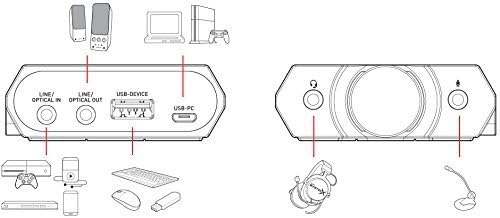
Figure 3: Connection diagram for the Sound BlasterX G5. This diagram illustrates various connection points including Line/Optical In, Line/Optical Out, USB-Device, and USB-PC, showing how to connect to PCs, consoles, headphones, and other peripherals.
Instruccions de funcionament
The Sound BlasterX G5 offers several controls for managing your audio experience.
- Pom de control de volum: Located on the side, this knob allows for precise adjustment of the master volume. It also adjusts the system volume in Windows.
- Scout Mode Button: Activates 'Scout Mode,' which enhances in-game audio cues like footsteps, providing a tactical advantage in competitive gaming.
- SBX Profile Botó: Cycles through pre-configured audio profiles (e.g., Gaming, Music, Movies) or custom profiles created using the software. LED indicators on the top panel show the active profile.
- Headphone Gain Switch (L/H): Adjusts the headphone amplifier gain to match the impedance of your headphones. Use 'L' for low-impedance headphones (32-150Ω) and 'H' for high-impedance headphones (150Ω-600Ω).
- Control de programari: For advanced customization, including equalizer settings, virtual surround sound adjustments, and creating custom audio profiles, use the dedicated Creative software on your PC.
Manteniment
To ensure the longevity and optimal performance of your Sound BlasterX G5, follow these maintenance guidelines:
- Mantingueu el dispositiu net netejant-lo amb un drap suau i sec. Eviteu utilitzar productes químics agressius o netejadors abrasius.
- Guardeu el dispositiu en un lloc fresc i sec, allunyat de la llum solar directa i de temperatures extremes.
- Eviteu exposar el dispositiu a humitat o líquids.
- Handle cables and connectors gently to prevent damage.
Resolució de problemes
If you encounter issues with your Sound BlasterX G5, refer to the following common solutions:
- Sense sortida de so:
- Comproveu totes les connexions del cable per assegurar-vos que estiguin segures.
- Verify the volume knob is turned up and not muted.
- Ensure the Sound BlasterX G5 is selected as the default audio output device in your operating system's sound settings.
- For Mac users, check 'Audio MIDI Setup' to confirm the G5 is configured correctly.
- Reinstall or update the device drivers for Windows.
- Audio Distortion or Crackling:
- Try connecting the G5 to a different USB port on your computer or console.
- Ensure the headphone gain switch is set appropriately for your headphones.
- Comproveu el sample rate and bit depth settings in your audio control panel; sometimes reducing these can resolve issues.
- Update the device drivers and firmware.
- Software Crashing or Not Responding:
- Reinicieu l'ordinador.
- Reinstall the Creative software.
- Assegureu-vos que el vostre sistema operatiu estigui actualitzat.
Especificacions
| Característica | Detall |
|---|---|
| Marca | Creatiu |
| Número de model | SB1700 |
| Mode de sortida d'àudio | 7.1 Virtual Surround |
| Interfície del maquinari | USB 2.0, USB 3.0, Optical In/Out |
| Dispositius compatibles | PC, Mac, PS4, Xbox |
| Sistemes operatius | Mac OS X, Windows 7, Windows 8, Windows 8.1, Windows 10, Windows Vista |
| Pes de l'article | 0.01 unces |
| Dimensions del producte (LxWxH) | 6.18 x 1.72 x 5.83 polzades |
| Primera data disponible | 26 de novembre de 2015 |
Garantia i Suport
For detailed warranty information, please refer to the warranty leaflet included in your product package or visit the official Creative website. For further technical support, driver downloads, and FAQs, please visit the Creative support page.
També podeu visitar el Botiga creativa a Amazon per a més informació sobre el producte i accessoris.


