1. Introducció
This manual provides detailed instructions for the installation, operation, and maintenance of your JOOAN 770 HD 720P Wireless IP Camera. Please read this manual thoroughly before using the product to ensure proper functionality and to avoid damage. Keep this manual for future reference.
2. Producte acabatview
2.1 Contingut del paquet
Verifiqueu que tots els elements que s'enumeren a continuació s'inclouen al vostre paquet. Si falta algun element o hi ha algun malmès, poseu-vos en contacte amb l'atenció al client.
- JOOAN 770 HD 720P Wireless IP Camera (Note: Some variants may be 1080P or have internal model JA-C9E-U)
- Adaptador d'alimentació
- Cable de dades USB
- Suport de muntatge
- Screw Pack (for mounting)
- Cable de xarxa (Ethernet)
- Manual d'usuari (aquest document)

Image: Contents of the JOOAN 770 HD 720P Wireless IP Camera package, including the camera, power adapter, cables, and mounting hardware.
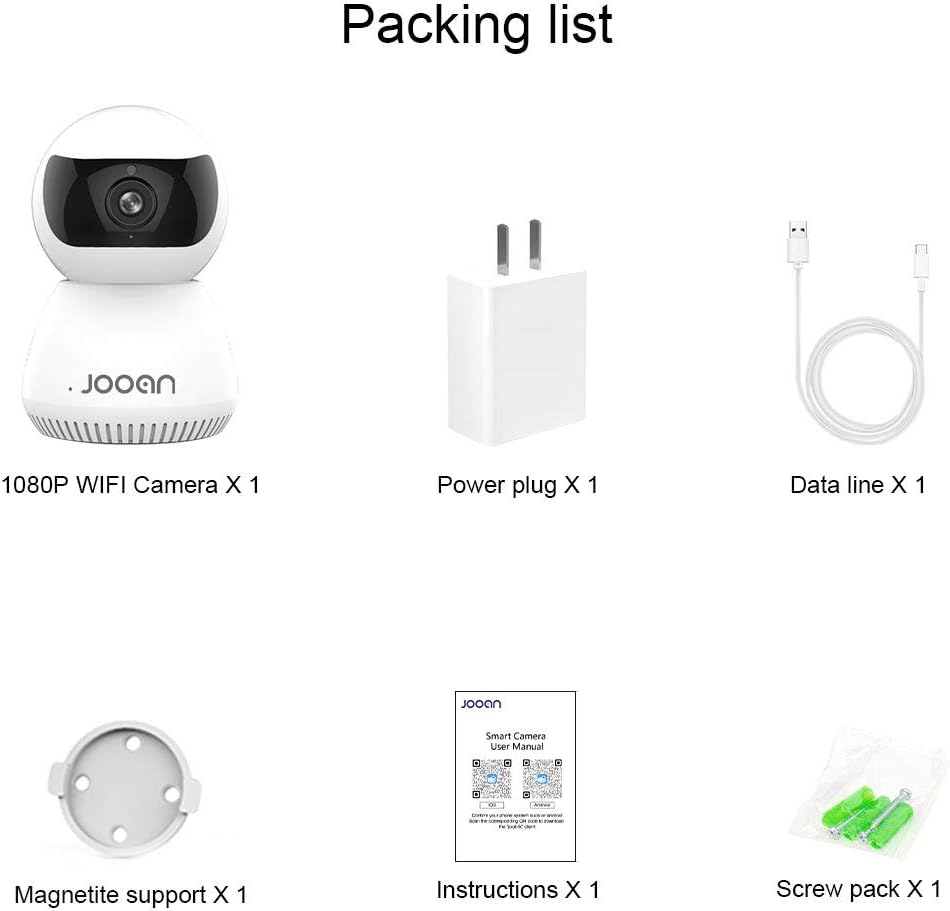
Imatge: Una imatge detallada view of the packing list for a JOOAN WiFi Camera, showing a 1080P camera, power plug, data line, magnetite support, instructions, and screw pack.
2.2 Característiques clau
- Qualitat de vídeo HD: Captures clear 720P high-definition video. (Note: Some models may support 1080P resolution).
- Connectivitat sense fils: Supports Wi-Fi for flexible placement and easy setup.
- Funcionalitat de panoràmica/inclinació: Ofereix una àmplia viewing angle with 355° horizontal rotation and 100° vertical tilt, controllable via the companion application.
- Àudio bidireccional: El micròfon i l'altaveu integrats permeten la comunicació en temps real.
- Visió nocturna: Equipped with infrared LEDs for clear monitoring in low-light conditions, up to 35 feet.
- Detecció de moviment: Alerts users to detected movement within the camera's field of view.
- Emmagatzematge local: Supports Micro SD cards up to 128GB for continuous or event-triggered recording.
- P2P Cloud Monitoring: Remote access and monitoring via smartphone (Android & iOS) and computer applications.
- Port Ethernet: Provides an option for wired network connection when Wi-Fi signal is unstable.

Imatge: Frontal view of the JOOAN 770 HD 720P Wireless IP Camera, showcasing its dome design and lens.

Image: A JOOAN camera with speech bubbles indicating two-way audio functionality, allowing communication between the camera's location and a remote user via a smartphone.

Image: A JOOAN camera in a nursery setting, illustrating its infrared night vision capability with red LEDs visible, providing clear monitoring in darkness.
3. Instruccions de configuració
3.1 Desembalatge i col·locació inicial
- Traieu amb cura tots els components de l'embalatge.
- Choose a suitable location for your camera. Ensure it is within range of your Wi-Fi network or close to an Ethernet port.
- For optimal performance, place the camera on a stable, flat surface or mount it using the provided bracket and screws.
3.2 Encès
- Connect the USB data cable to the camera's power input port.
- Connecteu l'adaptador d'alimentació a una presa de corrent estàndard.
- The camera will power on, and an indicator light will illuminate, typically blinking to indicate readiness for setup.
3.3 Network Connection (Wi-Fi or Ethernet)
Your camera supports both wireless (Wi-Fi) and wired (Ethernet) connections.
Connexió Wi-Fi:
- Ensure your smartphone is connected to the 2.4GHz Wi-Fi network you intend to use for the camera. (5GHz networks are generally not supported).
- Proceed to section 3.4 for app installation and pairing, which will guide you through the Wi-Fi setup process.
Connexió Ethernet:
- Connecteu un extrem del cable de xarxa proporcionat al port Ethernet de la càmera.
- Connect the other end of the network cable to an available LAN port on your router or network switch.
- The camera will automatically attempt to establish a wired network connection.

Imatge: Part posterior view of the JOOAN camera, highlighting the Ethernet port for wired network connectivity.
3.4 Instal·lació de l'aplicació i emparellament de dispositius
- Download the official companion application for JOOAN cameras from your smartphone's app store (e.g., Apple App Store for iOS, Google Play Store for Android). Refer to the quick start guide included in your package for the specific app name or QR code.
- Open the app and create a new user account, or log in if you already have one.
- Follow the in-app instructions to add a new device. This typically involves scanning a QR code on the camera, or selecting your camera model and following prompts for Wi-Fi configuration (entering your Wi-Fi password).
- Once successfully paired, the camera's indicator light will usually turn solid, and you will see the live video feed in the app.
4. Instruccions de funcionament
4.1 Viu View
After successful pairing, open the companion app and select your camera from the device list to view the live video feed. You can switch between standard and high-definition viewing modes if available.
4.2 Control de panoràmica i inclinació
En directe view screen within the app, use the directional controls (often a joystick-like interface or swipe gestures) to remotely adjust the camera's horizontal (pan) and vertical (tilt) angles. The camera supports 355° pan and 100° tilt.
4.3 Àudio bidireccional
To use the two-way audio feature, tap the microphone icon in the app's live view interface. Hold the button to speak, and release to listen. Ensure your phone's microphone permissions are granted to the app.
4.4 Detecció de moviment i alertes
- Navegueu fins a la configuració de la càmera dins de l'aplicació.
- Locate the "Motion Detection" or "Alarm Settings" option.
- Enable motion detection and configure sensitivity levels as desired.
- Set up alert notifications (e.g., push notifications to your phone, email alerts) to be informed when motion is detected.
4.5 Enregistrament i emmagatzematge
Micro SD Card Recording:
- Insert a Micro SD card (up to 128GB, Class 10 or higher recommended) into the camera's SD card slot. Power off the camera before inserting or removing the card.
- In the app settings, format the SD card if prompted.
- Configure recording settings: continuous recording, motion-triggered recording, or scheduled recording.
- Foo gravattagi pot ser viewed and downloaded directly from the app.
Emmagatzematge al núvol (opcional):
The camera may offer optional cloud storage services. Refer to the app for details on subscription plans and activation.
5. Manteniment
- Neteja: Feu servir un drap suau i sec per netejar la lent i el cos de la càmera. Eviteu utilitzar netejadors líquids o materials abrasius.
- Actualitzacions de programari: Regularly check the companion app for firmware updates. Keeping the camera's firmware updated ensures optimal performance and security.
- Col·locació: Ensure the camera is not exposed to extreme temperatures, direct sunlight for prolonged periods, or excessive moisture.
- Cicle d'alimentació: Si la càmera té problemes, prova de desconnectar-la de la font d'alimentació durant 10 segons i després torna-la a connectar.
6. Solució De Problemes
Aquesta secció tracta els problemes habituals que podeu trobar. Per a problemes més complexos, poseu-vos en contacte amb l'atenció al client.
| Problema | Causa possible | Solució |
|---|---|---|
| La càmera no es connecta a la Wi-Fi. | Incorrect Wi-Fi password; camera too far from router; 5GHz Wi-Fi network used; router firewall settings. | Verify Wi-Fi password. Move camera closer to router. Ensure you are using a 2.4GHz Wi-Fi network. Check router settings for any restrictions. |
| Sense transmissió de vídeo en directe. | Camera offline; poor network connection; app issue. | Check camera's power and network connection. Restart camera and router. Close and reopen the app. Ensure stable internet connection. |
| L'àudio bidireccional no funciona. | Microphone/speaker muted in app; app permissions not granted; network latency. | Check audio settings in the app. Ensure the app has microphone permissions on your phone. Verify network stability. |
| Motion detection alerts not received. | Motion detection disabled; notification settings incorrect; app running in background. | Enable motion detection in app settings. Check app notification permissions on your phone. Ensure the app is allowed to run in the background. |
| SD card not recording or recognized. | SD card not inserted correctly; card corrupted; unsupported card type/size; card not formatted. | Reinsert SD card. Try a different, compatible SD card (Max 128GB, Class 10). Format the SD card via the app. |
7. Especificacions
The following are the technical specifications for the JOOAN 770 HD 720P Wireless IP Camera:
| Característica | Detall |
|---|---|
| Model | 770 (Internal Model: JA-C9E-U) |
| Resolució de vídeo | 720P HD (Some variants may support 1080P) |
| Connectivitat | Wi-Fi (2.4GHz), Ethernet |
| Interval de panoràmica/inclinació | Horitzontal: 355°, Vertical: 100° |
| Font d'alimentació | Elèctric amb cable, 5 volts |
| Emmagatzematge | Targeta Micro SD (màx. 128 GB) |
| Característiques especials | Motion Sensor, Two-Way Audio, Infrared Night Vision |
| Dispositius compatibles | Smartphone (Android & iOS), Tablet, Computer |
| Material | Metall |
| Dimensions | Aproximadament 20 x 15.2 x 13.8 cm |
| Pes | Aproximadament 679.99 g |

Image: The bottom of a JOOAN Smart Camera, displaying the model number JA-C9E-U and power specifications.
8. Garantia i Suport
JOOAN products are designed for reliability and performance. For warranty information, please refer to the warranty card included with your product or visit the official JOOAN website. If you encounter any issues or require technical assistance, please contact JOOAN customer support.
Informació de contacte:
- Skype: live:market_491
- Correu electrònic: wendy@qacctv.com