Introducció
The Groov-e GVPS210SR is a lightweight and compact personal CD player designed for both portable and home use. It supports CD and MP3 playback, offering a programmable memory for up to 20 CD tracks and 99 MP3 tracks. Additionally, it features an integrated FM radio tuner with 40 preset channels, an LCD display, a low battery indicator, and anti-skip protection for uninterrupted listening. This manual provides detailed instructions for setup, operation, and maintenance of your device.
Contingut del paquet
Si us plau, comproveu que tots els elements que s'enumeren a continuació estiguin inclosos al vostre paquet:
- Groov-e GVPS210SR Personal CD Player
- Auriculars
- Micro USB Cable (for power, not charging)
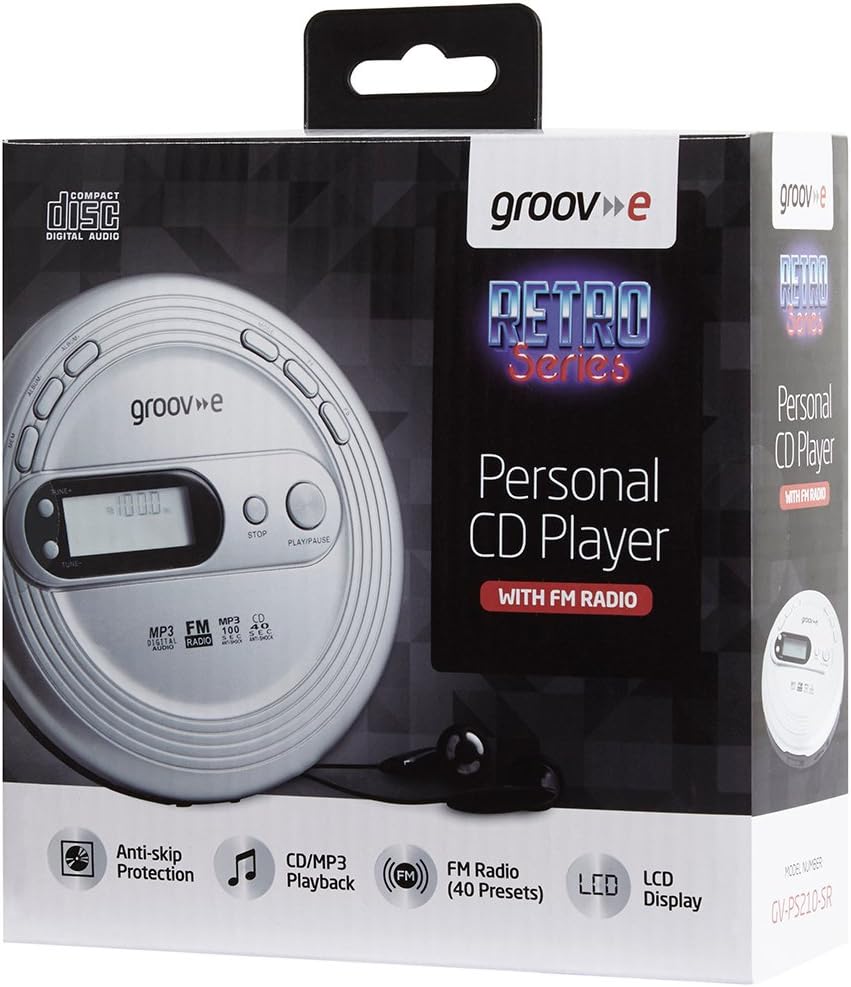
Producte acabatview
Familiarize yourself with the various parts and controls of your GVPS210SR CD player.

Controls i funcions:
- Pantalla LCD: Shows track number, time, FM frequency, and other status indicators.
- TUNE+ / TUNE-: Ajusta la freqüència de ràdio FM.
- STOP: Atura la reproducció.
- REPRODUCCIÓ/PAUSA: Inicia o posa en pausa la reproducció.
- MEM (Memory): Used for programming tracks or saving FM radio presets.
- ALBUM: Navigates between albums/folders on MP3 discs.
- Mode: Cycles through playback modes (e.g., Repeat One, Repeat All, Intro, Random).
- FF (Avançament ràpid): Salta a la pista següent o avança ràpidament dins d'una pista.
- FB (Fast Backward): Skips to the previous track or fast backwards within a track.
- Entrada de CC de 4.5 V: For connecting an optional external power adapter.
- Auriculars Jack: 3.5mm stereo output for connecting headphones.
- Compartiment de la bateria: Located on the bottom, for AA batteries.
Configuració
1. Engegar el dispositiu
Your GVPS210SR can be powered by AA batteries or an optional external DC 4.5V power adapter.
- Ús de piles: Open the battery compartment cover on the bottom of the unit. Insert 2 x AA batteries (not included), ensuring correct polarity (+/-). Close the cover securely.
- Using an AC Adapter (Optional): Connect a compatible DC 4.5V power adapter (not included) to the DC IN 4.5V jack on the side of the unit. Plug the adapter into a standard wall outlet.
2. Inserting a CD or MP3 Disc
- Gently press the OPEN button or slide the latch to open the CD compartment lid.
- Place the CD or MP3 disc onto the center spindle with the label side facing up.
- Premeu suaument el centre del disc fins que encaixi al seu lloc.
- Tanqueu fermament la tapa del compartiment del CD fins que encaixi.
3. Connexió d'auriculars
Connect the included headphones or any standard 3.5mm stereo headphones into the headphone jack on the side of the unit.

Instruccions de funcionament
Reproducció de CD/MP3
- Ensure a disc is inserted and headphones are connected.
- Premeu el botó REPRODUCCIÓ/PAUSA button to start playback. The LCD display will show the track number and elapsed time.
- Premeu REPRODUCCIÓ/PAUSA de nou per pausar la reproducció. Premeu-lo una vegada més per reprendre-la.
- Premeu el botó STOP botó per aturar la reproducció.
- Per passar a la pista següent, premeu el botó FF botó.
- To go back to the beginning of the current track or to the previous track, press the FB botó.
- To fast forward within a track, press and hold the FF button. Release to resume normal playback.
- To fast backward within a track, press and hold the FB button. Release to resume normal playback.
- For MP3 discs with multiple folders, use the ÀLBUM button to navigate between folders.
Memòria programable
You can program up to 20 tracks for CD playback and 99 tracks for MP3 playback to play in a specific order.
- While the player is in STOP mode, press the MEM button. The display will show "P01" (Program 01).
- Utilitza el FF or FB buttons to select the desired track number for the first program slot.
- Premeu MEM again to confirm the selection and move to the next program slot ("P02").
- Repetiu els passos 2 i 3 fins que es programin totes les pistes desitjades.
- Premeu REPRODUCCIÓ/PAUSA to start playing the programmed tracks.
Funcionament de la ràdio FM
The GVPS210SR features an FM radio tuner with 40 preset channels.
- Amb la unitat engegada, premeu el botó MODE button repeatedly until "FM" appears on the LCD display.
- To manually tune, press TUNE+ or TUNE- to adjust the frequency in small increments.
- To auto-scan for the next available station, press and hold TUNE+ or TUNE-. The player will stop on the next strong signal.
- To save a preset: Once you are on a desired station, press the MEM botó. El número preestablert parpellejarà. Feu servir FF or FB to select the desired preset number (P01-P40), then press MEM de nou per confirmar.
- To recall a preset: In FM mode, press the ÀLBUM per anar passant pels preajustos desats.
Funcions especials
- Protecció anti-salta: This feature helps prevent audio skipping during movement. It buffers audio data to ensure smooth playback.
- Intensificació dels sons més greus: Premeu el botó MODE button repeatedly until "BASS" appears on the display to enhance bass frequencies. Press MODE de nou per apagar-lo.
- Repetició de reproducció: While playing a CD/MP3, press the MODE button to cycle through repeat options: Repeat One (repeats current track), Repeat All (repeats all tracks on disc), Random (plays tracks in random order).
- Intro Playback: Plays the first few seconds of each track. Press MODE until "INTRO" appears.

Manteniment
Neteja de la unitat
- Wipe the exterior of the unit with a soft, slightly damp tela. No utilitzeu netejadors abrasius ni dissolvents.
- To clean the laser lens (inside the CD compartment), use a specialized CD lens cleaner disc. Do not touch the lens directly.
Cura de la bateria
- Traieu les piles si no heu d'utilitzar la unitat durant un període prolongat per evitar fuites.
- Substituïu totes les piles alhora per unes de noves del mateix tipus.
- Eliminar les bateries usades de manera responsable d'acord amb la normativa local.
Resolució de problemes
| Problema | Causa possible | Solució |
|---|---|---|
| Sense poder | Batteries are dead or inserted incorrectly; AC adapter not connected properly. | Replace batteries or check polarity; ensure AC adapter is securely plugged in. |
| El disc no es reprodueix / Error "NO DISC" | Disc is dirty, scratched, or inserted incorrectly; lid not closed. | Clean the disc; re-insert disc correctly; ensure lid is fully closed. |
| Audio skipping | Disc is dirty or scratched; excessive vibration; anti-skip protection off. | Clean the disc; avoid strong vibrations; ensure anti-skip is active. |
| No hi ha recepció de ràdio FM | Weak signal; location interference. | Adjust position of the unit; try a different location; extend headphone cable (acts as antenna). |
| Mala qualitat del so | Headphones not fully plugged in; dirty headphone jack; low battery. | Ensure headphones are fully inserted; clean headphone jack; replace batteries. |
Especificacions
- Model: GVPS210SR
- Dimensions: 40 x 20 x 20 cm (aprox. 15.7 x 7.9 x 7.9 polzades)
- Pes: 300 g (aprox. 0.66 lliures)
- Font d'alimentació: 2 x AA Batteries (not included) or DC 4.5V external power adapter (not included)
- Formats d'àudio compatibles: CD, CD MP3
- Sintonitzador de ràdio: FM (40 presets)
- Programmable Tracks: 20 (CD), 99 (MP3)
- Connectivitat: Conector d'auriculars de 3.5 mm
- Característiques especials: Anti-Skip Protection, Bass Boost, LCD Display, Low Battery Indicator
Garantia i Suport
For warranty information or technical support, please refer to the warranty card included with your product or visit the official Groov-e weblloc web. Conserveu el rebut de compra com a comprovant de compra.
For further assistance, you may contact Groov-e customer service through their official channels.


