Bluestone Automatic Wrist Blood Pressure Monitor User Manual
Model: 80-5103
1. Introducció
Thank you for choosing the Bluestone Automatic Wrist Blood Pressure Monitor. This device is designed to provide quick and accurate measurements of your systolic and diastolic blood pressure, as well as your pulse rate. Regular monitoring can help you track your heart health over time. Please read this manual thoroughly before using the device to ensure correct operation and accurate results.
2. Informació de seguretat
- Aquest dispositiu està pensat només per a ús domèstic d'adults. Consulteu el vostre metge per a la interpretació de les mesures de la pressió arterial.
- No utilitzeu aquest dispositiu en nadons, nens o persones que no puguin expressar el seu consentiment.
- Eviteu prendre mesures en un vehicle en moviment o durant l'activitat física.
- Do not self-diagnose or self-medicate based on the measurement results. Always consult a healthcare professional.
- Mantingueu el dispositiu allunyat de camps electromagnètics forts.
- Do not disassemble or attempt to repair the device. Contact customer support if issues arise.
3. Producte acabatview
The Bluestone Automatic Wrist Blood Pressure Monitor is a compact and portable device designed for ease of use. It features a large LCD screen for clear readings and a memory function to store past measurements.
3.1 Components
- Wrist Blood Pressure Monitor with integrated cuff
- Estoig d'emmagatzematge
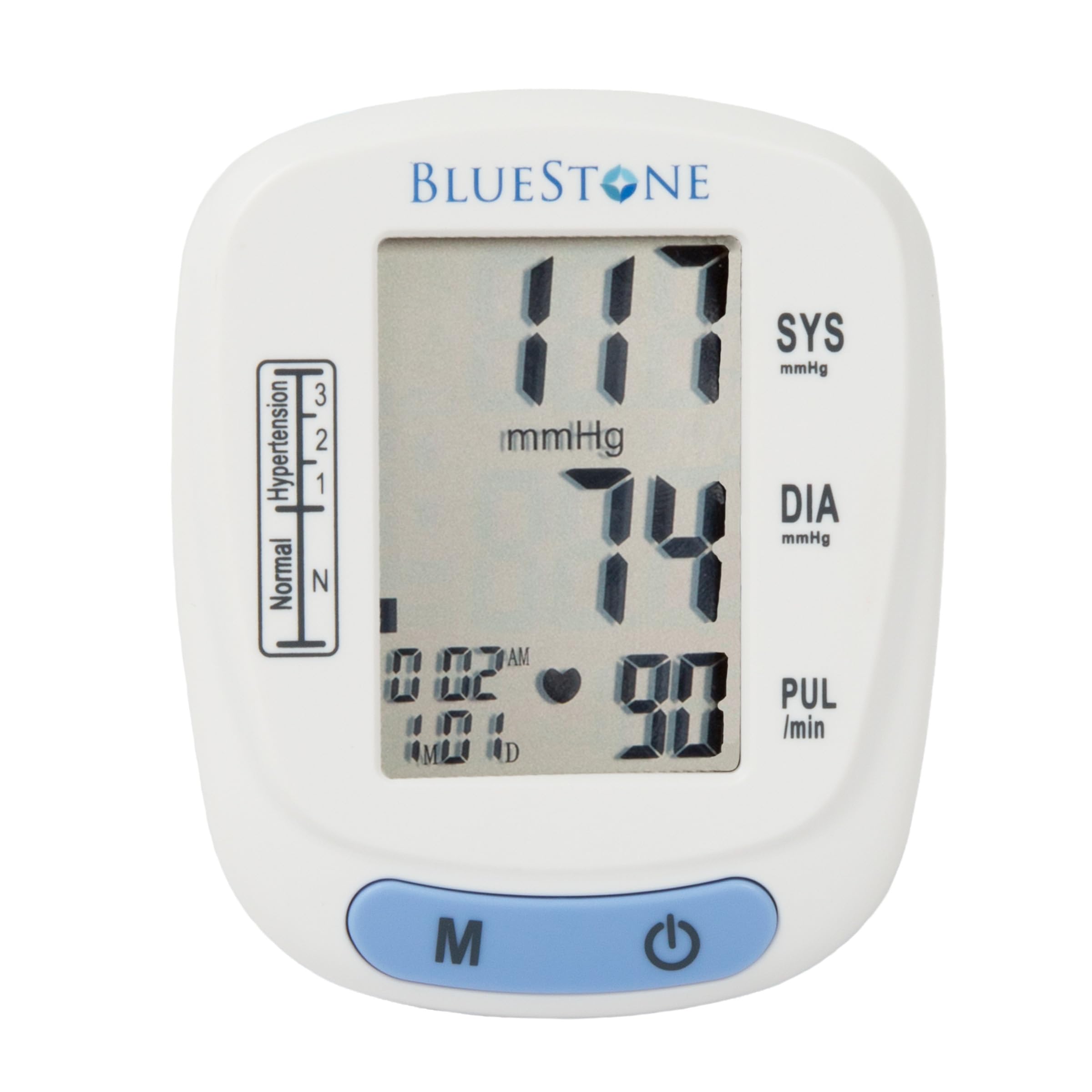
Image 3.1: Bluestone Automatic Wrist Blood Pressure Monitor on a user's wrist.
3.2 Característiques del dispositiu

Image 3.2: Labeled diagram highlighting the monitor's display elements and buttons.
- Pantalla LCD gran: Displays systolic, diastolic, pulse, date, and time.
- Blood Pressure Level Bar: Indicates blood pressure classification (Normal, Hypertension levels 1, 2, 3).
- Memory Button (M): Accesses stored readings.
- Botó On/Off: Powers the device on and off, and initiates measurements.
- Adjustable Cuff: Designed to fit wrists up to 10 inches in circumference.
4. Configuració
4.1 Instal·lació de la bateria
- Obriu la tapa del compartiment de la bateria a la part posterior del monitor.
- Introduïu dues piles AAA (no incloses), assegurant-vos de la polaritat correcta (+/-).
- Tanqueu bé la tapa del compartiment de la bateria.
4.2 Col·locació del maneguet
- Treu-te qualsevol roba ajustada del canell.
- Place the monitor on your left wrist with the display facing upwards. The cuff should be positioned approximately 1-2 cm above your wrist joint.
- Fasten the cuff snugly around your wrist. Ensure it is not too tight or too loose.
- Rest your arm on a table or flat surface so that the monitor is at the same level as your heart. Keep your palm open and relaxed.
5. Instruccions de funcionament
5.1 Prendre una mesura
- Ensure the cuff is correctly placed on your wrist and your arm is positioned at heart level.
- Press the On/Off button to power on the device. The display will show all symbols briefly, then '00'.
- The cuff will automatically inflate, and the measurement will begin. Remain still and silent during the measurement.
- Once the measurement is complete, the systolic pressure, diastolic pressure, and pulse rate will be displayed on the screen. The device will automatically store this reading.
- Press the On/Off button again to turn off the device, or it will automatically shut off after approximately one minute of inactivity.
5.2 Interpretació dels resultats
The monitor displays your systolic (SYS) and diastolic (DIA) blood pressure in mmHg, and your pulse (PUL) in beats per minute. The blood pressure level bar on the left side of the display indicates your reading's classification according to World Health Organization (WHO) guidelines:
- Normal: Optimal blood pressure.
- Hypertension (Levels 1, 2, 3): Indicates elevated blood pressure. Consult a healthcare professional for advice.

Image 5.1: Monitor displaying a sample reading and highlighting key features.
6. Funció de memòria
The monitor can store up to 120 measurements with date and time stamps, allowing you to track your blood pressure trends.
6.1 Storing Readings
Each successful measurement is automatically stored in the device's memory.
6.2 Recalling Readings
- With the device off, press the 'M' (Memory) button.
- The most recent reading will be displayed first.
- Press the 'M' button repeatedly to scroll through previous measurements.
- To exit memory mode, press the On/Off button or wait for the device to automatically shut off.
7. Manteniment
7.1 Neteja
- Netegeu el monitor i el braçalet amb un drap suau i sec.
- No utilitzeu productes de neteja abrasius ni submergiu el dispositiu en aigua.
7.2 Emmagatzematge
- Store the monitor in its included protective case when not in use.
- Mantingueu el dispositiu en un lloc fresc i sec, allunyat de la llum solar directa i de temperatures extremes.
- Si no heu d'utilitzar el dispositiu durant un període prolongat, traieu-ne les piles per evitar fuites.

Image 7.1: Monitor stored in its protective case.
8. Solució De Problemes
| Problema | Causa possible | Solució |
|---|---|---|
| Sense pantalla quan està encès | Les piles estan gastades o incorrectament inserides. | Canvieu les piles per piles AAA noves, assegurant-vos de la polaritat correcta. |
| Error message (e.g., 'Err') | Movement during measurement, improper cuff placement, or device malfunction. | Remain still and silent. Re-apply cuff correctly. If error persists, contact support. |
| Lectures inconsistents | Improper posture, talking during measurement, or recent physical activity. | Ensure proper technique (see Section 5.1). Take measurements at the same time each day. |
9. Especificacions

Image 9.1: Dimensions of the Bluestone Blood Pressure Monitor.
| Característica | Detall |
|---|---|
| Número de model | 80-5103 |
| Dimensions del producte | 3" de llargada x 2.5" d'amplada x 2.5" de gruix |
| Pes de l'article | 8.3 unces |
| Circumferència del puny | Fits up to 10" wrists |
| Font d'alimentació | 2 piles AAA (no incloses) |
| Tipus de visualització | LCD digital |
| Capacitat de memòria | Up to 120 readings with date/time stamp |
10. Garantia i Suport
Bluestone products are manufactured with quality and care. For warranty information or technical support, please refer to the contact details provided with your purchase documentation or visit the official Bluestone weblloc web. Si us plau, conserveu el comprovant de compra per a qualsevol reclamació de garantia.


