1. Introducció
The KORG minilogue is a 37-key polyphonic analog synthesizer designed to deliver authentic analog sound with modern features. It offers four voices of polyphony, a 16-step sequencer, and an OLED oscilloscope for real-time waveform visualization. This manual provides essential information for setting up, operating, and maintaining your minilogue synthesizer.

Figura 1: superior view of the KORG minilogue synthesizer, showcasing its control panel and keyboard.
2. Configuració
2.1 Connexió d'alimentació
Connect the included AC adapter to the DC 9V input jack on the rear panel of the minilogue. Plug the adapter into a standard AC outlet. Use only the specified AC adapter to prevent damage to the unit.
2.2 Connexions d'àudio
Connect the OUTPUT jack (L/MONO) to your amplifier, mixer, or audio interface using a standard 1/4-inch TS cable. For stereo monitoring, connect headphones to the HEADPHONES jack. The AUDIO IN jack allows external audio signals to be processed through the minilogue's filter and effects.
2.3 Connexions MIDI i de sincronització
The minilogue features MIDI IN/OUT ports for connecting to other MIDI devices. A USB B connector is also provided for MIDI communication with a computer. Use the SYNC IN/OUT jacks to synchronize the minilogue with other KORG Volca series units or compatible devices.

Figure 2: Rear panel connections of the KORG minilogue, showing AC power, USB, MIDI, Sync, Audio In, Output, and Headphones jacks.
3. Instruccions de funcionament
3.1 Power On and Initial Tuning
After connecting power, switch the unit ON. The minilogue will display "Tuning..." on its OLED screen and perform an automatic tuning process. This ensures optimal analog performance. Allow the unit to warm up for a few minutes after initial power-on for stable tuning. If tuning drifts after warming up, power-cycle the unit to re-initiate the tuning process.
3.2 Basic Sound Generation (VCOs, Mixer, Filter)
The minilogue features two Voltage Controlled Oscillators (VCO1 and VCO2). Use the OCTAVE and WAVE selectors to choose the base pitch and waveform (Saw, Triangle, Square). The MIXER section blends the output of VCO1, VCO2, and NOISE. The FILTER section (CUTOFF, RESONANCE) shapes the timbre of the sound. Experiment with the VCO2 MODULATION controls (CROSS MOD DEPTH, PITCH EG INT, SYNC, RING) to create complex sounds.
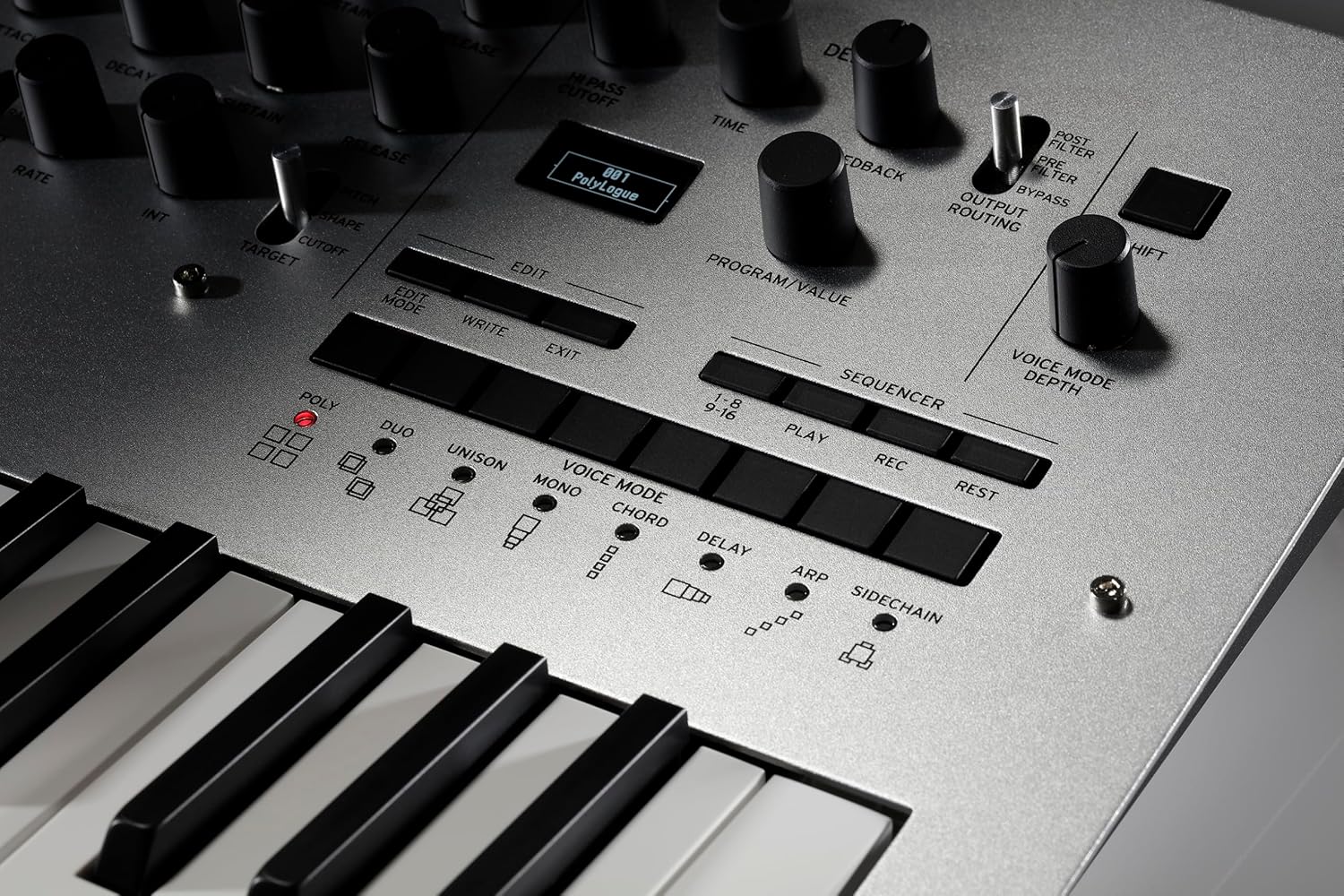
Figura 3: Primer pla view of the VCO, Mixer, and Filter sections, highlighting the controls for sound synthesis.
3.3 Envelope Generators (EG, AMP EG) and LFO
The EG (Envelope Generator) and AMP EG (Amplifier Envelope Generator) control the amplitude and filter cutoff over time using ATTACK, DECAY, SUSTAIN, and RELEASE parameters. The LFO (Low Frequency Oscillator) provides modulation sources for various parameters, adding movement and texture to your sounds.
3.4 Voice Modes and Sequencer
Select different voice modes (POLY, DUO, UNISON, MONO, CHORD) to alter how the four voices are used. The built-in 16-step sequencer allows for recording and playback of note sequences and motion sequencing (recording knob movements). Use the PROGRAM/VALUE knob to select and edit presets.

Figura 4: Primer pla view of the Voice Mode selectors and the 16-step sequencer controls.
3.5 OLED Oscilloscope and Delay Effect
The OLED oscilloscope provides a real-time visual representation of your waveform, aiding in sound design and understanding. The integrated DELAY effect (TIME, FEEDBACK) adds depth and space to your sounds.

Figure 5: The OLED oscilloscope displaying a dynamic waveform, providing visual feedback during sound creation.
3.6 Vídeo oficial del producte
Video 1: An official KORG video demonstrating the features and sound capabilities of the minilogue synthesizer.
4. Manteniment
To ensure the longevity and optimal performance of your KORG minilogue, keep the unit clean and free from dust. Use a soft, dry cloth for cleaning. Avoid using abrasive cleaners or solvents. Store the synthesizer in a cool, dry place away from direct sunlight and extreme temperatures. Do not place heavy objects on the unit.
5. Solució De Problemes
5.1 Inestabilitat d'afinació
If the minilogue exhibits tuning instability, especially after extended use, it may be due to temperature fluctuations affecting the analog circuitry. Power-cycling the unit and allowing it to re-tune after a few minutes can often resolve this. Ensure the unit is in a stable temperature environment.
5.2 Sense sortida de so
Verify all audio cables are securely connected to the correct input/output jacks. Check the volume levels on the minilogue, your amplifier/mixer, and any connected headphones. Ensure the correct program is selected and that the voice mode is appropriate for your playing style.
5.3 Unexpected Sequencer Behavior
If the sequencer is not behaving as expected, check the step length, resolution, and swing settings in the sequencer edit mode. Ensure that motion sequencing is enabled or disabled as desired. Clear any unwanted motion data if necessary.
6. Especificacions
| Característica | Detall |
|---|---|
| Pes de l'article | 5 lliures |
| Dimensions del producte | 24.4 x 6 x 16.6 polzades |
| Material del cos | Metall, plàstic |
| Nombre de tecles del teclat | 37 |
| Color | Gris |
| Tipus de connector | Jack d'àudio |
| Fabricant | Korg USA Inc. |
7. Garantia i Suport
For detailed warranty information and technical support, please refer to the official KORG website or contact KORG customer service directly. KORG is committed to creating new experiences in music and performance, offering unique instruments that bring the enjoyment of musical performance to many people worldwide.


