1. Introducció
This manual provides detailed instructions for the installation, operation, and maintenance of your Comelit AHCAM631A Vandal-Dome AHD 960p Camera. Please read this manual thoroughly before installation and use to ensure proper functionality and to prevent damage to the device. Keep this manual for future reference.
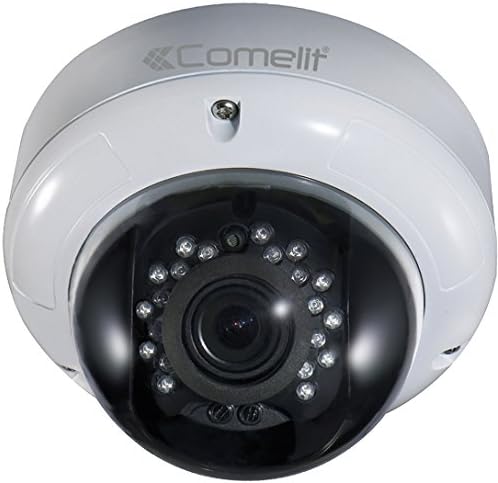
Figura 1: Comelit AHCAM631A Vandal-Dome AHD 960p Camera. This image displays the white dome-shaped camera with a dark lens housing, featuring multiple infrared LEDs surrounding the central camera lens.
2. Producte acabatview
2.1 Característiques clau
- Vídeo d'alta definició: Provides clear 960p resolution for detailed surveillance.
- Vandal-Dome Design: Robust construction designed to resist tampering and impact.
- Visió nocturna per infrarojos: Equipped with IR illumination for clear visibility up to 25 meters in low-light conditions.
- IP66 Weatherproof Rating: Suitable for both indoor and outdoor installations, protected against dust and powerful water jets.
- Varifocal Lens: Adjustable focal length from 2.8mm to 12mm for flexible viewangles d'ajust.
- AHD Technology: Analog High Definition for reliable video transmission over coaxial cable.
2.2 Contingut del paquet
Please check the package contents upon receipt. If any items are missing or damaged, contact your supplier immediately.
- Comelit AHCAM631A Vandal-Dome Camera Unit
- Cargols de muntatge i tacs de paret
- Plantilla d'instal·lació (si s'inclou)
- Guia d'inici ràpid / Manual d'usuari
3. Configuració i instal·lació
Before beginning installation, ensure that power is disconnected from the installation area. Professional installation is recommended.
3.1 Muntatge de la càmera
- Seleccioneu la ubicació: Choose a suitable indoor or outdoor location for mounting, considering the desired viewing angle and cable routing. The camera is designed for wall mounting.
- Prepara la superfície: Use the provided mounting template (if available) to mark drilling points on the wall or ceiling.
- Forats: Drill pilot holes for the mounting screws and insert wall plugs if necessary.
- Càmera segura: Fixeu la base de la càmera fermament a la superfície de muntatge amb els cargols proporcionats.
3.2 Connexions de cablejat
The AHCAM631A camera requires two main connections: video and power.
- Connexió de vídeo: Connect a BNC coaxial cable from the camera's video output to an AHD-compatible Digital Video Recorder (DVR) or monitor. Ensure the connection is secure.
- Connexió d'alimentació: Connect a 12V DC power supply (not included) to the camera's power input. Ensure the power supply meets the camera's power requirements.
3.3 Engegada inicial
Once all connections are made, apply power to the camera. The camera should power on, and video should appear on the connected DVR/monitor. Allow a few moments for the camera to initialize.
4. Instruccions de funcionament
4.1 Adjusting the Varifocal Lens
The AHCAM631A features a varifocal lens, allowing you to adjust the field of view and focus. This adjustment is typically done manually after installation.
- Access Lens: Carefully open the dome cover to access the lens adjustment screws.
- Adjust Zoom: Rotate the zoom adjustment ring to achieve the desired field of view (between 2.8mm wide angle and 12mm telephoto).
- Ajustar el focus: Rotate the focus adjustment ring until the image on your monitor is clear and sharp.
- Cobertura segura: Once adjustments are complete, securely close the dome cover to maintain its IP66 rating.
4.2 Menú de visualització en pantalla (OSD)
Many AHD cameras feature an OSD menu for advanced settings adjustments (e.g., exposure, white balance, DNR). Access to the OSD menu is typically controlled via a joystick on the camera cable or through a UTC (Up The Coax) controller connected to your DVR.
- Refer to your DVR's manual or the camera's specific OSD instructions for detailed navigation and setting adjustments.
- Common settings include: Brightness, Contrast, Sharpness, Backlight Compensation (BLC), Wide Dynamic Range (WDR), Digital Noise Reduction (DNR), and Day/Night mode.
5. Manteniment
5.1 Neteja de la càmera
Regular cleaning helps maintain optimal image quality.
- Use a soft, clean cloth to wipe the dome cover.
- Per a la brutícia tossuda, dampcaeu el drap lleugerament amb aigua o una solució de neteja suau i no abrasiva.
- Avoid using harsh chemicals, solvents, or abrasive materials, as these can damage the dome's surface.
5.2 Consideracions ambientals
While the camera has an IP66 rating, extreme environmental conditions can affect its lifespan and performance.
- Assegureu-vos d'una ventilació adequada si s'instal·la en un espai tancat.
- Avoid direct exposure to lightning or extreme voltage fluctuacions.
- Periodically check cable connections for corrosion or damage, especially in outdoor installations.
6. Solució De Problemes
Si teniu problemes amb la càmera, consulteu els problemes i solucions més comuns següents.
| Problema | Causa possible | Solució |
|---|---|---|
| Sense sortida de vídeo | No power; Loose video cable; Incompatible DVR | Check power supply and connections; Ensure BNC cable is securely connected; Verify DVR supports AHD 960p input. |
| Poor image quality / Blurry image | Lens out of focus; Dirty dome cover; Incorrect OSD settings | Adjust the varifocal lens focus; Clean the dome cover; Reset OSD settings to default or adjust for optimal image. |
| IR LEDs not illuminating at night | Insufficient power; Faulty IR sensor; OSD setting for Day/Night mode | Ensure adequate power supply; Check OSD settings for Day/Night mode (should be Auto); Contact support if sensor is faulty. |
| Camera not responding | Power issue; Internal fault | Verify power connection; Try power cycling the camera; If issue persists, contact customer support. |
7. Especificacions tècniques
| Model | AHCAM631A |
| Resolució | 960p AHD |
| Lent | Varifocal 2.8mm - 12mm |
| Rang d'infrarojos | Fins a 25 metres |
| Classificació resistent a la intempèrie | IP66 |
| Entorn d'ús | Interior / Exterior |
| Tipus de muntatge | Muntatge de paret |
| Color | Blanc |
| Dimensions (L x A x A) | 14.5 x 16.8 x 16.8 cm |
| Pes | 900 grams |
| Font d'alimentació | 12V CC (no inclòs) |
| Ús recomanat | Vigilància |
8. Garantia i Suport
8.1 Informació de la garantia
Comelit products are manufactured to high standards and are subject to strict quality control. For specific warranty terms and conditions, please refer to the warranty card included with your product or visit the official Comelit weblloc. La garantia normalment cobreix defectes de materials i fabricació en condicions d'ús normal.
8.2 Atenció al client
If you require technical assistance, have questions about your product, or need to report a fault, please contact Comelit customer support. Contact details can usually be found on the official Comelit weblloc web o a l'embalatge del producte.
- Before contacting support, please have your product model number (AHCAM631A) and a description of the issue ready.
- For the most up-to-date information and support resources, visit the official Comelit weblloc.


