Introducció
This manual provides comprehensive instructions for the setup, operation, and maintenance of your RCA 4 Device Universal Remote. This remote is designed to control up to four different audio/video components, simplifying your home entertainment experience. Please read this manual thoroughly before using the remote to ensure proper functionality and to maximize its capabilities.
Producte acabatview
The RCA 4 Device Universal Remote (Model: LYSB01B0MKAHY-ELECTRNCS) is an infrared (IR) remote control capable of operating various electronic devices such as televisions, satellite/cable boxes, DVD players, and VCRs. Its ergonomic design and clearly labeled buttons facilitate ease of use.
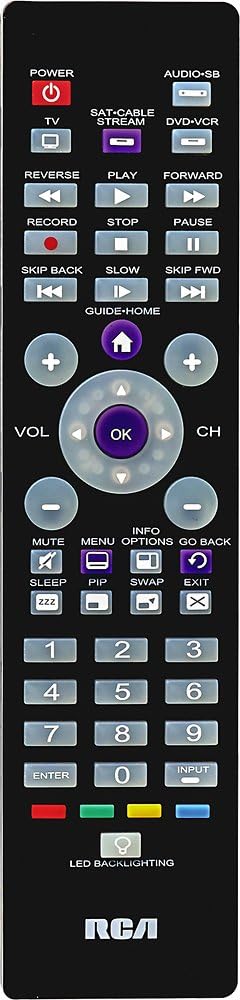
Imatge 1: Davant view of the RCA 4 Device Universal Remote. This image displays the full layout of the remote control, including the power button, device selection buttons (TV, SAT/CABLE, DVD-VCR), numeric keypad, channel and volume controls, playback buttons, and other function keys. The RCA logo is visible at the bottom.
Configuració
1. Instal·lació de la bateria
The remote requires two (2) AA batteries (not included). Ensure correct polarity when inserting the batteries.
- Obriu la tapa del compartiment de la bateria a la part posterior del comandament a distància.
- Insert two AA batteries, matching the (+) and (-) terminals as indicated inside the compartment.
- Substituïu la tapa del compartiment de la bateria.
2. Programació del comandament a distància
To control your devices, the remote must be programmed with the correct codes. There are typically two methods:
Mètode A: Introducció directa de codi
This method involves entering a specific code for your device's brand. A code list is usually provided with the remote (refer to the separate code list document if available).
- Engegueu el dispositiu que voleu programar (per exemple, el televisor).
- Premeu i manteniu premut el botó del dispositiu desitjat (per exemple, TV) al comandament a distància.
- Mentre manteniu premut el botó del dispositiu, premeu i manteniu premut el PODER botó simultàniament.
- Release both buttons. The PODER button should remain lit.
- Enter the 4-digit code for your device's brand using the numeric keypad.
- If the code is valid, the PODER button will turn off. If it blinks and stays on, the code is invalid; try another code.
- Proveu el comandament a distància prement el botó PODER button. If the device turns off, the programming was successful. If not, repeat the process with the next code for your brand.
Mètode B: Cerca automàtica de codi
If you cannot find a code or prefer not to use direct entry, the remote can search for the correct code.
- Engegueu el dispositiu que voleu programar.
- Premeu i manteniu premut el botó del dispositiu desitjat (per exemple, TV) for approximately 5 seconds until the PODER el botó s'il·lumina.
- Deixeu anar el botó del dispositiu.
- Apunteu el comandament a distància cap al dispositiu i premeu repetidament el botó PODER botó (o CH+) until the device turns off. This may take several presses.
- Un cop apagat el dispositiu, premeu immediatament el botó ENTRAR botó per desar el codi. El PODER el botó s'apagarà.
- Test the remote's functions. If not all functions work, repeat the search process to find a better code.

Imatge 2: Costat inclinat view of the RCA 4 Device Universal Remote. This perspective shows the remote's ergonomic shape and thickness, providing a better understanding of its physical design.
Instruccions de funcionament
Once programmed, your universal remote can control your selected devices. Always ensure the remote is pointed directly at the device's IR receiver.
1. Selecció d'un dispositiu
Per controlar un dispositiu específic, premeu el botó del dispositiu corresponent a la part superior del comandament a distància:
- TV: Per a la teva televisió.
- SAT-CABLE-STREAM: For satellite receiver, cable box, or streaming device.
- DVD-VCR: For DVD player or VCR.
- AUDIO-SB: For audio systems or soundbars.
The selected device button will light up briefly to confirm your selection.
2. Funcions bàsiques
- POTÈNCIA: Encén o apaga el dispositiu seleccionat.
- VOL (+/-): Augmenta o disminueix el volum.
- CH (+/-): Canvia el canal cap amunt o cap avall.
- MUT: Silences the audio. Press again to restore.
- Teclat numèric (0-9): Per a l'entrada directa de canals o la navegació pel menú.
- ENTRAR: Confirma les seleccions o completa l'entrada de canals.
- ENTRADA: Cycles through video input sources on your TV.
3. Controls de reproducció
These buttons are primarily used for DVD players, VCRs, or streaming devices when the DVD-VCR or SAT-CABLE-STREAM device is selected.
- JUGAR: Inicia la reproducció.
- PAUSA: Posa en pausa la reproducció.
- STOP: Atura la reproducció.
- REGISTRE: Inicia l'enregistrament (si el dispositiu ho admet).
- REVERSA: Rebobina la reproducció.
- AVANT: Avança ràpid de reproducció.
- SKIP BACK / SKIP FWD: Skips backward or forward (e.g., chapter skip).
- LENT: Activates slow-motion playback (if supported).
4. Funcions avançades
- GUIDE-HOME: Accedeix a la guia de programes o al menú d'inici.
- INFORMACIÓ: Mostra informació del programa.
- MENÚ: Opens the device's main menu.
- OPCIONS: Accedeix a opcions o configuracions addicionals.
- TORNA: Torna a la pantalla o menú anterior.
- DORMIR: Estableix un temporitzador de son per al televisor.
- PIP: Picture-in-Picture function (if supported by TV).
- CANVIA: Swaps between main and PIP screens.
- SORTIDA: Exits menus or on-screen displays.
- LED BACKLIGHTING: Activates the button backlighting for use in low-light conditions.

Imatge 3: Another angled side view of the RCA 4 Device Universal Remote. This view provides an alternative perspective of the remote's design and button placement, aiding in visual identification of controls.
Manteniment
Proper care will extend the life of your universal remote.
- Neteja: Feu servir un drap suau i sec per netejar el comandament a distància. No utilitzeu netejadors líquids ni materials abrasius.
- Substitució de la bateria: Replace batteries when the remote's response becomes sluggish or the indicator light fails to illuminate. Always replace both batteries at the same time with new AA batteries.
- Emmagatzematge: Si no feu servir el comandament a distància durant un període prolongat, traieu-ne les piles per evitar fuites i possibles danys. Guardeu-lo en un lloc fresc i sec.
- Evitar l'exposició: No exposeu el comandament a distància a temperatures extremes, a la llum solar directa ni a la humitat.
Resolució de problemes
If you encounter issues with your remote, refer to the following common problems and solutions:
| Problema | Causa possible | Solució |
|---|---|---|
| El comandament a distància no fa funcionar el dispositiu. | Incorrect device code entered; batteries are low or dead; remote not pointed at device. |
|
| Alguns botons no funcionen. | The programmed code may not support all functions of your device. | Try programming the remote with another code from the code list for your device's brand. Some universal remotes may not fully support all advanced functions of every device. |
| El llum indicador del control remot no s'il·lumina. | Les bateries estan esgotades o instal·lades incorrectament. | Comproveu la polaritat de les piles i substituïu-les per piles AA noves. |
Especificacions
- Marca: RCA
- Número de model: LYSB01B0MKAHY-ELECTRNCS
- Dimensions del producte: 10 x 6 x 3 polzades (aproximadament)
- Pes de l'article: 4.2 unces
- Bateries: Necessites 2 piles AA (no incloses)
- Nombre màxim de dispositius admesos: 4
- Tecnologia de connectivitat: Infrarojos (IR)
- Característica especial: Universal
- Dispositius compatibles: Television, Satellite/Cable Box, DVD Player, VCR, Audio System/Soundbar
Suport
For further assistance, troubleshooting, or to obtain a complete list of device codes, please refer to the official RCA support website or contact RCA customer service. Keep your product model number (LYSB01B0MKAHY-ELECTRNCS) handy when seeking support.
Nota: Les especificacions i les característiques del producte estan subjectes a canvis sense previ avís.


